









 New Dynamic QR Code
  New Static QR Code
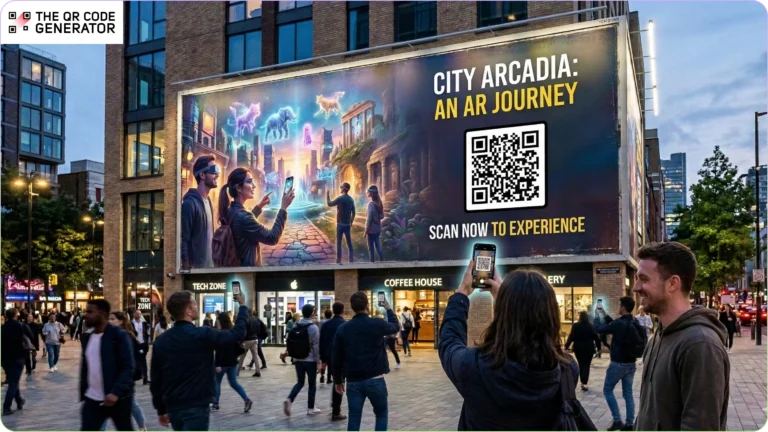
Lays gave away 100,000 free bags of chips in their latest Super Bowl ad and ran out in 20 minutes. The secret? A single QR Code.
Today, the average American is exposed to anywhere between 4,000 and 10,000 ads per day, yet we meaningfully pay attention to less than 100 of them. In the attention economy, the few seconds you capture from a prospect are incredibly valuable.
QR Codes for advertisements help you make those seconds count.
By embedding QR Codes directly into advertising assets, brands convert passive impressions into measurable, mobile-first interactions, bridging offline reach with online conversion.
Read on to learn why QR Codes belong in your ads, how to use them effectively, and how to get started.
Table of Contents
- Why traditional advertising campaigns underperform.
- How QR Codes on advertisements improve campaign outcomes
- How to create QR Codes for advertisements
- Best practices for high-performing QR Code advertising
- Create measurable QR Code advertising campaigns with TQRCG
- Frequently asked questions
Why traditional advertising campaigns underperform
Relying solely on static formats introduces multiple friction points across the customer journey.
1. Advertising captures attention but not intent
Offline advertising can generate awareness, but it rarely converts attention into immediate action. Unlike digital ads, where prospects can click instantly, most offline ads rely on delayed recall. Viewers must remember the brand, search for it later, or manually type a URL, and every extra step reduces follow-through.
2. Offline campaigns lack actionable attribution
Attribution is already challenging in marketing, and it is even harder for offline channels. Print, cinema, and outdoor ads typically report reach and impressions but provide little visibility into who engaged or what happened next. Without that data, measuring ROI and optimizing campaigns becomes difficult.
3. Offline ads are disconnected from digital journeys
Modern marketing journeys increasingly move across digital touchpoints such as landing pages and apps. Yet many offline ads remain isolated from these paths. With 91% of Americans owning a smartphone, most audiences already carry a device that could instantly connect a physical ad to a digital experience. When campaigns fail to use that bridge, awareness rarely turns into measurable engagement or conversions.
4. Campaigns can’t adapt once they go live
Once a flyer is printed or a billboard is live, changing messaging, offers, or destinations is nearly impossible. Static ads lock brands into decisions even if performance data suggests a change is needed.
QR Codes on advertisements solve these challenges by turning any ad surface into a live and trackable entry point.
How QR Codes on advertisements improve campaign outcomes
QR Codes make offline ads measurable. Brands can track scans, identify engaged audiences, and connect traditional campaigns to real performance data.
QR Codes in print advertising campaigns
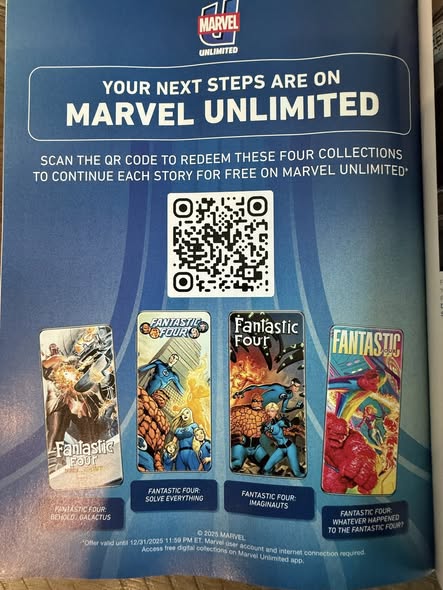
Print advertising delivers credibility and reach but often lacks immediacy. Adding QR Codes to flyers, brochures, magazines, or newspaper ads lets readers open app download pages, landing pages, product demos, or gated content instantly. Readers can scan when curiosity peaks rather than searching later.
Marvel Comics placed QR Codes in print ads to promote free comics on the Marvel Unlimited app. This helped interested readers discover the app organically while giving Marvel measurable first-party data on audience behavior.
QR Codes in outdoor advertising
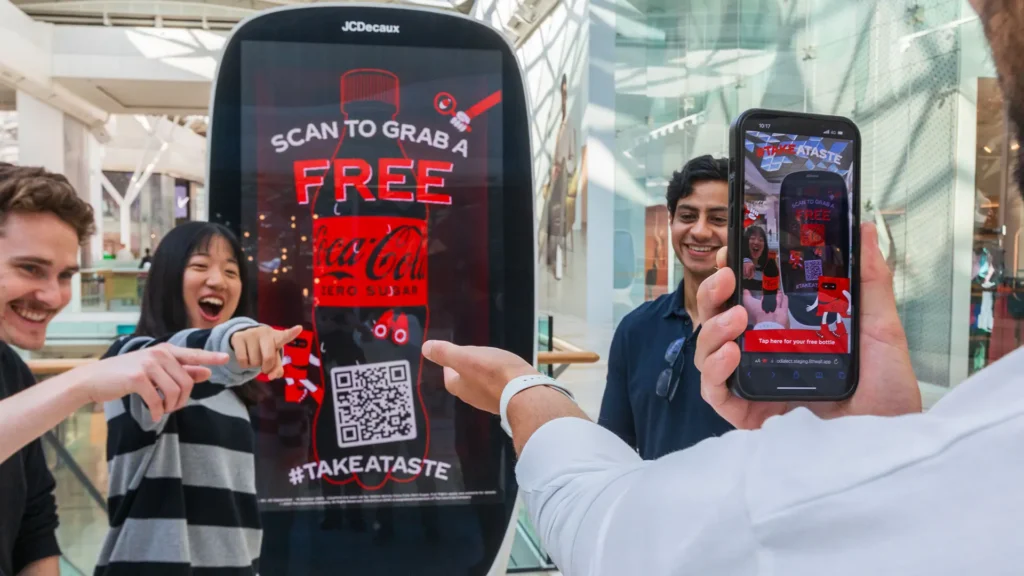
Outdoor advertising delivers scale, and QR Codes make it interactive. When prospects see QR Codes on billboards or outdoor ads, they can scan them immediately rather than engage later.
For example, take the #TakeATasteNow campaign by Coca-Cola, run with Tesco. The campaign used QR Codes to turn billboards into interactive displays. Scanning unlocked a 3D anamorphic experience, a digital bottle, a voucher redeemable at Tesco, and reward points in the Coca-Cola app.
QR Codes in cinema advertising campaigns
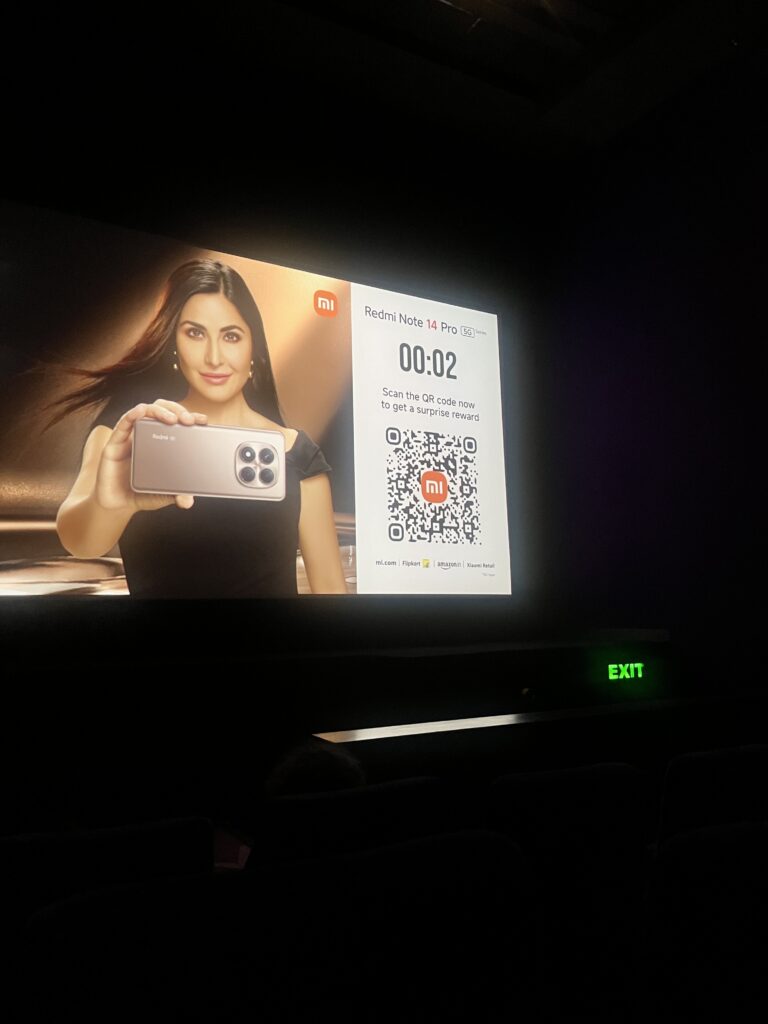
Cinema advertising offers something rare in marketing: uninterrupted attention. Audiences are seated and immersed in the experience. QR Codes allow brands to convert that attention into immediate action.
With QR Codes on cinema ads, brands can lead viewers to behind-the-scenes content, contests, limited-time offers, or app installs while excitement is high. With fewer distractions, scan intent can be stronger than in many other offline channels.
In one Xiaomi cinema promotion, viewers could scan an on-screen QR Code to receive a surprise coupon for the Redmi Note 14 Pro phone. Instead of asking audiences to remember the offer for later, the campaign captured interest in the moment.
QR Codes in OTT and connected TV advertising
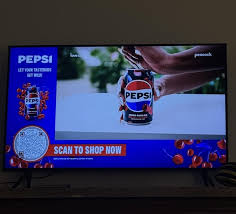
OTT and connected TV ads align naturally with second-screen behavior. Many viewers browse their phones while watching content, creating an opportunity for QR Code engagement.
Embedding a QR Code in the ad with a clear call to action, such as “Scan to shop now,” shortens the path from awareness to purchase. Research shows that 36% of TV audiences have interacted with a shoppable QR Code ad, highlighting how quickly this format has become normalized.
Pepsi has run OTT ads featuring QR Codes that direct viewers to shoppable destinations. Instead of searching later, viewers can act immediately.
QR Codes for in-store advertising
In-store environments are where purchase intent is strongest. QR Codes on shelves, packaging, displays, or POS materials allow brands to influence decisions while customers compare options.
71% of in-store shoppers who use smartphones for research say their device has become more important to their in-store experience. QR Codes for in-store advertising tap directly into this behavior. Shoppers can scan to compare products, unlock offers, or earn loyalty rewards without needing staff assistance.
Now that you know how QR Codes can enhance advertising campaigns, let’s look at how to create them effectively.
How to create QR Codes for advertisements
Creating QR Codes for marketing campaigns is simple. Here’s how you do it.
Step 1: Choose the QR Code type based on your campaign objective
There are multiple types of QR Codes you can use, depending on what action you want your audience to take.
- Use a URL QR Code to send users directly to a landing page, product page, or campaign microsite.
- Use an app store QR Code to drive app installs during print, outdoor, or OTT campaigns.
- Use a coupon QR Code to unlock limited-time discounts or promotional offers.
- Use a video QR Code to launch a product demo or brand film instantly.
- A multi-URL QR Code works well for global campaigns, allowing you to redirect users based on location, device type, or language.
For advertising campaigns, use dynamic QR Codes. They allow you to track scans by time, device, and geography, helping you measure performance across placements. You can also update the destination URL without reprinting the ad, which is critical for long-running billboard, print, or transit campaigns.
Step 2: Generate your QR Code
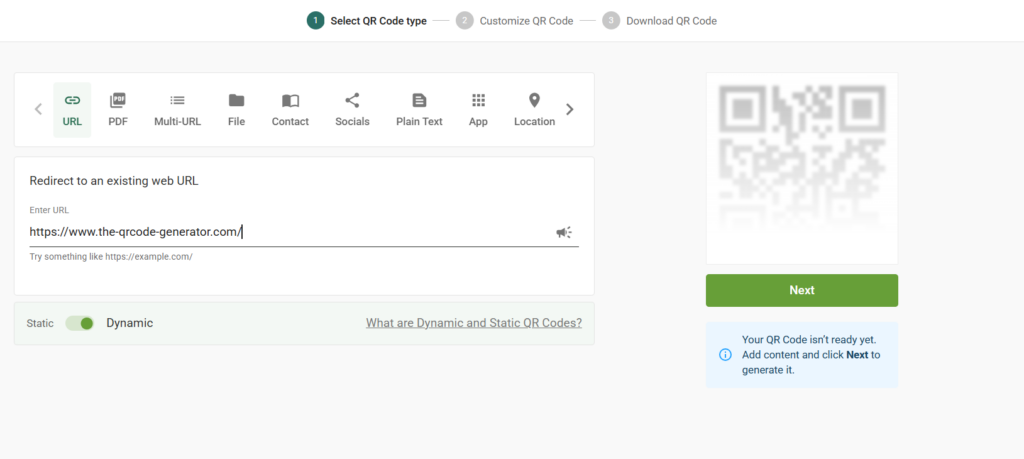
To create your advertising QR Code, sign in to The QR Code Generator (TQRCG) and select the QR Code type that aligns with your objective. Enter the destination URL, app store link, coupon page, or upload the relevant content file, then click Next.
Make sure the landing experience is mobile-optimized. Because most scans happen on smartphones, your page should load quickly and clearly reflect the promise made in the ad creative.
Step 3: Customize it to match your campaign creative
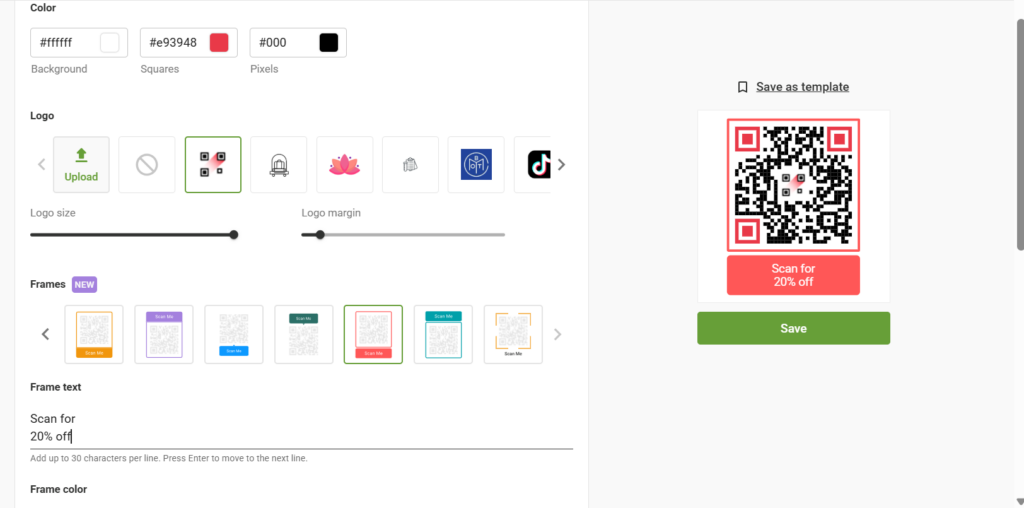
Customize the QR Code using your brand colors and add your logo in the center for recognition and trust. Use a custom QR Code frame with a clear call to action such as “Scan to Shop,” “Scan to Get 20% Off,” or “Scan to Unlock.” A strong CTA significantly increases scan rates because it tells viewers exactly what they’ll gain.
Step 4: Download and test before placement
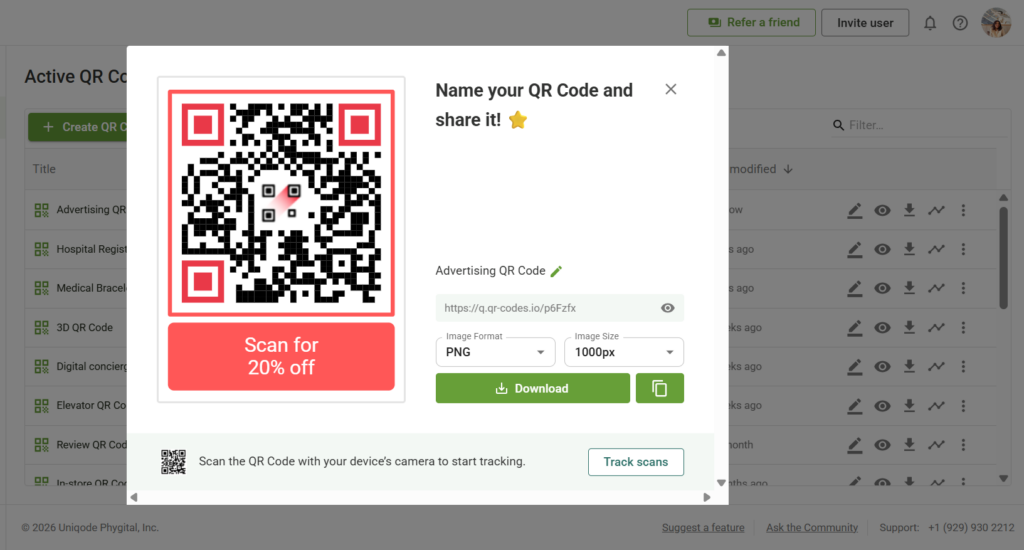
Name and download it in a high-resolution QR Code format. For large-scale advertising such as billboards or DOOH screens, use SVG to ensure scalability without pixelation. For digital ads or smaller print placements, PNG works well.
Before launch, test the QR Code across multiple devices and lighting conditions. Scan it from different distances to simulate real-world environments.
Before deployment, let’s look at some expert tips to ensure your QR Code advertising campaign is a success.
Best practices for high-performing QR Code advertising
If you want your QR Code advertising campaigns to drive real results, then the right execution matters. Below is how you make your QR Codes work harder across different environments.
Use clear CTAs
A QR Code should never appear without instructions. Add a short, action-oriented CTA such as “Scan to Shop,” “Scan to Get 20% Off,” or “Scan to Watch.”
The value of scanning should be immediately clear. Tailor the CTA to the environment. Outdoor placements benefit from short, direct messaging, while cinema or OTT ads can use slightly more descriptive prompts.
Align the destination with the ad promise
The experience after the scan should match what the ad promotes. If the ad offers a discount, display it immediately. If it promotes a product demo, open the video directly.
When the landing experience delivers exactly what the viewer expects, engagement and conversion rates improve.
Use scan analytics to optimize campaigns
One of the biggest advantages of QR Code advertising is measurability. Track scans by location, device type, and time of day to understand where engagement is strongest.
Compare performance across placements, formats, and creatives to identify what drives the most conversions. These insights help refine future campaigns and optimize underperforming placements.
Track campaigns with Google Analytics
To go beyond basic scan data, add UTM parameters to your QR Code destination URLs and connect them to Google Analytics. You can track campaign source, medium, placement, and creative variation inside your analytics dashboard. For example, you can A/B test billboard scans versus cinema ads, or compare multiple creatives within the same campaign.
Offer QR Code–exclusive experiences
Give audiences a reason to scan by offering something they cannot access elsewhere. This could include exclusive discounts, early access to products, bonus content, or limited-time rewards.
Clear exclusivity increases motivation and improves scan rates.
Create interactive experiences
QR Codes perform best when they unlock experiences rather than static pages. Instead of linking to a basic landing page, use them to trigger interactive formats such as AR experiences, gamified contests, or immersive product storytelling.
For example, during the promotion of Stranger Things Season 5, fans discovered interactive elements tied to Google Search, including QR Codes that led to a scavenger hunt game. After solving puzzles, fans could unlock a multi-step adventure inspired by the show’s storyline.
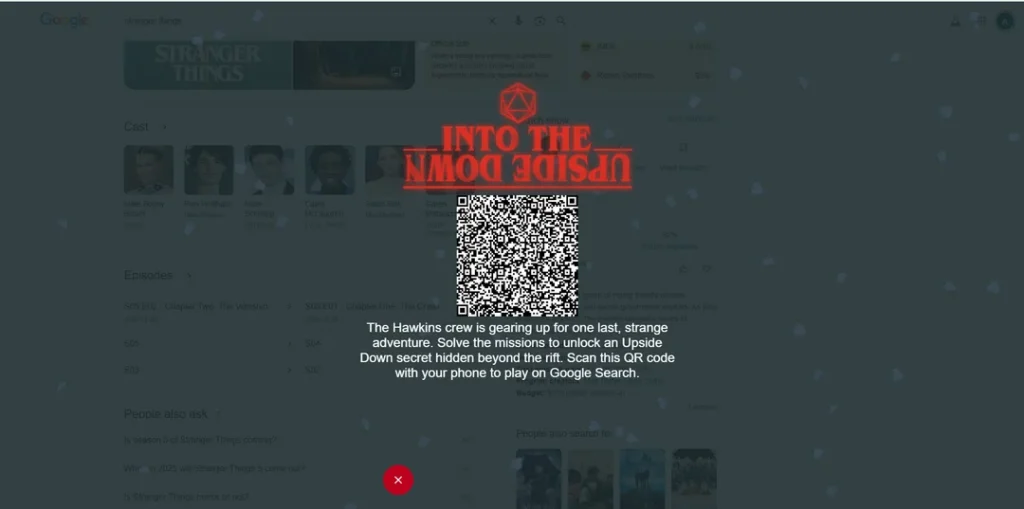
Similar interactive journeys can be launched directly from QR Code scans.
Optimize placement and size
Placement is critical for real-world usability. Make sure the QR Code size is large enough to scan from the expected viewing distance.
In outdoor environments, ensure viewers have enough time and proximity to scan safely. In print or in-store displays, position the code at a comfortable eye level.
Create measurable QR Code advertising campaigns with TQRCG
If you’re ready to move beyond static advertising and start understanding what your campaigns truly deliver, QR Codes are one of the fastest and lowest-friction ways to get there.
With The QR Code Generator’s (TQRCG) dynamic QR Codes, built-in analytics, and secure redirects, you can transform every ad placement into a trackable conversion point. Measure scans by location, device, and time and optimize campaigns based on actual performance, not assumptions.
Frequently asked questions
To advertise using QR Codes, place them on print ads, packaging, billboards, events, or TV screens. When scanned, users are directed to a landing page, an offer, an app download, or a video. Always include a clear CTA and link to a mobile-optimized page for better conversions.
In OTT and TV ads, a QR Code appears on screen for viewers to scan with their smartphones. The scan instantly directs them to a campaign page, product launch, or special offer and reduces friction between viewing and action.
Yes. Dynamic QR Codes allow you to track total scans, location, device type, and scan time. This data helps measure ROI, compare placements, and optimize campaigns without changing the printed code.
A QR Code should be large enough to scan from the expected viewing distance. A common rule is: minimum QR Code size = viewing distance ÷ 10. For print, use a minimum of 2 × 2 cm. For billboards or TV, test visibility before launch.
Brands should use dynamic QR Codes for advertising. They allow URL edits, scan tracking, and campaign optimization. Static QR Codes are better suited for permanent, non-changing links.
