
Free Spotify QR Code Generator
Redirect to a Spotify track or playlist
To enable tracking,


Spotify has over 675 million users and has become a global phenomenon in the music and podcast streaming industry. The sharing of Spotify QR Codes mostly began during the Covid-19 pandemic when users started making playlists to share on Instagram, via QR Codes.
Fast forward to 2025, Spotify QR Codes are still being extensively used to share new music for promotion or engaging audiences for podcasts. So, if you’re here to learn more about creating a Spotify QR Code or simply scanning one, you’re in the right place.
Let’s start with the basics.
What is a Spotify QR Code?
A Spotify QR Code links to the URL of a song, playlist, artist, album, band profile, or podcast on Spotify. It can be scanned with a smartphone camera to access and listen to music or other content on Spotify.
A Spotify QR Code can be created using an online QR Code generator and customized to add your picture, logo, frames, and brand colors. It helps you attract new audiences to your content and makes promoting your playlist or podcast easier.
How do you create a Spotify QR Code?
If you want to create a Spotify QR Code for free, follow these steps:
Step 1: Go to The QR Code Generator (TQRCG)
Step 2: Paste the URL of the song, playlist, artist, profile, podcast, etc for which you want to create a QR Code.
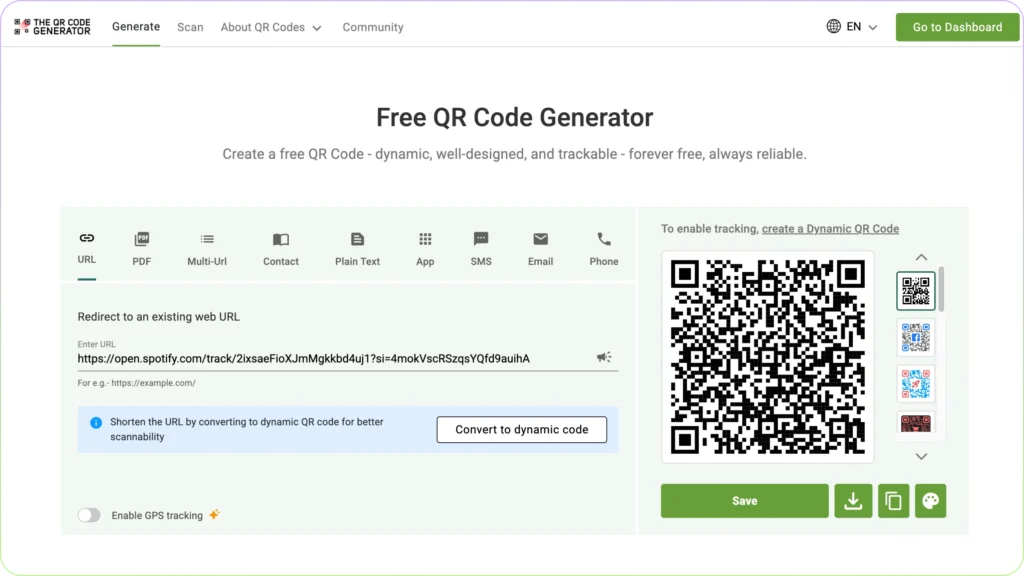
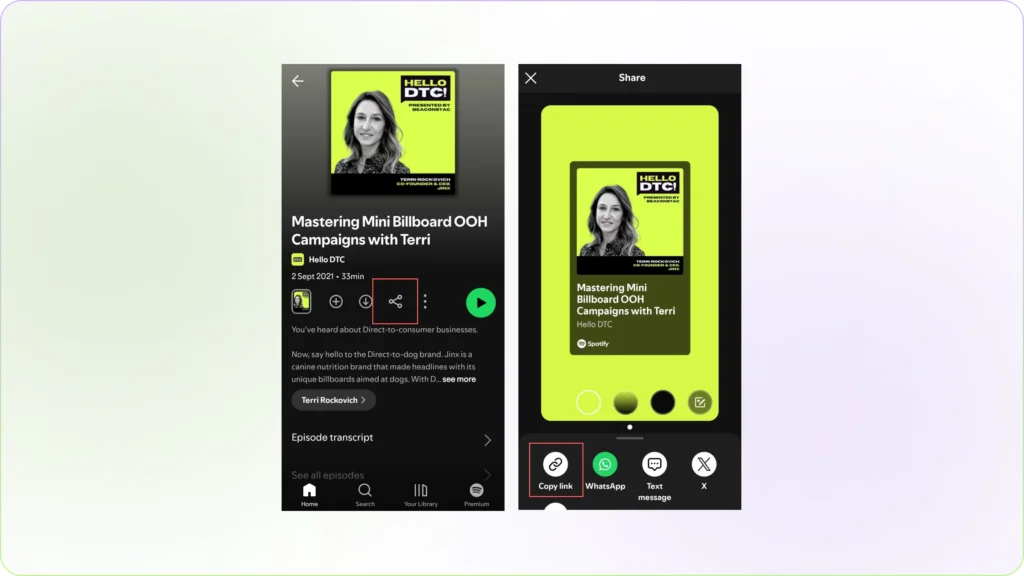
Step 3: Your QR Code appears on the right side of the page.
If you want to customize, you can scroll through pre-made designs beside the QR Code or click on the right-most button (the color palette).
Step 4: A customization window will appear on your screen.
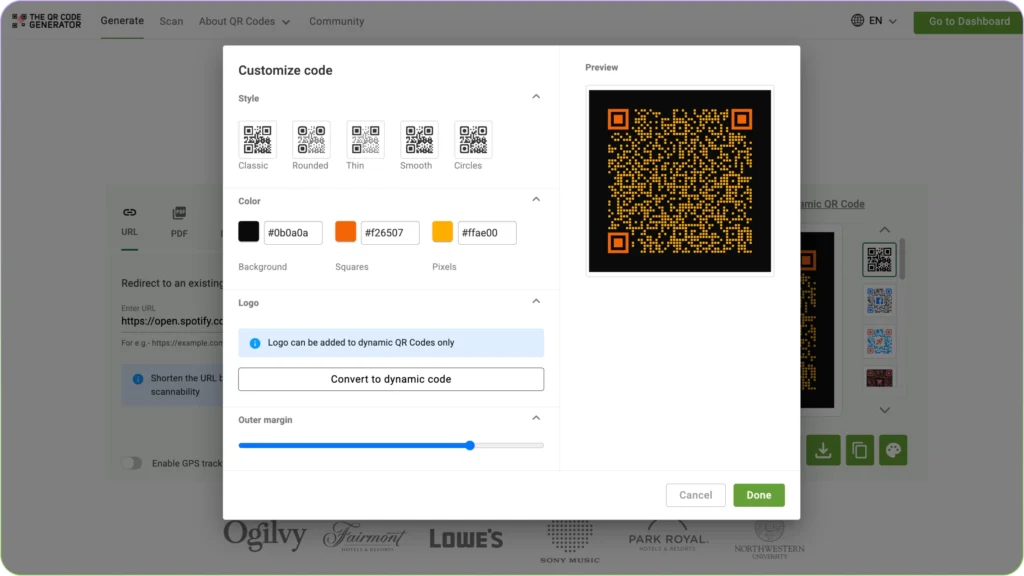
Add your personalizations with different code styles, colors, and outer margins, and click on ‘Done’.
Step 5: Once you’re done, click on ‘Save’. Log in to the app and download the QR Code after selecting the image format and size.
You may have also come across Spotify Codes, which is, again, a sharable and scannable encoding for sharing your music. However, it differs from QR codes in functionality and sharability.
What is the difference between a Spotify Code and a Spotify QR Code?

A Spotify Code is unique to the platform, visually distinct, and requires the Spotify app for scanning.
In contrast, a Spotify QR Code can be scanned with a simple phone camera or any QR Code reader and has a typical QR Code appearance.
A QR Code is usually a better option for music promoters, marketing, and advertising since it can be scanned through any device and does not require the Spotify app to be installed.
Here’s a table highlighting the differences:
| Feature | Spotify Code | Spotify QR Code |
|---|---|---|
| Appearance | Unique soundwave-like pattern | Standard square QR Code |
| Scanning Method | Requires the Spotify app | It can be scanned with any QR Code reader or phone camera |
| Functionality | Directly opens a Spotify song, playlist, or profile | It can redirect to Spotify or any other link, depending on how it’s created |
| Platform | Exclusive to Spotify | It can be used outside of Spotify for broader sharing |
| Customization | Limited to Spotify’s design | The QR Code be customized with colors, logos, and different designs |
| Engagement | It’s a static code, so you cannot track engagement metrics like scans, location, users, etc. | A dynamic QR Code lets you track location, user data, scan data, etc. |
How do you scan a Spotify QR Code?
Follow these simple steps to scan a Spotify QR Code:
Note: Make sure it’s a QR Code, not a Spotify code.
- Point your phone camera at the Spotify QR Code.
- Click on the ‘Open in Chrome’ prompt.
- If you’re asked to allow to redirect to the Spotify app, select ‘Allow’.
Alternatively, you can also use an online QR Code scanner to read your Spotify QR Code. For this:
- Open The QR Code Generator.
- Select the scan option from the menu.
- Allow the app to access your phone’s camera.
- Point your device towards the QR Code
- Click on the URL link detected. That’s your Spotify music destination.
That’s all, you can now listen to whatever content is embedded in the Spotify QR Code.
What are some common uses of Spotify QR Codes?
Spotify QR Codes are mostly used for sharing and promoting music and podcast content either online or offline. Here are some more use cases:
1. Event promotion: You can print QR codes for event promotions like on concert tickets, event flyers, or promotional materials to direct your attendees to specific playlists or artist profiles.
2. Social sharing: You can share Spotify QR Codes on social media platforms to easily share your favorite playlists or songs with your friends and followers.
3. Offline to online engagement: QR codes bridge the gap between offline and online engagement by allowing you to scan codes on physical materials like posters or business cards and instantly access Spotify content.
4. Tracking scans: You can also create trackable QR Codes to keep a tab on the number of scans on your Spotify QR.