
How to Add Frames to QR Codes to Boost Scans

Shreesh
Last updated: August 11, 2026
11 min read
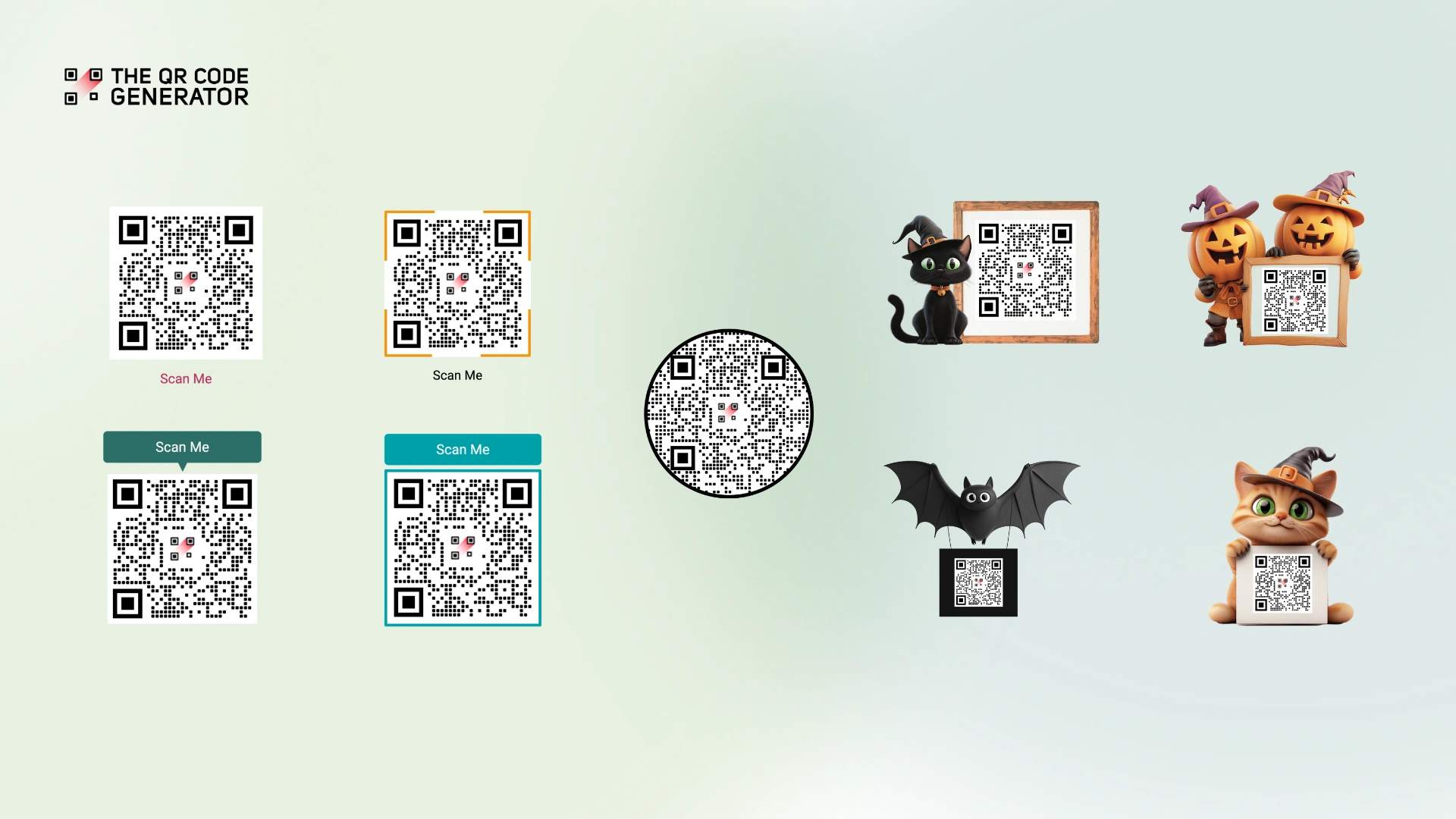
Many QR Codes go un-scanned, not because they’re broken, but because people don’t know what to scan for. A plain QR Code on a poster gives no context for what it will lead to. A discount? A menu? A video? That uncertainty kills engagement.
Adding a frame with a clear call to action changes this. The frame grabs attention, while the frame text tells people precisely what they’ll get.
But here’s the catch: customizing QR Codes can break their scannability if not done correctly. Each element contains information directing you to your destination, and tampering with the wrong parts renders them useless.
This guide shows you how to design frames (including seasonal themes like Halloween) that drive scans while maintaining perfect scannability across all devices. Let’s start by understanding why adding frames to a QR Code leads to increased scans.
How a QR Code frame impacts user behavior
A QR Code frame changes user behavior by solving two problems at once: visibility and clarity. It makes the QR Code stand out on a crowded surface and tells people exactly why they should scan it.
But the benefits go deeper. The right frame design can tap into seasonal excitement during promotions, while consistent frame styling builds long-term brand recognition across all your materials. Here’s how frames change user behavior:
QR Code Frames create visual contrast that attracts attention
A frame creates visual contrast that pulls the eye to your QR Code. On a busy retail shelf crowded with labels, price tags, and graphics, an unframed QR Code blends in, while a bright orange or teal frame stands out.
A local bookstore, for example, can put an orange-framed QR Code on author event posters, where it pops against the neutral background and catches attention.
QR Code Frames provide direction and remove hesitation
Frame text removes the hesitation that stops people from scanning. A plain QR Code gives no clue where it leads, and that ambiguity is enough to make most people skip it.
A specific CTA, on the other hand, can increase conversion rates by 161%, so text like "Scan for 20% Off" or "Get the Menu" beats a generic "Scan Me" by telling people exactly what they get before they commit.
Festive QR Code frames tap into seasonal excitement
Festive frames tap into seasonal excitement that standard frames can't. A Halloween frame with pumpkins, ghosts, and seasonal colors feels timely in October and signals a limited-time offer, which adds urgency.
A coffee shop can put Halloween-themed QR Code frames on table tents for its seasonal menu to match the campaign timing. The same applies to Christmas, Valentine's Day, or any seasonal moment, so match the frame to the calendar when it fits.
Standard QR Code frames build consistent brand recognition
Standard frames in brand colors build recognition across year-round campaigns like contact cards, product information, and feedback collection. When a real estate agent uses the same teal-framed QR Code on business cards, property flyers, and yard signs, the frame becomes a visual signature people start to recognize as part of the brand.
Key components of a framed QR Code
Every effective QR Code frame includes some crucial elements that need to be understood before designing to strike the right balance between scannability and customizability:
- Frame border: The outer shape that creates visual separation from everything else on the page
- Frame text zone: Where CTAs such as “Scan Me,” “Get Offer,” or “Watch Video” appear
- Quiet zone: The white space around the QR Code must remain clear. Scanners need this margin to detect and read the pattern. Block it, and the QR Code won’t scan.
- Contrast: Dark QR Code on light background is the standard for a reason. High contrast ensures readability in all lighting conditions.
- Brand elements: Optional logos or colors that reinforce identity without getting in the way of functionality.
Manually optimizing all these technical aspects after adding a frame is challenging and time-consuming. Plus, if you get any of these components wrong, your QR Code won’t scan. That’s why it’s better to use a professional QR Code generator that lets you add and customize your desired frame during the creation stage itself.
Here’s how to do it.
How to create a QR Code with a frame
Before you begin, ask yourself: What’s the goal of this campaign?
Driving people to a landing page? Sharing contact information? Promoting a time-sensitive offer? The answer determines what type of QR Code to choose and which frame style will work best.
For this example, we’ll create a Halloween-framed QR Code that links to a homepage.
Step 1: Sign up and start creating
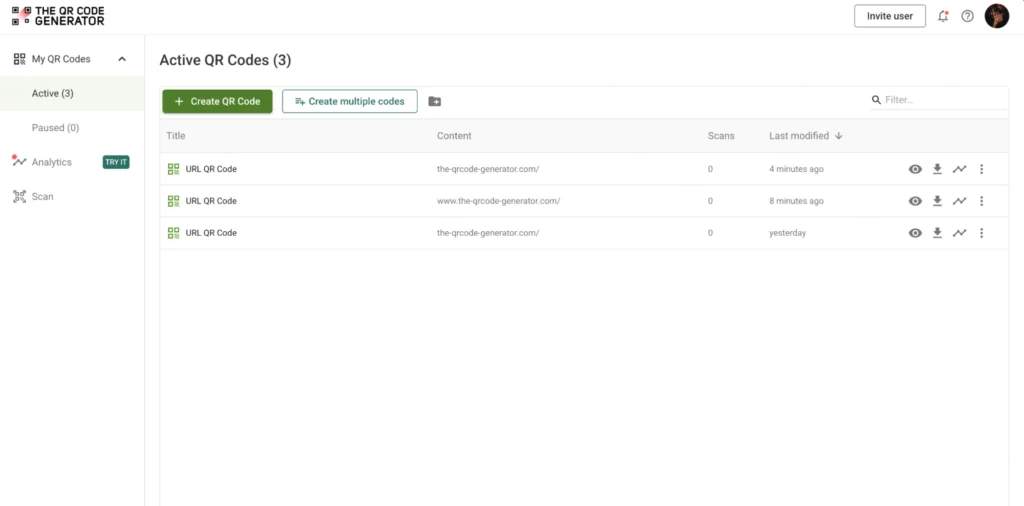
Sign up for a free profile on The QR Code Generator (TQRCG). Click + Create QR Code and select your QR Code type from the list. For this example, we’re using a URL QR Code.
Step 2: Enter your QR Code details
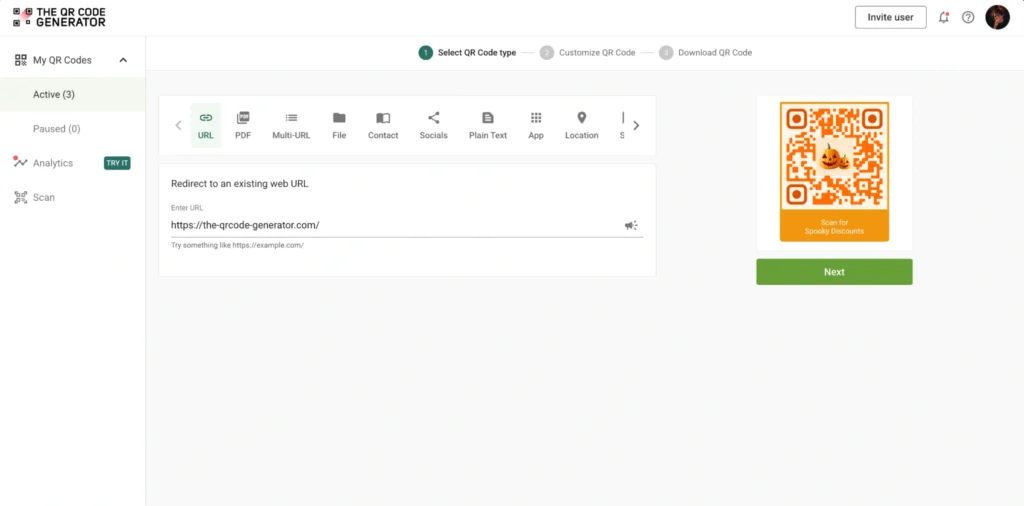
Once you select your QR Code type (URL, vCard, PDF, etc.), you must enter the required information. For a URL QR Code, paste the destination link you want people to reach when they scan.
Step 3: Customize your QR Code design
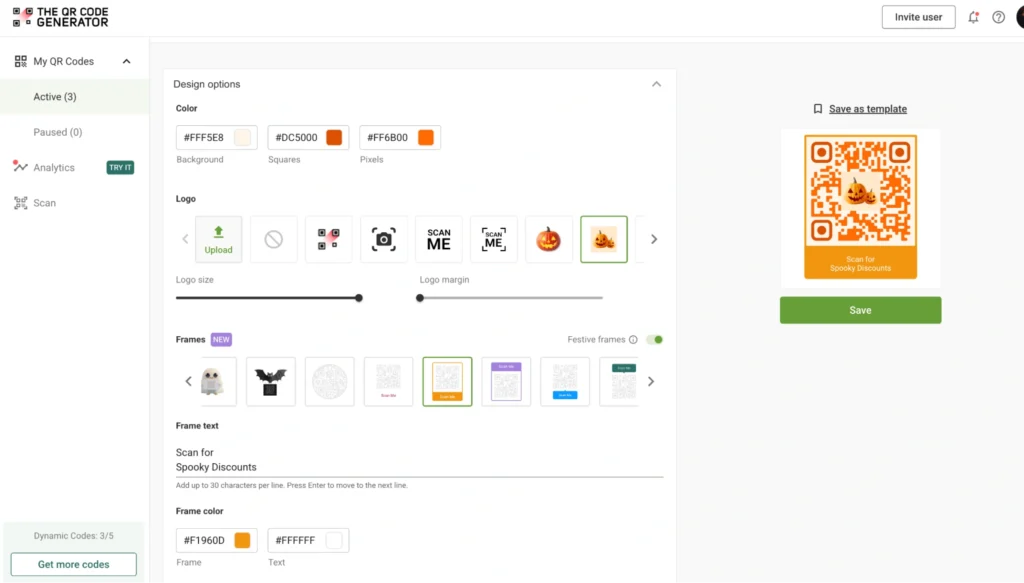
Before selecting a frame, customize your QR Code to match your brand. Add your logo and brand colors and adjust elements such as patterns and eye shapes to align with your brand identity.

Once you’re satisfied with the rest of the design, scroll down to the frames section.
Step 4: Select your frame style
Scroll down and choose any of the frames you like and select it.
TQRCG offers two frame categories:
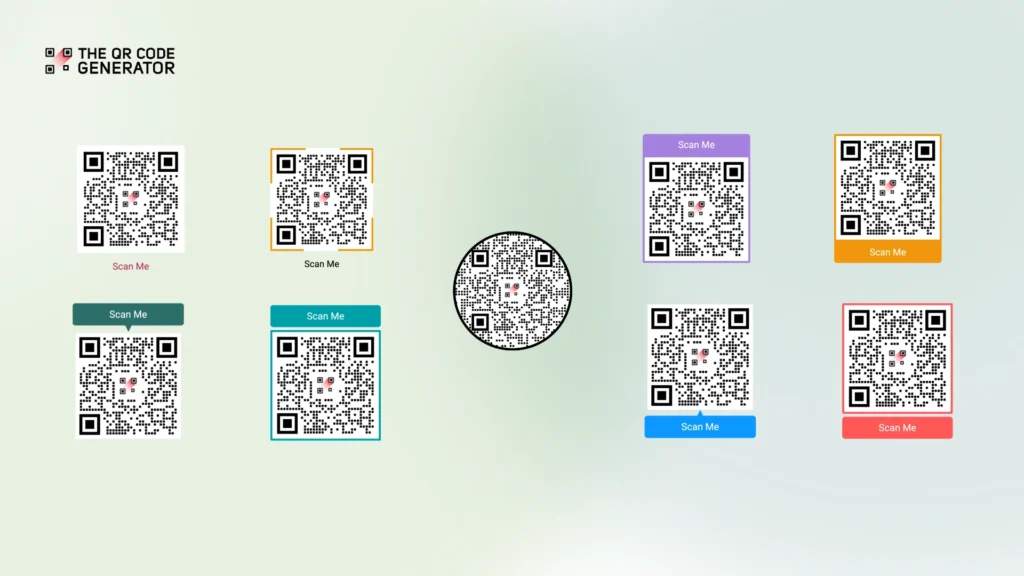
Standard frames feature clean colors (teal, orange, blue, red, purple) with customizable frame texts. These work for professional, year-round campaigns.
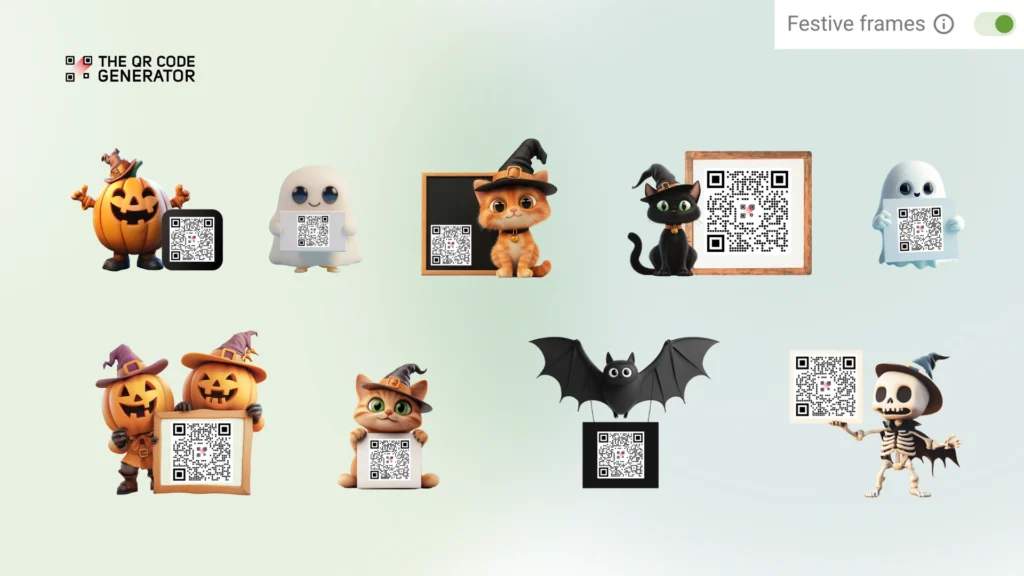
Festive frames feature seasonal graphics, and TQRCG rotates them through the year, so the themes on offer change with the calendar. You might find Halloween characters around October or festive designs during the winter holidays, though the exact set varies by season. Use whichever festive frame is live when the timing matches your campaign and you want a seasonal connection.
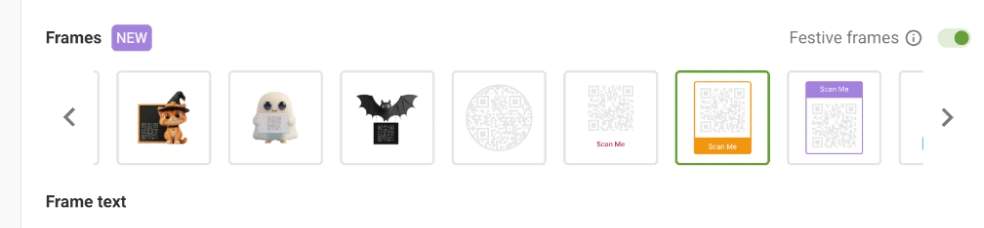
Step 5: Add your frame text
This is where you tell people why they must scan. Type your preferred CTA in the frame text section.
Note: Frame text customization is only available with standard frames in TQRCG. If you’re using festive frames, you must manually add CTAs after downloading.
For standard frames, keep your frame texts short:
- “Scan Me” (safe default)
- “Get Coupon” (clear benefit)
- “Watch Video” (specific action)
- “Join Now” (creates urgency)
- “See Menu” (contextual value)
Step 6: Match colors and verify design
Click the color picker to select the colors for your frame and frame text. Ensure that the frame and text colors have good contrast for visibility.

Pick a frame color that matches your brand colors when possible. Financial advisors should probably skip the Halloween pumpkin frame, but boutique cafes running seasonal promotions should lean into it.
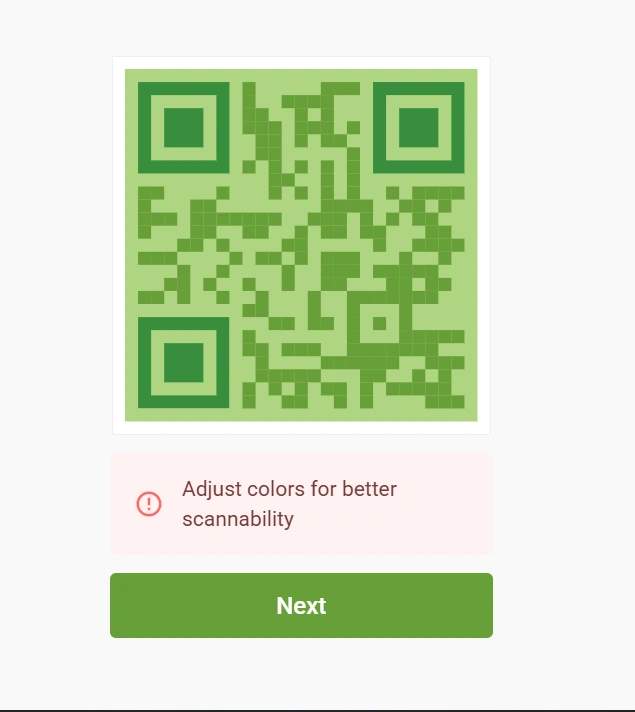
Step 7: Download and test your QR Code
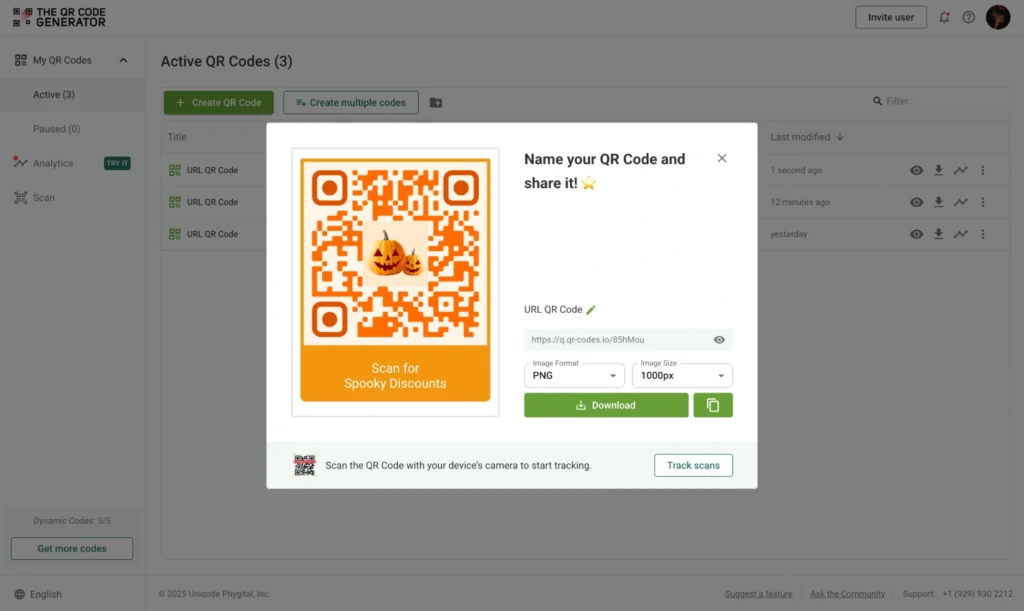
Name your QR Code and choose the desired format to download. Click Download.
Before bulk printing or deploying, test your framed QR Codes thoroughly. This includes testing on multiple devices, under different lighting, and at various angles and distances.
This testing phase catches problems before they become expensive mistakes.
Step 8 (Optional but recommended): Track performance and optimize
Dynamic QR Codes let you track which frame choices actually work. Run parallel campaigns with different frame styles, measure the scan lift between framed and plain QR Codes, and note which colors and styles drive the most engagement.
For seasonal campaigns, compare festive frames against standard ones over the same period to see whether Halloween designs really pull more scans in October, and by how much. TQRCG's dynamic QR Codes track scan volume by frame type, so each campaign builds a playbook for the next.
Best practices for using QR Code frames
Now that you know how to create framed QR Codes, let’s explore the frame design principles that distinguish high-performing QR Codes from those that are ignored.
| Best practice | Guidelines | Examples/Tips |
|---|---|---|
| Preserve the quiet zone | The white margin around the QR Code (quiet zone) is a functional requirement, not a decorative space. Never let decorative frame elements or tight borders intrude on this zone. | When in doubt, add extra margin rather than cutting it too close. Intrusions cause failed scans and frustrated users. |
| Keep decorative elements simple | Ornate designs that creep too close to the QR Code or create busy patterns degrade scannability. Keep decorative elements clearly separated from the scan area. | Festive frames should be charming, not cluttered. A clean, well-executed frame almost consistently outperforms a complex one. |
| Write action-driven CTAs | Use verbs and front-load the benefit. Cut every unnecessary word. Avoid passive statements. | “Get Info” instead of “Scan for more information””See Details” instead of “Details can be found by scanning” |
| Match design to context | Posters in busy areas: Larger size, higher contrast, bold CTA text (readable from 5 feet)Business cards: Smaller dimensions, refined design | Design for the real-world environment where scanning will happen. |
| Test and iterate | Run A/B tests with different frame styles. Track which combinations drive the most scans. | If using dynamic QR Codes, use built-in analytics to measure performance. Data often reveals unexpected winners. |
Framed QR Codes best practices in action
Here’s how the best practices (or lack thereof) actually look in practice:
What works
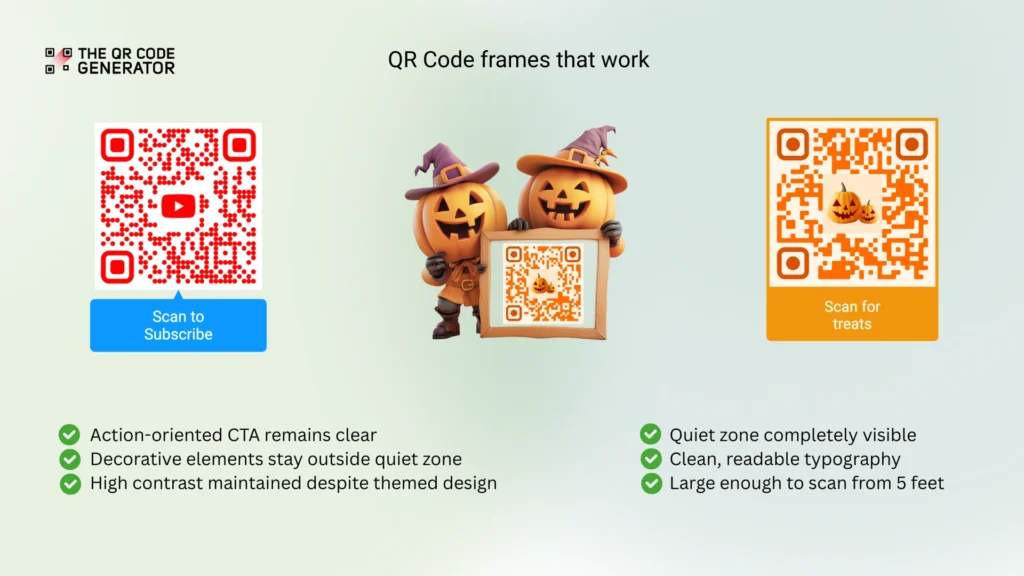
Standard professional frame:
- A clear CTA positioned above or below the QR Code
- High-contrast frame on a light background
- The quiet zone is completely visible with proper margins
- Brand colors integrated without compromising function
- Large enough to scan easily from five feet away
- Clean, readable typography
A standard frame is the gold standard. It does everything right without being fancy.
Festive Halloween frame:
- Playful pumpkin or ghost graphics create seasonal appeal
- Decorative elements stay outside the quiet zone
- High contrast is maintained despite the themed design
- Perfect for October campaigns and limited-time Halloween promotions
The festive design adds personality without sacrificing functionality.
What doesn’t work
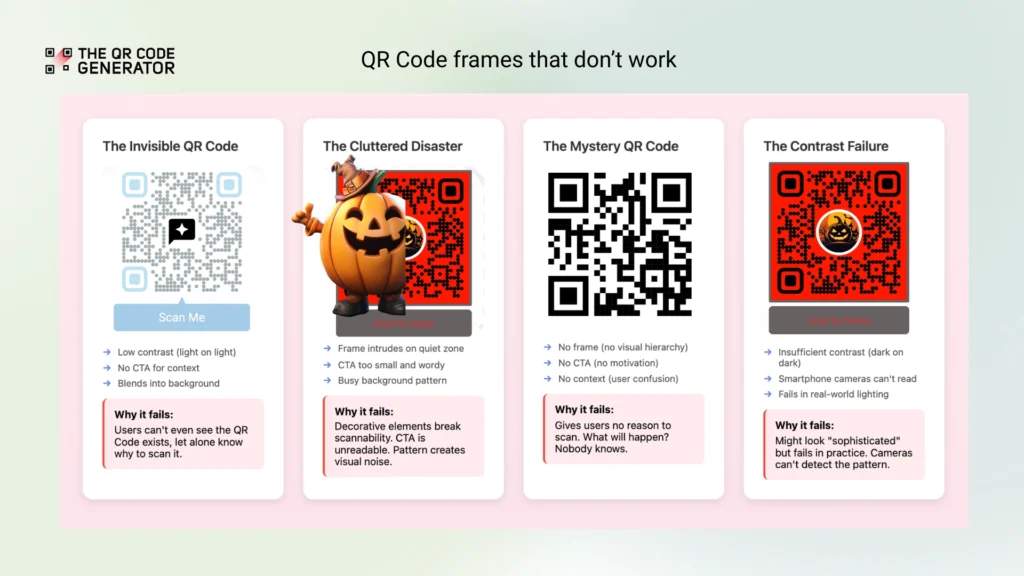
- The invisible QR Code: Light blue frame on a white background with no CTA. This QR Code would go unnoticed.
- The cluttered disaster: Decorative border intrudes on the quiet zone, tiny text CTA that’s unreadable from three feet away, busy background pattern behind the QR Code.
- The mystery QR Code: No frame, no CTA, no context. Just a lonely QR Code expecting people to scan it out of curiosity.
- The contrast failure: Dark gray QR Code on a black background. It might work in perfect lighting with a premium phone camera, but it won’t work anywhere else.
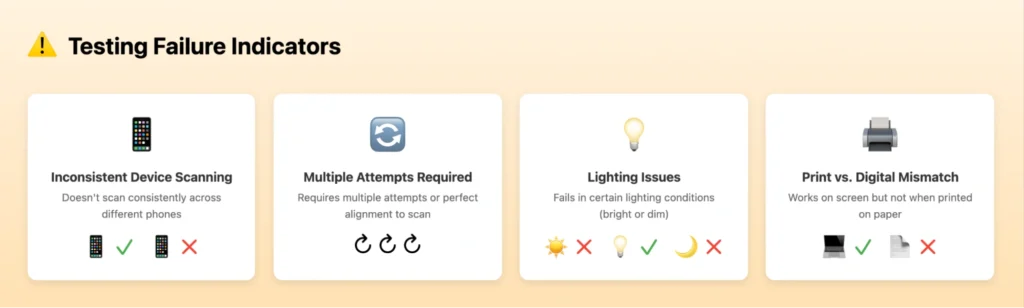
If you see any of these issues, return to the design phase.
Real-world use cases and examples of QR Code frames
Now that we understand how to make the perfect QR Code frames. Let’s look at them in action.
QR Code on retail packaging to drive product engagement
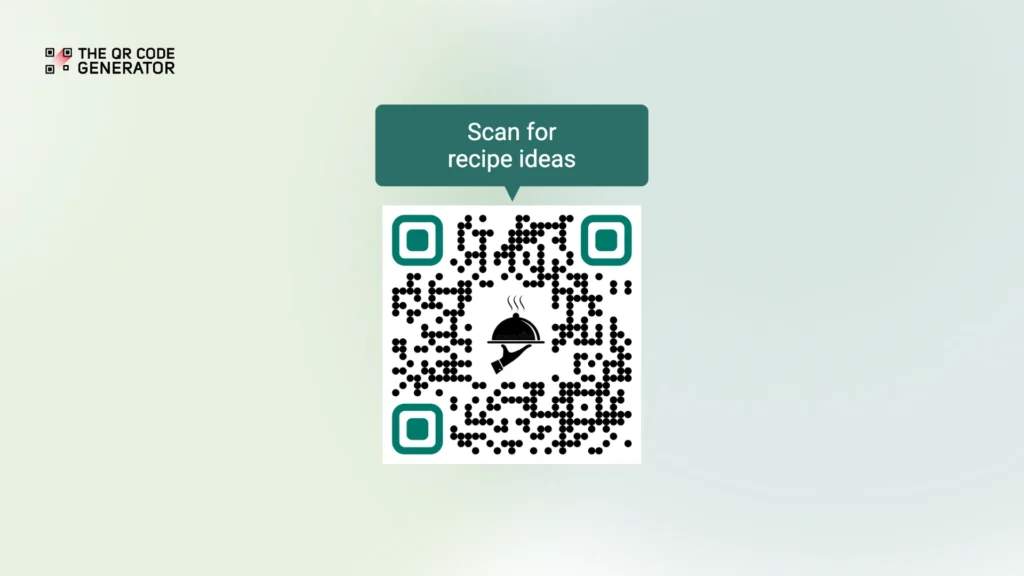
QR Code on retail packaging example: Frame + “Scan for recipe ideas” on a specialty ingredient package.
The goal of using a QR Code frame for retail packaging is to extend engagement beyond the purchase. With the frame text, customers get immediate value (recipe ideas), and the brand gets a chance to drive repeat purchases through email capture on the landing page.
A single clear benefit is stated upfront, and the customers know exactly what they’re scanning for.
QR Codes on event signage to boost registrations
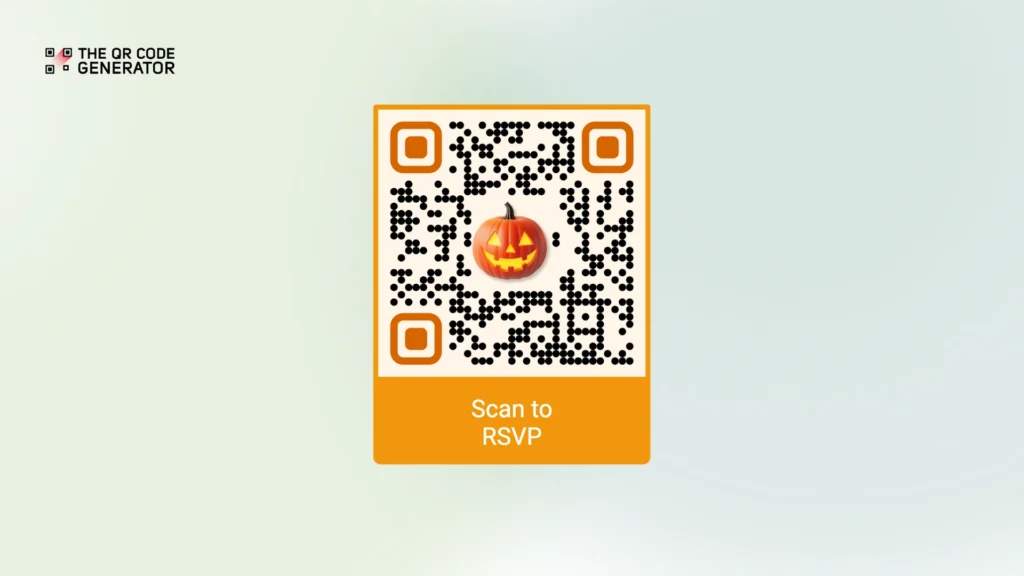
QR Codes on event signage example: Festive Halloween frame + “Scan to RSVP” on promotional posters for a costume party.
This themed design creates excitement and reinforces that this is a special, limited-time event. The frame text is friction-free and straightforward.
QR Codes on business cards to simplify contact sharing
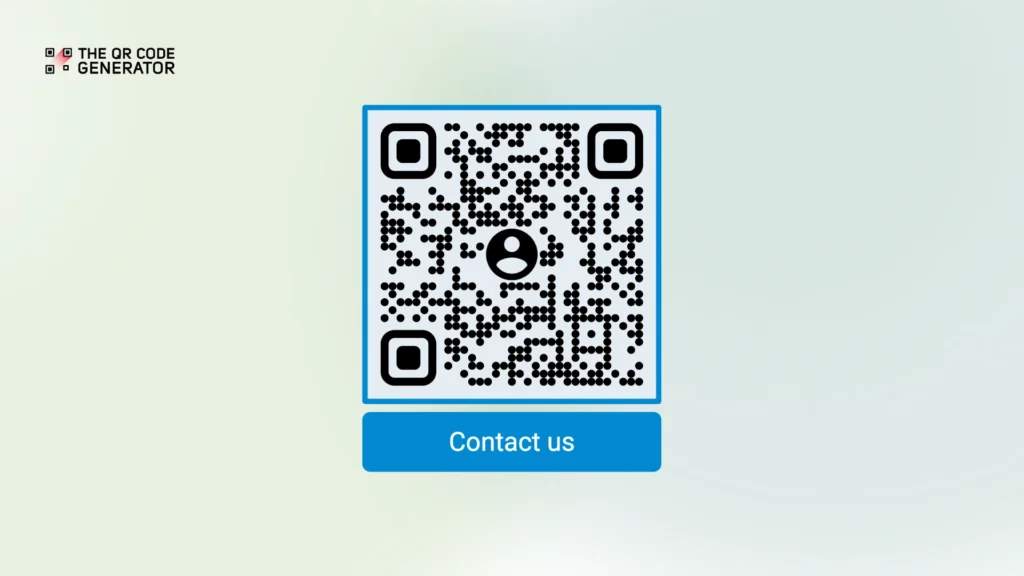
QR Codes on business cards example: Professional frame + “Contact us” with a vCard QR Code.
By using a well-framed vCard QR Code, users can save all contact information with one scan, without anyone having to type it manually. This makes it memorable, convenient, and positions the person as a professional.
QR Codes on restaurant table tents to simplify ordering
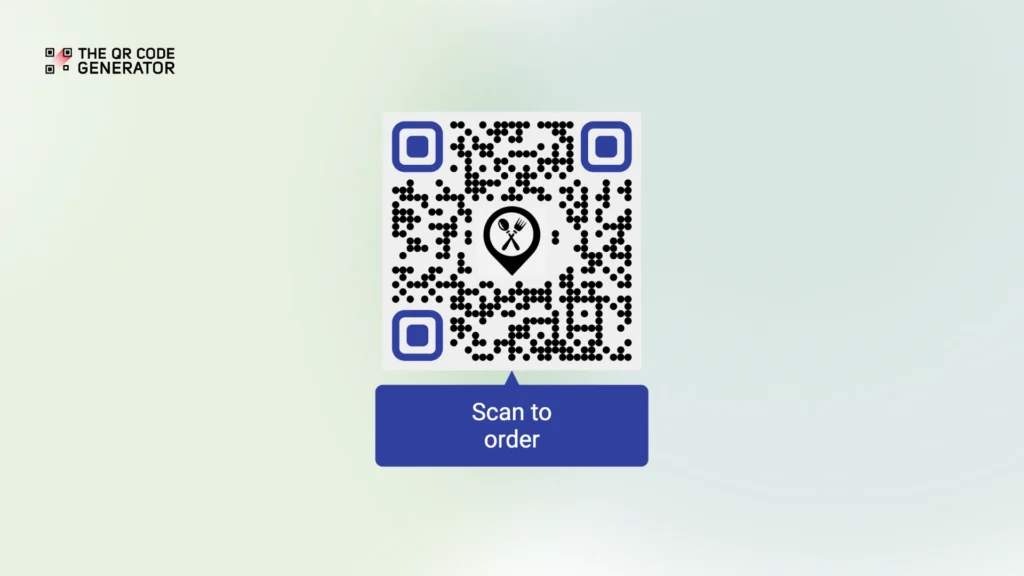
QR Codes on restaurant table tents example: Frame + “Scan to order” on table tents in a fast-casual restaurant.
A colored frame makes the QR Code on restaurant table tents impossible to miss in a busy restaurant with menus and promotional materials competing for attention. The specific frame text “Scan to order” tells customers exactly what they’ll get (the ordering interface, not just browsing), increasing scan likelihood.
QR Codes on digital presentations to extend engagement

QR Codes on digital presentations example: Slide with framed QR Code + “Download resources” during a conference talk.
A bold frame ensures the QR Code on the presentation remains visible even in large auditoriums with varying screen quality against a projected slide background. The specific frame text “Download Resources” creates urgency and clarity, prompting immediate action while attendees are engaged, rather than a generic “Scan Me” that people might ignore or postpone.
Make your QR Codes stand out using frames
A well-designed frame transforms a QR Code from a static graphic into an active call to action, helping it stand out in crowded environments. The key is balance: frames should enhance visibility without affecting scannability.
Whether you’re running year-round campaigns with clean, professional designs or limited-time promotions with seasonal frames like Halloween themes, the same principles apply: make it clear, valuable, and easy to scan.
The best part? You don’t need design expertise. Tools like The QR Code Generator (TQRCG) offer ready-to-use frame templates optimized for visibility and function. Just choose a style, add short frame text, and you’re ready to go.
Ready to create framed QR Codes that actually get scanned? Sign up for TQRCG’s free QR Code generator to get two free dynamic QR Codes that never expire, customize them, and track results with built-in analytics.
Frequently Asked Questions
Does adding a frame break my QR Code?
Not if you preserve the quiet zone (that white margin around the QR Code) and avoid overlaying the QR Code's data area. Frame tools such as TQRCG automatically maintain safe spacing to ensure scannability. Always test framed QR Codes on multiple devices before printing.
Can I use seasonal or festive frames like Halloween designs?
Absolutely. Seasonal frames boost engagement during relevant campaigns by creating an emotional connection and timely urgency. Just maintain high contrast, preserve quiet zones, and don't let decorative elements interfere with the QR Code. TQRCG's festive frames are designed specifically to maintain scannability while adding seasonal appeal.
Will the frame cause scanning problems on certain phones?
If the contrast or quiet zone margin is compromised, yes. That's why testing across both iPhone and Android devices is essential before finalizing designs. Also test in different lighting conditions and, if printing, scan the actual printed version. Different camera apps and phone models can behave differently.
Can I change the frame later?
If using dynamic QR Codes, you can update the destination content without changing the QR Code itself. However, the physical frame printed on materials can't be changed once produced. This is why testing before bulk printing matters. For digital displays, you can swap frame designs anytime.
What's the difference between standard and festive frames?
Standard frames feature clean, professional designs with simple borders that work year-round. Festive frames include seasonal graphics (Halloween, Christmas, Valentine's Day) that create timely relevance and emotional appeal. Use standard frames for evergreen campaigns and festive frames for limited-time seasonal promotions that benefit from that contextual connection.
Do frames work for both printed and digital QR Codes?
Yes, but each environment has specific considerations. Printed QR Codes must account for DPI, print quality, paper texture, ink coverage, and ambient lighting conditions. Digital QR Codes displayed on screens need proper resolution, screen brightness, and clear viewing angles. Always test in the actual environment where QR Codes will appear. Don't assume what works on a monitor will work on glossy printed materials.