
How Hotels Use QR Codes for Housekeeping Services

Shreesh
Last updated: January 16, 2026
12 min read
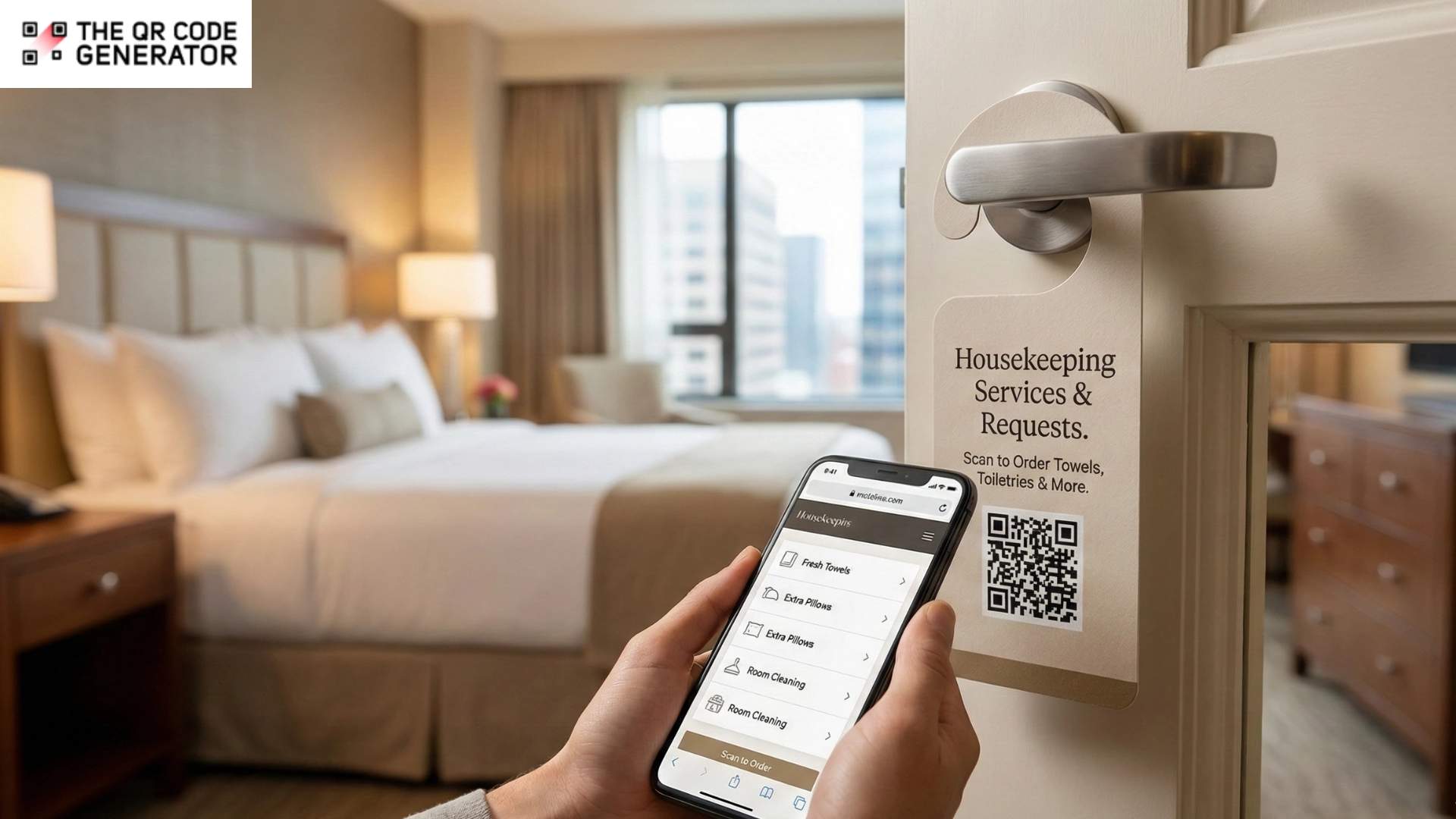
How do most hotels handle guest requests today? Door hangers, phone calls, quick verbal handoffs between staff, right?
The system works, but it’s full of gaps. Requests lack confirmation and tracking. If the front desk misses a message or housekeeping is working from yesterday’s list, that request just vanishes. Guests wonder if anyone received what they asked for, while staff have limited visibility into what’s pending or urgent.
Meanwhile, guest expectations have shifted. According to Oracle Research, 73% of travelers prefer mobile and self-service tech to manage their hotel experience. Yet most in-room service materials remain entirely manual.
QR Codes on housekeeping materials close this gap. When a guest scans a code on a door hanger, tent card, or closet placard, their request is instantly transmitted into a centralized system. Staff see it immediately. Guests get confirmation. Everyone knows what’s happening.
Read on to see how QR Codes can make housekeeping smoother, service faster, and guests happier.
Why relying on paper-based systems limits housekeeping teams
Paper-based housekeeping systems have been around for a long time, and for the most part, they have done the job effectively. But as guest expectations have changed and operations have grown more complex, the cracks are starting to show.
Small, everyday friction points, such as those listed below, quietly erode efficiency, team morale, and the overall guest experience.
No confirmation that requests were received
When a guest flips a door hanger or calls the front desk for something, they’re left waiting and wondering. Most guests won’t follow up because they don’t want to be a bother. But that uncertainty sits with them. And when the request shows up late, or not at all, it feels like they were ignored.
For your team, the problem goes deeper. Without a digital footprint, there’s no way to figure out what went wrong. Maybe the housekeeper never got the message. Maybe it was written on a sticky note that got buried. You have no way to know.
Front desk friction during peak hours
During peak hours, staff must handle check-ins, check-outs, and guest inquiries, while housekeeping requests continue to arrive through calls, door hangers, or even walk-ups.
However, front desk agents jot notes between tasks or pass along requests verbally. This can cause small details to drop off or requests to be entirely missed. The slowdown affects everyone. For housekeeping teams that work reactively instead of following a plan, the front desk teams often bear the brunt when delays occur.
Housekeeping staff work without real-time updates
Housekeeping teams rarely see the full picture as their day unfolds. They begin with a printed list or morning briefing, but once they’re on the floor, new guest requests arrive through other channels that don’t always reach them in a timely manner.
Rooms get cleaned and closed out, only to be reopened twenty minutes later for something that could’ve been handled the first time. Staff backtracks and reprioritizes on the fly, losing time that can’t be recovered. Even well-run teams feel disorganized when updates don’t come and go in real time.
Language barriers complicate international guest requests
When a guest who does not speak the local language calls the front desk, things can become complicated. Maybe they’re trying to explain they need hypoallergenic pillows or that their shower drain is slow. The agent is doing their best, asking clarifying questions, and paraphrasing what they think they heard.
Sometimes it works. But details often get lost or simplified just to keep things moving. The guest hangs up, unsure if they were understood. The housekeeper gets a vague note that doesn’t capture what was needed. Some guests stop asking altogether.
QR Codes can eliminate these barriers, making service feel effortless for global travelers.
How QR Codes on housekeeping materials improve service coordination
QR Codes benefit hotels by turning static signage into direct lines of communication, ones that are instant, trackable, and available in any language.
Here’s how QR Codes work across your hotel property.
Door hangers with QR Codes for service requests and privacy preferences
Traditional door hangers offer guests two options: “disturb” or “do not disturb.” That’s it. They don’t capture what the guest actually needs, and they don’t tell your team if preferences change.
A QR Code turns that static sign into a live request channel. Guests can scan it to submit specific requests, such as fresh towels, trash pickup, or a later cleaning time, and set their privacy preferences without needing to call the front desk. The best part? Each request is entered into a shared system, timestamped, and visible to housekeeping and operations.
The same logic applies to QR Codes on door hangers. It provides teams with clarity before they enter the room and managers with visibility into demand and response times.
Marriott has been moving in this direction for years. Their Mobile Requests feature (available through the Bonvoy app) lets guests chat directly with staff and submit service requests from their phones.
Bedside cards with QR Codes for towel, linen, and amenity requests
When guests wake up needing extra towels or a different pillow, they want help without having to call for assistance.
A bedside card with a QR Code gives them that option right where they need it. One scan, and they can request pillows, blankets, hypoallergenic bedding, or temperature adjustments in seconds. The request is sent directly to housekeeping’s mobile devices and bypasses the front desk entirely.
When guests can submit requests digitally, they receive confirmation that their request has been processed. That small reassurance reduces follow-up calls and maintains a stress-free experience.
Bathroom amenity stickers with QR Codes for restocking alerts
Small QR Code stickers near soap dispensers, shampoo bottles, and towel racks let guests flag supply issues the moment they notice them. Simply scan, and the request is forwarded directly to your team.
This approach works especially well in extended-stay properties, where daily housekeeping isn’t standard. Instead of waiting for a complaint at checkout, your team can respond while the guest is still in-house.
Properties utilizing digital restocking systems have experienced measurable decreases in supply-related complaints and can eliminate complaints entirely about insufficient supplies, simply because issues are identified early and reach the right people without delay.
Maintenance request QR Codes on bathroom and closet signage
When something breaks, most guests don’t want to explain it over the phone. A QR Code on the closet door or bathroom mirror gives them a faster option. Guests scan the code, select the issue from a dropdown menu, add a brief description or photo, and submit. The room number auto-populates, eliminating the need for back-and-forth. The request routes to maintenance directly. With clear details upfront, your team arrives with the right tools on the first visit.
Multilingual service request forms via QR Codes
Details often get lost when a guest who may not be fluent in the local language calls the front desk. The agent paraphrases, the guest isn’t sure they were understood, and the housekeeper gets a vague note.
QR Codes linked to multilingual forms remove that friction entirely. Guests select their language (or it auto-detects from their device), choose from standardized options, and submit. Your staff receives the request in their working language with clear, actionable details.
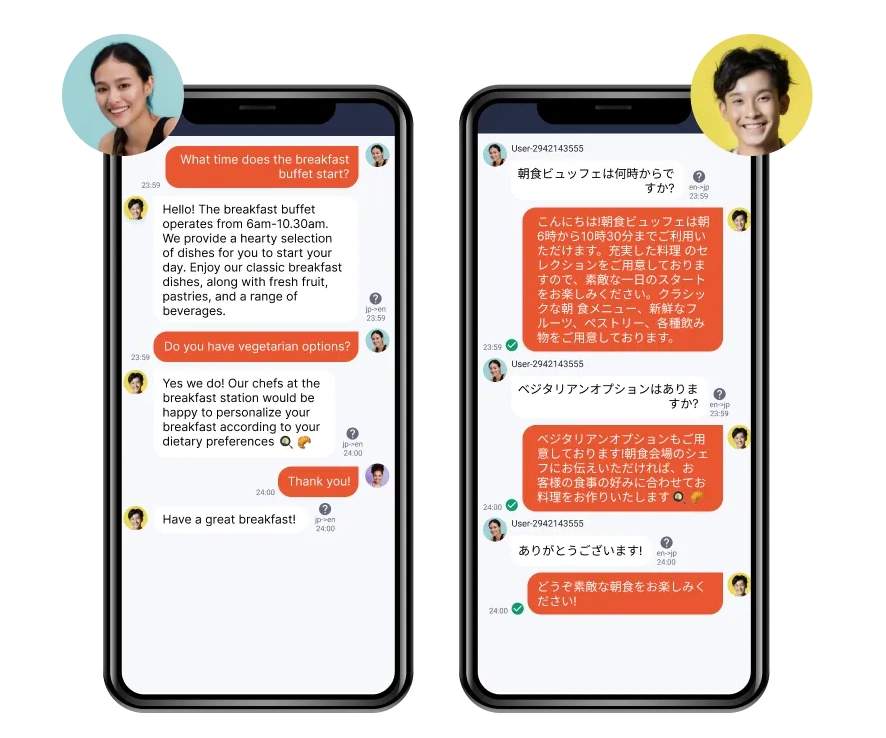
Kotozna, a platform used by hotels in Japan, has a QR Code-based in-room concierge that supports 109 languages.
This kind of system makes a big difference for hotels in tourist-heavy markets. You support diverse guest demographics without adding pressure on the front desk, and service feels effortless for travelers who just want to be understood.
Now that you understand all the benefits that QR Codes bring, let’s see how you can create QR Codes.
How to create QR Codes for hotel housekeeping materials
You don’t need an enterprise software budget to give guests a modern way to request service. The QR Code Generator, or TQRCG, makes it easy to create, customize, and track QR Codes.
With TQRCG, you get two free dynamic QR Codes that never expire, plus unlimited static QR Codes.
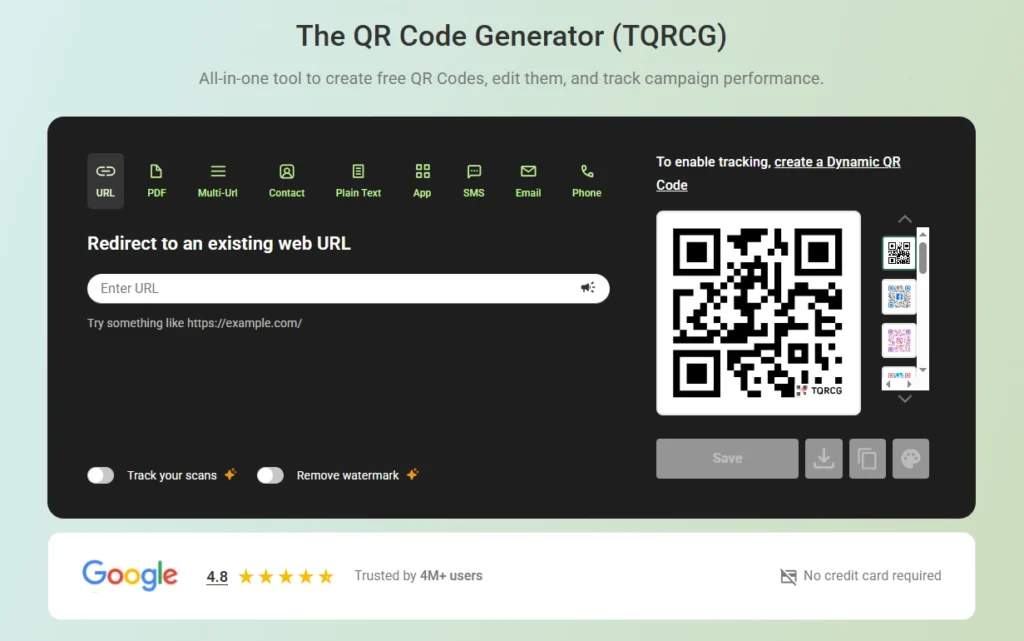
That’s enough to pilot a housekeeping request system across multiple room types. Here’s how to set up QR Codes for your housekeeping materials using TQRCG.
Step 1: Sign up and choose dynamic QR Codes
Head to TQRCG and create a free account. Once you’re in, you’ll have access to two dynamic QR Codes right away.
Dynamic QR Codes are essential for hotel operations. Unlike static QR Codes (which lock in a destination permanently), dynamic ones allow you to update the linked URL at any time, without reprinting your door hangers or tent cards. You can launch with a simple towel request form today, add late checkout options next month, and swap in a seasonal amenity menu in winter. The same printed QR Code handles all of it.
TQRCG’s dynamic QR Codes also come with built-in QR Code tracking, so you can see exactly how guests are using them.
Step 2: Build a mobile-friendly request form
Your QR Code needs somewhere to send guests. Create a QR Code linking to a Google Form, Microsoft Form, Typeform, or your PMS’s native request feature. Keep it clean, fast-loading, and easy to complete with one thumb.
Try to design your QR Code around how guests think. Offer clear categories such as towels, linens, amenities, or maintenance. Capture the room number automatically, if possible, and limit free-text fields to ensure requests remain structured and actionable.
Step 3: Generate and link your QR Code
Back in TQRCG, click + Create QR Code and select the URL option. Paste in your form link.
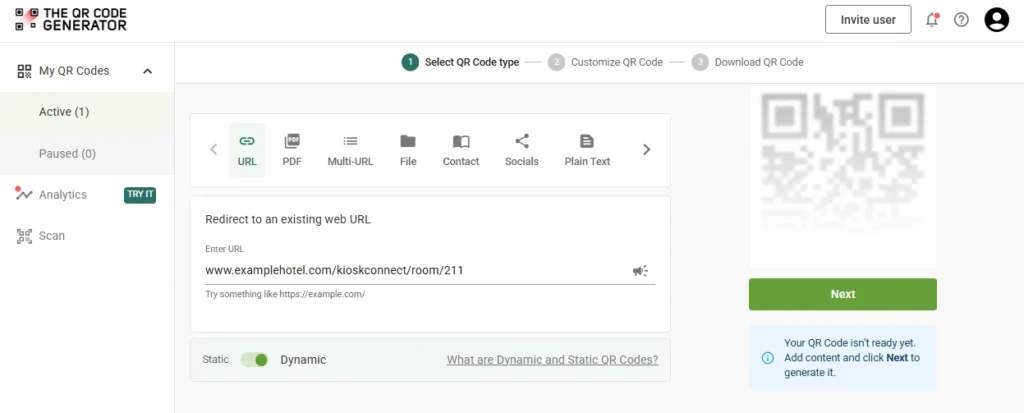
Give each code a clear label based on placement. This makes it easy to track performance later and know exactly which touchpoints are driving engagement. Before moving on, test the code on your own phone to confirm it loads quickly and displays correctly.
Step 4: Customize and brand your code
TQRCG allows you to customize colors, add your hotel logo, and select from pre-built frame styles. A branded QR Code builds trust and looks intentional, not like an afterthought taped to the wall.
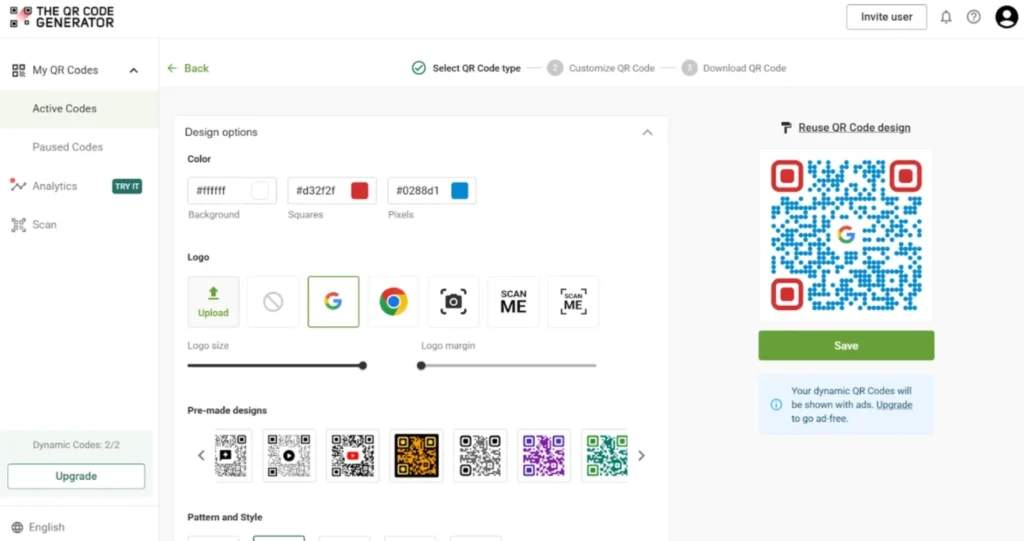
Pair your code with a clear call to action, such as “Scan to Request Service,” “Scan for Extra Towels,” or “Scan to Update Cleaning Preferences.” Place the CTA close to the code, using readable fonts and strong contrast, so it stands out in different lighting conditions.
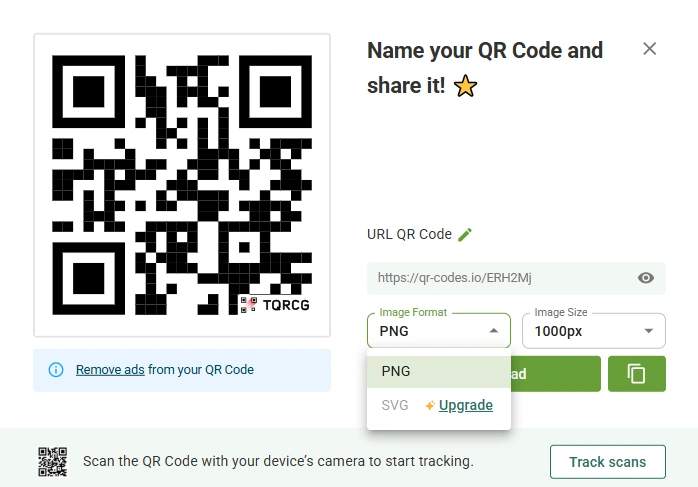
When you’re ready to download, select a preferred QR Code format. TQRCG offers PNG for digital use and SVG for high-resolution print. Use vector formats for door hangers and signage to keep your QR Codes sharp at any size.
Step 5: Test in real conditions
Before rolling QR Codes out across rooms, test them where guests will actually scan. Try dim bathroom lighting, bright window light, and a bedside lamp with a soft glow. Scan with both iOS and Android devices, including older models.
If a QR Code doesn’t work as intended, adjust the size, contrast, or placement of the QR Code. A smooth scan experience means guests follow through.
Step 6: Train your team
Your QR Code workflow only works if staff know how to use it. Walk the housekeeping, front desk, and maintenance teams through the process of where digital requests appear, how to prioritize them, and how to close them once a task is completed.
Show them how requests arrive with clear details, such as room number, request type, and notes, so they can respond more efficiently with fewer follow-ups.
Step 7: Track what’s working
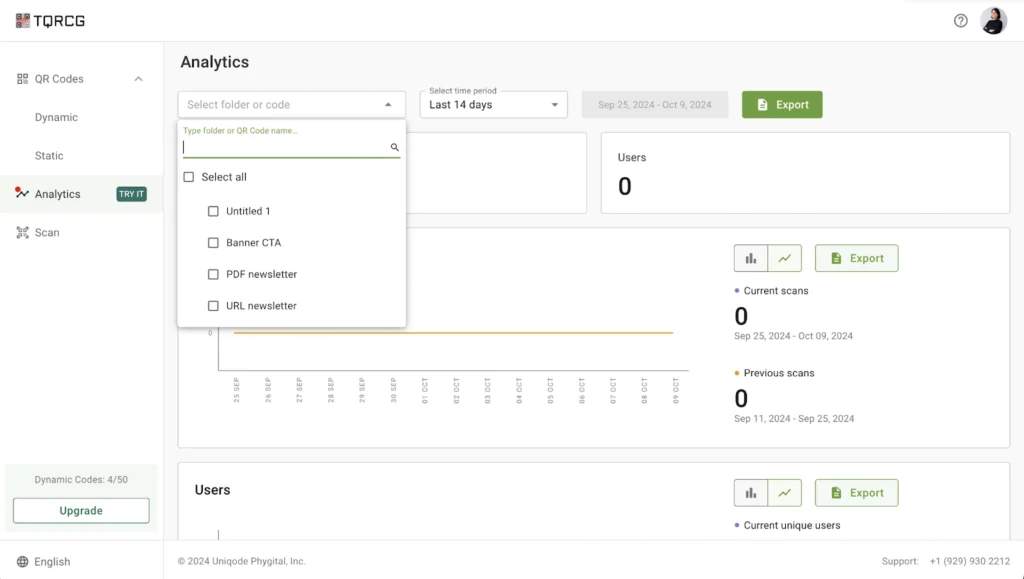
Once your QR Codes are live, check TQRCG’s analytics dashboard to see scan QR Code trends by location, time of day, and device type. If bedside cards get more scans than door hangers, you’ll know where to focus. If requests spike between 6 AM to 9 AM, you can adjust staffing accordingly.
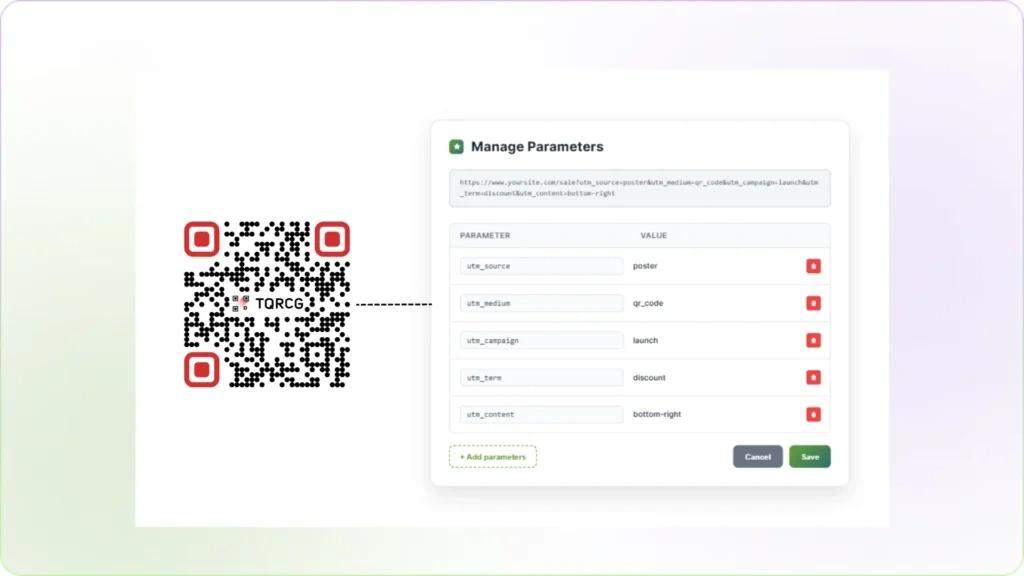
For deeper attribution, use TQRCG’s UTM campaign builder to tag your URLs and track guest behavior in Google Analytics. This will connect your offline scans to online actions without extra tools.
And you’re done! Now is a good time to top it off with some best practices.
Best practices for using QR Codes on hotel housekeeping materials
The thing is, simply creating your QR Codes and placing them everywhere is not going to work. For the best results, you have to stick to these best practices:
- Design for scannability in varied lighting conditions: Make sure QR Codes are large enough and printed with high contrast so guests can scan them easily, even in dim hallways or bright sunlight. Test placement and readability before finalizing materials.
- Write clear, action-oriented CTAs: Use simple, direct language, such as “Scan to Request Towels” or “Update Your Cleaning Preferences.” A good CTA tells guests what to do and encourages them to engage.
- Integrate QR Code requests with your property management system (PMS): Link QR Code submissions directly to your PMS so requests are automatically routed to housekeeping and tracked in real time, reducing errors and missed tasks.
- Use dynamic QR Codes for flexibility: Dynamic QR Codes let you update forms, workflows, or destinations without reprinting materials. This makes it easy to add new service options or adjust routing as operations evolve.
- Train staff on digital workflow integration: Make sure housekeeping and front desk teams understand how QR Code requests flow, how to access them, and how to respond efficiently. Familiarity prevents delays and confusion.
- Monitor scan rates and request patterns: Track which QR Codes get used most, what requests are common, and peak usage times. These insights help optimize staffing, anticipate guest needs, and improve service efficiency.
Improve your housekeeping materials with QR Codes
QR Codes won’t fix a broken housekeeping operation, but they can make a good one feel effortless. When guests can request towels, flag a maintenance issue, or adjust their cleaning preferences without picking up the phone, the whole experience feels smoother.
And when your team gets timestamped requests instead of secondhand messages, they can actually deliver.
The best part? You don’t need a big budget or a tech team to make this work. A free TQRCG account, a simple Google Form, and a few well-placed cards can get you up and running in an afternoon.
Frequently Asked Questions
What types of housekeeping materials can include QR Codes?
QR Codes can be added to door hangers, bedside tent cards, bathroom amenity stickers, in-room service directories, or laminated cards near closets and minibars. Essentially, any area where guests naturally look when they need something is a suitable spot.
Do QR Codes on housekeeping materials work for all guest demographics?
Yes, when implemented thoughtfully. Provide a backup option, such as a phone number or text-based URL, for guests who prefer not to use the scanning feature. Most travelers under 60 are comfortable using QR Codes, and adoption has grown significantly since 2020.
Should I use static or dynamic QR Codes for hotel housekeeping materials?
Always use dynamic QR Codes. They let you update forms, backend workflows, or links without reprinting materials, which is essential for long-term flexibility and efficiency.
How do I prevent spam or fake requests from guests?
You can mandate room number verification in the form and cross-check submissions against your PMS to confirm active reservations. Spam isn’t usually a problem since guests are identified by room number.
How to set up a QR Code for tips?
To set up a QR Code for tips, create a digital tipping page using a payment link or wallet service your guests already trust. Generate a QR Code pointing to this page, then place it on high-visibility touchpoints such as room cards, housekeeping carts, or table tents. Ensure the page is mobile-friendly, clearly labeled for tipping, and easy to complete with just a few taps.