









 New Dynamic QR Code
  New Static QR Code
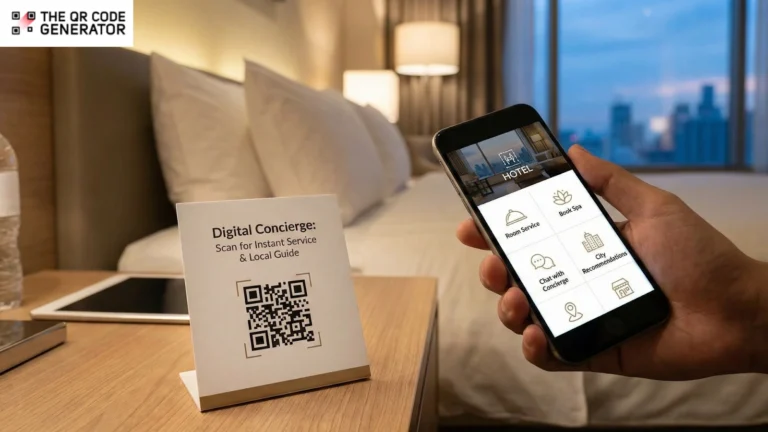
How much time do your guests spend waiting at the front desk or searching for basic hotel information?
Research shows that 70% of guests find chatbots helpful, and 58% believe that AI can improve their hotel stay. Despite this evident demand for digital integration, many properties still rely on physical directories and phone calls, which often lead to peak-hour bottlenecks and delayed service.
This often leaves guests frustrated and front desk staff overwhelmed by repetitive queries. A great way to bridge this gap and provide instant, 24/7 support is through QR Codes for a digital concierge service.
QR Codes can help you deliver a smooth and contactless guest experience from check-in to checkout while streamlining your internal operations.
In this guide, you’ll see how top hotels use them to improve guest satisfaction, why they can outperform expensive mobile apps, and how you can implement your own digital concierge service today.
Table of contents
- Why traditional concierge services no longer meet guest expectations
- How QR Code digital concierge services improve guest experience
- How to create effective QR Codes for digital concierge services
- How to maximize guest adoption of QR Code digital concierge
- Start creating better guest experiences with The QR Code Generator (TQRCG)
- Frequently asked questions
Why traditional concierge services no longer meet guest expectations
Modern guests expect uninterrupted support the moment they arrive, yet outdated concierge methods often fall short, which can leave guests frustrated and staff overwhelmed.
1. Missed requests and delayed responses
When guests don’t have a clear, instant way to reach concierge services, requests are often dropped altogether. Calling the front desk for simple needs can feel like an unnecessary effort. As friction increases, guests abandon requests entirely. These unresolved moments can surface later as negative reviews and lower satisfaction scores, even when staff are doing their best.
2. Overloaded front desk teams
On a day-to-day basis, front desk teams handle the same questions repeatedly, such as Wi‑Fi passwords, breakfast timings, checkout rules, or directions. While small by itself, these interactions pile up quickly during peak hours. As a result, teams spend less time on meaningful and high-touch guest interactions and more time acting as an information desk.
3. App-based concierge tools that guests don’t download
Many hotels invest in dedicated concierge apps, expecting them to streamline service delivery. Meanwhile, guest adoption may not happen.
Travelers on short stays are reluctant to download an app, create logins, and learn a new interface just to request towels or check hotel timings. As a result, app-based concierge tools often go underused, while guests revert to calls and front desk visits, bringing hotels back to the same operational bottlenecks.
4. Scattered guest information and service entry points
Hotel information is scattered across paper cards, TV menus, verbal instructions, and phone calls, with no centralized access point. This fragmentation forces guests to search, ask repeatedly, or give up, while staff continue to re-explain the exact details across channels.
QR Codes solve these issues by providing a single, always-available access point that instantly connects guests to concierge services.
How QR Code digital concierge services improve guest experience
Here is how you can implement specific QR Code campaigns to transform your guest journey from arrival to checkout.
1. Scan on arrival for easy check-in
The first hour of a guest’s stay is usually the most information-dense. You can place QR Codes on your reception desks, elevator lobbies, and inside key card holders to provide answers to the most common questions.
When your guests scan this QR Code, they can gain Wi-Fi credentials, checkout times, house rules, and emergency contacts. This frees up your front desk’s time and also establishes the digital concierge as their primary support channel from the moment they walk in.
2. Scan for contactless service
By placing QR Codes on bedside table tent cards or TV screens, you can accommodate guests who prefer not to call. They can request extra towels, book a housekeeping time, or order room service without ever having to dial a number. This removes language barriers and ensures your service remains functional even when you are operating with minimal staff.
3. Scan for personalized local experiences
Place QR Codes in elevators and lobby seating areas to lead guests to curated nearby restaurants, attractions, and transport options.
Curate experiences based on the preferences, such as adventurous, couple, or family experiences. This gives your guests a way to explore the city based on their preferences. Moreover, it helps you land partner deals while offering a personalized experience.
💡 Pro tip: You can refresh offerings seasonally. Update your recommendations daily or seasonally using dynamic QR Codes. This way, you can reflect local events or partner discounts instantly.
4. Scan for instant query resolution
During check-in and checkout rushes, physical lines are the primary driver of guest dissatisfaction. You can use signage at your reception that explicitly invites guests to “Skip the line: Scan for concierge support.”
The QR Code can open digital request forms, FAQs, or live chat options. This way, you can redirect non-urgent queries away from your staff. This allows them to focus on interactions that require a human face while reducing wait times.
5. Scan for 24/7 concierge chat and language support
You can offer round-the-clock support without the overhead of 24/7 staffing by linking QR Codes directly to WhatsApp, web chat, or an AI concierge assistant. This can help with overcoming language barriers. Guests can communicate in their native language via text and digital assistants or translation tools. Because your guests are likely already using messaging apps, there is no need for them to download a separate app to talk to you.
You can evaluate success by comparing your chat initiation rates and resolution times with traditional phone call metrics.
6. Scan to schedule housekeeping
Friction in housekeeping often leads to missed cleanings or unwanted interruptions. You can place QR Codes in the rooms that allow guests to choose a specific cleaning time or request specific items, such as extra pillows.
Sometimes staff forget when a guest requested cleaning services, and this often leads to customer dissatisfaction. However, with trackable QR Codes, you can track requests in real time and ensure they’re not missed.
7. Scan to unlock more services
QR Codes help drive incremental revenue because they allow guests to browse upgrades privately and at their own pace. You can place these codes on lift posters and in-room digital displays to promote spa bookings, dining reservations, or room upgrades. When guests scan to see what is available, the upsell feels like a helpful suggestion rather than a pushy sales pitch.
Additionally, you can track your ROI by monitoring the conversion rate per QR Code and the total revenue generated per occupied room (RevPOR).
8. Scan for feedback collection
Your concierge’s job doesn’t end when the guest leaves the room. You can place QR Codes on checkout desks or include them in digital invoice emails to capture feedback while the experience is still fresh.
Beyond surveys, you can use QR Codes for loyalty programs. This high-intent moment at checkout lets you connect your concierge service to a feedback loop that encourages repeat visits.
Improving the guest journey through these digital touchpoints is only effective if the technology behind them is reliable and straightforward to use. Once you have identified which concierge campaigns will benefit your property, the next step is creating your QR Code.
How to create effective QR Codes for digital concierge services
You can create a QR Code–enabled digital concierge experience in four steps using The QR Code generator (TQRCG).
Step 1: Choose the QR Code type based on the concierge experience
Start by deciding what you want guests to do after scanning the QR Code. The intended action will determine the QR Code type you use.
For digital concierge services, use dynamic QR Codes. These allow you to update menus, service details, promotions, or request flows without reprinting physical materials.
Dynamic QR Codes also provide scan and engagement analytics. This helps your hotel teams understand when guests need help most, which services are most frequently used, and where QR Codes perform best across the property.
Step 2: Generate your digital concierge QR Code

To create your digital concierge QR Code, sign in to The QR Code Generator (TQRCG) and select the appropriate QR Code type. Enter the destination link, such as a concierge hub, service request form, chat link, FAQ page, or upload the relevant file. Review the details and click Next.
Step 3: Customize the QR Code to match your hotel experience

Next, customize the QR Code so it feels like a natural extension of your hotel’s brand. Apply your brand colors or logo to maintain visual consistency across in-room and lobby touchpoints.
Use a QR Code frame with a clear call to action (CTA), such as “Scan for Concierge Services,” “Scan to Request Housekeeping,” or “Scan for Local Recommendations.” Once you’re satisfied with the design, click Save.
Step 4: Download, test, and place the QR Code thoughtfully

Name your QR Code and download it in the desired QR Code format. Use SVG files for large-format printing, such as lobby signage or standees, and PNG files for in-room cards, key card sleeves, or digital displays.
Before rolling it out, test the QR Code across multiple mobile devices to ensure fast and reliable scanning. Place QR Codes where guests naturally pause or need assistance, such as bedside tables, elevator lobbies, reception counters, or inside rooms.
Now that you know how to create and use QR Codes for digital concierge services, the next step is to follow best practices to maximize adoption and long-term impact.
How to maximize guest adoption of QR Code digital concierge
To ensure your digital concierge service is a success rather than a source of frustration, you should follow these industry-proven best practices for implementation.
1. Use dynamic QR Codes for maximum flexibility
For a digital concierge service, you should opt for dynamic QR Codes over static QR Codes. You can update the destination URL or change the linked service, such as updating a seasonal menu or changing a Wi-Fi password, without having to reprint your physical signage or tent cards. This flexibility saves you significant printing costs and ensures your guests never scan a broken or outdated link.
2. Keep the interface mobile-first and fast-loading
Your guests will be scanning these QR Codes on their smartphones, often while walking or standing in a lobby. You must ensure that the landing page is fully optimized for mobile devices and loads almost instantly. If a guest has to wait more than a few seconds for your concierge hub to appear, they are likely to abandon the digital experience and return to calling the front desk.
3. Place QR Codes at decision points
Place the QR Codes where the guests are most likely to have a question or a need. A QR Code for room service belongs on the bedside table or the TV, while a QR Code for baggage assistance or late checkout is best placed near the room exit or on the back of the door. Strategic QR Code placement ensures the solution is present the moment the need arises.
4. Use clear and actionable CTAs
Move beyond generic instructions; instead, use specific calls to action (CTAs) that clearly communicate the value of the scan. Phrases such as “Scan to view local dinner recommendations” or “Scan for instant Wi-Fi access” tell your guests exactly what they will get, which significantly increases scan rates.
5. Train your staff to reference the QR Code concierge
Digital tools work best when your human team supports them. You should train your front desk and bell staff to mention the digital concierge during the initial check-in process. A simple phrase such as, “Everything you need for your stay, from extra towels to local tours, is available by scanning the QR Code on your key card,” sets the expectation that the QR Code is an easy way to get help.
6. Avoid overwhelming the first screen
When your guests scan the QR Code, you should present them with a clean and simple interface. Avoid listing every single hotel service on the first page. Instead, categorize your offerings into four or five clear buckets, such as “Dining,” “Support,” and “Explore,” to ensure the user journey remains intuitive and stress-free.
Start creating better guest experiences with The QR Code Generator (TQRCG)
Traditional guest directories and physical brochures simply can’t keep up with today’s travelers’ fast-paced expectations.
Dynamic QR Codes offer you a practical and sustainable way to move beyond static service and give every guest the instant, personalized, and contactless experience they are looking for. Moreover, it helps make your hotel operations more agile and your staffing model more sustainable.
If you are ready to bridge the gap between your physical property and your guest’s digital needs, try The QR Code Generator (TQRCG). It is a budget-friendly hotel QR Code generator that scales with your business. With TQRCG, you can track scan metrics, customize your branding, and instantly update your QR Codes to evolve with your seasonal offers and keep your guest experience fresh.
Sign up to create two forever-free dynamic digital concierge QR Codes today!
Frequently asked questions
Digital concierge services via QR Codes allow hotel guests to access services, information, and requests by scanning a QR Code using their smartphone. Guests can view amenities, request housekeeping, order room service, or contact the concierge instantly without installing an app.
No, guests do not need an app to use a QR Code digital concierge. Most systems are browser-based and open instantly on a mobile device, making them frictionless for guests and easy to use across all smartphone types.
Hotels should place QR Codes for concierge services in locations where guests naturally pause or need assistance, such as in-room desks, key card holders, elevators, and lobby signage. These placements ensure high visibility and convenient access throughout the guest journey.
Yes, QR Code concierge services can significantly reduce front desk workload. They automate repetitive questions and routine service requests, allowing hotel staff to focus on personalized guest interactions and complex issues.
Yes, QR Code concierge services are well-suited for small hotels and vacation rentals. QR-based systems are cost-effective, easy to deploy, and scalable, making them ideal for properties without large front desk teams or complex technology stacks.
