
What Is an Airline QR Code and How Does It Work?

Shanti Nair
Last updated: April 20, 2026
9 min read
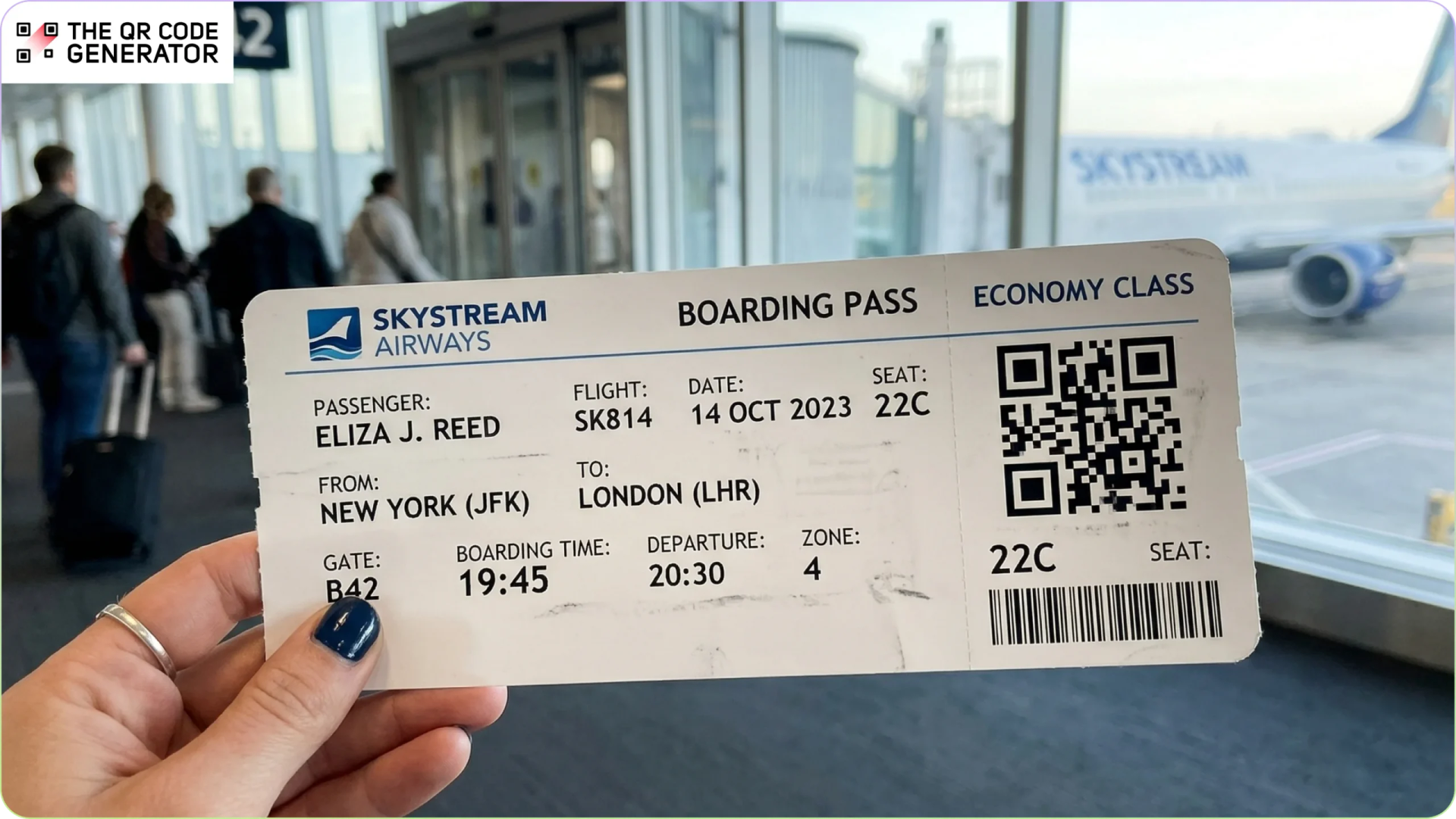
Airports are designed for speed, but every delay compounds quickly. A slow scan, a manual check, or a paper ticket that will not read can ripple across an entire boarding process.
To reduce that friction, airlines have moved away from paper-heavy systems toward digital boarding passes powered by QR Codes. A single scan now connects a passenger to their flight details, identity checks, and boarding status in seconds.
From check-in to gate entry, QR Codes sit at the center of how passengers move through modern airports. This article breaks down what an airline QR Code is, how it works, where it appears across the airport, and why it matters for both travelers and aviation businesses.
What is an airline QR Code?
An airline QR Code is a two-dimensional code printed or displayed on a boarding pass. It stores key flight details in a scannable format that airport systems can read instantly. A standard boarding pass QR Code contains the passenger’s name, flight number, departure date and time, gate number, seat assignment, and the passenger name record (PNR).
QR Codes with encoded passenger data enable airlines and airports to scan and verify passenger information without manual entry. These codes help with processing thousands of passengers quickly and accurately.
The aviation industry uses a shared global standard to ensure boarding pass QR Codes can be scanned consistently across airlines and airports.
The International Air Transport Association developed the Bar Coded Boarding Pass (BCBP) standard, which defines how passenger and flight data are structured and encoded within these machine-readable codes. This means the QR Code on a boarding pass is not just a visual pattern, but a standardized data format. Airport systems and partner airlines worldwide can read and process it reliably, supporting smooth transfers and multi-carrier travel.
Business and operational benefits of airline QR Codes
Airline QR Codes convert passenger data into a format that systems can process instantly. This reduces manual checks and improves speed, accuracy, and operational efficiency across the airport.
Faster boarding and fewer delays
QR Code scanning at boarding gates processes each passenger in seconds, compared to manual document checks that require agents to inspect and match paper tickets visually. This reduces gate congestion, keeps departure queues moving, and helps flights push back on time.
Fewer staffed check-in desks
Mobile boarding passes reduce the number of passengers who need to visit a staffed check-in counter. Airlines can operate with fewer open desks during peak hours, which lowers counter staffing costs and frees agents to handle irregular operations such as rebooking, upgrades, and accessibility requests.
Alaska Airlines, for example, has removed check-in desks at major hubs in favor of mobile boarding passes to speed up lobby lines. Passengers scan their mobile QR Code at a self-service station, print a bag tag, and leave their luggage at an automated drop-off machine.
Faster flight updates
Airlines can push updated flight information, such as gate changes, delays, and boarding time revisions, directly to the mobile boarding pass. This eliminates the need for travelers to visit a counter, reprint a pass, or actively monitor departure boards. For airlines, it also reduces the volume of passenger-initiated queries to gate agents during disruptions.
Lower paper waste and printing costs
A single digital boarding pass eliminates the need for a printed ticket at every touchpoint. Across billions of annual flights, the reduction in paper boarding passes, baggage receipts, and printed itineraries contributes directly to airlines’ sustainability and ESG commitments.
Several major carriers, including United Airlines and Lufthansa, have published targets to reduce single-use paper in ground operations as part of broader environmental programs.
Simpler travel for passengers with disabilities
A mobile boarding pass consolidates check-in, security, baggage drop, and boarding into a single QR Code on one device. This removes the need to manage multiple paper documents across different airport touchpoints.
For passengers with mobility impairments, this means fewer counters to visit and less physical handling. For passengers with visual impairments, screen reader compatibility on airline apps and mobile wallets means the boarding pass is accessible without staff assistance at every step.
How a QR Code boarding pass works
Airlines generate QR Code boarding passes by integrating a QR Code generator into their reservation platform. Here is how the process looks:
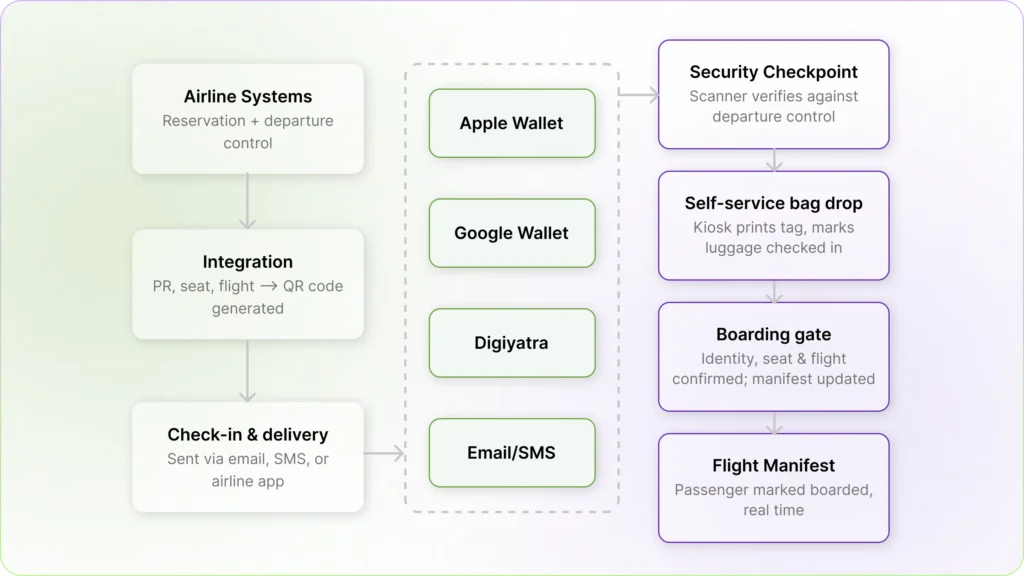
Step 1: Integration with airline systems
Airlines connect a QR Code solution provider to their reservation system. This system automatically gathers details, such as the passenger’s name, flight number, departure time, seat number, and booking confirmation code. It then uses this specific information to generate a unique QR Code for the traveler’s boarding pass.
Step 2: QR Code generation at check-in
Once check-in is completed, the system encodes the boarding pass information into the QR Code and attaches it to the digital boarding pass. The boarding pass is then automatically issued and delivered via email, SMS, or the airline’s mobile app.
The same code can also be stored in mobile wallets such as Apple Wallet or Google Wallet, or government-managed platforms such as India’s DigiYatra.
Step 3: Security checkpoint verification
Airport scanners read the QR Code at the security checkpoint. The scanner retrieves the encoded data and verifies it against the airline’s reservation database to confirm that the passenger is cleared for the flight.
Step 4: Self-service bag drop processing
At bag drop kiosks, the QR Code pulls up the passenger’s booking in the airline system. The kiosk prints the baggage tag and updates the booking record to confirm that luggage has been checked in.
Step 5: Boarding gate validation
The final scan occurs at the boarding gate. The QR Code confirms the passenger’s identity, seat assignment, and flight details. The system then marks the passenger as boarded in the flight manifest.
Every time the QR Code is scanned, it checks the airline’s system to verify the traveler’s ticket. This helps the airport move passengers through lines quickly while instantly updating the airline’s live passenger database.
Just like in India, several airports worldwide now offer contactless entry systems. At Hong Kong International Airport, for example, passengers do not need to scan their boarding pass QR Code at the boarding gate. A facial recognition camera verifies the passenger’s identity and boarding status, allowing them to walk through the gate.
Where airlines and airports use QR Codes beyond boarding
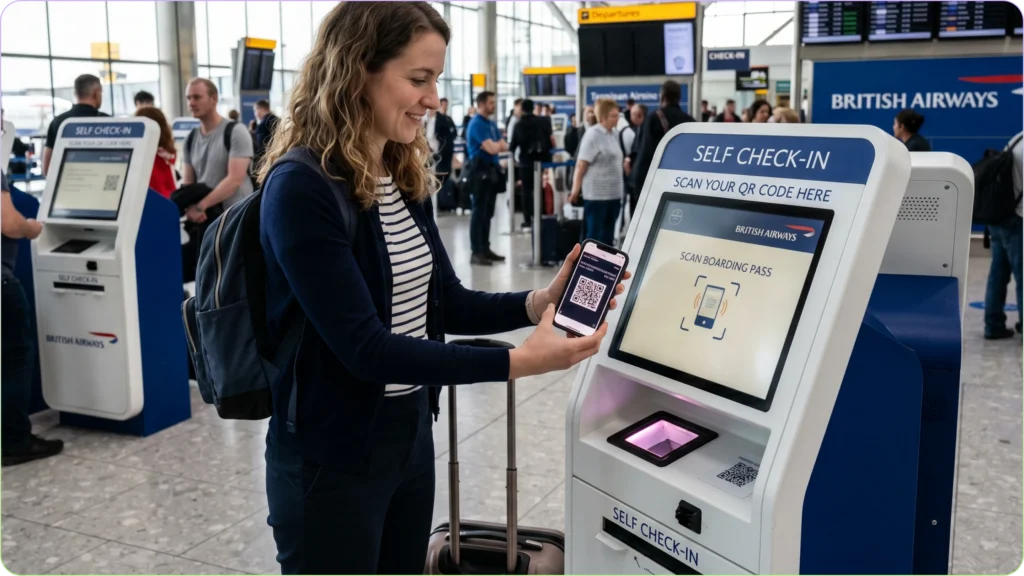
Boarding is just one of the ways QR Codes are used in an airport. Throughout the airport, on airplanes, and behind the scenes, QR Codes power many systems. These codes help make travel easier for passengers and keep the airline running smoothly.
Baggage tags
Every checked bag carries a QR-Coded baggage tag that ground crew scans at each stage of the handling process, from the check-in belt to the aircraft hold and on to the destination carousel. Each scan creates a timestamped checkpoint in the airline’s system, building a digital trail for every piece of luggage.
When a bag goes missing, this trail allows staff to identify exactly where it was last scanned. Additionally, with more and more self-service technologies coming out, the industry has witnessed a 9.2% year-on-year drop in the mishandled baggage rate.
Airlines are even blending QR Code technology with consumer tracking devices. For example, American Airlines allows passengers with lost luggage to scan a QR Code at the baggage office to securely share their Apple AirTag’s location data, accelerating recovery.
Airport navigation
Large international airports can be difficult to navigate, particularly for passengers on tight layovers. QR Codes on terminal maps and gate signage give passengers instant access to live navigation tools without requiring a separate app download.
In-flight services
Airlines and airports use QR Codes to provide instant Wi-Fi access in lounges, terminals, and on airplanes. Scanning a code automatically connects a traveler’s device, removing the need to search for a network or type a password.
Once on board, passengers can scan seatback QR Codes to connect their phones to the plane’s entertainment system to browse movies, track the flight map, and view digital food and drink menus over the local Wi-Fi.
Qatar Airways, for example, offers a “Zero-Touch” system where passengers scan a seatback QR Code to turn their personal phone into a remote control for the screen in front of them.
Frequent flyer programs
At airport lounges and partner retail locations within terminals, QR Codes serve as the verification layer for loyalty program access. Scanning a code at the lounge entrance instantly confirms a traveler’s membership level, records their visit, and adds any bonus miles to their account. This saves staff from having to look up account details on a computer or check a plastic membership card.
Ground operations
QR Codes serve a range of staff-facing functions that rarely reach the passenger experience but are operationally significant.
- Access control: Digital ID badges with embedded QR Codes control entry to restricted airside zones. Each scan verifies the clearance level, logs the entry in real time, and can be revoked instantly. Vendor and contractor passes work the same way, granting access only to specific zones within a defined time window.
- Aircraft maintenance logging: Maintenance teams scan QR Codes on specific aircraft parts to retrieve service history, certificates, and inspection records. For example, Bridgestone Aircraft Tire introduced a mobile tracking app that allows technicians to scan a QR Code printed directly on aircraft tires. This scan instantly pulls up the tire’s entire maintenance history, serial number, and electronic certificates on a mobile device. Mechanics can then easily log dismounts, wear-and-tear, and landing performance without dealing with paper records.
- Equipment serviceability checks: Ground crew scans QR Codes on vehicles and ground support equipment to confirm serviceability before each use. The scan logs the check and flags any outstanding maintenance issues, preventing the use of uncleared equipment.
Start building your airline QR Code workflow
What makes airline QR Codes remarkable is not any single use; it is how much one small QR Code handles across an entire journey. The same QR Code that gets scanned at check-in also clears security, tags your bag, lets you into the lounge, and boards you onto the plane. Passengers rarely think about it, and that is exactly the point. When a system works this well, it disappears into the background.
Businesses outside aviation are finding the same thing. A QR Code on a menu, a product label, a storefront window, or an event badge gives customers instant access to exactly what they need, without friction and without extra staff to manage it. If you have printed material that sends people somewhere, a QR Code makes that journey faster and easier to track.
Sign up and create your first free QR Code with TQRCG in a few minutes, with no technical background needed.
Frequently Asked Questions
What information does an airline QR Code contain?
A boarding pass QR Code contains the passenger's name, flight number, departure date and time, gate number, seat assignment, and the passenger name record (PNR) locator. This data is encoded according to the IATA Bar Code Boarding Pass (BCBP) standard, ensuring it can be read by any airline or airport scanning system worldwide.
Can a screenshot of a QR Code boarding pass be used at the airport?
Yes. A screenshot of a mobile boarding pass is accepted at most airports, provided the QR Code is not pixelated and can be scanned. However, saving the boarding pass to Apple Wallet or Google Wallet is a more reliable option.
Is it safe to share a boarding pass photo online?
No, the QR Code on a boarding pass encodes the PNR locator, which can be used to access the full booking record, contact details, and frequent flyer information through the airline's manage booking portal. Passengers should never post boarding pass photos on social media and should delete digital copies after travel.
How do passengers receive a QR Code boarding pass?
Airlines deliver boarding passes via email, SMS, or their mobile app once check-in is complete, typically 24 to 48 hours before departure. Passengers can save it to a mobile wallet or access it directly through the app at the airport.
What should travelers do if their boarding pass QR Code does not scan?
Passengers should approach the nearest airline counter or gate agent rather than attempting multiple rescans. Staff can retrieve the booking using the PNR locator and immediately reissue the boarding pass.
Do all airports accept digital QR Code boarding passes?
Most major domestic and international airports accept digital boarding passes. However, some international routes require passengers to have their travel documents verified at a check-in counter before the digital boarding pass is valid for the airside area. Passengers should check the airline's specific requirements before travel, particularly on international itineraries.