
How to Create a Seating Chart QR Code for Weddings and Events

Harshajit
Last updated: June 7, 2026
13 min read
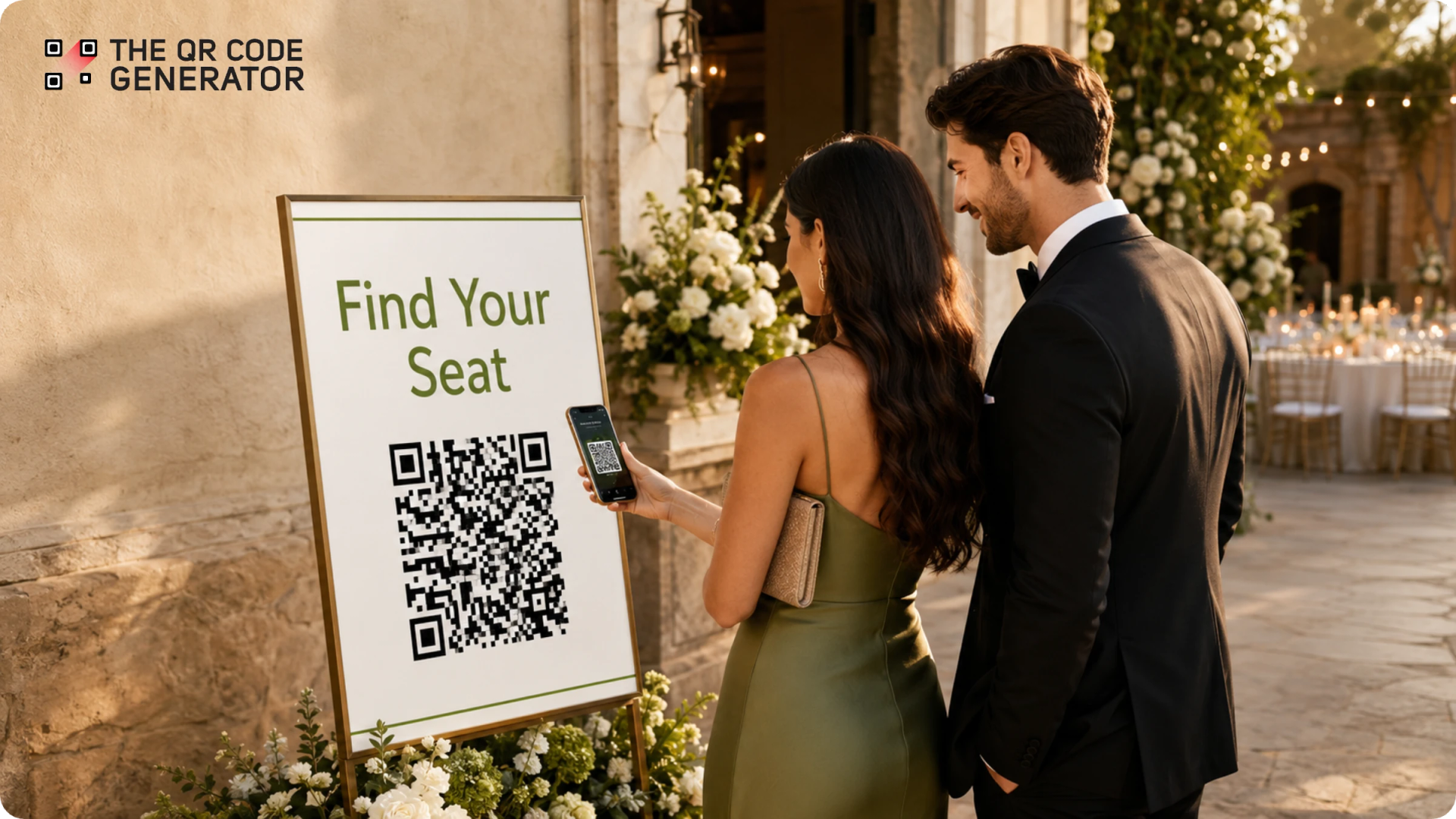
Seating charts often create congestion at event entrances because guests must stop to search for their table assignments, leading to crowding, longer wait times, and frequent staff interruptions.
A seating chart QR Code solves this by linking guests directly to a digital seating chart that they can access on their phones. Guest can simply scan the QR Code displayed at the entrance and find their table in seconds instead of crowding around a seating display. It also gives organizers more flexibility when seating assignments change at the last minute.
As a result, the overall guest arrival experience feels smoother, whether you are running a wedding, conference, school event, or fundraiser.
This guide covers everything event organizers and wedding couples need to know: how seating chart QR Codes work, which type to use, how to create one step by step, and how to make the experience work for every guest. You can replicate this across weddings, corporate events, galas, conferences, school events, and fundraisers.
What is a seating chart QR Code?
A seating chart QR Code is a scannable code that helps guests find their assigned table or seat using their phones. When guests scan the QR Code, it opens an online seating chart. The seating chart can be a PDF, image, webpage, spreadsheet, or guest lookup tool.
The QR Code does not store the seating chart itself. Instead, it links guests to where the seating chart is hosted. Because the seating chart and QR Code are separate, organizers can update seating information without replacing printed signs. This makes seating chart QR Codes useful for weddings, conferences, galas, school events, banquets, and fundraisers where seating assignments sometimes change before the event begins.
Why use a seating chart QR Code?
A seating chart QR Code helps guests find their seats faster and reduces crowding at the entrance. Guests scan the code and view the seating chart on their own phones, rather than gathering around a single display.
A seating chart QR Code provides four main benefits.
- Reduce crowding. Guests can spread out while checking their table assignments instead of waiting around a seating board.
- Handle last-minute changes. Organizers can update the seating chart without reprinting large signs.
- Make seat assignments easier to find. Guests can check their table number anytime during the event.
- Reduce printing needs. One QR Code sign can replace multiple printed seating charts.
These benefits help create a smoother arrival experience for both guests and event staff.
Static vs. dynamic QR Codes for seating charts
A dynamic QR Code lets you update the seating chart after the QR Code has been printed. A static QR Code does not. A static QR Code links directly to one web address. If that web address changes, the QR Code stops working and must be replaced.
A dynamic QR Code gives organizers more flexibility. The printed QR Code stays the same even if the seating chart moves to a different link or platform.
Choose a static QR Code when the seating chart is final and no changes are expected. Choose a dynamic QR Code when guest counts, table assignments, or seating plans may change before the event.
For most weddings, conferences, galas, and fundraisers, a dynamic QR Code is the better choice because seating changes are common during the final days before an event.
Two seating chart formats and how to choose
The best seating chart format depends on the size of your event. Smaller events work well with a simple seating chart, while larger events work better with a searchable guest lookup.
Option 1: Full seating chart
A full seating chart shows the complete seating arrangement after guests scan the QR Code. Guests scroll through the chart to find their names and table numbers. This format works best for events with fewer than 50 guests because the list remains easy to read on a phone screen.
Option 2: Searchable guest lookup
A searchable guest lookup allows guests to type their names into a search box and instantly see their table assignments. This format works best for events with 100 or more guests because it removes the need to scroll through long lists of names.
For large weddings, conferences, galas, and fundraising events, a searchable lookup usually creates the fastest and easiest experience for guests.
How to create QR Codes for seating charts
Create a seating chart QR Code in five steps with The QR Code Generator (TQRCG). Create the seating chart first because the QR Code needs a destination before it can be generated.
Step 1: Create and host your seating chart
Create a digital version of your seating chart using a tool such as Google Sheets, Google Slides, Canva, Excel, or event planning software.
Host the seating chart online and make sure guests can access it without signing in. If you are using Google Drive or Google Docs, set the sharing permissions to “Anyone with the link can view.”
Format the seating chart for mobile devices before publishing it.
- Use a minimum 14pt font.
- Organize names alphabetically.
- Use dark text on a light background.
- Avoid layouts that require horizontal scrolling.
Step 2: Generate a dynamic QR Code with TQRCG
Sign up for The QR Code Generator (TQRCG) and select URL as the QR Code type.
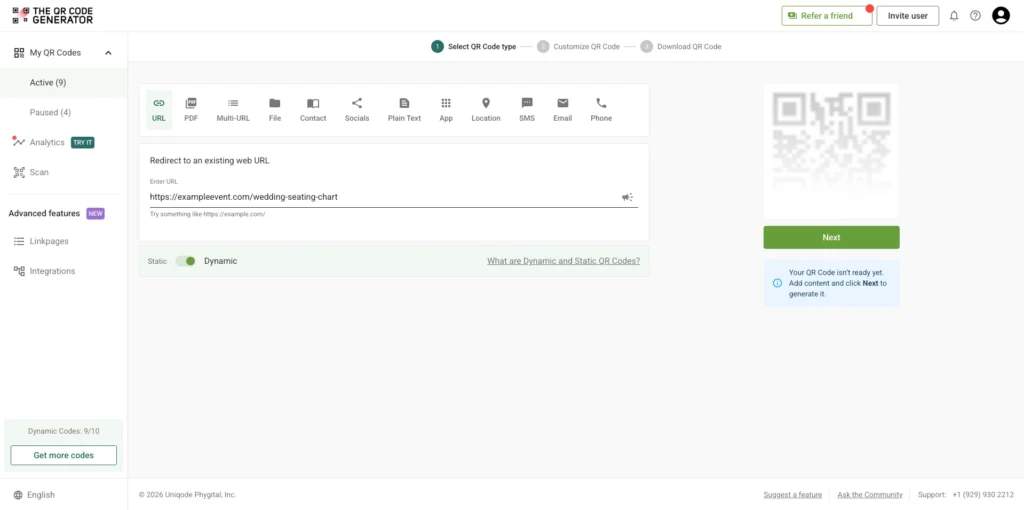
Paste the link to your hosted seating chart into the destination field. Select Dynamic QR Code before generating the code. A dynamic QR Code allows you to update the destination later without reprinting signs, table cards, or welcome displays.
Select Next to generate the QR Code and move to the customization step.
Step 3: Customize the QR Code
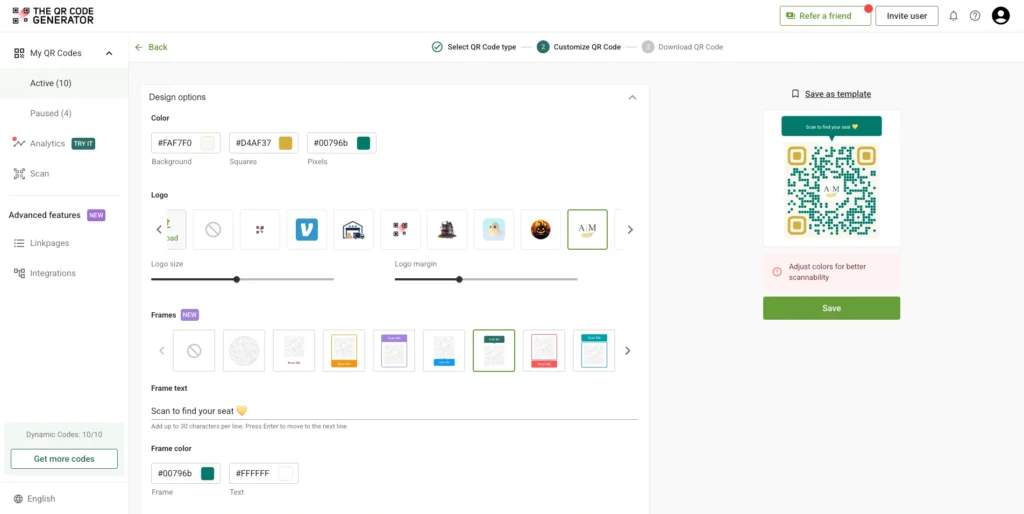
Customize the QR Code before downloading it. A well-designed QR Code is easier for guests to notice and scan. Use the customization options in TQRCG to add event colors, a logo or monogram, a frame around the QR Code, and call-to-action text.
Use a dark QR Code on a light background for the best scanning performance. Add text such as “Scan to find your seat” or “Scan for your table assignment” so guests know exactly what the QR Code does.
Avoid low-contrast color combinations, pastel QR Codes, and inverted color schemes because they reduce scan reliability. TQRCG’s built-in scannability detector displays a warning if your customizations are likely to cause scanning failures.
Step 4: Download the QR Code
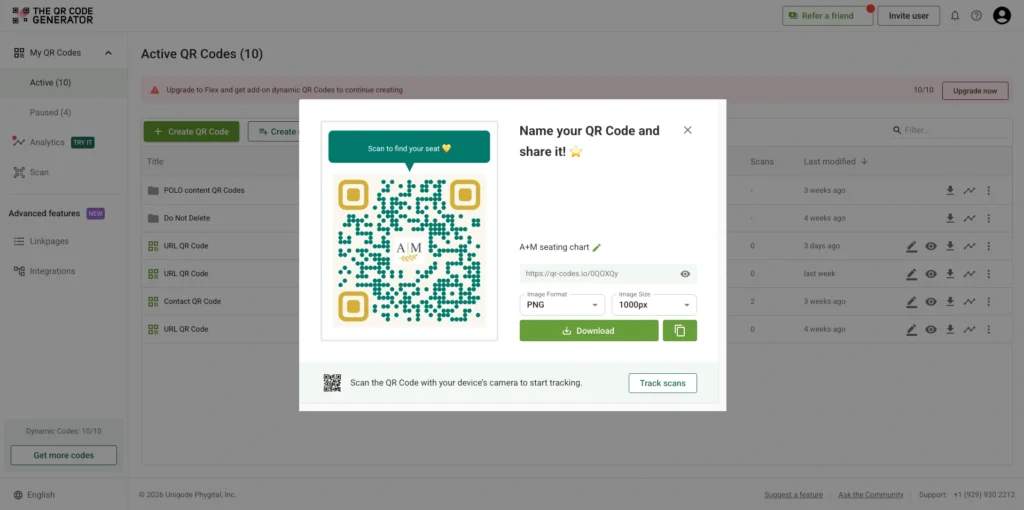
Download the QR Code in the format that matches how it will be used. Download a PNG file for most event signage, invitations, table cards, and printed materials. For large-format printing, such as foam boards, banners, and oversized welcome signs, download an SVG file.
Before downloading, confirm that the QR Code is large enough for its intended use.
- Use a minimum size of 2 × 2 inches for invitations and table cards.
- Use a minimum size of 4 × 4 inches for entrance signs and easel displays.
Save the downloaded files in a location that is easy to access if reprints are needed later.
Step 5: Test and place the QR Code
Test the QR Code before printing large quantities or displaying it at the venue. Testing helps identify problems before guests arrive. For example, scan the QR Code using an iPhone, an Android phone, and an older smartphone.
Confirm that the QR Code scans quickly and that the seating chart loads correctly on both Wi-Fi and mobile data.
After testing, place QR Code signs where guests naturally stop after entering the venue.
Common placement locations include the following.
- Venue entrances
- Welcome tables
- Cocktail hour areas
- Reception entrances
- Bars
For events with 150 or more guests, place two to three QR Code signs at different entry points to reduce crowding and distribute traffic.
How to handle last-minute seating changes
A dynamic QR Code makes last-minute seating changes easy because the printed QR Code does not need to change. Update the seating chart, and guests automatically see the latest version when they scan.
There are two ways to handle seating changes on event day.
Option 1: Update the existing seating chart
Update the seating chart if it stays at the same web address.
For example, edit the Google Sheet, update the Canva design, or modify the seating chart in your event software. The QR Code continues working because it already points to that location. This is the fastest option because no QR Code settings need to be changed.
Option 2: Change the QR Code destination
Change the QR Code destination if the seating chart moves to a new web address.
Log in to your TQRCG dashboard, open the QR Code, update the destination URL, and save the changes. Guests who scan the QR Code after the update are automatically directed to the new seating chart. This option is useful when switching platforms, replacing files, or publishing a completely new seating chart.
Create a seating chart QR Code backup plan for guests
A seating chart QR Code works best when it is supported by a simple backup plan. A backup plan helps guests who have dead phone batteries, limited mobile service, or difficulty scanning QR Codes.
Prepare these backup options before the event:
- Print an alphabetical guest list. Print a single backup list showing guest names and their assigned tables. Keep it near the entrance with an usher, coordinator, or member of the event team.
- Open the seating chart on a tablet or laptop. Load the seating chart before guests arrive and keep the device at the check-in desk. Staff can quickly help guests who need assistance.
These backup options take only a few minutes to prepare and help ensure every guest can find their seat.
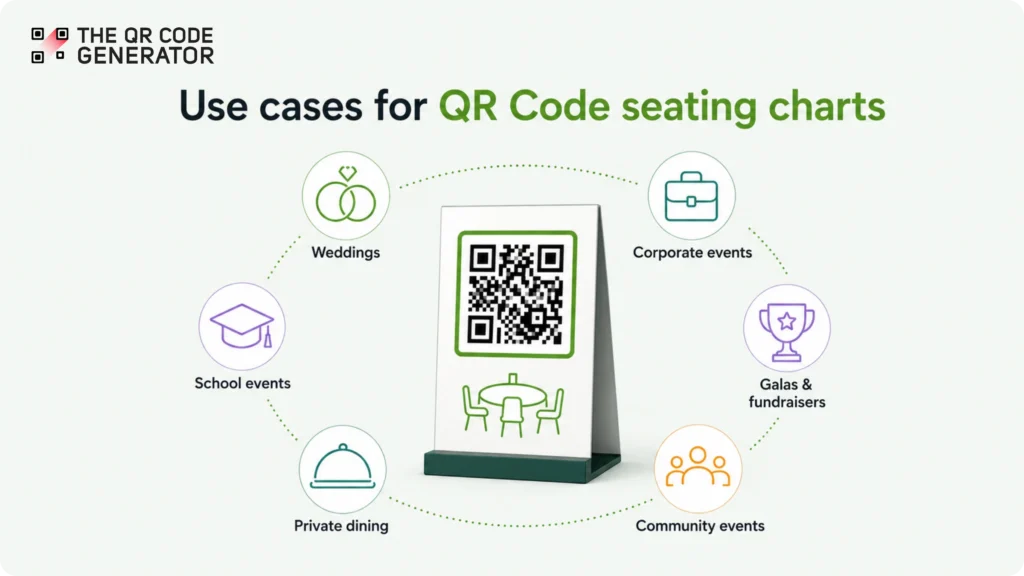
Use cases for QR Code seating charts
QR Code seating charts can be used at weddings, conferences, galas, school events, private dinners, and community gatherings. The right setup depends on the size of the event, how seating assignments are managed, and whether updates may be needed after the QR Code is printed.
Weddings
A QR Code seating chart helps wedding guests find their tables without crowding around a seating board. Guests can scan the QR Code at the reception entrance and view their table assignment on their phones.
Wedding seating plans often change during the final days before the event. A dynamic wedding QR Code allows couples to update table assignments without reprinting signs or welcome displays.
For larger weddings, place QR Code signs at both the cocktail hour area and the reception entrance. Multiple signs help distribute guests and reduce bottlenecks during the busiest arrival period.
Corporate events and conferences
A QR Code seating chart makes it easier to manage assigned seating across large groups of attendees. Guests can access seating information immediately after checking in or receiving their badges.
Corporate events often group attendees by department, registration tier, job role, or networking goals. A digital seating chart makes these assignments easier to manage and update.
Dynamic conference QR Codes also support events with multiple sessions. Organizers can update seating assignments between sessions without reprinting badges, programs, or signage.
Galas, fundraisers, and awards dinners
A QR Code seating chart simplifies VIP and sponsor table management. Organizers can update seating assignments without replacing printed materials.
Formal events often experience last-minute changes involving sponsors, donors, speakers, and VIP guests. A dynamic QR Code allows organizers to make updates while keeping the same printed QR Code on invitations, programs, and event signage.
Adding the QR Code to invitations or event programs also allows guests to check their table assignments before arriving at the venue.
School events and graduation ceremonies
A QR Code seating chart helps students and families find assigned sections quickly. Guests can search for seat assignments on their phones instead of looking through long printed lists.
Large auditoriums often require seating changes because of ticketing adjustments, accessibility requests, or attendance updates. A digital seating chart allows staff to make those changes without reprinting signage.
Private dining events
A QR Code seating chart helps guests find their assigned seats without waiting for staff assistance. Guests can scan the QR Code on arrival and view their table assignment immediately.
This approach works well for rehearsal dinners, private restaurant events, networking dinners, and executive gatherings where assigned seating is important.
Community events and fundraisers
A QR Code seating chart provides a low-cost way to manage seating assignments. Organizers can create, update, and share seating information without printing large seating boards.
Community events often rely on limited budgets and volunteer staff. A QR Code seating chart reduces printing costs while making seating information available on any smartphone.
How to make seating chart QR Codes work for every guest
A seating chart QR Code works best when every guest has a simple way to access seating information. A few small adjustments can make the experience easier for older guests, first-time QR Code users, and guests who need accessibility support.
Following accessible QR Code best practices before the event helps ensure every guest can find their seat comfortably.
1. Add clear scanning instructions
Print simple instructions directly on the sign, such as:
- Open your phone’s camera.
- Point it at the QR Code.
- Tap the link.
- Find your name.
Clear instructions help guests who may be using a QR Code for the first time.
2. Place multiple QR Code signs
Display QR Code signs at multiple locations, such as the entrance, welcome table, and cocktail area.
Multiple signs reduce crowding and allow guests to look up their seating assignments without blocking others.
3. Keep a printed backup list
Print an alphabetical guest list with table assignments and keep it near the entrance.
Assign an usher, coordinator, or member of the event team to assist guests who prefer not to use a smartphone.
4. Consider a hybrid setup
For events with a large number of older guests, place a small printed seating list next to the QR Code sign.
Providing both options allows guests to choose the method they are most comfortable using.
5. Support guests with visual impairments
Digital seating charts allow guests to zoom in, increase text size, and use accessibility tools on their smartphones, such as screen readers.
In many cases, a digital seating chart is easier to read than a large printed seating board.
Make your guests’ first impression count
A seating chart QR Code helps guests find their seats faster, reduces crowding at event entrances, and makes last-minute seating changes easier to manage. Instead of gathering around a single seating board, guests can access seating information directly from their phones with a quick scan.
Whether you’re planning a wedding, conference, gala, fundraiser, or school event, The QR Code Generator (TQRCG) can help you create a seating chart QR Code. With its two forever-free dynamic QR Codes, create a smoother arrival experience for guests while giving yourself more flexibility behind the scenes.
Create your seating chart QR Code with TQRCG and seat guests instantly.
Frequently Asked Questions
Do guests need to download an app to use a seating chart QR Code?
No. Modern iPhone and Android devices can scan QR Codes directly through the built-in camera app. Guests simply point their camera at the QR Code, tap the notification, and open the seating chart in their mobile browser.
What happens if a guest cannot scan the seating chart QR Code?
Keep a printed backup list and assign an usher or coordinator to help guests find their seats. For additional support, display the seating chart on a tablet or laptop at the check-in desk. For events with many older guests, consider placing a small printed seating list next to the QR Code sign so guests can choose whichever option they prefer.
Can I update my seating chart after printing the QR Code?
Yes, if you use a dynamic QR Code. You can either update the seating chart at the existing URL or change the QR Code destination to a completely new URL. In both cases, the printed QR Code stays the same, and guests automatically see the latest version when they scan it.
How do I host a seating chart so guests can access it without logging in?
You can host a seating chart on Google Sheets, Google Docs, Canva, a wedding website, an event website, or seating chart software that provides a public link. Before creating the QR Code, confirm that guests can access the seating chart without signing in. Testing the link in an incognito browser window is the easiest way to verify this.
Should I still have a physical seating chart if I am using a QR Code?
Not necessarily. Most events only need a printed backup list rather than a full seating board. A simple alphabetical list kept near the entrance provides a reliable fallback for guests who prefer not to use their phones.
What size should a seating chart QR Code be for event signage?
Use a minimum size of 2 × 2 inches for invitations, table cards, and other close-range scanning situations. For entrance signs, welcome displays, and easels, use a minimum size of 4 × 4 inches. Always test the printed QR Code at the expected scanning distance before the event.