
How to Use Conference QR Codes to Collect Real-Time Feedback

Kritika
Last updated: January 14, 2026
10 min read
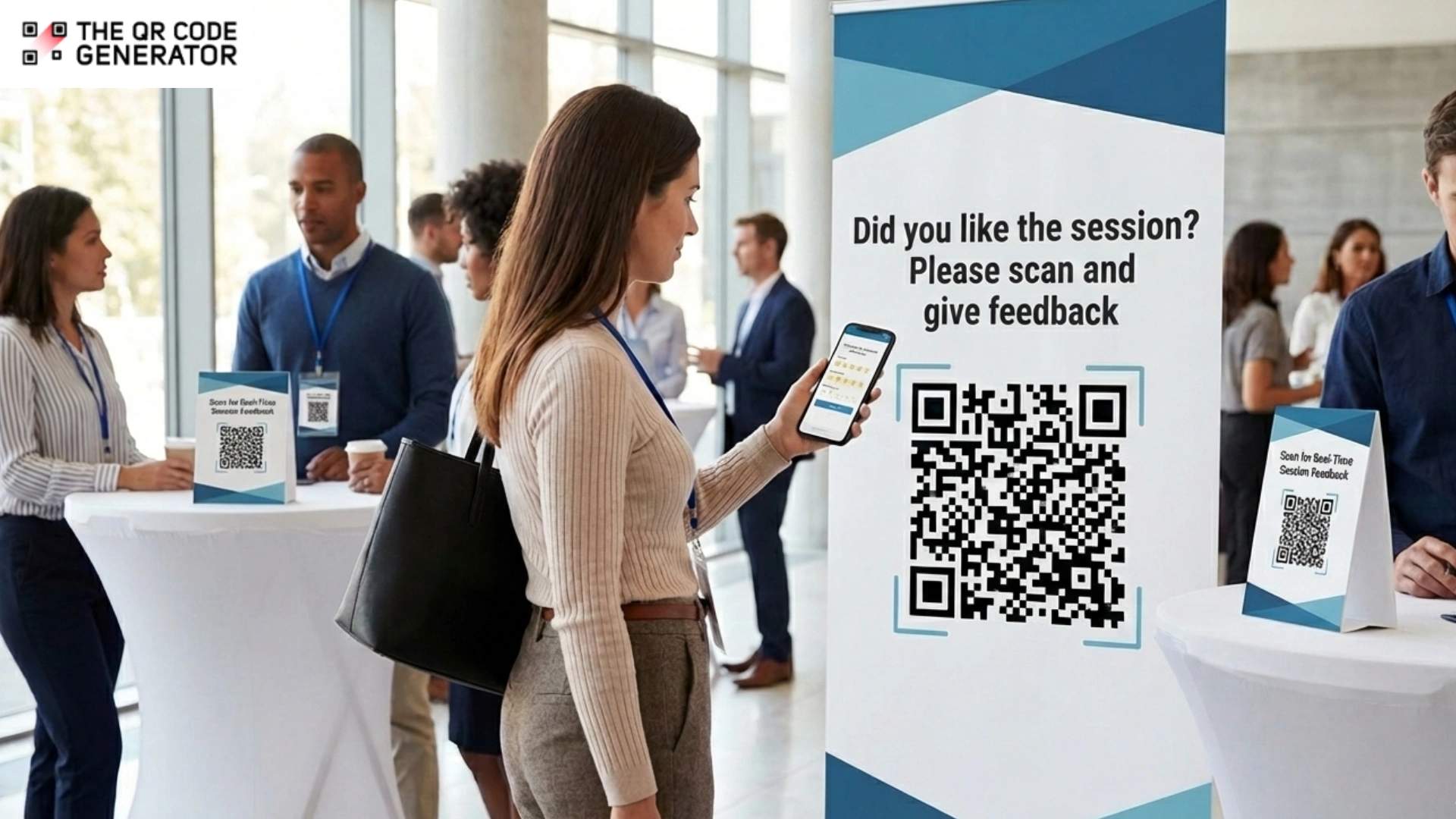
You spend months planning your conference, but the feedback that matters most often arrives too late or never arrives at all.
Post-event surveys sit unopened in inboxes. By the time responses trickle in, attendees have moved on, and the context has faded. What you need is feedback captured in the moment, when experiences are fresh, and reactions are genuine.
That’s where QR Codes change the game. Industry benchmarks indicate that in-person surveys achieve response rates of up to 57%, outperforming post-event email surveys. When you make it effortless for attendees to share their thoughts immediately after a session, you receive more responses and higher-quality data.
In this guide, you’ll learn exactly where to place QR Codes for maximum response rates, how to design frictionless feedback flows, and how to turn live event data into immediate, actionable insights.
Why traditional conference feedback methods fall short
Despite the effort that goes into planning and executing conferences, feedback collection often relies on outdated methods that fail under real event conditions.
1. Low post-event survey response rates
Event industry benchmarks show that post-event email surveys achieve response rates of 20-30%. This leaves organizers without input from almost 80% of attendees. As a result, overall experience scores can be misleading, making it difficult to accurately gauge event success or justify decisions to stakeholders.
2. Inconvenience of paper feedback forms
In-person surveys tend to perform the best, but paper forms require attendees to exert effort during peak engagement periods. Attendees must locate pens, complete forms while engaging in networking conversations, and deposit the completed sheets at the exits. Completion rates also suffer as forms get misplaced, partially filled, or abandoned entirely.
3. No real-time data collection
Without access to live feedback, organizers are forced to wait until the event ends to understand how attendees are experiencing it overall. This eliminates the opportunity to address issues as they arise or build on what’s working. For multi-day conferences, the lack of real-time insight is a major missed opportunity to improve the overall event experience while attendees are still on site.
4. No standardization across the conference
When different sessions use different feedback methods, it creates an uneven attendee experience and fragments your data collection. Without standardization, you cannot meaningfully compare feedback across sessions or booths. Different methods introduce response bias.
QR Codes eliminate all these problems by providing a consistent and frictionless experience for collecting feedback. Let’s understand why it’s a valuable addition to conferences.
How QR Codes on conference materials improve feedback collection
Collecting feedback at conferences often fails because the ask comes too late or feels like extra effort.
QR Codes solve this by embedding feedback opportunities directly into the attendee journey, placing them in various locations throughout the event. Once scanned, these QR Codes can lead to a short questionnaire, a quick poll, or a simple rating scale, depending on the context.
The following are some ways QR Codes on conference materials can make feedback collection more effective and frictionless.
1. Place QR Codes on conference badges
Badge-based QR Codes provide persistent feedback access throughout multi-day events. Printing QR Codes on lanyards or badge corners allows attendees to share feedback whenever a session ends or an interaction concludes. For badges, use lightweight formats such as a one-tap session rating, emoji-based “How was this session?” feedback, or a single open-ended question like “One thing you learned today.” These micro-interactions reduce effort and increase response rates.
2. Add QR Codes to session materials and presentation slides
Placing QR Codes on presentation slides and printed handouts ensures attendees encounter the feedback opportunity while the content is top of mind. The final slide is the most effective placement, especially when paired with a clear CTA like “Scan to rate this session.” Here, you can use structured feedback formats such as 1–5 star ratings, speaker scorecards, or quick polls about the session. These formats help you compare sessions without overwhelming attendees.
3. Use QR Codes on booth signage
Exhibitor booths benefit from dedicated QR Codes on table tents, demo screens, or standees. These QR Codes can link to short forms that capture both experience quality and intent. For example, attendees can rate the demo using a slider, answer a yes/no poll, such as “Would you consider this solution?” or select what interests them most from a list.
4. Print QR Codes on event signage and program materials
Printed agendas, session guides, and event programs are ideal for feedback that spans multiple sessions or the overall event. Because attendees refer to these materials repeatedly, QR Codes placed here encourage responses without disrupting the experience.
Use simple formats, such as net promoter score (NPS) questions, multiple-choice polls on event relevance, or ranking questions like “Which session added the most value today?” to gather actionable insights at scale.
With QR Codes helping you increase feedback collection easily, it’s also important to understand how you can create conference QR Codes that get scanned.
How to create and embed QR Codes on conference materials
Creating an effective QR Code strategy impacts both the attendee experience and your ability to measure and optimize feedback collection over time. Start by understanding what value you want to deliver.
Step 1: Define the attendee experience behind the QR Code
Before placing a feedback QR Code, decide what should happen after the scan. The experience should be short, relevant, and tied to a specific moment in the attendee journey.
- Session feedback: Link the QR Code to a quick satisfaction survey that asks attendees to rate the speaker’s clarity, content relevance, and pacing.
- Booth interactions: Use the QR Code to capture product interest levels, demo satisfaction, or basic lead qualification details.
- Overall event experience: Collect broader insights such as NPS, likelihood to attend again, or email sign-ups for future event updates.
Step 2: Choose the QR Code type based on your goal
Your goal determines the QR Code type you use. If it is collecting conference feedback, use dynamic QR Codes. These provide you with detailed scan analytics, helping you understand how attendees engage with feedback collection across the event. You can track which placement drives the highest response rates and which session types generate the most scans.
Step 3: Generate your QR Code
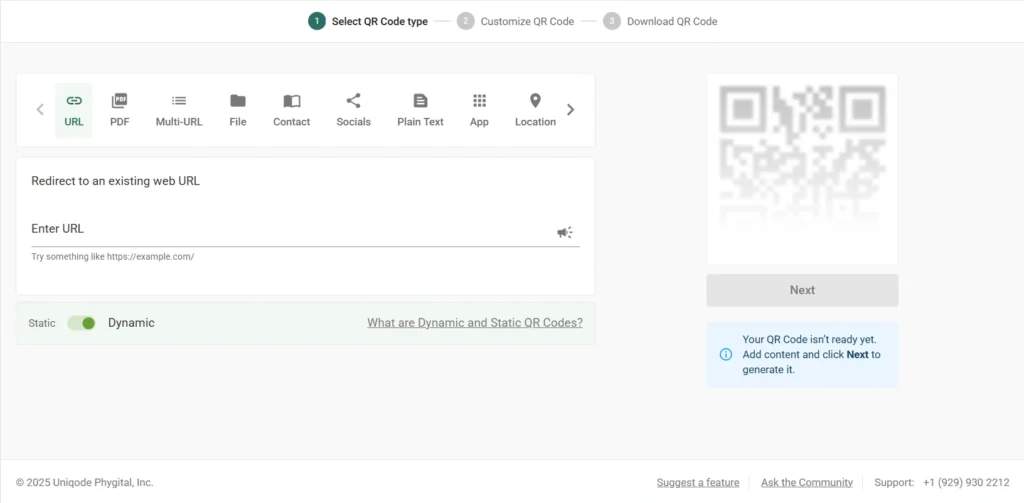
To create your conference feedback QR Code, sign in to The QR Code Generator (TQRCG) and select the appropriate QR Code type based on your goals. Review all details carefully and click Next.
You can opt for a URL QR Code where you can add a link to survey platforms such as SurveyMonkey, Google Forms, or Microsoft Forms. Simply paste your feedback link, review the details, and click Next.
Step 4: Customize the QR Code to match your conference theme
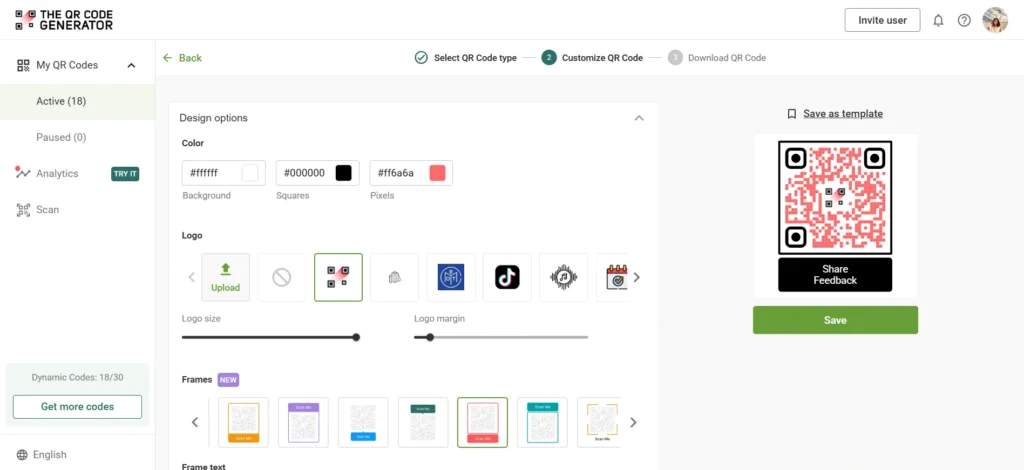
Next, customize the QR Code so it feels like a natural extension of your conference materials.
Use a QR Code frame with a clear call to action, such as “Scan to Share Feedback,” or “Rate This Session.” Once you’re satisfied with the design, click Save to lock in your design.
Step 5: Download, test, and place the QR Code thoughtfully
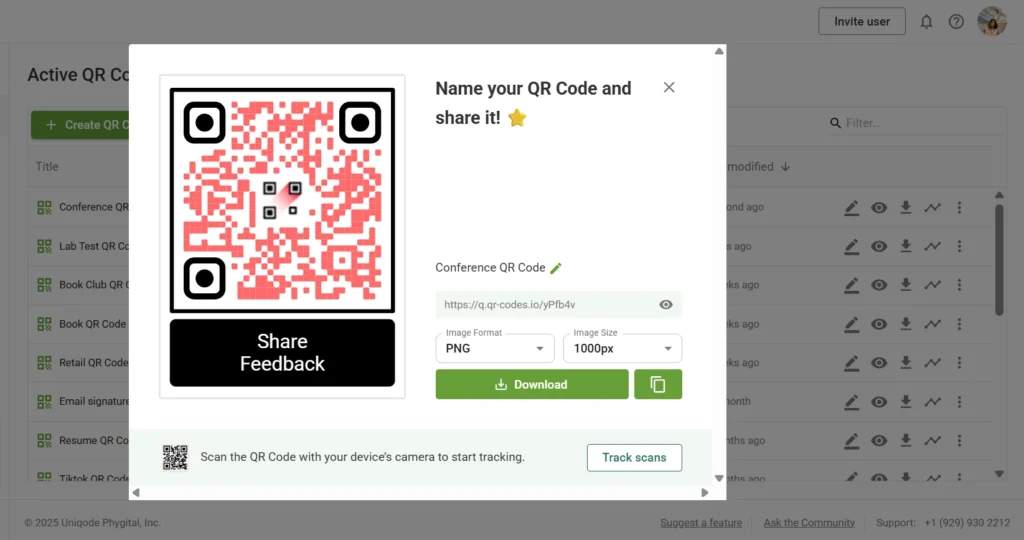
Name your QR Code and download it in the right QR Code format. Choose SVG format for print layouts requiring high-resolution printing on badges or large signage. Use PNG format for digital use, such as presentation slides.
Before finalizing sending materials to print, test the QR Code extensively across multiple mobile devices.
Your conference feedback QR Code is now ready to use.
Step 6: Analyze responses and optimize your feedback form
Once the QR Code is deployed, review scan-to-completion rates to understand where attendees drop off and refine the experience accordingly. Look for patterns, such as skipped questions, overly long forms, or unclear wording. Use these insights to shorten the form, reorder questions, or adjust prompts to improve response quality and completion rates.
Now that you know how to create and embed QR Codes on conference materials, you need to follow some best practices to get the most out of them.
Conference QR Code strategies to boost scan rates and feedback collection
To boost scan rates and feedback collection at conferences, QR Codes must be easy to spot and scan. Here’s how you ensure to get the best out of your QR Codes on conference materials.
1. Design for visibility and trust
Your QR Codes should scan reliably under real conference conditions. Use dark codes on light backgrounds or light codes on dark backgrounds for the best contrast. Include clear calls-to-action beside the QR Code that tell attendees exactly what to do. Brand the QR Codes with your event logo and colors to increase trust and scan rates. Moreover, ensure your QR Code size is right for the material you are printing it on.
2. Optimize placement for maximum scans
The placement of your QR Code determines engagement rates significantly. Session exits and final presentation slides have the potential for higher completion rates, particularly in areas where attendees naturally pause. For multi-day events, track which locations generate high completion rates and adjust positioning accordingly.
3. Keep feedback forms short and mobile-optimized
Even perfect placement fails without user-friendly forms. Lengthy forms get abandoned when attendees face competing session schedules. Keep your form short and use rating scales and NPS questions instead of open text fields.
4. Use dynamic QR Codes for flexibility
Dynamic QR Codes enable you to update survey questions in real time, based on what you’re learning during the event. Since they are trackable QR Codes, you can analyze the time of scan, device type, location, and operating system. These metrics reveal which placements drive engagement.
5. Incentivize participation
Not every attendee naturally fills out feedback, even when convenient. Incentives are known to increase survey responses by up to 30%. Offer raffle entries or provide access to exclusive content, such as session recordings, speaker slides, or industry reports. Make incentives prominent in your messaging as a clear value proposition drives more action.
6. Access real-time results during the event
Use live analytics dashboards to analyze session ratings, speaker performance data, and logistics feedback within minutes of response submission. This real-time visibility enables you to resolve issues quickly while the conference is ongoing.
Get real-time conference feedback with TQRCG
At the end of the day, your next conference is only as successful as the data you collect from it. Relying on post-event emails usually leads to low response rates and vague feedback because the moment has already passed.
Using QR Codes changes that dynamic, allowing you to catch attendees while they are still engaged and in the room. This shift gives you more specific insights to improve the experience before the next session even begins.
When you use dynamic QR Codes, you aren’t locked into a single destination. If a speaker changes or a feedback form needs an update after your signage is already printed, you can swap the back-end link in seconds without needing to reprint anything.
Using The QR Code Generator (TQRCG) also simplifies how you prove value to your sponsors and exhibitors. You can provide hard data on how many people interacted with their materials in real time.
Ready to see the difference for yourself? Sign up and create your free dynamic conference feedback code on TQRCG today.
Frequently Asked Questions
What’s the difference between static vs. dynamic QR Codes for conference feedback, and which one should I use?
Static QR Codes have a fixed link and can’t be edited once printed. In comparison to static QR Codes, dynamic QR Codes can be updated anytime, track scans, and offer analytics such as device type, location, and response count. For conference feedback, dynamic QR Codes are the better option because you can edit URLs, assign per-session links, and measure engagement in real time without reprinting materials.
Where is the best placement for feedback QR Codes at conferences to get the highest scan and response rates?
The best placements are:- Name badges- Session exits and near auditorium doors- Slide decks at the end of presentations- Exhibitor booth counters and demo stations- Event programs, agendas, or table tentsPlace QR Codes where attendees naturally pause, such as exits, queues, seating areas, or recap screens, to increase responses.
How can I increase feedback response rates at conferences using QR Codes on badges, signage, and handouts?
You can increase response rates by adding a clear CTA and placing QR Codes at session exits to capture immediate reactions. Shortening the form fields to under six questions is also helpful.
Can I track QR Code feedback by individual session, speaker, or exhibitor booth at a conference?
Yes. Using dynamic QR Codes, you can assign a unique link to each session or booth. This makes it possible to track which sessions performed best, compare booth engagement, and measure sponsor ROI based on real visitor data.
Do attendees need a specific app to scan QR Codes, or can they scan feedback links with a native phone camera?
Most modern devices can scan QR Codes with the built-in camera app. For older devices, built-in scanners in apps like Google Lens (Android) or Control Center Scanner (iPhone) also work automatically.
What is the recommended QR Code size for conference badges, posters, and booth displays to ensure quick scanning?
For conferences and trade shows, the recommended QR Code sizes are:- Badges: 1 inch minimum (0.8" is the smallest acceptable, but ~1" scans more reliably)- Handouts and flyers: 1.25 inches for smoother handheld scanning- Booth posters and banners: 4–6 inches, depending on viewing distance and foot traffic- Large signage/stage screens: 8 inches or larger for long-distance scans in large roomsIf attendees need to step closer than 3–4 feet to scan a banner or screen, the QR Code is too small for real-world event use.