
How Publishers Use QR Codes in Books to Compete with E-books

Kritika
Last updated: December 30, 2025
13 min read
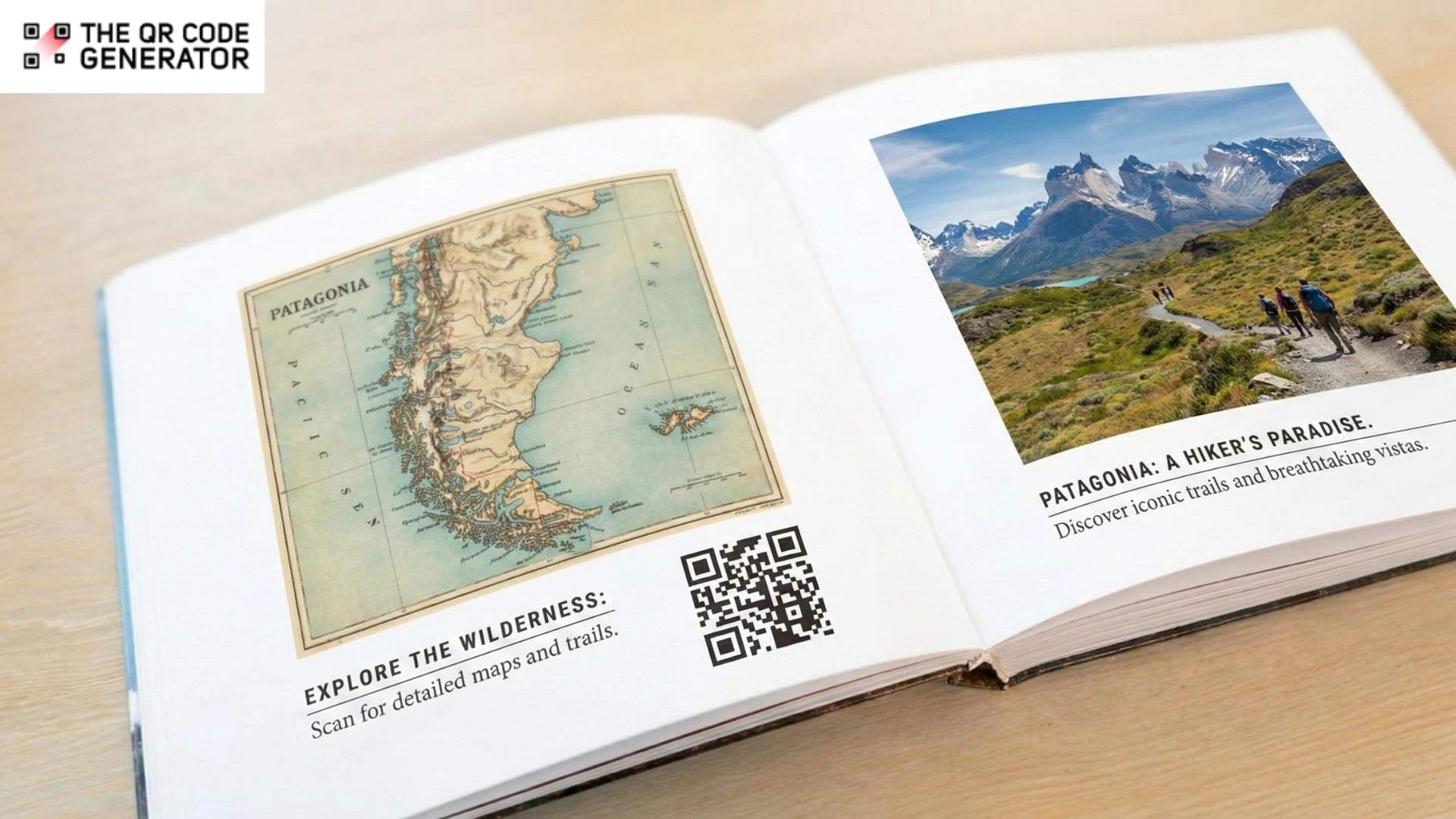
A reader finishes the final chapter of a cookbook, scans a QR Code on the back page, and instantly watches the chef demonstrate the most challenging recipe. A college student stuck on a calculus problem scans their textbook and accesses a video walkthrough. A parent reads the last page of a children’s book and scans to hear the author narrate the story at bedtime.
This kind of convenience is no longer just a nice-to-have; it’s a must-have. Physical books need to remain competitive when e-books already deliver these features by default.
E-books have captured significant market share by offering what printed books traditionally can’t: searchability, adjustable fonts, embedded dictionaries, instant updates, and multimedia content. The numbers tell the story. According to Market.us, the global e-books market is projected to reach $29.9 billion by 2033, up from $18.2 billion in 2023, reflecting a 5.1% compound annual growth rate. For publishers watching sales shift to digital, the question isn’t whether to abandon print but how to make physical books worth choosing.
QR Codes are the answer. They transform printed pages into gateways for video content, real-time updates, interactive study materials, and direct reader engagement. Yet many publishers miss out on these opportunities to enhance reader value and differentiate their titles in an increasingly crowded market. Let’s understand this in detail.
Where traditional print falls short without QR Codes
The limitations of traditional print publishing create specific disadvantages that directly impact reader satisfaction and competitive positioning. The most significant disadvantages include:
Limited content updates after print
Once a book goes to press, every error, outdated statistic, or broken URL stays frozen on the page. A travel guide published in early 2024 still lists restaurants that closed six months ago. A business book references websites that no longer exist. A textbook contained a calculation error that was discovered after 50,000 copies had been shipped to schools.
E-books fix these issues with remote updates. Physical books without QR Codes cannot be updated, leaving readers frustrated and publishers fielding complaints they can’t resolve without expensive reprints.
No competitive edge against an ebook’s multimedia features
E-books come with built-in advantages: tap a word for its definition, click a footnote to jump to references, play embedded audio clips, and watch embedded videos. Physical books traditionally offer none of these enhancements.
This gap matters most for textbooks, where multimedia enhances comprehension, cookbooks, where visual demonstrations clarify techniques, and children’s books, where audio narration supports early literacy. Without these features, physical editions appear less valuable despite often costing more than their digital counterparts.
Inability to track reader engagement and behavior
Publishers printing physical books operate in silos. They know how many copies have been sold, but have no insight into which chapters readers found most valuable, which supplementary materials are referenced, or where readers typically stop engaging with the content.
This lack of data prevents publishers from refining future editions based on actual reader behavior, understanding audience preferences, or measuring whether bonus content justifies its production cost.
Missed cross-promotion and series marketing opportunities
A reader finishes the first book in a thriller series and immediately wants to start the second. With an ebook, one tap takes them to the purchase page. With a physical book, that impulse fades by the time they get to a bookstore or remember to search online.
Physical books exist as isolated products with no built-in path to promote sequels, related titles, author events, or reader communities. Publishers lose conversion opportunities at the exact moment when reader engagement peaks and purchase intent is highest.
QR Codes eliminate these gaps by layering digital capabilities onto physical books without sacrificing what makes print appealing.
How publishers use QR Codes in books for a better reader experience
QR Codes eliminate these gaps by layering digital capabilities onto physical books without sacrificing what makes print appealing. Here’s how publishers are putting this into practice.
Linking to multimedia content and additional resources
Publishers place QR Codes at strategic points throughout books that link directly to videos, audio content, and interactive demonstrations, thereby deepening the reading experience.
Cookbook publishers add QR Codes beside complex recipes linking to step-by-step video tutorials. Instead of reading “fold the dough twelve times,” home cooks watch the author demonstrate the proper technique. Educational publishers link from textbook diagrams to 3D models that students can rotate and examine from every angle. Children’s book publishers offer author read-alouds where scanning brings the story to life in the author’s voice.
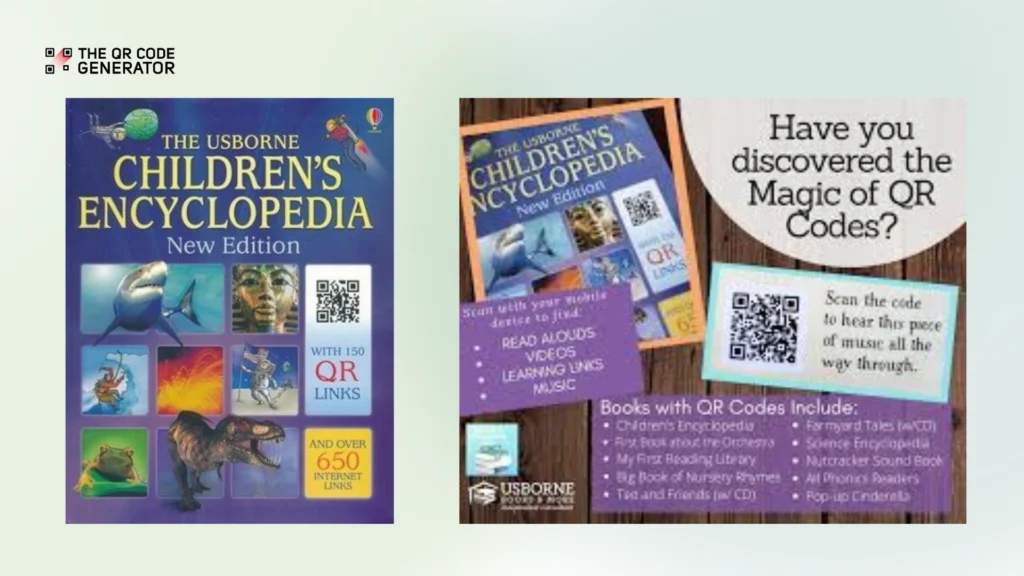
For example, Usbrone uses QR Codes on its encyclopedias to provide QR Code links that lead to additional resources.
This approach works because it enhances the reading experience. These resources help readers feel like they get more value from their purchase.
Offering real-time content updates and corrections
Reference books, travel guides, business books, and technical manuals become outdated quickly. Traditional publishing requires reprints to fix errors or update information. By the time a corrected edition is released, the original version has already been circulated across thousands of readers with incorrect information.
Dynamic QR Codes solve this. Publishers create a single QR Code in the printed book that links to an errata page, updated statistics, corrected URLs, or revised content that they can modify anytime. The printed QR Code never changes, but the destination updates as often as needed.
For example, a travel guide publisher uses QR Codes on each chapter linking to real-time updates about closures, new attractions, current prices, and seasonal changes. This maintains reader trust and book value long after publication. Librarians particularly appreciate this feature, as library copies often circulate for years after newer editions are published.
Creating interactive community spaces for reader engagement
Publishers that build communities around their books create reader loyalty that extends beyond a single purchase. QR Codes provide the bridge from solitary reading to collective discussion.
Fiction publishers include QR Codes in back matter linking to discussion questions, character deep-dives, author Q&A sessions, or dedicated reader forums. A mystery series might link to a community solving puzzles together between book releases. A romance publisher creates a space where readers discuss their favorite scenes and get sneak peeks of upcoming titles.
This works especially well for book clubs, where publishers use QR Codes on book club editionsto link readers to discussion guides, author video messages, and shared platforms where clubs can continue their conversations beyond the final chapter. Some publishers track which discussion questions generate the most engagement and use that data to craft better reader guides for future titles.
Self-published authors use this strategy to build direct relationships with readers without intermediary platforms taking a cut. Scan the QR Code in the back of an indie novel and join the author’s Discord server or newsletter specifically for fans of that series.
Enabling accessibility features and multi-language support
Physical books have traditionally struggled with accessibility. Large-print editions require expensive separate print runs. Audio versions require separate production and distribution. Translations mean entirely different books.
QR Codes provide accessibility overlays that expand the reach of a single print edition. Scan a QR Code in the front matter to access audio narration for readers with visual impairments. Link to text in alternative languages for multilingual classrooms. Provide detailed descriptions of complex illustrations, graphs, and images for readers using screen readers.
Educational publishers can use this to serve diverse classrooms from a single textbook. The printed content is in English, but QR Codes provide Spanish translations, simplified text for English language learners, and extended explanations for advanced students. One print run serves multiple student populations that traditionally required separate materials.
Children’s book publishers can offer bilingual story experiences. The printed text is in English, but parents can scan to hear the story in Mandarin, Spanish, Arabic, or other languages, supporting literacy development in children’s home languages.
This approach makes physical books more accessible than many e-books while keeping production costs reasonable. Publishers who neglect accessibility risk losing institutional buyers who are required to comply with accessibility mandates.
Driving book series sales and cross-promotions
The back of a physical book is prime real estate for conversion. Readers just finished your content, enjoyed it enough to read to the end, and are primed to want more. QR Codes convert that moment into sales.
Publishers can place QR Codes on the final pages linking to first-chapter previews of the next book in a series, complete catalog listings for fans who want to binge-read everything an author has written, or limited-time promotions for loyal readers. Publishers can also offer exclusive bonus chapters that can only be accessed by scanning a code. This content rewards physical book buyers and drives word-of-mouth marketing.
Fiction series publishers may see particularly strong results. A reader finishes book three at 11 PM and immediately scans to pre-order book four, releasing next month. The QR Code captures that impulse purchase that would otherwise fade by morning.
Publishers can track exactly which titles drive conversions to later books in a series. If readers who finish book one consistently buy book two, but book two doesn’t drive purchases of book three, that signals quality issues in book two that need to be addressed in the next edition.
Now that you understand the value QR Codes bring to physical books, the next step is implementation. Here’s a straightforward process for creating and deploying QR Codes that deliver real results.
How to create QR Codes for books
Creating effective book QR Codes starts with clear goals and strategic planning. Follow this step-by-step process to ensure your codes enhance rather than distract from the reading experience.
Step 1: Define the goal of your book QR Code campaign
Start QR Code campaigns with your publishing goal in mind: increasing reader engagement, collecting feedback, driving series sales, or providing educational resources. Then align placement, content format, and call-to-action with that goal.
Consider these questions during planning:
- Where will readers encounter the QR Code? Placement matters significantly. Bookstore browsers scan a QR Code on the back cover before purchase. One at chapter endings gets scanned during active reading. QR Codes on the front cover of books appeal to readers who want supplementary content from page one. Back cover QR Codes target readers who have finished and loved your content.
- What action do you want readers to take? Be specific. “Watch the author demonstrate this recipe” drives different behavior than “Download the complete study guide” or “Preview the next book in this series.” Your content and CTA should align precisely with your goal.
- What context are readers in when they scan? A student scanning a textbook during homework needs quick access to solutions, not a long video. A parent scanning a children’s book at bedtime wants the read-aloud audio file to start playing immediately. A cookbook reader mid-recipe needs a technique video, not an author biography. Context determines what content works.
- What device will they use? Assume smartphones. Optimize every landing page for mobile screens with fast load times, large touch targets, and minimal scrolling. Test on both iOS and Android because some QR Code features work differently across operating systems.
For this example, we will create a multi-URL QR Code, placed at the end of the book. The goal is to provide multiple interactive touchpoints for the reader once they’ve completed the book and want more.
Step 2: Sign up and select your QR Code
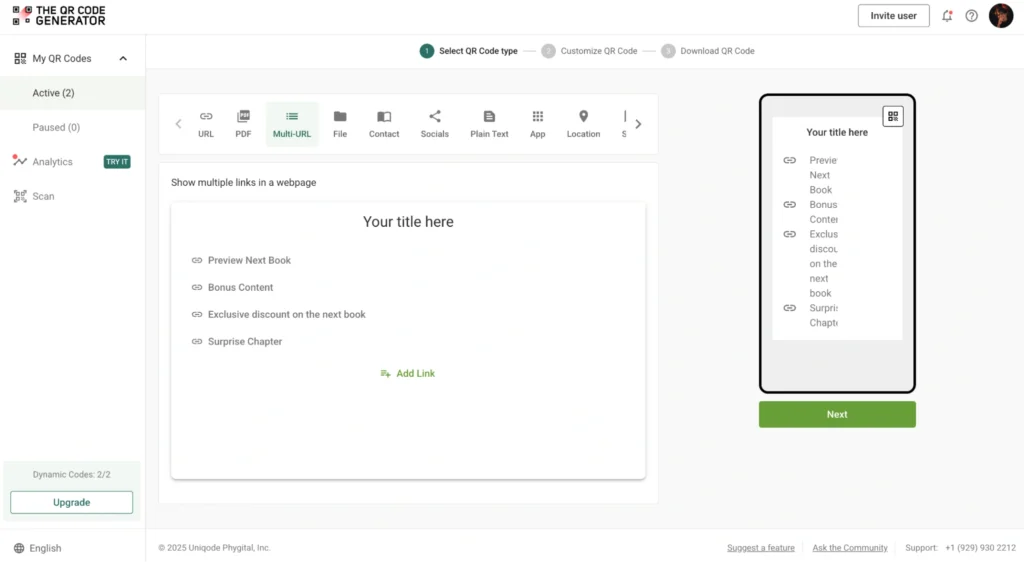
Sign up for free to The QR Code Generator (TQRCG), click + Create QR Code, and select the QR Code of your choice. You can select URL, PDF, File, Socials, etc., for single destinations or a multi-URL QR Code to link multiple resources, such as author catalogs, community pages, and bonus content from a single QR Code.
Step 3: Customize your design
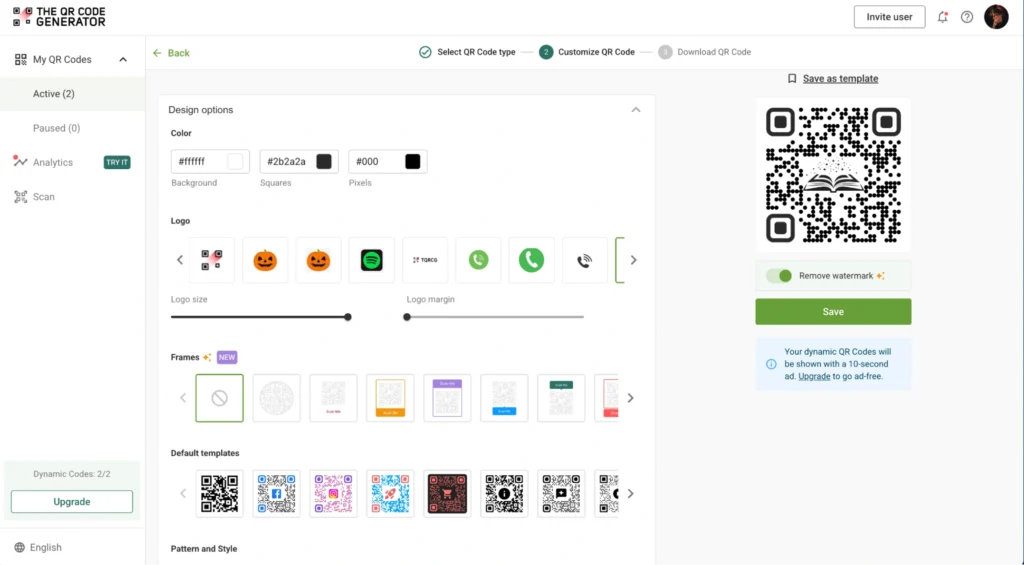
Match your book theme with custom logos, colors, elegant frames, and your initials or monogram. Add CTAs such as “Scan to download study guide,” or “Read bonus chapter” for clarity.
Step 4: Download and test
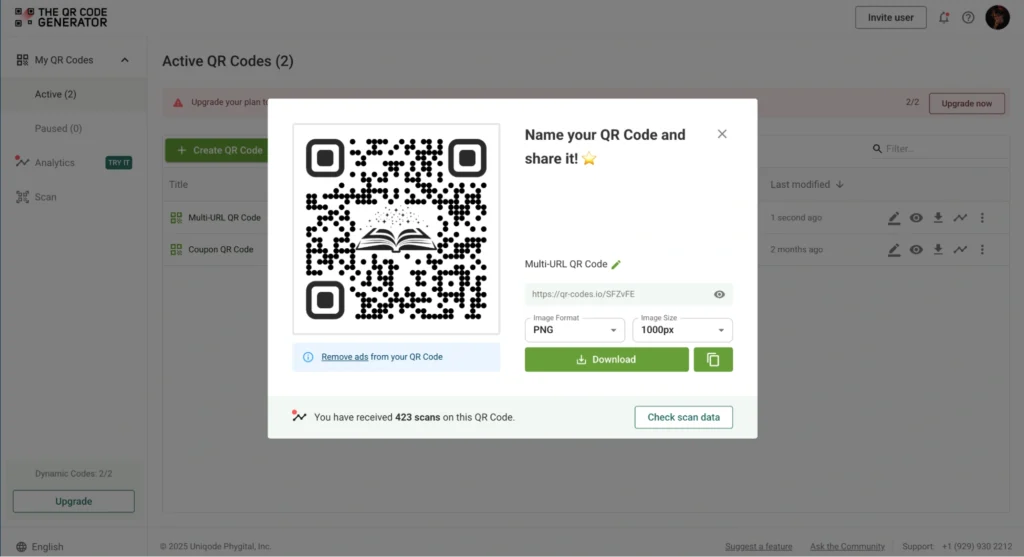
Download in high-resolution format (PNG, SVG, or EPS) suitable for professional printing on invitations, programs, and signage. Test with multiple devices before final printing.
With your QR Codes created, strategic placement becomes crucial. Different book types and reader behaviors demand different placement approaches to maximize engagement and value.
Placement strategy based on book type and reading patterns
Where you place QR Codes significantly impacts scan rates and reader satisfaction. Let’s understand how to match placement to how readers actually use each book type.
Textbooks
Place QR Codes at chapter endings, linking to practice problems, or position them in the margins near complex diagrams, linking to video explanations. Avoid mid-chapter placement that disrupts study flow. Students scan when they’ve finished a section and want to test comprehension or when they’re confused and need additional explanation. Position codes where these needs naturally arise.
Cookbooks
Position QR Codes directly below recipe titles or near ingredient lists where readers naturally pause before cooking. Never place codes over ingredient measurements or cooking instructions. These areas require constant reference during the cooking process. Back-of-chapter placement for recipe collections works well because cooks finish reading instructions before starting.
Children’s books
Place QR Codes on dedicated pages, not story pages, so scanning doesn’t interrupt the read-aloud experience. Place them on the inside back cover or a special “scan here” page at the end. Include parent-friendly CTAs, such as “Scan for storytime audio with the author,” that clearly explain the value. Parents, not children, typically handle the scanning.
Fiction series
Reserve QR Codes for back matter after the story concludes. Readers who encounter QR Codes mid-story sometimes flip ahead and accidentally expose themselves to spoilers on later pages. Front matter codes risk the same problem. Wait until readers finish your content, then present codes linking to the next book previews, character guides, or author notes.
Reference books
Place QR Codes in the table of contents or index, directing readers to updated editions, correction sheets, or expanded digital appendices. Reference books get used non-linearly. Readers often skip to specific sections rather than reading cover-to-cover, so front matter placement ensures that every user sees the codes, regardless of which section they’re referencing.
Best practices for using QR Codes in physical books
While strategic placement of QR Codes sets the foundation, technical execution determines success. Follow these best practices to ensure your QR Codes work flawlessly across years of circulation and thousands of scans.
| Category | Best practice | Key details |
|---|---|---|
| QR Code type and branding | Use dynamic, branded QR Codes | Dynamic codes let you change destination URLs after printing. Customize with colors and publisher logos to match book cover design while maintaining scan reliability. |
| Size, positioning, and testing | Test at actual print size on multiple devices | QR Codes require a minimum size of 0.8 × 0.8 inches, positioned 0.25 inches from the trim edges. Test on iPhones, Android phones, and tablets before printing. |
| Paper stock adjustments | Adjust for glossy and textured paper | Increase QR Code size by 15-20% on glossy stocks to compensate for glare. Use pure black codes on bright white backgrounds for textured paper. |
| Content and version management | Plan for multi-year circulation with unique codes per edition | Update destinations quarterly in year one, and then annually thereafter. Use unique codes to track which editions drive engagement. Redirect out-of-print titles rather than breaking links. |
| Design and print integration | Add QR Codes during layout with proper specifications | Work with designers to integrate codes before typesetting. Provide printers with a minimum of 300 DPI resolution, color values, and test scan procedures. |
| Distribution and metadata | Coordinate with retailers and include in book metadata | Inform distributors about QR Code features to highlight “enhanced editions.” Add functionality details to catalog copy, ONIX records, and retailer descriptions. |
| Clear CTAs and content relevance | Set specific promises, avoid vanity metrics | Specify exactly what readers get: “Scan to download study guide,” not “Scan for more.” Link to book-related content, not generic social media or newsletters. |
| Library considerations | Respect patron privacy | Don’t capture personally identifiable information. Avoid requiring account creation that interferes with library lending models. |
Turn physical books into connected experiences
QR Codes offer publishers a practical way to compete with e-books, providing readers with the satisfaction of physical pages combined with digital enhancements. By adding multimedia content, real-time updates, and interactive features, you create enhanced reading experiences that justify choosing print over digital formats.
With strategic placement, valuable content, and proper tracking tools, you transform every physical book into a gateway for deeper reader engagement and measurable results. The publishers seeing success with this approach aren’t adding QR Codes randomly; they’re thinking carefully about what readers need at specific moments in their reading journey and delivering value.
Ready to create QR Codes for your next book release? Start with The QR Code Generator’s free dynamic QR Codes that never expire, perfect for content that evolves as your readers’ needs change. Sign up now!
Frequently Asked Questions
What type of QR Code should publishers use in books—static or dynamic?
Dynamic QR Codes are strongly recommended for books. Unlike static QR Codes, dynamic versions let you update the destination URL even after the book is printed. This means you can fix broken links, update supplementary content, or redirect readers to new resources without reprinting—essential for books that circulate for years. Static QR Codes should only be used for destinations that will genuinely never change, which is rare in publishing.
Where should QR Codes be placed in a book for maximum scan rates?
The most effective placements are chapter endings, margins near relevant content, the back cover, and the inside back pages. Avoid interrupting reading flow by placing QR Codes mid-paragraph or on pages readers need to reference constantly. Cookbooks work well with QR Codes alongside recipes. Textbooks benefit from chapter-end placements linking to practice materials. Fiction should reserve codes for back matter after the story concludes. Always test placement with your target audience before finalizing layouts since scan behavior varies by reader type.
How can publishers track whether readers are scanning QR Codes in their books?
Use a QR Code generator with built-in analytics that tracks scan data, including total scans, scan locations (geographic data), scan times, and device types. This data reveals which supplementary content resonates with readers, when engagement peaks, and which books or editions drive the most interaction. These insights inform future publishing decisions, help you calculate ROI on supplementary content production, and identify which titles benefit most from QR Code enhancements.
Do QR Codes in books work for readers without smartphones?
Not all readers have smartphones capable of scanning QR Codes, so always include alternative access methods. Print the full URL beneath the QR Code so readers can type it manually. Offer shortened, branded links that are easy to remember and enter. Create a dedicated section on your publisher website where readers can access all supplementary materials by entering a book code. This ensures accessibility for all readers, regardless of their technology access, while maintaining the convenience of QR Codes for those who can use them.
What content should publishers link to with book QR Codes?
Link to content that genuinely enhances the reading experience: video demonstrations for cookbooks and DIY books, audio narrations for children's books, practice materials and solution guides for textbooks, author interviews, discussion questions for book clubs, errata or content updates, bonus chapters, or series previews. Avoid using generic links to publisher homepages, author social media profiles, or newsletter sign-up pages. Readers expect specific, valuable content directly related to what they're reading. The scan should feel like a natural extension of the book, not a marketing interruption.
Can QR Codes in books violate copyright or privacy regulations?
QR Codes themselves don't violate copyright, but ensure the content you link to has proper permissions—especially for multimedia content, music, or third-party materials. For privacy, be transparent if you collect data from scans. Include privacy policies on landing pages and comply with regulations such as GDPR if serving international readers. Never require unnecessary personal information to access promised content. Library books present special privacy concerns because multiple readers scan from the same copy—avoid tracking that could identify individual patrons.