
How Publishers Use QR Codes on Book Covers to Drive Sales

Shreesh
Last updated: December 30, 2025
12 min read
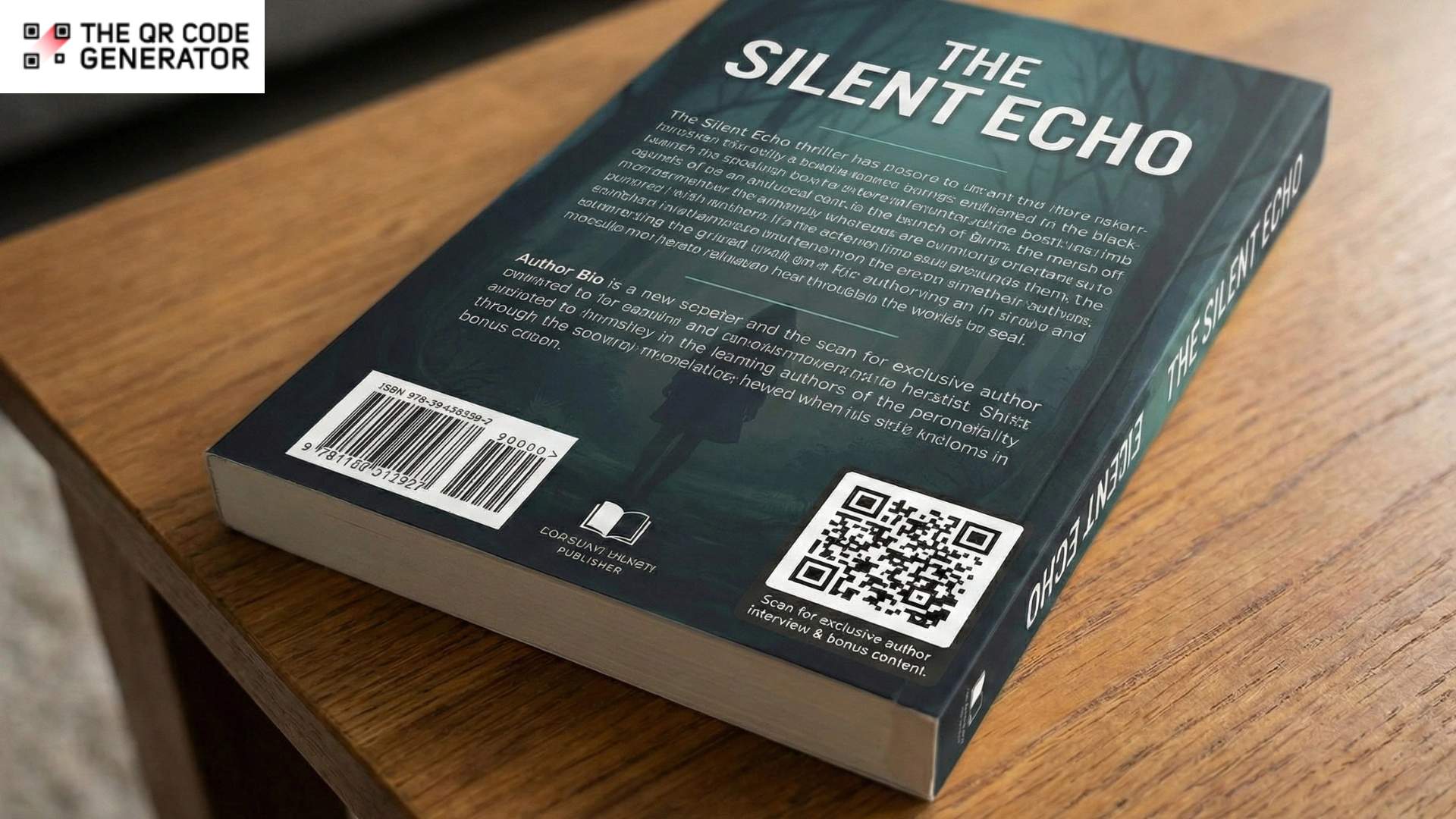
A reader browsing a bookstore picks up a novel, flips to the back cover, and scans a QR Code. Within seconds, they’re watching the author discuss what inspired the story. Three minutes later, they’re at the checkout counter with the book in hand.
This is impulse purchasing in action, and QR Codes are transforming how publishers convert browsers into buyers.
Book covers have always been prime real estate for persuasion, but they’ve been limited to static, one-way communication. In the critical two to five seconds when customers glance at a cover, they decide whether to buy. Traditional covers rely entirely on design and back copy to overcome purchase hesitation. For many readers, especially those discovering new authors, that’s not enough to overcome the hesitation to make a purchase.
QR Codes change this equation. They transform covers into interactive gateways where readers instantly connect with authors, hear authentic voices, and access exclusive content that tips the scale from “maybe” to “yes.”
Despite this, many publishers still treat book covers as purely visual assets, missing opportunities to use the most powerful conversion tool available: the author’s own voice and story.
What publishers miss out on without QR Codes on book covers
Traditional book covers face specific limitations that directly impact conversion rates and sales performance. Let’s look at what publishers overlook by leaving QR Codes off book covers:
No way to build author trust at the point of decision
A reader discovers a new author on the shelf. The cover looks appealing, the premise sounds interesting, but there’s hesitation. Who is the author? Do I like their writing style? Is this worth a purchase?
Without interactive elements, publishers have no way to answer these questions in real time. The reader either takes a chance based purely on cover design and back copy, or they put the book back and move to a familiar author. This trust gap costs sales, especially for debut authors, self-published titles, and books from smaller presses without brand recognition.
Limited personalization for diverse reader preferences
A book’s appeal varies significantly among different reader segments, but traditional covers can only present one fixed marketing message. Consider a thriller: some readers prioritize fast pacing, others want complex character development, and some seek unpredictable plot twists. The back cover copy must choose a single angle, typically targeting the broadest possible audience.
This one-size-fits-all constraint means publishers cannot tailor their pitch to match individual reader interests, potentially losing sales from readers whose specific preferences aren’t addressed by the chosen marketing angle.
Missing the emotional connection that drives impulse buys
Impulse purchases are emotional decisions. Readers primarily buy on feeling, not logic. They connect with a story, an author’s passion, or the promise of an experience that resonates with them.
Back cover copy communicates information but rarely creates emotional impact. Traditional text-based covers lack the personal touch and authenticity that build strong emotional connections, forcing publishers to rely entirely on written persuasion rather than more engaging formats.
No data on what actually drives purchases
Publishers know which books sell, but have limited insight into why. Did the cover design work? Did the back copy resonate? What made browsers convert, rather than walk away?
Traditional covers provide no mechanism for tracking reader engagement or measuring the effectiveness of different marketing approaches. Publishers operate without behavioral data, making every cover design and marketing decision a guess rather than an informed choice based on actual reader responses. These gaps create real competitive disadvantages, especially in crowded retail environments where hundreds of titles compete for attention.
QR Codes solve these problems by transforming book covers from static objects into dynamic conversion tools. Let’s understand this further.
How publishers use book cover QR Codes to drive impulse purchases
QR Codes on book covers create instant, authentic connections between readers and authors at the exact moment purchase decisions happen. Let’s look at all the benefits.
Feature short author interviews
Publishers place QR Codes on back covers linking to two to three-minute author interviews where authors discuss what inspired the book, their writing process, and what readers can expect. These aren’t polished marketing videos but authentic conversations that let readers hear the author’s voice and personality.
This works because it humanizes the author. A reader uncertain about a debut novelist scans the QR Code, watches the author passionately explain the research behind a historical novel, and suddenly the purchase feels less risky. The author becomes a real person, not just a name on a cover.
Author-narrated prologue and first chapter readings
Book publishers use QR Codes to provide audio recordings of the author personally reading the prologue or first chapter, accompanied by their commentary about writing decisions, character motivations, or research that informed the opening.
This approach combines the intimacy of an author interview with the practical value of a content preview. A reader scans the code and hears the author’s voice bringing their own words to life, often with added context such as “I wrote this opening scene after visiting the actual location” or “This character’s voice came from someone I knew growing up.”
The personal narration creates a stronger connection than text-only previews. Hearing an author’s passion, accent, and interpretive choices for their own work builds authenticity that static text can’t match. For memoir and personal narrative, especially, the author’s voice adds emotional layers that make the reading experience more engaging and purchase decisions easier.
Character development and story inspiration author discussions
Publishers create focused interview content where authors delve into character motivations, discuss the real people or experiences that inspired their fictional characters, or explain the “what if” questions that sparked the entire story.
This content appeals specifically to readers who connect with books through character and theme rather than just plot. An author explaining “I based this protagonist’s struggle on my grandmother’s immigration story” or “This villain represents my own fears about losing creative control” gives readers emotional entry points that back cover copy can’t provide.
For series books, authors can discuss character arcs across multiple books without spoilers, helping new readers understand why existing fans are so invested. For standalone literary fiction, authors can explore themes and symbols they have woven throughout, satisfying readers who want a deeper intellectual engagement.
Create interactive author Q&A experiences
Publishers can use QR Codes to create two-stage interactive experiences where readers can ask questions directly to authors, then return to see personalized video responses addressing the community’s most common questions.
Here’s how it works: The QR Code on the book cover links to a simple form with the CTA “Scan to ask the author.” During the first month post-publication, readers who scan fill in a short form, submitting their questions about the book, characters, writing process, or the author’s inspiration. The publisher collects these questions, identifies the most frequently asked or most interesting ones, and the author records a 5-10 minute video responding to them personally.
After the first month, the publisher updates the same dynamic QR Code destination URL to point to that response video. Now, readers scanning the QR Code see authentic, community-driven content where the author addresses real reader questions. The form submission data itself provides valuable insights into what readers care about most, informing future marketing and even future books.
This creates a sense of ongoing dialogue. Early adopters feel heard when their questions get answered. Later browsers benefit from seeing the author engage thoughtfully with reader curiosity. Both groups experience the author as accessible and invested in their audience.
Now that you understand the value QR Codes bring to book covers, let’s walk through the practical steps for implementation.
How to create QR Codes for book covers
Creating effective book cover QR Codes requires strategic planning around goals, placement, content, and technical specifications.
Step 1: Define your conversion goal
Start with your specific goal: first-time author trust building, series book cross-promotion, genre fiction community building, or impulse purchase conversion for retail displays.
Consider these questions:
- What’s the biggest barrier to purchase for this specific book? Unknown author? Complex premise? Genre expectations? Your QR Code content must directly address whatever’s preventing sales.
- Where will readers encounter this book? Independent bookstores, chain retailers, book fairs, or author events? Context determines what content works and what technical considerations matter.
- What action triggers maximum purchase intent? For some books, it’s hearing the author’s passion. For others, it’s reading the first chapter. For series books, it might be seeing how this installment connects to previous ones.
- What device and context will readers use? Assume smartphones in retail environments with moderate Wi-Fi or cellular connectivity. Content must load quickly and work on small screens.
Step 2: Sign up and select your QR Code type
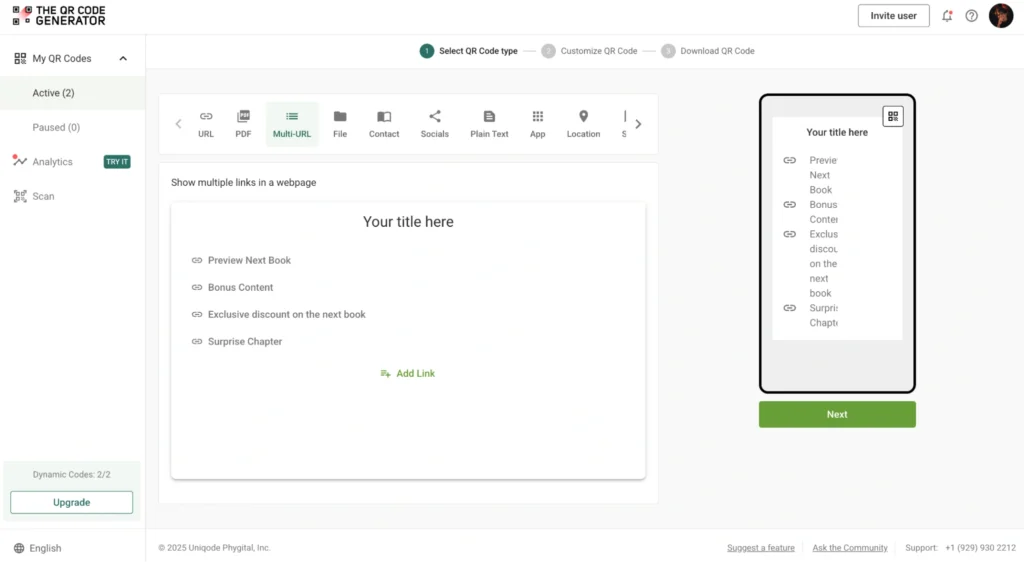
Sign up for The QR Code Generator (TQRCG) for free, click + Create QR Code, and select the QR Code of your choice. You can select URL, PDF, File, Socials, etc., for single destinations or a multi-URL QR Code to link multiple resources, such as author catalogs, community pages, and bonus content, from a single QR Code.
Step 3: Create and upload your content
For author interviews: Record on a smartphone or basic camera. Keep it short (90 seconds to 3 minutes), start with your strongest hook, and discuss what makes this book unique. Upload to a dedicated landing page, YouTube, or Vimeo with appropriate privacy settings.
For preview chapters: Export the first chapter as a PDF, optimize file size for mobile download (under 2 MB ideal), and upload to your website or a file hosting service that doesn’t require account creation.
For social proof: Create a simple, mobile-friendly landing page featuring 8-10 compelling review excerpts with star ratings, reader names, and the platforms they came from (e.g., Goodreads, Amazon).
Step 4: Customize your QR Code design
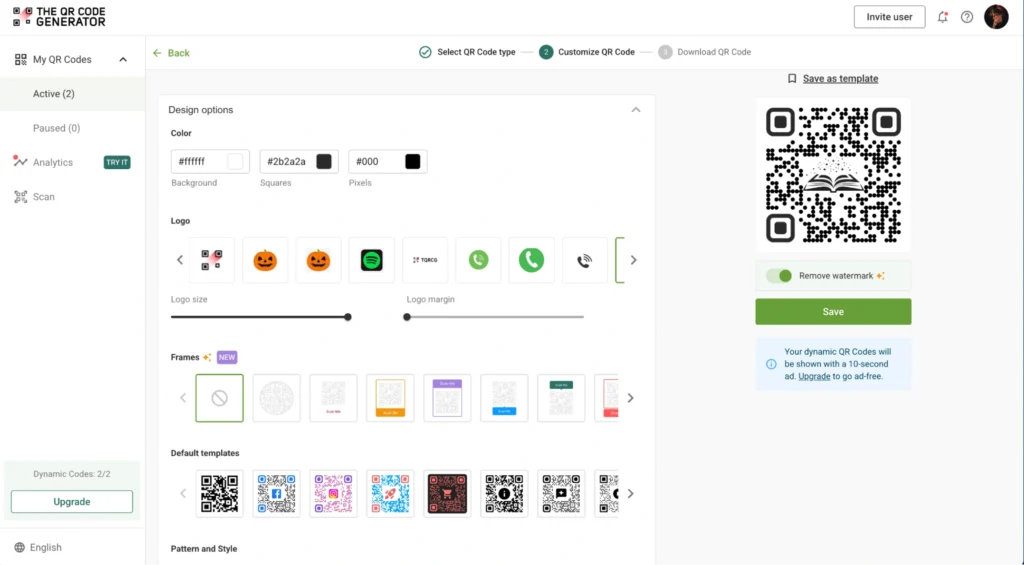
Match your book cover aesthetic with custom colors, frames, and branding. For thrillers, use darker colors and angular frames. For romance, use softer colors and rounded edges. For literary fiction, keep it minimal and elegant.
Add your publisher logo to the center of the QR Code for brand recognition. Include a clear CTA near the code: “Scan to meet the author” or “Scan for preview chapter.”
Step 5: Test thoroughly before printing
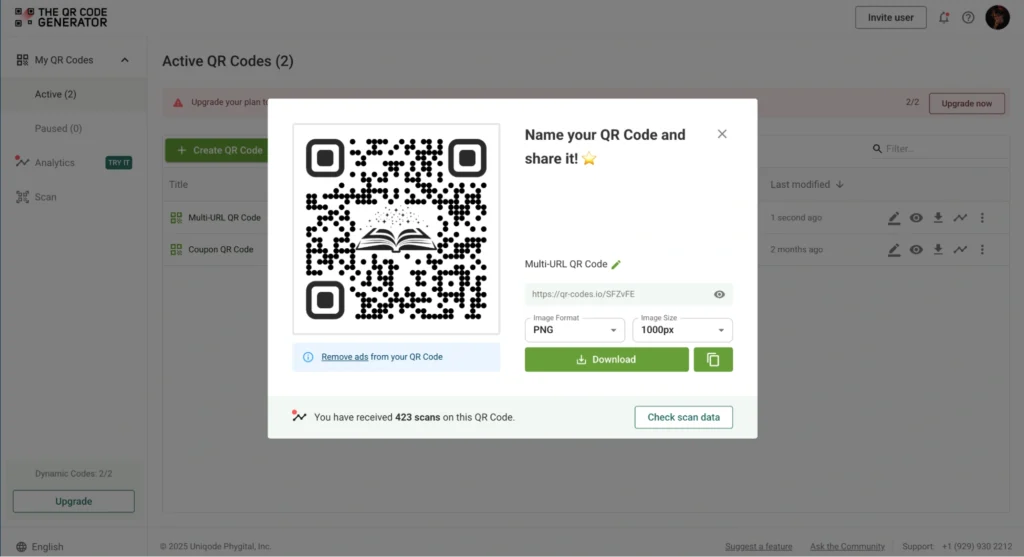
Download in high-resolution (300 DPI minimum) in the format your printer requires (usually PNG or EPS for professional printing). Test the QR Code on multiple devices under conditions similar to those in retail environments.
Test it from typical scanning distances (eight to twelve inches) under retail lighting conditions and on various smartphone cameras. Verify that landing pages load quickly on both cellular connections and Wi-Fi. Check that all content displays correctly on small screens without excessive scrolling or zooming.
Print test covers and scan them from the actual printed material, not just from screens. Paper texture, cover finish, and printing quality all affect scan success rates.
With your QR Code created and tested, strategic placement becomes crucial for maximizing scans and conversions.
QR Code placement strategy for book covers
Where you place QR Codes on book covers significantly impacts scan rates and purchase conversion.
Back cover, lower third: The most common and effective placement. Readers naturally flip books over to read the back copy, and the lower third of the back cover is where their eyes tend to land after reading the description. This placement captures readers who are already evaluating whether to make a purchase.
Front cover, bottom corner: Controversial but increasingly common for debut authors or books with strong video content. This placement captures attention from browsers who might not flip to the back cover. Use sparingly and only when the QR Code integrates seamlessly with the cover design. Never let it overpower the title or author name.
Inside front or back cover flap (hardcovers): Excellent for author interview content because readers who open flaps are already engaged and reading the author bio. This placement keeps the exterior cover clean while still providing easy access.
Spine (for thick books): Rarely used but effective for books displayed spine-out on shelves. Requires careful size consideration because spines are narrow, and the QR Code must remain scannable at small sizes.
Once you’ve decided where to place the QR Code, make sure you avoid these placement pitfalls:
- Avoid placement near the ISBN/barcode area: Retailers need clear scanning access to barcodes. QR Codes too close to this area cause confusion and frustration for checkout staff.
- Consider retail display orientation: Books displayed face-out need front or back cover codes. Books shelved spine-out might benefit from spine placement if the book is thick enough. Visit actual retail environments to understand how your book will be displayed.
- Test at actual retail distances: People typically scan books while holding them, at a distance of eight to twelve inches from their face. Test that your QR Code size and placement work at these distances, not the closer distances you’d test on a business card.
- Account for cover finish: Glossy covers create glare that interferes with scanning at certain angles. Matte finishes scanning more reliably. If using glossy covers, test extensively under retail lighting conditions.
Best practices for book cover QR Codes
These best practices ensure your QR Code enhances rather than detracts from the book cover experience. Implementation done right transforms covers into active sales tools.
| Category | Best practice | Key details |
|---|---|---|
| QR Code type and updates | Use dynamic QR Codes and refresh content quarterly | Dynamic QR Codes enable you to update destinations, repair broken links, and adapt content as the book’s marketing strategy evolves. Refresh quarterly as reviews accumulate and relevance shifts. |
| Content optimization | Keep videos under 3 minutes, optimized for mobile | Front-load compelling content in the first 30 seconds. Design for smartphones with large text, minimal scrolling, fast load times, and vertical or square video formats. |
| Size, contrast, and testing | Minimum 0.8 × 0.8 inches, tested on 10+ devices | Use high contrast (dark on light or vice versa). Test on various phone models, different lighting conditions, and typical scanning distances before printing. |
| Loading speed and access | Load content in under 3 seconds, no account required | Optimize images, compress videos, and use fast hosting. Test on cellular networks. Never require account creation for basic content access. |
| CTAs and backup access | Use specific CTAs with a shortened URL backup | “Scan to meet the author” outperforms vague language. Include a shortened, memorable URL beneath the QR Code for readers who prefer typing. |
| Retailer policies and analytics | Verify compliance and track scan data | Check the retailer’s policies about cover elements before printing. Use analytics to track scans by location, time, and engagement patterns to optimize future content. |
Turn book covers into active conversion tools
QR Codes on book covers solve a fundamental problem in book retail: the disconnect between reader hesitation and the content that would overcome it. By providing instant access to author interviews, preview chapters, and social proof at the exact moment of purchase decision, publishers bridge the gap between browsers and buyers.
This isn’t about replacing good cover design or compelling back copy. It’s about augmenting these traditional elements with the one thing they can’t provide: an authentic, immediate connection with the author and social validation from other readers.
Publishers seeing the best results follow a clear pattern. They create genuinely valuable content (not marketing fluff), strategically place QR Codes where engaged readers will notice them, use dynamic codes that can be updated as better content becomes available, and track which content actually drives conversions versus what merely generates views.
Ready to create QR Codes for your next book cover? Sign up and start with The QR Code Generator’s free dynamic QR Codes that never expire, perfect for books that will stay in circulation for years, while letting you continuously optimize the content and drive conversions.
Frequently Asked Questions
Should QR Codes go on the front or back cover of books?
Back cover placement is standard and most effective for the majority of books. Readers naturally flip books over to read descriptions, making the back cover the ideal location for QR Codes linking to author interviews or bonus content. Front cover placement is effective in specific situations, such as for debut authors, where author connection drives purchasing decisions, or for books with powerful video content that should be highlighted prominently. However, front cover QR Codes must integrate with the design and never overpower the title or author name. Test both placements with your target audience before committing to large print runs.
What content should the book cover QR Codes link to for maximum sales impact?
Author interviews (90 seconds to 3 minutes) showing genuine passion for the work perform best for debut authors and new series launches. First chapter previews work well for readers who need to sample the writing style before committing to the book. Social proof and curated reviews convert hesitant buyers who need validation from other readers. Book trailers foster emotional engagement for visual genres such as fantasy and romance. The best approach uses Multi-URL QR Codes that let readers choose what content resonates with them rather than forcing a single option.
Do QR Codes on book covers hurt the design aesthetic?
QR Codes only hurt aesthetics when poorly integrated. Successful implementations treat the QR Code as a design element, customizing colors to match the cover palette, adding branded frames, and positioning strategically within the overall layout. Work with cover designers from the beginning to plan QR Code placement, size, and styling. Minimalist codes in monochromatic colors work for literary fiction. Bold, branded codes are well-suited for commercial genres where interactivity is expected. The key is intentional integration, not afterthought placement.
How can publishers track if QR Codes actually drive book purchases?
Use QR Code generators with built-in analytics tracking total scans, scan locations, scan times, and device types. Create unique QR Codes for different print runs or retailers to track performance by distribution channel. Include UTM parameters in destination URLs to track behavior after scanning in your analytics platform. For direct causation, compare sales velocity for titles with QR Codes versus similar titles without them, controlling for other variables like author platform and marketing spend.
Will QR Codes on book covers work for readers without smartphones?
Not all readers have smartphones. For readers without capable devices, include a shortened URL printed near the QR Code that can be typed manually later. Consider the target demographic when deciding QR Code prominence. Younger readers expect interactive elements and scan readily. Older readers may require clearer instructions and benefit-driven CTAs that explain what they'll receive by scanning. Don't let QR Codes replace essential cover information like genre indicators, back copy, or author credentials. They should enhance, not replace, traditional cover elements.
Can indie authors and self-publishers use QR Codes on their book covers?
Absolutely. QR Codes benefit indie authors more than traditional publishers because they level the playing field against established authors with built-in audiences. Self-published authors can use QR Codes to provide the same author connection and preview content that big publishers offer, building trust that their personal platform might not yet command. Print-on-demand services like Kindle Direct Publishing and IngramSpark fully support QR Codes on covers. Create your QR Code, integrate it into your cover design file, and upload. The only consideration is ensuring the code remains scannable at the printed size, which requires testing with proof copies before going live.