
How QR Codes Improve Passenger Flow in Airport Arrivals

Shanti Nair
Last updated: May 8, 2026
10 min read
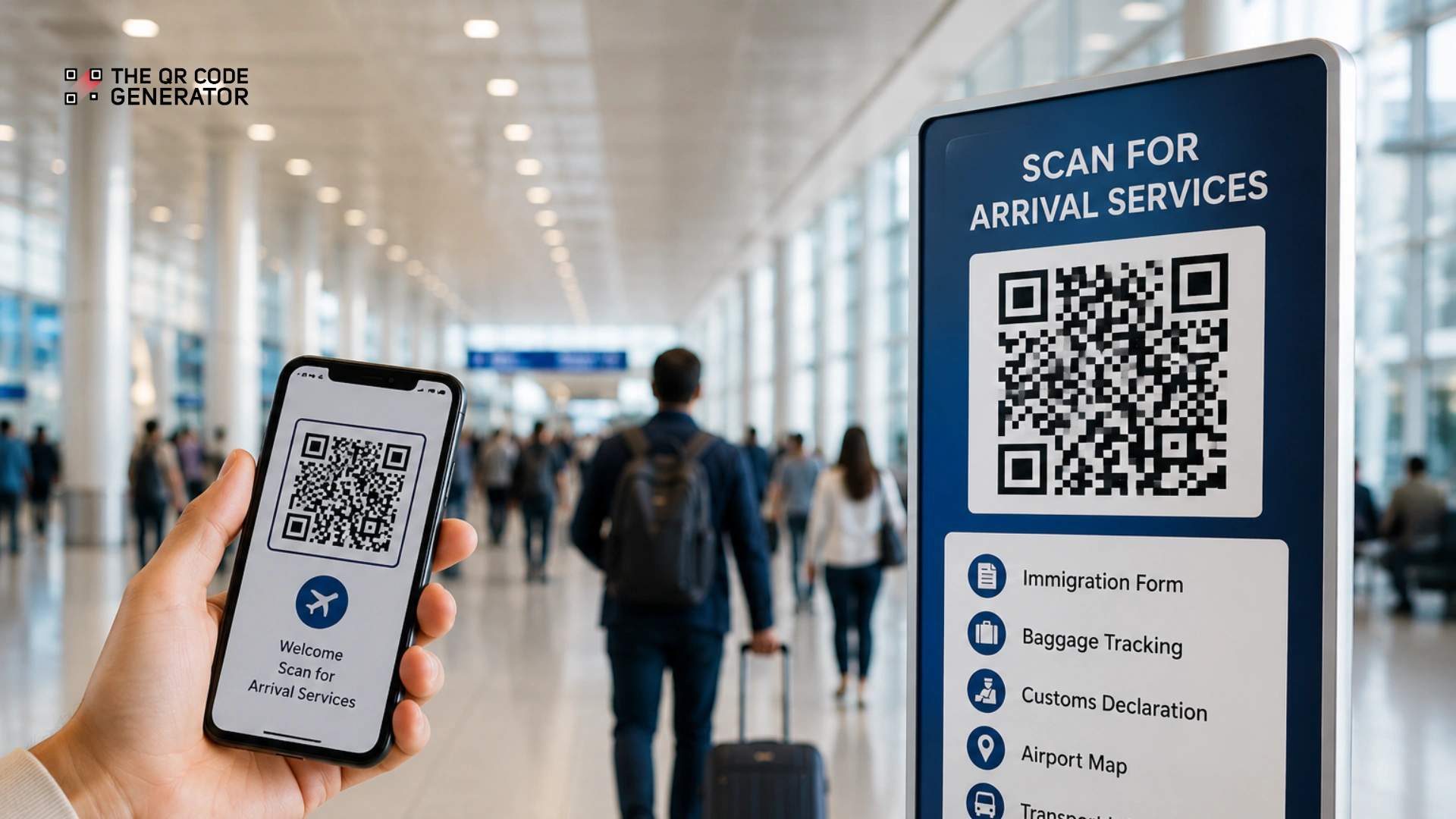
Every time a flight lands, the same problems play out. Passengers flood immigration queues, and baggage carousels draw crowds before bags appear. A single peak hour can see staff manually managing the flow of hundreds of people across the same 200 meters of the terminal.
The bottleneck is not space or headcount. Passenger movement lacks real-time direction, so even well-designed arrival halls struggle to move people efficiently.
QR Codes for airports are a contactless passenger flow system that connects travelers to real-time information and self-service actions through a simple scan. At each step in the arrival journey, a scan reduces the need to wait, ask, or queue unnecessarily while giving airport teams clearer data on where congestion builds.
But QR Codes only work when placed at the right touchpoints, and that starts with understanding where arrivals break down.
Where passenger flow breaks down in airport arrivals
The biggest passenger arrival bottlenecks usually appear at immigration control, baggage claim, and customs checkpoints.
Immigration queues slow down processing
Multiple flights often arrive within a short window, sending large groups of passengers to immigration at once. Without a way to distribute or pre-process passengers, queues form quickly. Staff then manually redirect passengers, which slows overall processing and increases wait times during peak hours.
Baggage claim creates crowding and uncertainty
Passengers arrive at baggage claim without clear updates on when their bags will arrive or which carousel to use. Many wait near the same few belts, even when their baggage is not assigned to those belts. This creates crowding in some areas while other baggage belts remain underused. Once passengers settle in one place, it becomes harder to redistribute them.
Customs processing slows the final step
Customs processing slows when passengers complete declarations at the checkpoint instead of earlier in the arrival journey. Passengers often arrive in clusters, forcing staff to verify each declaration individually as queues continue to grow. Processing remains slow unless airports collect passenger information before passengers reach customs checkpoints.
Across these arrival areas, the pattern stays the same. Information reaches passengers too late, actions occur at the wrong time, and airport staff manage congestion rather than prevent it.
How QR Codes help manage passenger flow in airport arrivals
QR Codes are improving passenger flow in airport arrivals by reducing manual processing, guiding passengers in real time, and helping airport teams respond before congestion builds.
Speed up passenger processing
Delays often happen when passengers provide information through paper forms at the checkpoint. Each passenger spends more time at the counter, slowing processing during peak hours.
QR Codes give passengers access to digital forms that can be completed before arrival. By the time passengers arrive at immigration or customs, staff only need to verify the information rather than process it from scratch. This reduces processing time per passenger and improves throughput at checkpoints.
Guide passengers in real time
Passengers often wait in the wrong place when they are unsure where to go next.
QR Codes placed across arrival areas help passengers access directions, queue updates, and airport navigation tools on their phones. Passengers scan the code, check the fastest route, and move toward the correct queue or baggage carousel. This helps evenly distribute passenger movement and reduces crowding in busy areas.
Track passenger movement in real time
Passenger flow is difficult to monitor without real-time movement data.
Each QR Code scan creates a data point. Over time, scan activity shows where passengers are gathering, where delays are forming, and how movement changes across arrival areas. This visibility helps airport teams identify bottlenecks earlier and adjust operations before queues build.
Reduce operational load
Airport staff spend significant time answering routine questions and directing passengers through arrival areas.
QR Codes reduce this dependency by giving passengers direct access to information and the ability to perform self-service actions on their phones. Fewer interruptions at checkpoints allow staff to manage busy periods more efficiently.
How to create and deploy QR Codes for airport arrivals
Airports create and deploy QR Codes for arrivals by assigning one QR Code to each passenger action, placing the codes at high-traffic touchpoints, and tracking scan activity to improve passenger flow over time.
The most effective airport QR Code systems support navigation, digital forms, baggage tracking, and real-time passenger routing across arrival areas.
Step 1: Define the purpose of each QR Code
Each QR Code should support one specific action in the arrival journey. A QR Code near immigration may open a digital entry form, while one at baggage claim may provide live tracking or carousel updates.
Keeping one QR Code tied to one action makes the passenger experience faster and easier to follow.
Step 2: Create dynamic QR Codes
Most airport arrival workflows use URL QR Codes linked to forms, tracking pages, navigation tools, or service requests.
Use dynamic QR Codes so airport teams can update links, instructions, or routing without replacing physical signage. Platforms like The QR Code Generator (TQRCG) also support scan tracking, multi-URL routing, and real-time QR Code management across different terminals or passenger groups.
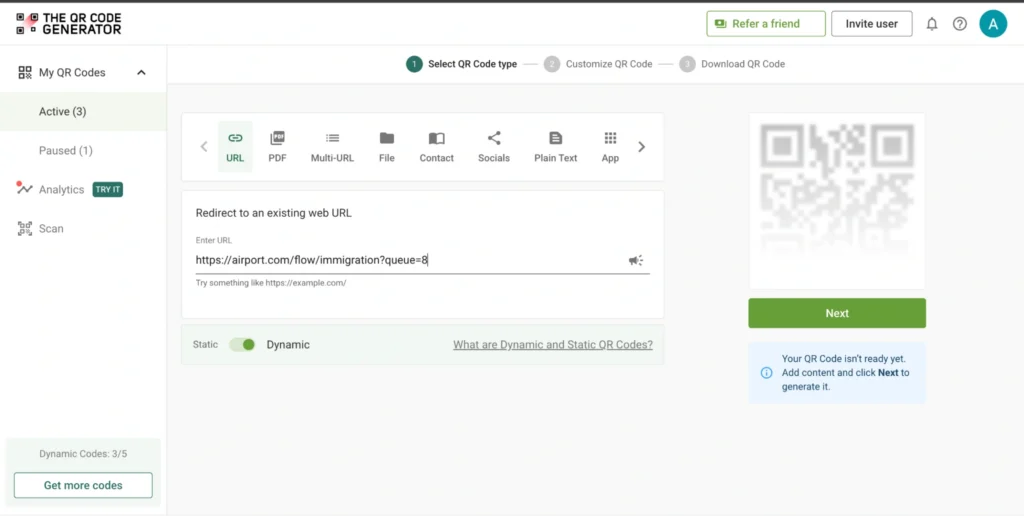
To create your QR Code, visit TQRCG, add your link, and click Next.
Step 3: Customize for visibility
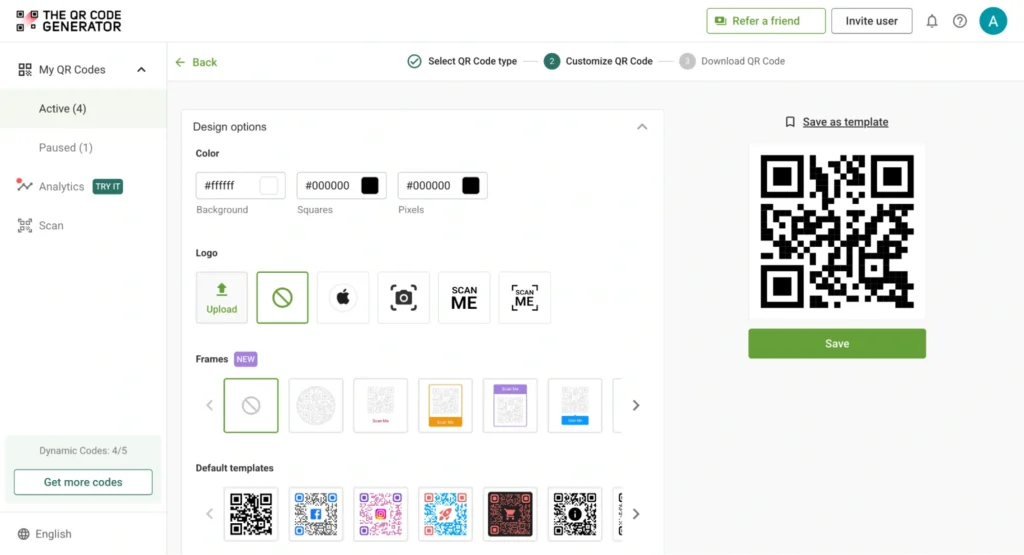
Arrival areas are crowded and fast-moving, so QR Codes must remain easy to scan at a distance. Use high-contrast colors, clear labels, and large placement areas. If needed, add a frame or logo without reducing scannability.
Step 4: Download and deploy
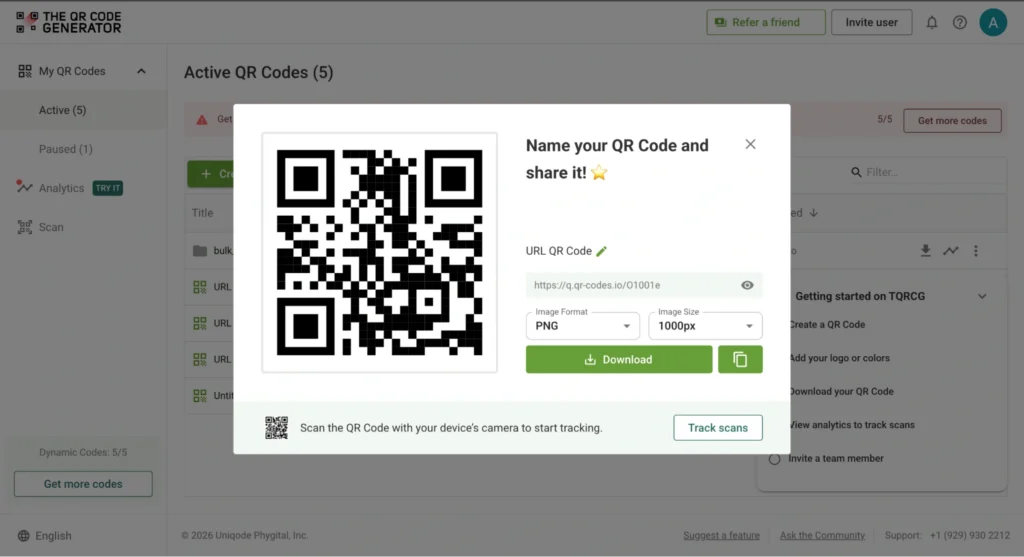
Once your QR Code is ready, download it in a suitable format.
For print, use high-resolution PNG or vector formats such as SVG or EPS to keep the code sharp and scannable. For digital screens, test how the QR Code appears on different devices and screen sizes.
Step 5: Track scans and improve passenger flow
QR Code scan data helps airport teams understand where passengers gather, when congestion builds, and which arrival areas receive the highest traffic. This data helps teams adjust signage placement, improve routing, and respond to passenger flow issues before queues grow during peak arrivals.
Where to place QR Codes in the arrival journey
QR Codes work best at points where passengers pause, decide where to go next, or need to complete a step. In airport arrivals, the highest-impact placement areas are immigration, baggage claim, customs, navigation points, and exit zones.
| Arrival area | QR Code placement | Passenger action | Operational benefit |
|---|---|---|---|
| Immigration and border control | Boarding gates, aircraft cabins, terminal entrances, e-gates | Complete entry forms and present digital verification codes | Reduces checkpoint processing time and keeps immigration queues moving |
| Baggage claim | Baggage tags, baggage desks, carousel signage | Track baggage status, check carousel assignments, report missing bags | Reduces crowding around baggage belts and improves baggage distribution |
| Customs checkpoints | Arrival corridors, baggage claim exits, customs entry points | Complete digital customs declarations before reaching the checkpoint | Speeds up customs processing and separates passengers into the correct lanes earlier |
| Navigation and wayfinding | Arrival hall signage, terminal junctions, corridor entry points | Access live airport maps and route guidance | Reduces congestion and helps distribute passenger movement more evenly |
| Exit and pickup zones | Exit doors, waiting areas, transport pickup points | Access transport links, pickup instructions, and onward travel details | Keeps exit flow steady during peak arrival periods |
Real examples of QR Codes in airport arrivals
Airports are already using QR Codes to reduce delays by moving key actions earlier in the arrival journey.
Kuala Lumpur International Airport (KLIA), Malaysia
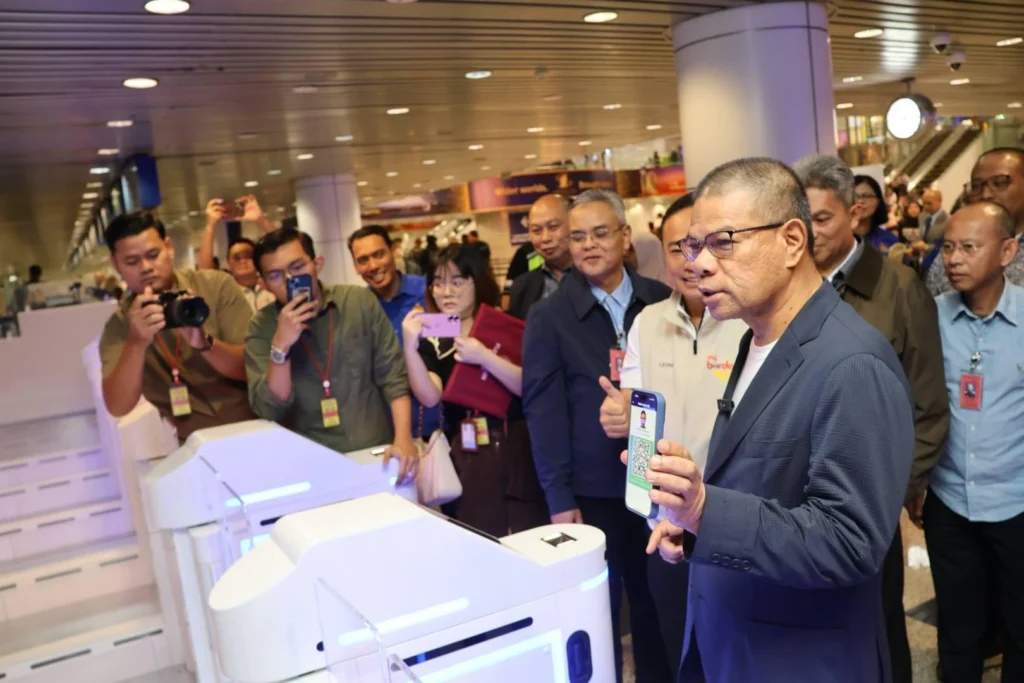
Kuala Lumpur International Airport (KLIA) significantly improved immigration processing speed by introducing QR Codes into the system.
Now, there is no need to enter information at the counter. Passengers register their details in advance and receive a QR Code linked to their information. At the airport, they scan this code at an autogate. The system pulls up their details, verifies them, and the gate opens. QR Codes at airport arrivals remove the need to enter information at the checkpoint and helps maintain faster processing during peak arrivals.
Japan Airports
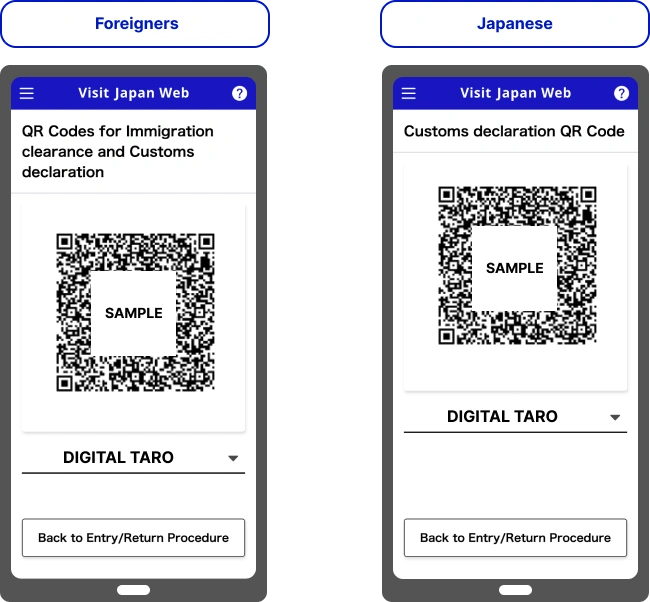
Japan improved immigration and customs processing by introducing a QR Code–based pre-arrival system. Manual checks have reduced, and clearance has been faster.
With Visit Japan Web, an online pre-arrival system run by the government, passengers now complete their forms before arrival. Once submitted, they receive a QR Code linked to their data.
At the airport, they scan the QR Code at immigration and customs checkpoints. The system retrieves their details, and staff or e-gates verify them instead of collecting information again.
Soekarno-Hatta International Airport, Indonesia
Soekarno-Hatta International Airport, Indonesia, streamlined arrivals by introducing an integrated QR Code–based system for international passengers.
Passengers submit their details once through the system and receive a QR Code linked to their submission. This QR Code is then used across multiple checkpoints.
At each step, the same QR Code is scanned to retrieve the passenger’s information, which staff verifies. This connects immigration and customs into a single flow. removing duplicate data entry and reducing repeated stops across checkpoints.
Greater Orlando Aviation Authority (GOAA), USA
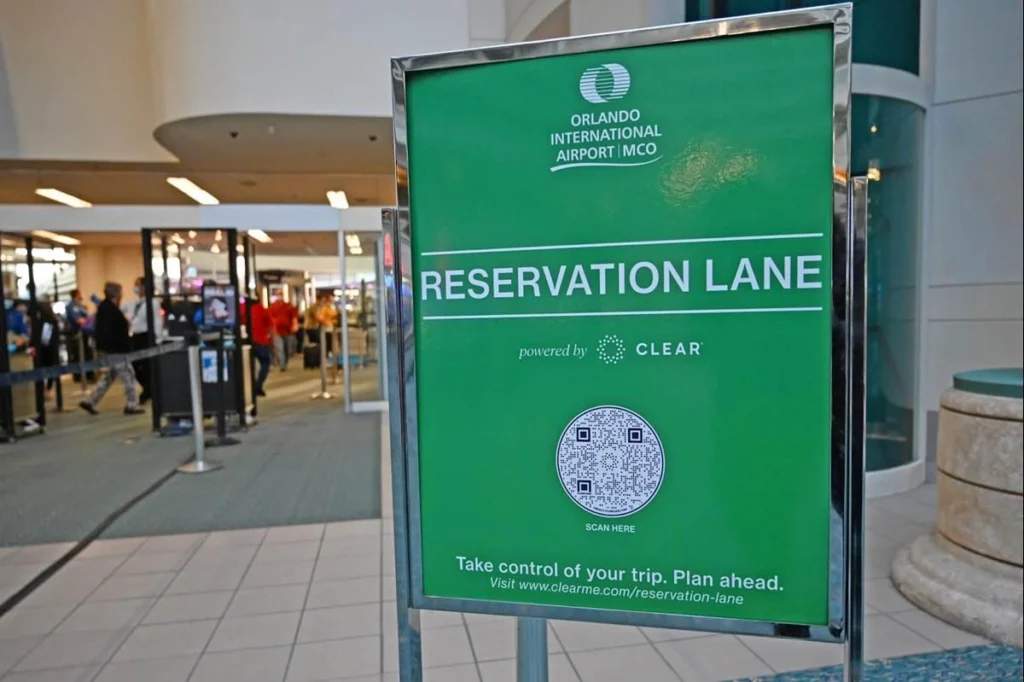
Orlando International Airport uses QR Code-based checkpoint access through its MCO Reserve system. Passengers scan a QR Code at dedicated screening lanes instead of joining the standard queue, helping distribute passenger traffic more efficiently during peak travel periods.
Hong Kong International Airport
Hong Kong International Airport improved passenger movement in arrivals by introducing QR Code-enabled maps across the terminal.
Passengers can scan QR Codes to see directions based on their location. The map shows available routes, helping them choose where to go next.
Instead of following the crowd, passengers move based on clearer information. This spreads foot traffic more evenly and reduces congestion in busy arrival areas.
Common challenges in QR Code adoption (+ solutions)
Most challengesin QR Code adoption for arrivals arise from small gaps, unclear instructions, slow loading, or a lack of trust.
Low passenger adoption
At many airports, QR Codes are available, but passengers walk past them. Not because they don’t work, but because it’s not clear what they’re for.
If a passenger sees a code without context, they hesitate. And when they hesitate, they skip it. This usually comes down to unclear signage, missing instructions, vague labels, or poor placement.
Solution:
- Use clear, action-led prompts like “Scan to fill form” or “Scan for directions”
- Place staff near key QR Code points initially to guide passengers
- Add simple instructions near the code on how to scan
When passengers understand what they’ll get from scanning, adoption improves quickly.
Connectivity issues
Even when passengers are willing to scan, the experience can break if the page doesn’t load.
In some areas, mobile data may be weak. Airport Wi-Fi may not connect immediately. If the page takes too long, passengers drop off and move ahead.
Solution:
- Use lightweight, fast-loading pages that open quickly on any network
- Enable easy access to airport Wi-Fi at key scan points
The goal is simple. The scan should lead to an instant result, not a delay.
Data security concerns
In arrival journeys, passengers are often asked to share sensitive information. If they don’t trust the process, they won’t engage.
A QR Code that opens a form can raise questions: Where is the data going? Is it safe? If this isn’t addressed, adoption drops.
Solution:
- Use secure, encrypted QR Code workflows
- Only collect and store the data that is necessary
- Clearly communicate that the process is secure, through short messages near the QR Code
Clarity builds trust. When passengers feel the process is safe, they are more likely to complete it.
Best practices for using QR Codes in airport arrivals
QR Codes don’t usually fail in testing. They break when real passengers use them — when multiple flights arrive at once, people are in a hurry, and small delays start to matter.
| Best practice | Why it matters |
|---|---|
| Design for peak load | Fast-loading pages prevent drop-offs during busy arrival periods. |
| Integrate with airport systems | Real-time data keeps passenger flow moving efficiently. |
| Test under real conditions | Reveals where passengers hesitate or skip scanning. |
| Place QR Codes before decision points | Helps passengers complete actions before queues build. |
| Use clear instructions | Simple prompts improve scan rates and reduce confusion. |
| Optimize for weak connectivity | Pages should load quickly on mobile data or airport Wi-Fi. |
| Use secure workflows | Visible security measures improve passenger trust. |
Streamline passenger flow at airport arrivals with QR Codes
Airport arrival delays happen when passengers stop to ask questions, fill out forms, or wait for instructions at the wrong point in the journey. QR Codes reduce these bottlenecks by giving passengers the information and actions they need before queues build.
When connected to airport systems, QR Codes help airports manage passenger flow more efficiently across immigration, baggage claim, customs, and navigation areas.
The QR Code Generator (TQRCG) offers two free dynamic QR Codes to start you off with and scan tracking. With dynamic QR Codes, airport teams can adjust routes, update instructions, and monitor scan activity without replacing physical signage.
Frequently Asked Questions
What happens if you lose your airport QR Code after arrival?
The QR Code is usually just a way to access your submitted data. The data itself is stored in the backend system.If the QR Code is lost, staff can retrieve your details using other identifiers, such as your passport or a reference number. Some systems also allow you to reopen your submission and generate the QR Code again.So the process doesn’t stop. It shifts from QR Code-based access to backend lookup or manual verification.
Can you use a screenshot of a QR Code at immigration or customs?
It depends on how the QR Code is set up. If the QR Code is static, a screenshot may work. But many airport systems use dynamic QR Codes linked to a live record in the backend, such as the one in your submitted entry form. These codes are checked against your actual submission in real time. Because of this, they need the latest version. A screenshot taken earlier may be outdated or expired, which is why it can get rejected at the checkpoint.
Do airport QR Codes work without an internet connection?
Scanning the QR Code itself does not require the internet.However, most airport systems rely on backend validation to retrieve or verify passenger data. Without a connection, this step may not complete. So the scan may work, but full processing usually depends on connectivity.
What should you do if your QR Code doesn’t scan at the airport?
If a QR Code doesn’t scan, the process usually shifts to a manual flow.The QR Code is only a way to access data. The actual information is stored in the system. Staff can retrieve it using passport details or system records. In some cases, the information may need to be re-entered or handled at a counter.The process continues, but without relying on the QR Code.