
QR Codes for Musicians and Artists: Uses, Creation, and Best Practices

Harshajit
Last updated: October 23, 2026
9 min read
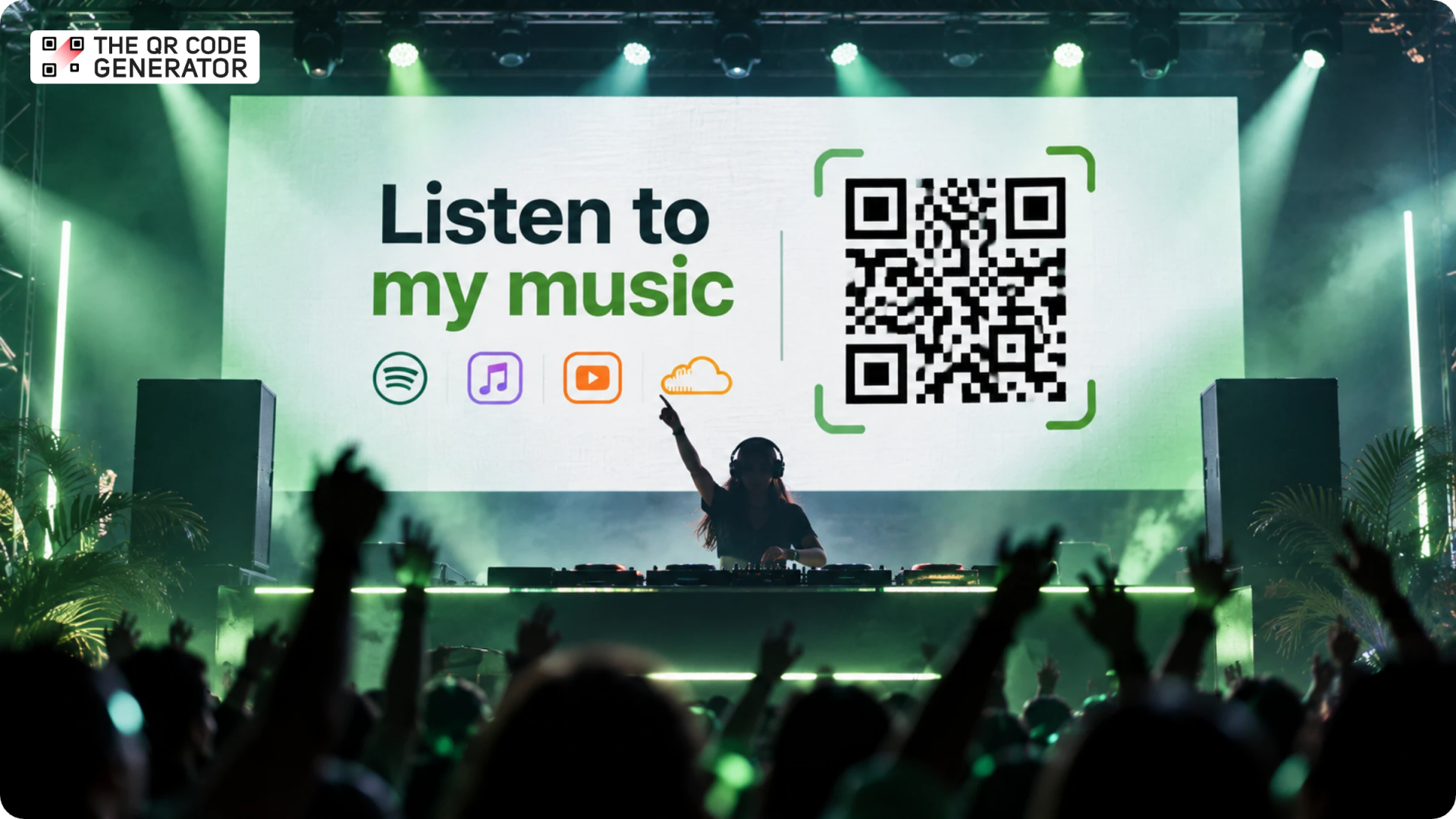
The best set I heard all year came from a DJ at a conference afterparty, past midnight, when a run of house mixes took over the room. I wanted those tracks by morning, so I searched Spotify, then YouTube, and found nothing. We connected on Instagram later, where she told me she was a new artist who had barely released her music, and the songs I loved had nearly slipped away for good.
That near miss is the gap every emerging musician lives with: a captivated listener in the moment, and no easy path to the music afterward. A QR Code for musicians closes that gap. For instance, a SoundCloud QR Code on her booth that night would have sent the whole room to her music before her set was over.
So, in this blog, we are going to look at how artists use QR Codes to grow a real audience, from a free setup to the tracking that reveals which sets and posts bring fans back.
What is a QR Code for musicians?
A QR Code for musicians is a scannable link to a song, album, streaming profile, electronic press kit (EPK), or landing page where fans can find an artist's music and other details. For example, a QR Code linked to a SoundCloud track opens the track when scanned, while one linked to a landing page can give fans access to Spotify, Apple Music, YouTube Music, upcoming shows, and a mailing list from a single place.
Musicians can print these QR Codes on gig flyers, tour posters, business cards, album inserts, or merch table displays, or show them on a screen during a live set. A fan who discovers an artist at a music festival, for instance, can scan the QR Code before leaving and save the artist's profile or join their mailing list instead of trying to remember the name later.
Static vs dynamic QR Codes: which one do musicians need?
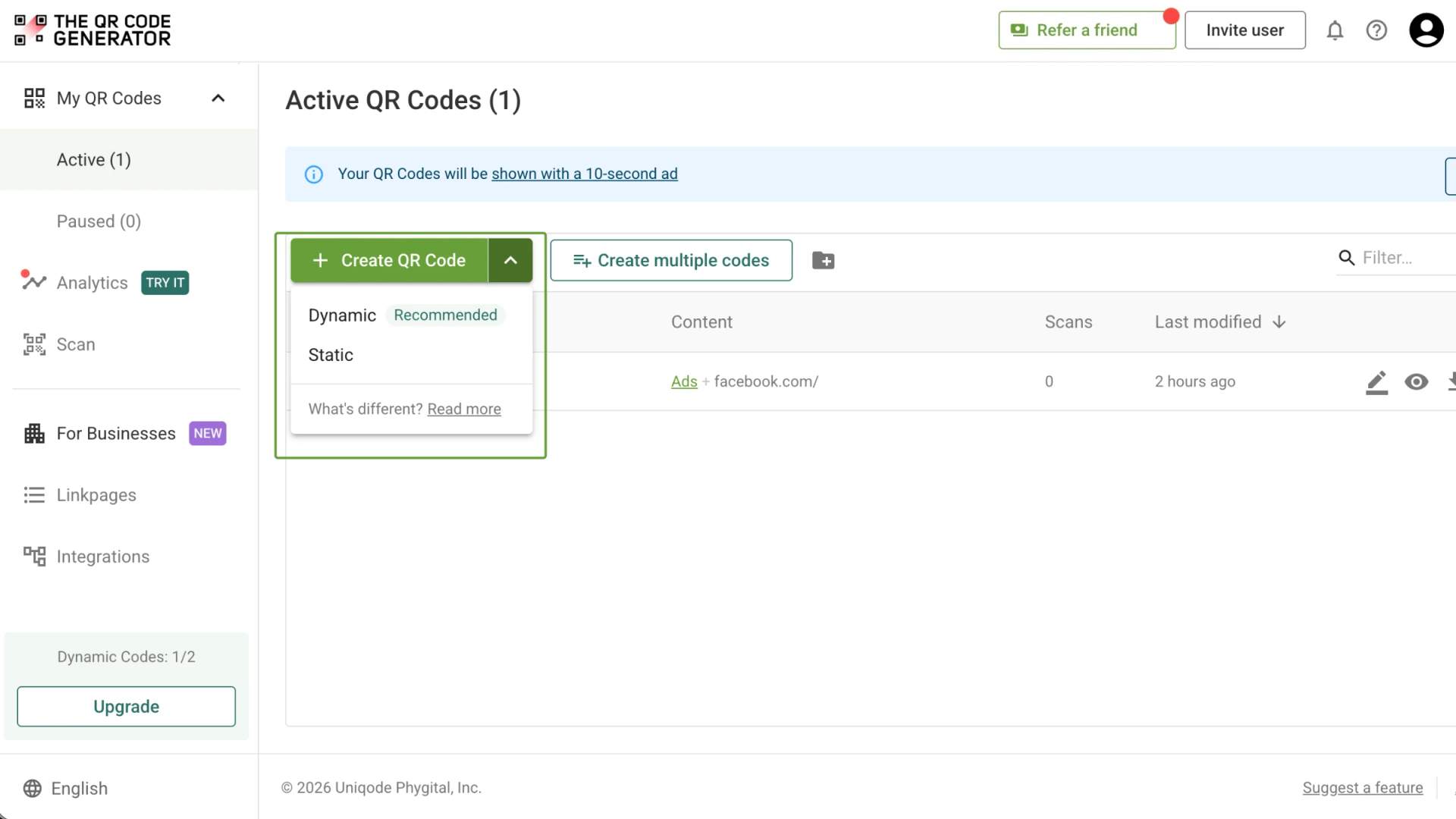
Dynamic QR Codes are the right choice for nearly every musician. A dynamic QR Code redirects scans through an editable link, allowing musicians to update the destination without reprinting the QR Code. A static QR Code, on the other hand, stores the link directly in the QR Code pattern, so the destination cannot be changed after creation.
For most musicians running ongoing promotions, a dynamic QR Code is the more practical choice. It lets you keep printed materials in circulation while updating links and measuring scan activity. If you are sharing a permanent link and do not need these features, a static QR Code may be all you need.
6 ways musicians and artists can use QR Codes
1. Get more streams from live performances
Listeners who enjoy a live set may want to revisit a particular track or hear more of the artist's music afterward. A QR Code displayed during a performance gives them a quick way to save the artist's profile or listen to their tracks before moving on to the next act.
How to use it: Display a QR Code on a screen behind the stage, at your DJ booth, or on a small stand near the exit. If you perform at multiple venues or festivals, create separate dynamic QR Codes for each event. Scan analytics can help you compare audience engagement across performances and identify which events bring more listeners to your music.
→ Related: How to Write a QR Code Call to Action That Gets More Scans
2. Make your music accessible across streaming platforms
Fans have different listening preferences, and asking them to search for your music on their preferred service adds an extra step. A single QR Code can link to your Spotify, Apple Music, YouTube Music, Amazon Music, Bandcamp, and SoundCloud pages.
How to use it: Create a mobile-friendly, link-in-bio or multi-url style landing page with your artist name, profile image, latest release, and links to your streaming profiles. Put the QR Code on your website, social media graphics, digital press materials, and printed promotional items. Keep your newest release near the top so visitors can find it quickly.
→ Related: How to Create a QR Code Landing Page (Linkpage)
3. Promote new releases and pre-saves
A release campaign often spans several weeks, from the first announcement to launch day and the weeks that follow. A dynamic QR Code lets you keep the same printed or digital promotional asset in circulation while updating its destination as the campaign progresses.
How to use it: Before release day, link the QR Code to your pre-save page. Once the track or album is live, change the destination to the release page or a landing page with streaming options. Include the QR Code on teaser posters, event flyers, and promotional cards.
4. Turn merchandise into a way to discover your music
Merchandise gives fans a physical reminder of an artist, and a QR Code can connect that item to music, exclusive content, or future releases. This works well for merchandise tables, album packaging, CD sleeves, cassette inserts, and apparel labels.
How to use it: Link the QR Code to a YouTube video of a live performance recording, a bonus track, a behind-the-scenes video, or a page featuring your latest music. Print a short explanation beside it so buyers know what they will get after scanning.
5. Help promoters and booking agents discover your work
Promoters, venue managers, festival organizers, and booking agents may encounter your music through a referral, a live performance, or a promotional flyer. An electronic press kit (EPK) gives them the information they need to assess your work and contact you about opportunities.
How to use it: Create a mobile-friendly EPK with your artist biography, selected tracks, performance videos, press coverage, high-resolution photos, and booking contact details. Link a QR Code to the EPK and add it to your musician business card, promotional one sheet, or event networking materials. Review the page regularly to keep your latest releases and contact information up to date.
6. Collect fan signups and tips
An audience member who enjoys your performance may want to support your work or hear about your next show. A QR Code can take them to a mailing list signup form, a fan membership page, or a tipping platform that accepts online payments.
How to use it: Display a QR Code beside your busking setup, at your merch table, or on a sign near the stage. Use separate QR Codes for email signups and tips if you want to understand which action fans take. Explain what supporters receive, such as tour announcements, early access to releases, or occasional studio updates.
How to create a QR Code for your artist profile
To create a QR Code for your music, start with the link you want fans to open. This could be a song on SoundCloud, an album on Spotify, or a landing page that brings your music platforms together.
Once you have your link, you can generate the QR Code, customize its appearance to fit your artwork, and download it for print or digital use.
Here is how to do it with The QR Code Generator (TQRCG):
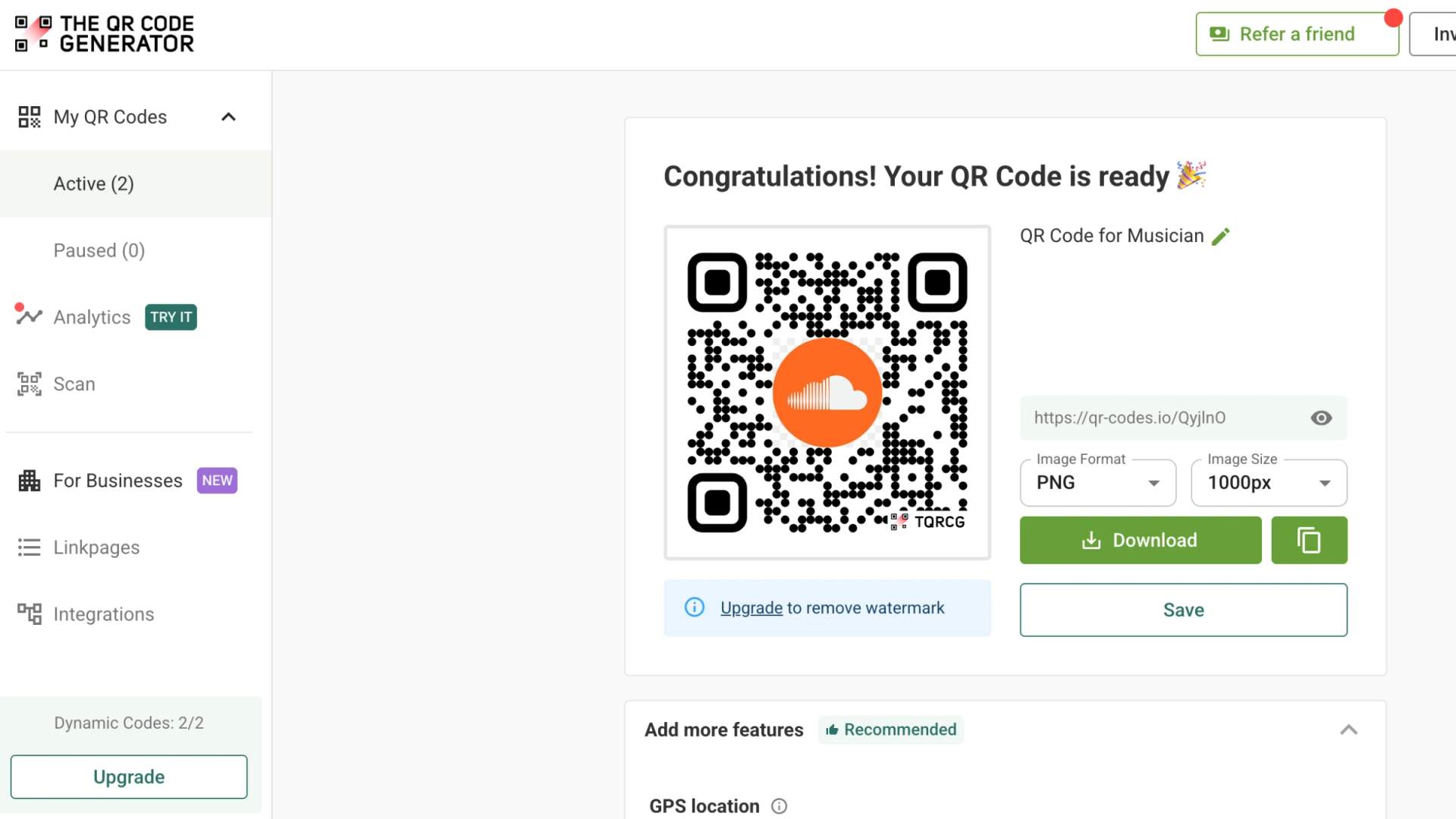
Step 1: Log in to the TQRCG dashboard and click + Create QR Code
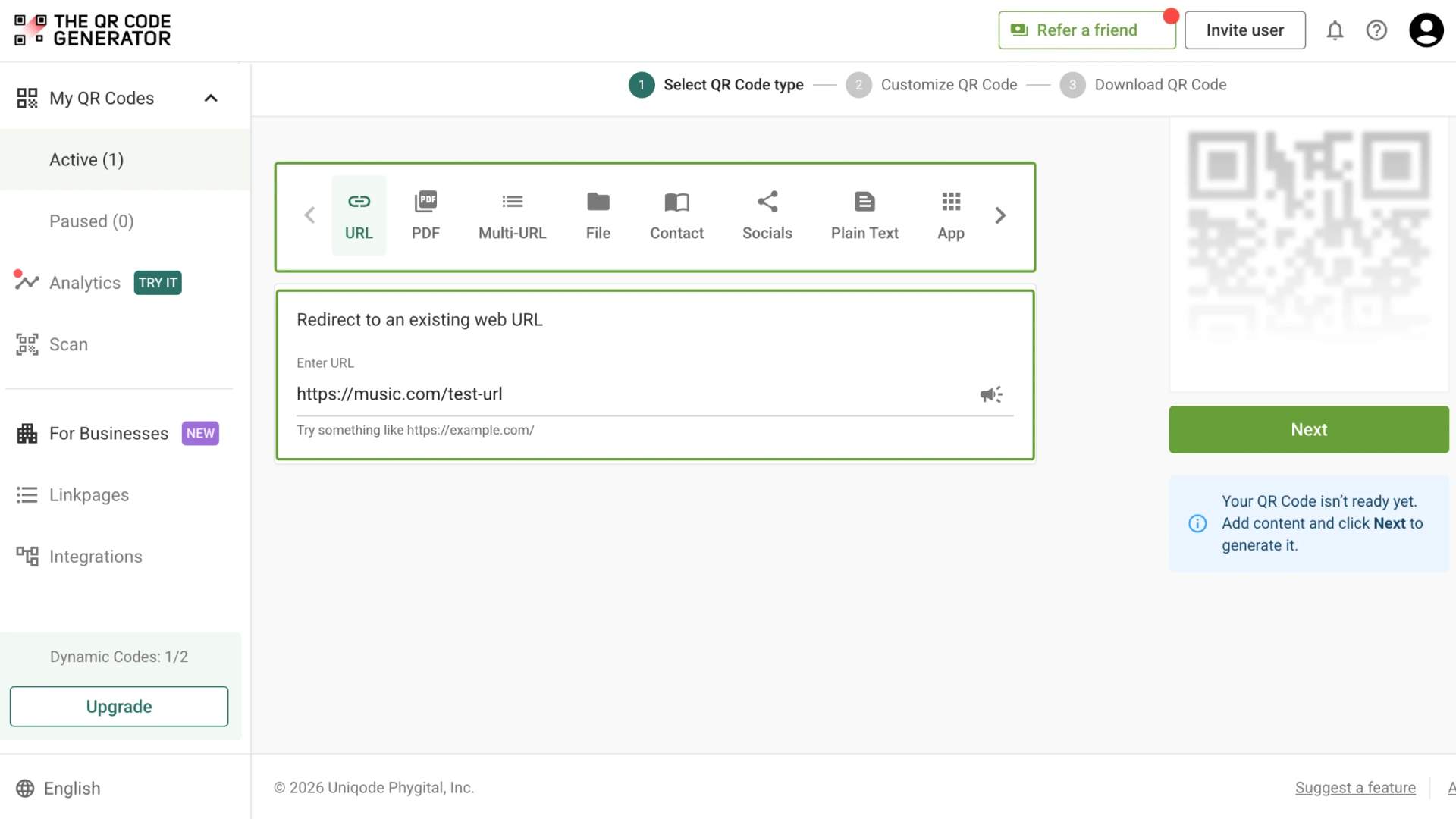
Step 2: Choose the QR Code type and add your link. To send fans to a new artist's music, select URL QR Code type, and paste a SoundCloud profile address
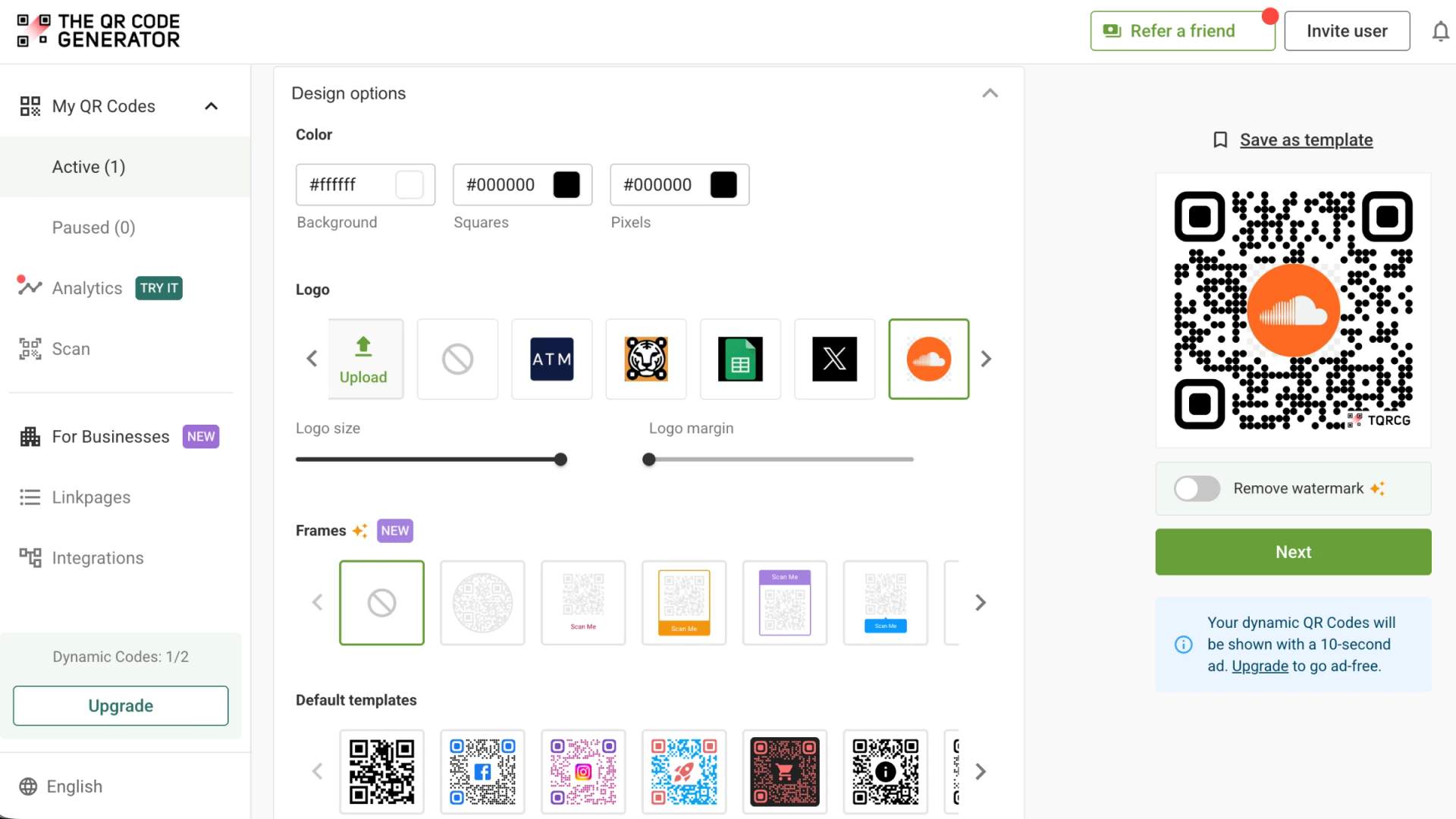
Step 3: Customize the QR Code with your colors, a frame, and a logo to match your artwork
Step 4: Download the QR Code in your preferred format, PNG or SVG, then share it on your flyer, screen, or socials.
Best practices for QR Code design and placement
Before printing a QR Code on a poster, adding it to merchandise, or displaying it at a gig, check that fans can scan it easily in the setting where they will encounter it. These five practices help you avoid scanning problems and make it easier to measure which placements work for your audience.
1. Choose a size that suits the viewing distance: For handheld print materials, start with a QR Code around 1.2 inches (3 cm) wide and test it at the distance people will hold the item. For stage screens, increase the size to suit the venue, screen dimensions, and distance from the audience.
2. Use strong contrast: Dark QR Code elements on a light background generally scan reliably. If you customize the colors to match your album artwork, check that the QR Code remains clearly distinguishable from the background under the lighting conditions where fans will see it.
3. Write a specific call to action: Tell fans what they will access after scanning, such as “Listen to the new single,” “Get the setlist,” or “Join the mailing list.” Match the wording to the destination so people know what to expect.
4. Keep the quiet zone clear: Leave an uninterrupted margin around all four sides of the QR Code. Avoid placing text, logos, borders, or artwork too close to its edges, as these elements can interfere with scanning.
5. Test the final design in its intended setting: Scan the downloaded QR Code on both iPhone and Android devices, then test the printed version or screen display under realistic lighting and viewing conditions. Confirm that the destination opens correctly and the page works on mobile before distributing the material.
For touring artists, scan analytics can help compare placements across venues and promotional materials. Use those results to decide where to place QR Codes for future shows and campaigns, based on how your audience actually responds.
Start promoting your music with free dynamic QR Codes
As you release new tracks, announce gigs, and promote your music across platforms, your QR Codes can help fans find your latest work and give you insight into how people engage with your promotions.
TQRCG's free plan includes two dynamic QR Codes that never expire. You can update their destination links as your music and campaigns evolve, then use scan analytics to review scan activity, including when and where people scan and which devices they use. This helps you understand which promotional placements attract attention and make more informed decisions about future releases and performances, without committing to a paid plan.
Frequently Asked Questions
Do The QR Code Generator (TQRCG) QR Codes expire or stop working if I cancel my plan?
Static QR Codes created with TQRCG never expire. The two dynamic QR Codes included in the free plan also never expire. Dynamic QR Codes created under a paid plan stop resolving if the subscription is not renewed, so check your plan's terms before relying on them for long-term promotions.
What scan data can I see for a music QR Code in TQRCG?
A dynamic QR Code records total scans along with the time, location, and device behind each one. You can see which cities and days drive the most activity, then compare separate QR Codes for different venues or campaigns to learn which placements bring you the most listeners.
Is TQRCG free for musicians, and what do the paid plans add?
The QR Code Generator (TQRCG) offers a free plan with two dynamic QR Codes that never expire. The Flex plan adds five ad-free dynamic QR Codes, 60 days of scan analytics, bulk creation, CSV export, and watermark-free QR Codes. The Core and Plus plans, powered by Uniqode, offer additional capacity and advanced features for musicians managing larger campaigns.
Does a QR Code store my song, or does it just link to it?
A QR Code stores a link to your song, album, or music landing page, not the audio itself. Fans need an internet connection to open the link and stream your music.
How do I make a QR Code for a Spotify song or playlist?
To create a Spotify QR Code, open the song, album, or playlist in Spotify, tap the three-dot menu, and choose Share, then Copy link. Log in to TQRCG, select the URL as the QR Code type, and paste the link. Customize the QR Code and download it either in PNG or SVG.
Can I get a free Apple Music QR Code?
Yes, you can get a free Apple Music QR Code with The QR Code Generator (TQRCG). Open the song, album, or playlist in Apple Music, tap Share, and copy the link. Next, you need to log in to TQRCG, select the URL as the QR Code type, and paste the link. Customize the QR Code and download it either in PNG or SVG.
Do fans need a special app to scan a music QR Code?
No. Most iPhone and Android phones scan a QR Code straight from the built-in camera app, with no extra download. Fans point the camera at the QR Code, then tap the link that appears to open your music. Older phones can use any free QR Code scanner app.