
How to Create a QR Code Landing Page (Linkpage)

Harshajit
Last updated: September 15, 2026
9 min read
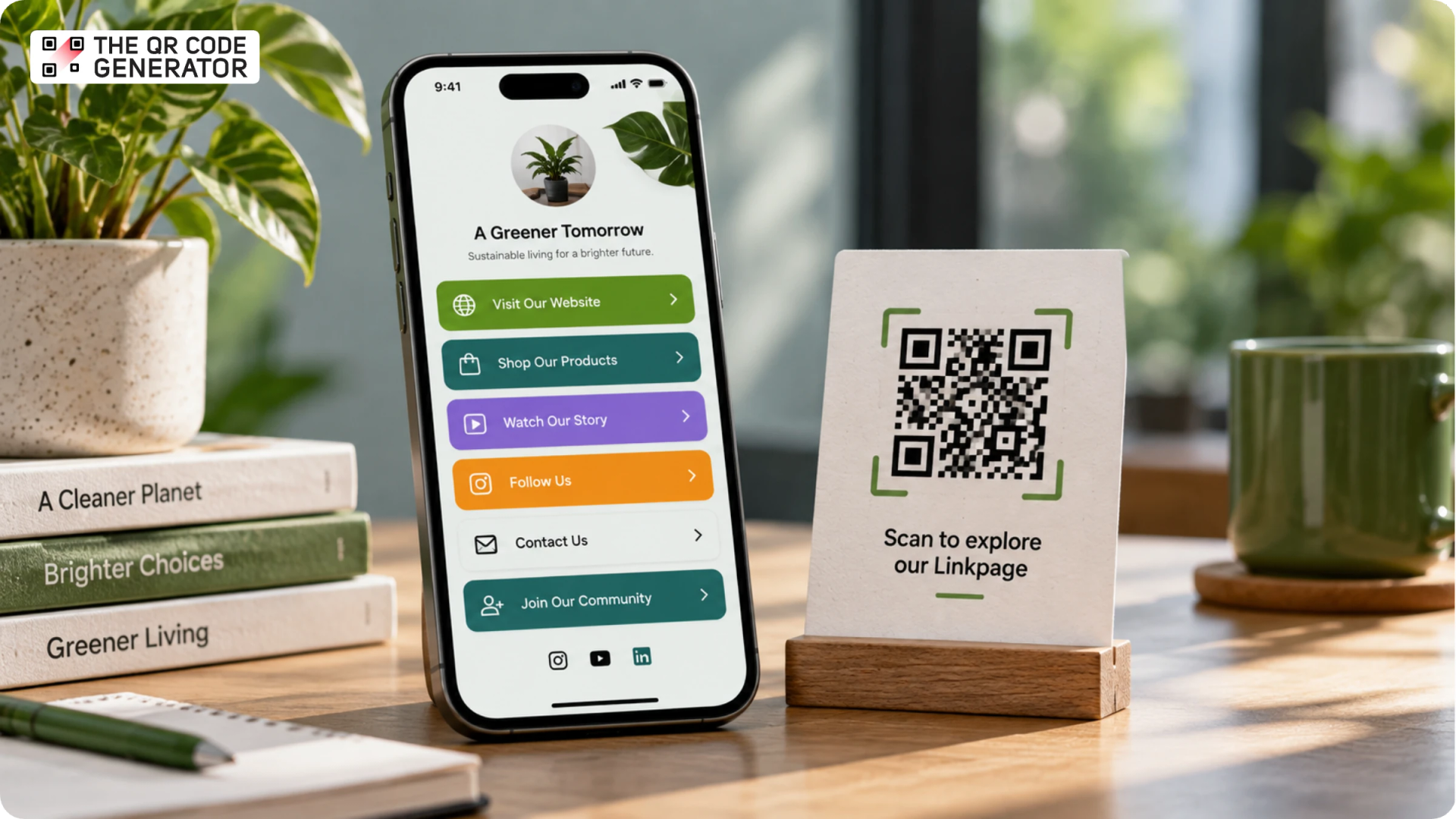
A Linkpage is a single web page that brings multiple important links together under one URL. You can share that URL wherever you have an audience, from social profiles and email signatures to websites, digital ads, or printed materials. Visitors land on a page and choose where to go next, whether that is your store, the latest video, a sign-up form, contact details, or another destination.
Linkpages gained popularity as link-in-bio pages to bypass social media link limits. They allowed creators and businesses to consolidate multiple destinations into one page. Over time, their use expanded beyond social media, with tools like Linktree popularizing the format for organizing and sharing links.
On The QR Code Generator (TQRCG), this feature is called Linkpages. You build a branded page, add as many links as you need, and send followers to it from any profile. A restaurant might list its menu, reservations, and reviews on one page. A musician might stack tour dates, streaming links, and merch.
In this guide, we'll look at why businesses use Linkpages, what you can add to one, how to create a Linkpage with The QR Code Generator, and how to use it as a QR Code landing page across digital and physical touchpoints.
Linkpages vs multi-URL QR Codes
Linkpages and multi-URL QR Codes both enable more than one link per scan, but they are built for different purposes. A Linkpage is a branded landing page that displays all your links in one place, styled with your logo, colors, and layout, so visitors browse and choose where to go. It works like a link-in-bio page: your shop, socials, latest video, and contact details, all on one designed page you control.
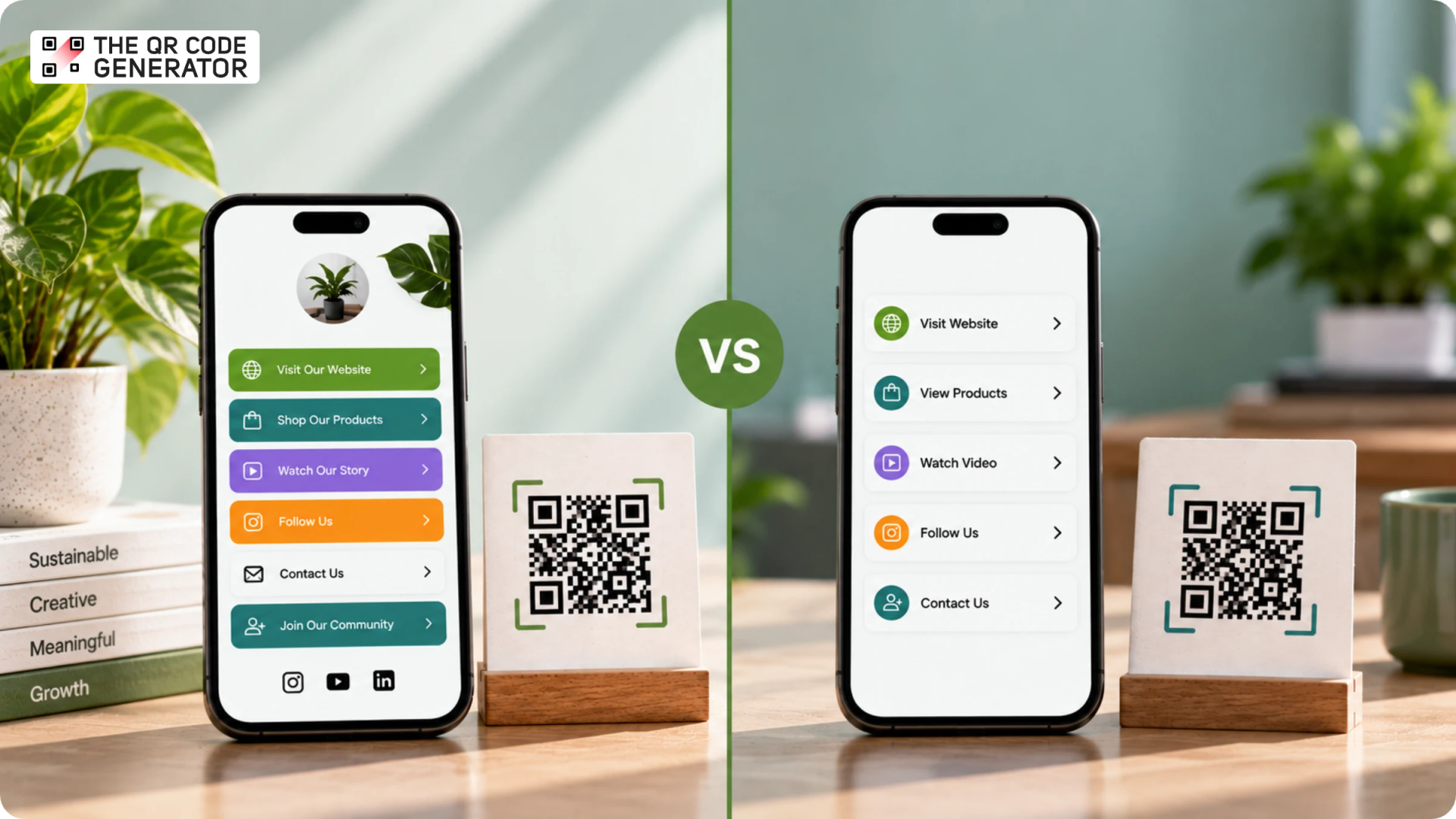
A multi-URL QR Code links one code to multiple URLs and can work in two ways. It can show scanners a menu of link options to choose from, or send each scan to a specific URL based on factors like device type, location, or time. On TQRC, a multi-URL QR Code gives you that menu of links, a fast set of choices behind one scan, without the page design and branding of a Linkpage.
Why businesses use Linkpage
Businesses use Linkpages to send one audience to many destinations without ever changing their profile link. The reasons range from everyday convenience to the standards a serious brand cannot skip.
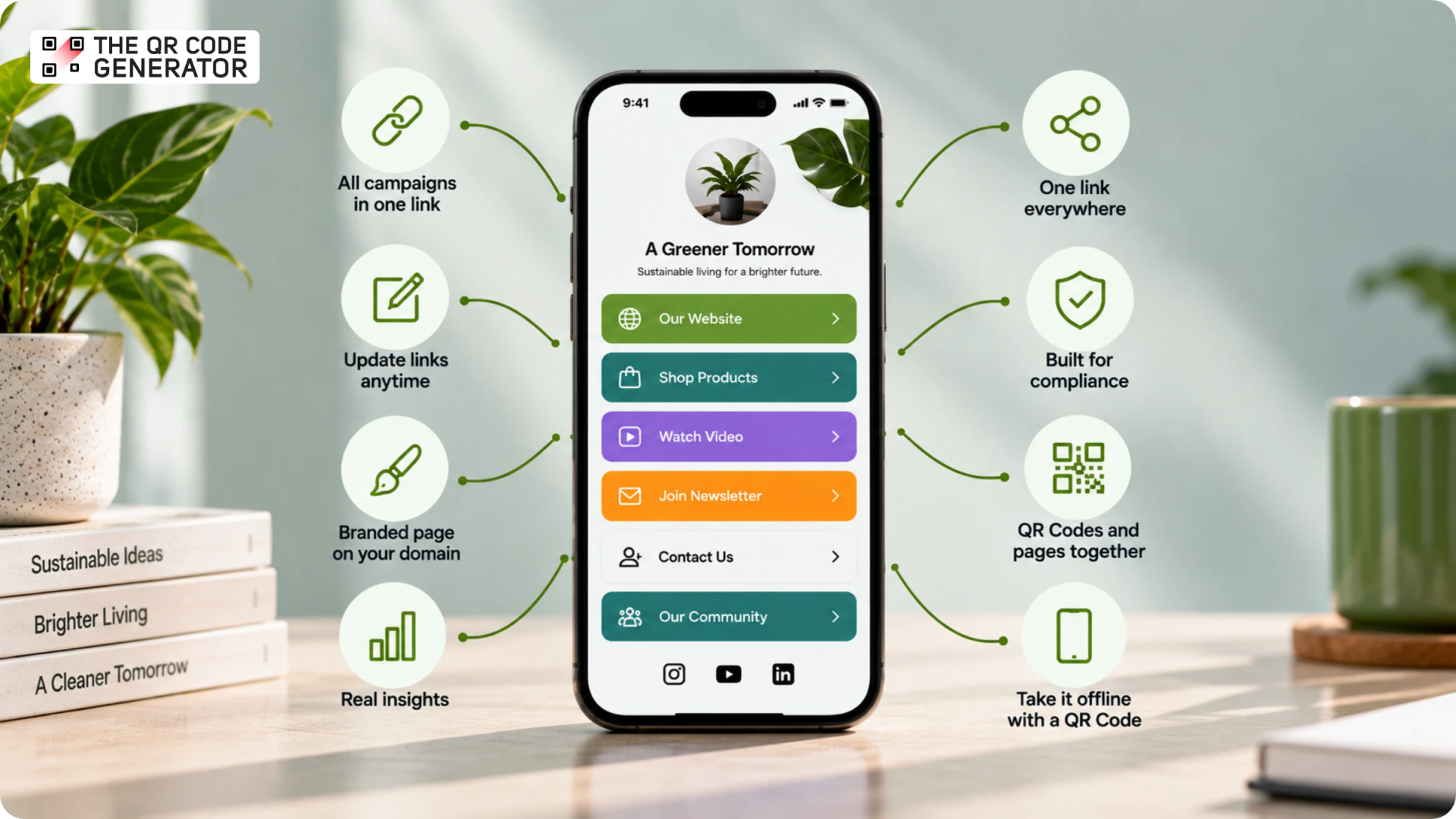
Consolidate every campaign behind one link
A Linkpage holds every active link in one place, so a single profile link can carry several campaigns at once. You never have to choose which URL to feature this week. During a product launch, a brand can list the new product, a demo video, and a discount page on the same page, and shoppers reach whichever one they came for.
Update your links without touching your profile
You can change what the page shows at any time, and your profile link stays the same. That means no editing your Instagram or TikTok bio every time an offer or a post changes. A creator swaps last week's video for this week's on the page, and the bio link never has to move.
Show a branded page on your own domain
A Linkpage can carry your logo, colors, and layout, so the click feels like part of your business instead of a raw address people have to trust. The stronger tools go further and run that page on your own domain rather than a shared one. That matters for any brand that invests in recognition, because when visitors land on an unfamiliar domain with a different visual system, trust drops and the brand connection weakens.
See what your links and scans actually do
A Linkpage shows you which links people tap, so you act on real behavior instead of guessing. When a store sees most clicks landing on its size guide, it moves that link to the top and puts its bestseller right below. The reporting that drives bigger decisions goes deeper: where visitors came from, what devices they used, and, when the page sits behind a QR Code, the city or country where it was scanned.
Use one link across every platform
One page link works everywhere you have an audience, from Instagram and TikTok to YouTube, X, and your email signature. You keep a single link to share and maintain, rather than a different URL for each channel. A musician uses the same page link on every profile and in the newsletter, so one update reaches every follower at once.
Meet the compliance bar in regulated industries
Healthcare, finance, pharma, and enterprise teams need tools that meet strict security and privacy standards. When a legal team asks about SOC 2, GDPR, or HIPAA, most link-in-bio tools cannot answer. A page that handles customer traffic is subject to the same scrutiny as any other business system, so in a regulated industry, compliance is the deciding factor rather than a nice-to-have.
Run QR Codes and pages on one platform
A business that already runs QR Codes should not pay for a second tool to manage link-in-bio pages. Two tools mean two dashboards, two billing cycles, and two sets of analytics that never talk to each other. A single platform that builds both your QR Codes and your link-in-bio pages keeps the data and the billing in one place, which is where a QR Code generator with built-in Linkpages earns its keep.
Take your links offline with an updatable QR Code
Because a Linkpage lives at a single URL, you can turn it into a QR Code and put it on packaging, a poster, a receipt, or a business card. As a QR Code landing page, it reaches people who have never opened your social profile. A dynamic QR Code keeps that printed page editable long after it ships, so its content is never frozen the moment it goes to press. The sections ahead show how to build a Linkpage and turn it into a scannable QR Code.
How to create a Linkpage with TQRCG
Linkpage is a Uniqode feature, so you create a Linkpage on The QR Code Generator by upgrading to the Core or Plus plans. Both plans run on Uniqode, the platform behind TQRCG, so you build your Linkpage in your Uniqode dashboard, the same connected account, rather than a separate tool you sign up for again.
Here is how to build one in four steps.
Step 1: Create a new Linkpage
- Sign in to your Uniqode dashboard, click Linkpages in the left navigation, then + Create linkpage.
Step 2: Choose a starting point
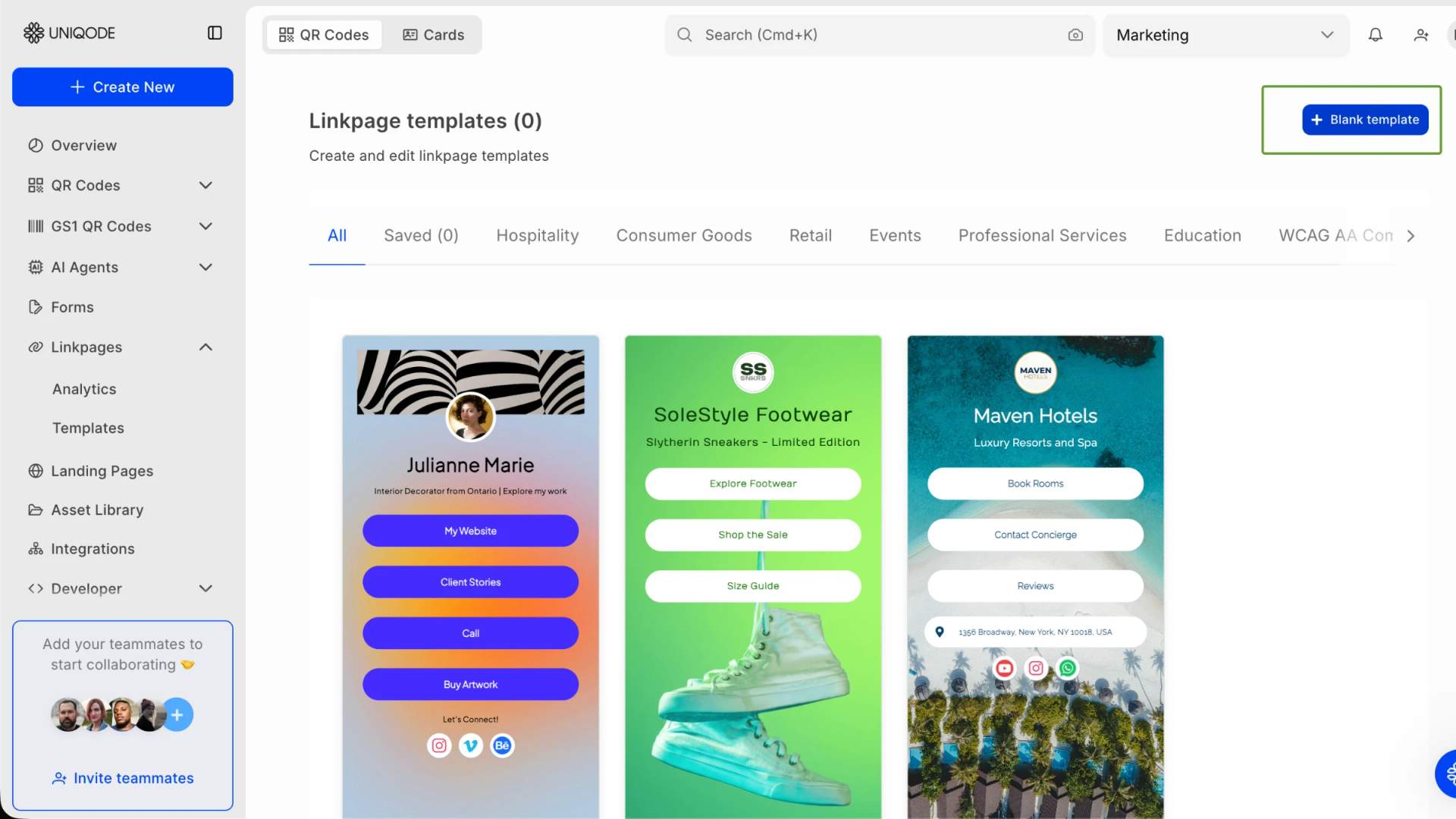
- Pick Start from a template for a ready-made layout built for events, products, or contact pages, or start from scratch by clicking + Blank Template.
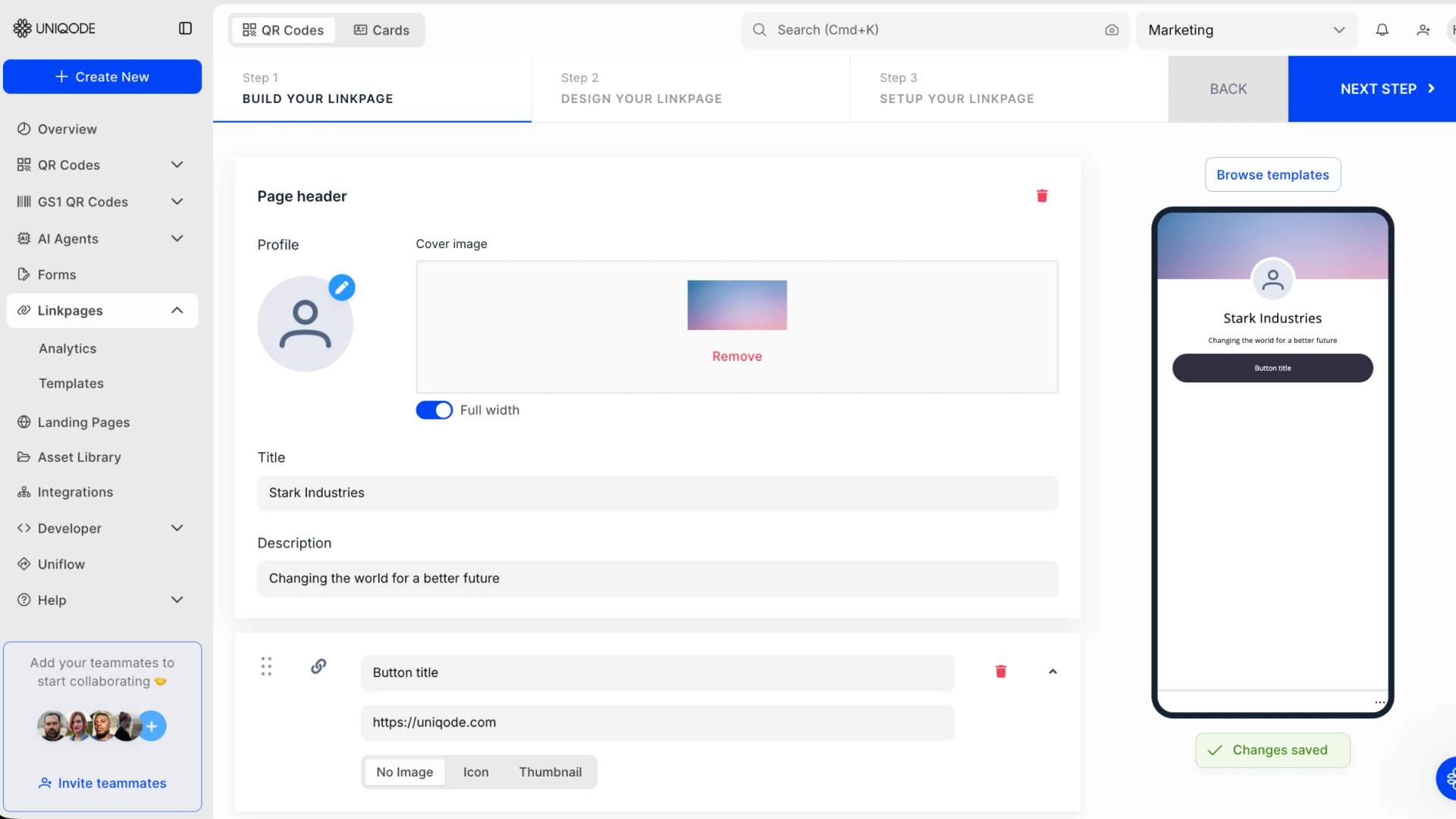
Step 3: Build your Linkpage
- Add what visitors see: a page title, a short description, and your buttons or links.
- Give each button a specific title, such as “Download product specs,” and the URL it links to. Keep the list tight, around 5 to 7 links, and put the most important action first.
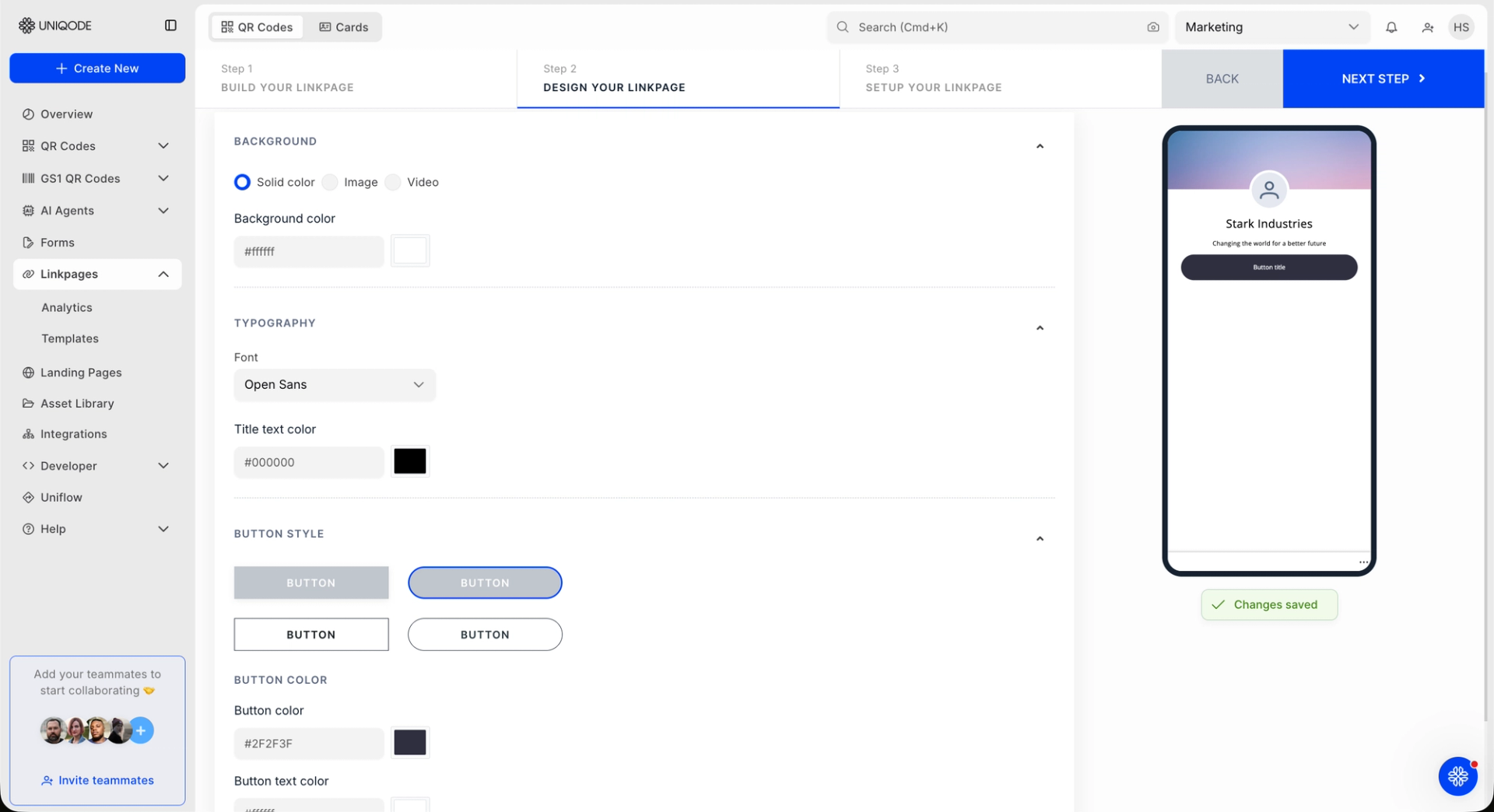
Step 4: Design your Linkpage
- Style the page to match your brand with your colors, fonts, background, logo, and profile image. A consistent look makes the page feel like part of your business rather than a generic list.
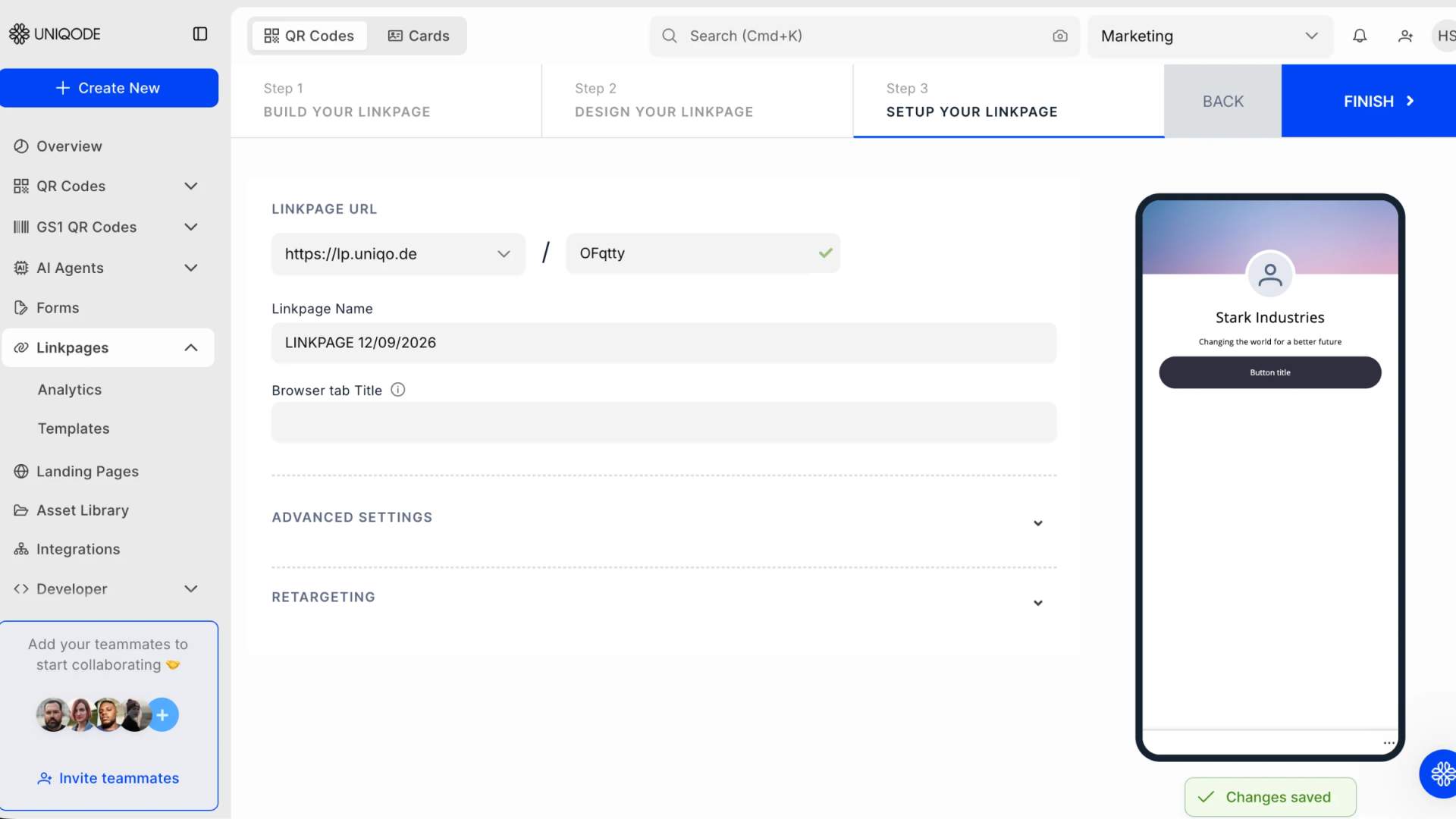
Step 5: Set up your Linkpage
- Set the Linkpage URL and slug, or select a Custom domain if you have one connected, then name the page and add a Browser tab Title.
- Under Advanced Settings, you can enable location analytics, schedule start and end dates, add password protection or an age restriction, or add the page to your Watchlist for daily view and click updates.
- The Retargeting fields let you add a Facebook Pixel or Google AdWords ID to measure and remarket to visitors.
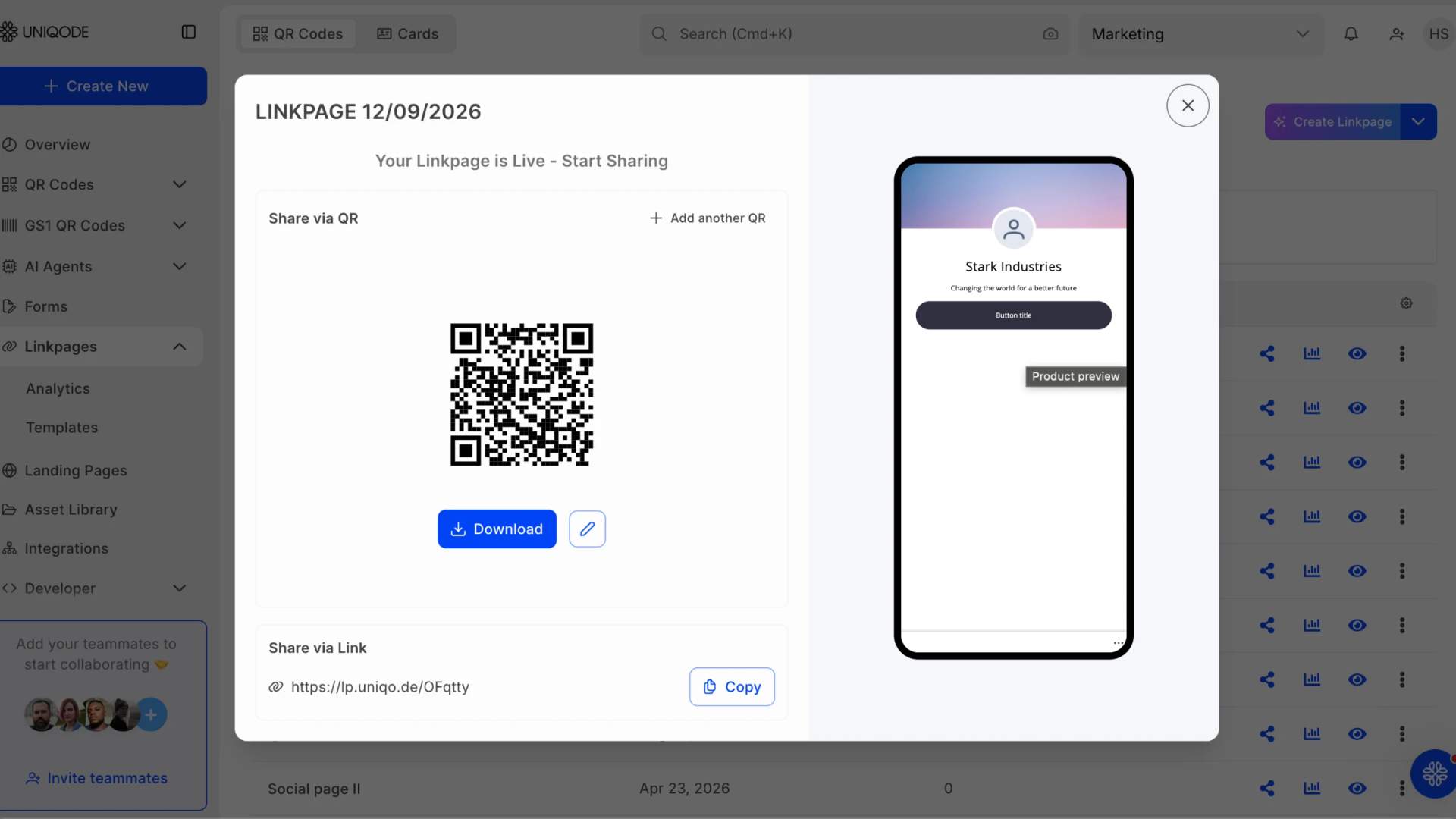
Step 6: Share via QR Code
- Once your Linkpage is live, Uniqode creates a QR Code and a shareable link for it.
- Click Download to save the QR Code for print or digital use, or use Copy under Share via Link to send the URL directly.
Beyond buttons, widgets like text, an image gallery, video, PDFs, a lead-capture form, tap-to-call, and maps turn a Linkpage into a lightweight landing page. A CPG brand might combine a product video, an image carousel, a sourcing PDF, and a wholesale inquiry form into a single page, all scannable on mobile.
→ Related: Uniqode's guide on combining multiple links into one page walks through every option in detail.
Best practices for creating Linkpages
A few simple practices can help you keep your Linkpage focused, useful, and effective after you publish it. Whether you share it through a social bio or a printed QR Code, keep these five best practices in mind:
- Focus on one goal per page: Create separate Linkpages for different audiences or objectives instead of trying to fit everything onto one page. For example, you can create separate pages for product information, event attendees, and social followers.
- Update your Linkpage regularly: Keep your content current and remove outdated links or offers to maintain visitor trust. Review active campaign pages monthly and evergreen pages quarterly.
- Use password protection strategically: Protect content intended for specific audiences, such as internal resources, VIP pre-launch content, or exclusive offers. You can also password-protect the QR Code itself for an additional layer of control.
- Connect your Linkpage to a dynamic QR Code: A dynamic QR Code lets you update your QR Code landing page without reprinting the code. This is especially useful when your code is already printed on packaging, signage, or other physical materials.
- Test your Linkpage on mobile first: Most visitors will access your Linkpage from their phones, especially after scanning a QR Code. Check that the text is readable, buttons are easy to tap, important content appears above the fold, and images or videos load quickly.
Create your Linkpage with TQRCG
A Linkpage gives you one branded destination for everything you want your audience to find, whether you share it online or turn it into a QR Code landing page for physical touchpoints. With TQRCG, you can create your Linkpage in the Uniqode dashboard, customize it to match your brand, and keep your links up to date as your needs change.
Ready to create yours? Sign up for TQRCG, upgrade to a Core or Plus plan powered by Uniqode, and start building your Linkpage today.
Frequently Asked Questions
What is a link-in-bio page?
A link-in-bio page is a single web page that hosts multiple links under a single URL. You share that one link on your social profiles, and visitors choose where to go from there, whether that is your shop, your latest video, or a signup form.
What is a Linkpage?
A Linkpage is The QR Code Generator's link-in-bio page feature. You build a branded page with your links, widgets, and design, then share it by link or QR Code. Linkpages is available on the paid plans and runs on Uniqode, the platform behind TQRCG.
Is a Linkpage necessary?
A Linkpage is worth it when you have more than one place to send people. Social profiles allow only one clickable link, so a business with a shop, a newsletter, and social channels uses a link-in-bio page to cover them all without swapping the profile link. If you only ever point followers to a single destination, a link-in-bio page is optional.
How much does a Linkpage cost on The QR Code Generator?
Linkpages is a paid feature, available on the Core plan (powered by Uniqode) and the Plus plan (powered by Uniqode). The Core plan costs $49 USD/month, billed yearly, while the Plus plan costs $99 USD/month, billed yearly.
Why does building a Linkpage happen in Uniqode?
TQRCG's paid plans are powered by Uniqode. When you upgrade to Core or Plus, you build and manage Linkpage in the Uniqode dashboard, the same connected account, rather than a separate tool you sign up for again. Your QR Codes and your Linkpages stay in one place.
Can I turn my Linkpage into a QR Code?
Yes. When your Linkpage goes live, you get a QR Code and a shareable link for it in the same dashboard. Use a dynamic QR Code so you can update the page later without reprinting the code. This is what lets a printed Linkpage stay current long after it ships.