









 New Dynamic QR Code
  New Static QR Code
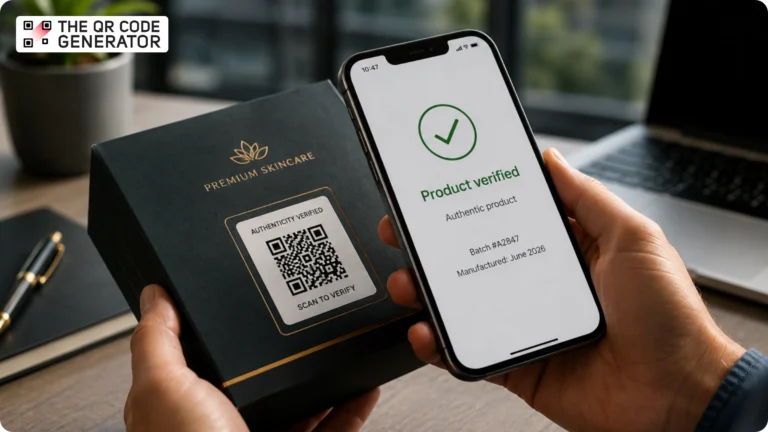
How do you prove that a product is genuine with a simple smartphone scan?
For many brands, the answer is product authentication QR Codes. These QR Codes link physical products to digital verification records, enabling customers, retailers, and distributors to verify authenticity in seconds.
But not all QR Codes provide the same level of protection. A standard QR Code can be copied and reused by counterfeiters, while a properly implemented authentication QR Code can help identify suspicious products and improve supply chain visibility.
This guide explains how QR Code product authentication works and how brands can use it to protect both their products and their reputation.
Table of contents
- What is a product authentication QR Code?
- Why a regular QR Code doesn’t prevent counterfeiting
- How QR Code product authentication works
- How to set up a product authentication QR Code system
- QR Codes vs. NFC tags vs. holograms
- Industry use cases for product authentication QR Codes
- GS1 Digital Link and the future of product authentication
- Choosing the right product authentication approach
- Start building a product verification workflow today
- Frequently asked questions
What is a product authentication QR Code?
A product authentication QR Code is a QR Code connected to a verification system that helps confirm whether a product is genuine. When a customer scans the code, the system checks the product’s unique identifier against a secure database and returns a verification result.
Authentication QR Codes are commonly used for:
- Product verification
- Warranty registration
- Product traceability
- Supply chain visibility
- Customer engagement
- Post-purchase support
Unlike a standard QR Code that simply opens a webpage, an authentication QR Code connects a physical product to a specific digital record. This allows brands to verify individual items rather than entire product categories.
For customers, the process is simple:
- Scan the QR Code
- View the verification page
- Confirm whether the product is authentic
For brands, each scan creates valuable data that can help identify suspicious activity and potential counterfeit products.
Why a regular QR Code doesn’t prevent counterfeiting
Many businesses assume that placing a QR Code on a package automatically makes the product harder to counterfeit. Unfortunately, that’s not how QR Codes work.
A standard static QR Code contains the same information every time it’s scanned. If a counterfeiter obtains one genuine product, they can scan the QR Code, recreate it, and print it on thousands of fake products. The copied QR Code will continue to work because it points to the same destination as the original.
For example, a skincare company prints a QR Code that links customers to a product information page. A counterfeiter can copy that QR Code and place it on counterfeit packaging. When customers scan the code, they still reach the company’s legitimate webpage. From the customer’s perspective, everything appears normal. This is why authentication requires more than a QR Code alone.
Effective product authentication relies on a combination of unique product identifiers, verification records, secure landing pages, scan analytics, and ongoing monitoring. These elements work together to create a product verification workflow rather than a simple link.
How QR Code product authentication works
Most product authentication systems use unique QR Codes connected to individual product records. When a customer scans the QR Code, the verification system retrieves information associated with that product and displays it on a verification page.
- Create a unique identifier: Each product is assigned a unique identifier. This could be a serial number, batch number, product ID, or warranty number. The identifier helps distinguish one product from another.
- Connect it to a product record: The identifier links to a digital record containing product information. This record may include details such as the product name, manufacturing date, warranty information, or other relevant data.
- Generate and assign QR Codes: Once product records are created, a unique QR Code is generated for each identifier. The QR Code links to the corresponding product record, ensuring that each product, batch, or unit points to the correct verification page.
- Add the QR Code to the product: The QR Code is printed on the product, packaging, label, or insert. When customers scan it, they are taken directly to the product’s verification page.
- Record scan activity: Each scan can generate useful data, such as when and where it occurred. Brands can use this information to understand customer engagement and monitor product activity.
- Show the verification result: The verification page displays information that helps customers confirm they have the correct product. A clear, easy-to-use page helps build trust and creates a better customer experience.
- Update information when needed: If the QR Code is dynamic, brands can update the destination page without reprinting the QR Code. This makes it easy to keep product information accurate and add new content over time.
How to set up a product authentication QR Code system
Building a product authentication workflow doesn’t have to be complicated. Many businesses start with a simple verification experience and expand it over time as their needs evolve.
Here’s a practical approach to getting started.
Step 1: Identify your authentication goals
Before generating QR Codes, determine what you’re trying to achieve.
For some businesses, the goal is simply to help customers verify product information. Others may want to improve traceability, support warranty registration, or gain visibility into how products are being scanned after purchase.
Common goals include:
- Building customer trust
- Verifying product information
- Improving product traceability
- Supporting warranty claims
- Monitoring product engagement
- Detecting unusual scan activity
Defining your goals early helps shape the rest of your authentication workflow.
Step 2: Create and assign QR Codes
Once you’ve established your goals, the next step is generating the QR Codes that customers will scan.
For products that require item-level verification, many businesses create a unique QR Code for each product record. This can be done by importing product information such as GTINs, serial numbers, batch numbers, warranty IDs, or other identifiers through a spreadsheet and generating QR Codes in bulk.
With The QR Code Generator (TQRCG), you can create dynamic QR Codes individually or in bulk from a single dashboard. This makes it easier to manage large product catalogs while maintaining a unique QR Code for each product, batch, or item, depending on your authentication requirements.
Because the QR Codes are dynamic, you can update where they lead at any time without reprinting packaging. This flexibility is especially useful when product information changes, support resources need updating, or verification workflows evolve over time.
Step 3: Create a verification landing page
The verification page is often the first interaction a customer has with your authentication system.
A well-designed page should clearly answer one question:
“Does this product match the information I’m expecting to see?”
At a minimum, the page should display key information such as the product name, image, description, manufacturing or batch details (when applicable), and customer support information.
Many brands also use verification pages to provide additional value after the scan, including product instructions, ingredient information, sustainability details, warranty registration, product manuals, and customer support resources.
The goal is to create a simple experience that helps customers quickly find the information they need while building trust in the product and the brand.
Step 4: Add QR Codes to product packaging
Placement matters. If customers can’t easily find or scan the QR Code, adoption rates will suffer.
Authentication QR Codes are commonly placed on:
- Product labels
- Product boxes
- Hang tags
- Product inserts
- Warranty cards
For higher-value products, businesses may place QR Codes beneath scratch-off panels or across tamper-evident seals to discourage label transfers. Regardless of placement, ensure the QR Code remains easy to scan under normal lighting conditions.
Step 5: Monitor scan analytics
Authentication isn’t a one-time setup. The real value often comes from understanding what happens after products reach customers.
Scan analytics can help businesses understand which products receive the most scans, where products are being scanned, which markets generate the most engagement, and whether unusual scan patterns warrant further investigation.
TQRCG’s scan analytics dashboard provides visibility into scan activity, helping brands better understand customer interactions and product performance.
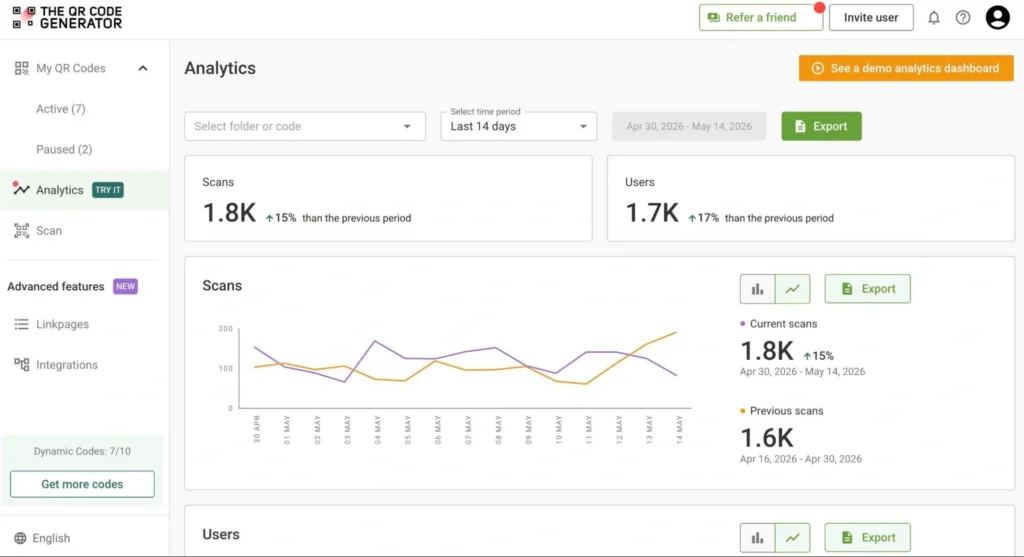
While scan data alone cannot prove counterfeiting, unusual activity may highlight areas worth investigating further.
Step 6: Continuously improve the experience
Product authentication should evolve alongside your business. As your product catalog grows, consider expanding your verification experience to include product registration, loyalty programs, customer education, product recommendations, and support resources.
Because dynamic QR Codes can be updated without reprinting, businesses can continue improving customer experiences long after products leave the factory.
QR Codes vs. NFC tags vs. holograms
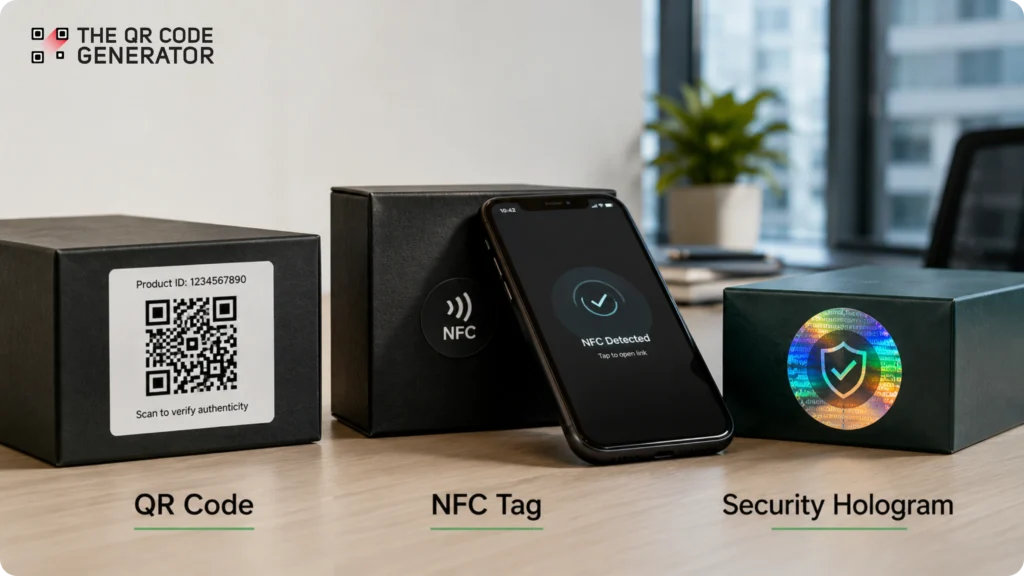
Businesses evaluating authentication solutions often compare QR Codes vs. NFC tags and holographic labels. Each approach offers different advantages.
| Feature | QR Codes | NFC Tags | Holograms |
| Smartphone compatibility | Excellent | Good | None |
| Consumer familiarity | High | Moderate | High |
| Cost per unit | Low | Higher | Moderate |
| Digital verification | Yes | Yes | No |
| Scan analytics | Yes | Yes | No |
| Implementation complexity | Low | Higher | Low |
QR Codes
QR Codes remain one of the most accessible authentication tools available. They are inexpensive to implement, familiar to consumers, and compatible with virtually every smartphone camera.
For most businesses, QR Codes provide the best balance of cost, scalability, and usability.
NFC Tags
NFC (Near Field Communication) tags contain embedded chips that communicate with smartphones when placed nearby. Because they require dedicated hardware, NFC tags are often used for luxury goods, high-value products, and specialized supply chain applications.
While highly effective, NFC implementations typically involve higher production costs and greater manufacturing complexity.
Holograms
Holograms provide a visual security layer that consumers recognize immediately. However, they offer limited digital capabilities and cannot provide scan analytics, verification pages, or customer engagement opportunities.
For this reason, holograms are often used alongside digital authentication methods rather than as standalone solutions.
For many brands, QR Codes serve as the most practical starting point because they combine verification, engagement, and analytics within a single solution.
Industry use cases for product authentication QR Codes
Product authentication QR Codes can be used across many industries. While the exact use case may vary, the goal is usually the same: help customers access trusted product information and build confidence in their purchase.
Cosmetics and personal care
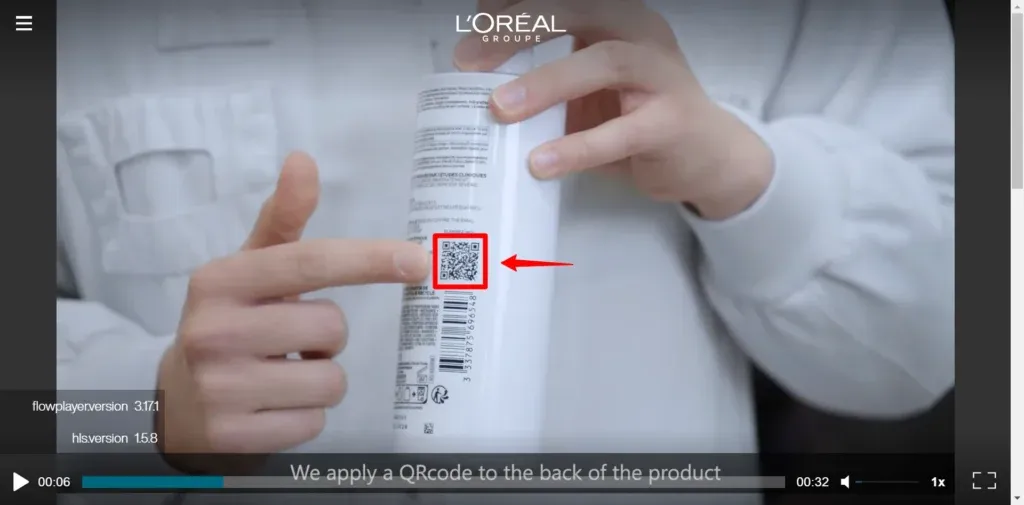
Counterfeit beauty products can erode customer trust and pose safety risks. Product authentication QR Codes give customers a simple way to access product information. They can also access ingredient details, usage instructions, and support resources with a quick scan. The QR Codes also help brands provide greater transparency after purchase.
📌 For example, La Roche-Posay places QR Codes on certain products that allow customers to access detailed information about the product. This includes where it was made, when it was produced, its ingredient list, the origin of ingredients, and the quality checks it passed before reaching store shelves.
Supplements and wellness products
Consumers increasingly want to know more about the products they consume. Authentication QR Codes can help supplement and wellness brands share that information. These brands can share manufacturing information, certifications, educational content, and product details in one place with QR Codes. Brands can also use the scan experience to direct customers to support resources, subscription programs, or reorder options.
📌 For example, Wellversed uses QR Code-based verification labels that allow customers to check the authenticity of certain products before using them.
Electronics
For electronics manufacturers, product authentication often goes beyond verification. A QR Code can help customers register products, activate warranties, access setup instructions, and find troubleshooting resources. This makes it easier for customers to get support while reducing the need to search through manuals or paperwork.
📌 For example, Samsung uses QR Codes on certain products and packaging to help customers quickly access product information and support resources.
Food and beverage
Food and beverage brands often use QR Codes to improve transparency and traceability. A quick scan can help customers learn more about a product’s ingredients, sourcing practices, nutritional information, and sustainability efforts. This allows brands to share more information than would fit on a product label.
📌 For example, Carrefour uses QR Codes on selected food products to help shoppers learn where their food comes from, how it was produced, and how it moved through the supply chain.
Luxury goods and premium products
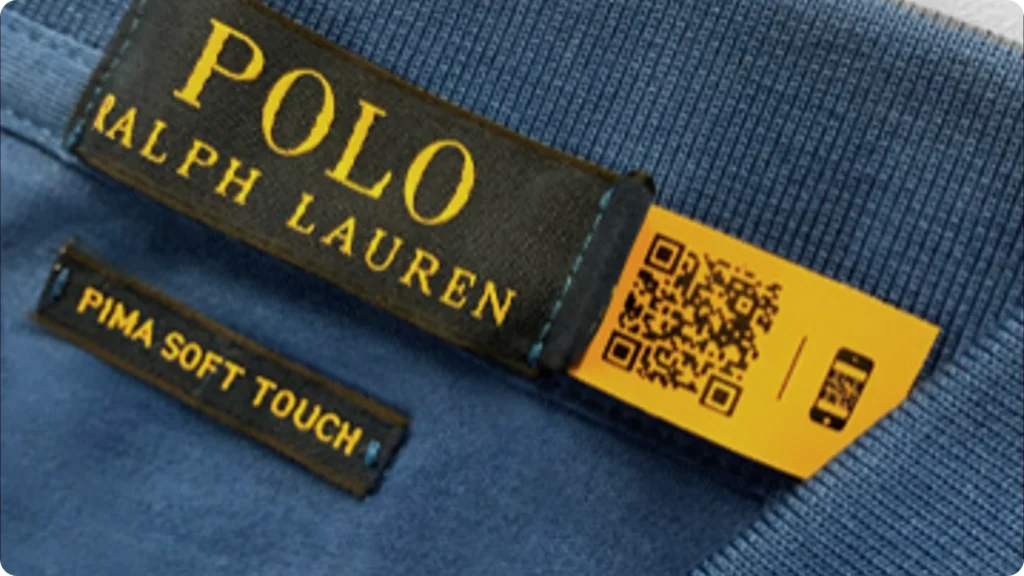
Luxury brands frequently use QR Codes as part of broader product authentication and customer engagement programs. In addition to helping customers verify product information, QR Codes can provide access to care instructions, product registration, exclusive content, and personalized brand experiences.
📌 For example, Ralph Lauren has used QR Code-enabled digital identity programs that allow customers to verify products and access additional brand content through a scan.
GS1 Digital Link and the future of product authentication
As more brands add QR Codes to their packaging, many are looking for ways to do more with a single code. That’s where GS1 Digital Link comes in.
Today, a product may need multiple codes on its packaging. A barcode helps retailers identify the product at checkout, while a separate QR Code gives customers access to product information, support resources, or digital experiences.
GS1 Digital Link allows brands to combine these functions into a single QR Code. Instead of printing multiple codes on a package, businesses can use one standardized QR Code that works across different systems and use cases.
For example, the same QR Code can help a retailer identify a product at checkout while also giving customers access to product information, traceability details, sustainability information, or authentication-related content. This creates a cleaner packaging design and a more connected product experience.
As brands look for better ways to share information and improve transparency, GS1 Digital Link is becoming an important part of the conversation around product authentication and traceability.
Preparing for Sunrise 2027
GS1 Sunrise 2027 is a global initiative designed to help retailers and brands adopt 2D barcodes, including QR Codes, at checkout.
As retailers upgrade their systems, brands have an opportunity to rethink how they use QR Codes on packaging. Instead of using QR Codes only for marketing campaigns, businesses can use them to support product information, customer engagement, traceability, and verification efforts.
For brands investing in QR Code tools today, it makes sense to think beyond immediate use cases. Building a flexible strategy with QR Codes can help simplify packaging, improve customer experiences, and prepare for future industry standards.
Choosing the right product authentication approach
Not every business needs the same level of product authentication. The right solution depends on what you’re trying to achieve.
| Business need | Recommended approach |
| Product information and support resources | Static QR Code |
| Editable product information | Dynamic QR Code |
| Scan tracking and customer engagement insights | Dynamic QR Code with analytics |
| Warranty registration | Dynamic QR Code linked to a registration form |
| Product traceability | Dynamic QR Code linked to product records |
| Advanced anti-counterfeiting protection | Specialized authentication solution |
For many small and mid-sized businesses, dynamic QR Codes offer the best balance of flexibility and cost. They allow brands to update information without reprinting packaging, track scan activity, and create better customer experiences after purchase.
Using The QR Code Generator (TQRCG), businesses can create dynamic QR Codes, generate them in bulk, and manage them from a centralized dashboard. This makes it easier to support product information, traceability, and customer engagement initiatives as needs evolve.
Brands operating in highly regulated industries or facing significant counterfeiting risks may require additional technologies, such as serialization systems or tamper-evident packaging.
The most important step is choosing a solution that fits your current needs while leaving room to grow in the future.
Start building a product verification workflow today
Product authentication QR Codes help brands connect physical products with digital information. They make it easier for customers to access trusted product information with a simple scan.
While a QR Code alone cannot prevent counterfeiting, it can play an important role in a broader product authentication strategy. The right approach depends on your products, customers, and business goals.
For many businesses, the best place to start is with dynamic QR Codes. They provide the flexibility to update information over time, track scan activity, and create better post-purchase experiences without changing product packaging.
With The QR Code Generator (TQRCG), businesses can create dynamic QR Codes and generate them in bulk. As your needs grow, those same QR Codes can support product information, traceability, customer engagement, and other digital experiences.
Create your first product authentication QR Code with TQRCG today.
Frequently asked questions
To check product authenticity, scan the QR Code using your smartphone camera. The QR Code should take you to a verification page that displays product information, such as the product name, batch details, or warranty information. Always make sure the page belongs to the brand’s official website and that the information matches the product you purchased.
Businesses can create product authentication QR Codes using a QR Code platform such as The QR Code Generator (TQRCG). The QR Code can be linked to a product record, verification page, warranty registration form, or other information that helps customers verify and learn more about a product.
A QR Code alone cannot prevent counterfeiting. However, QR Codes can support product verification workflows by helping customers access trusted product information and allowing brands to monitor scan activity.
A static QR Code always points to the same destination and cannot be edited after creation. A dynamic QR Code allows businesses to update the destination without changing the printed QR Code, making it better suited for product verification and customer engagement.
Yes. TQRCG can be used to create dynamic QR Codes, generate QR Codes in bulk, and track scan activity. These features help businesses create product verification workflows that improve transparency and customer trust.
