
How to Use QR Codes for Logistics Management

Harshajit
Last updated: May 18, 2026
10 min read
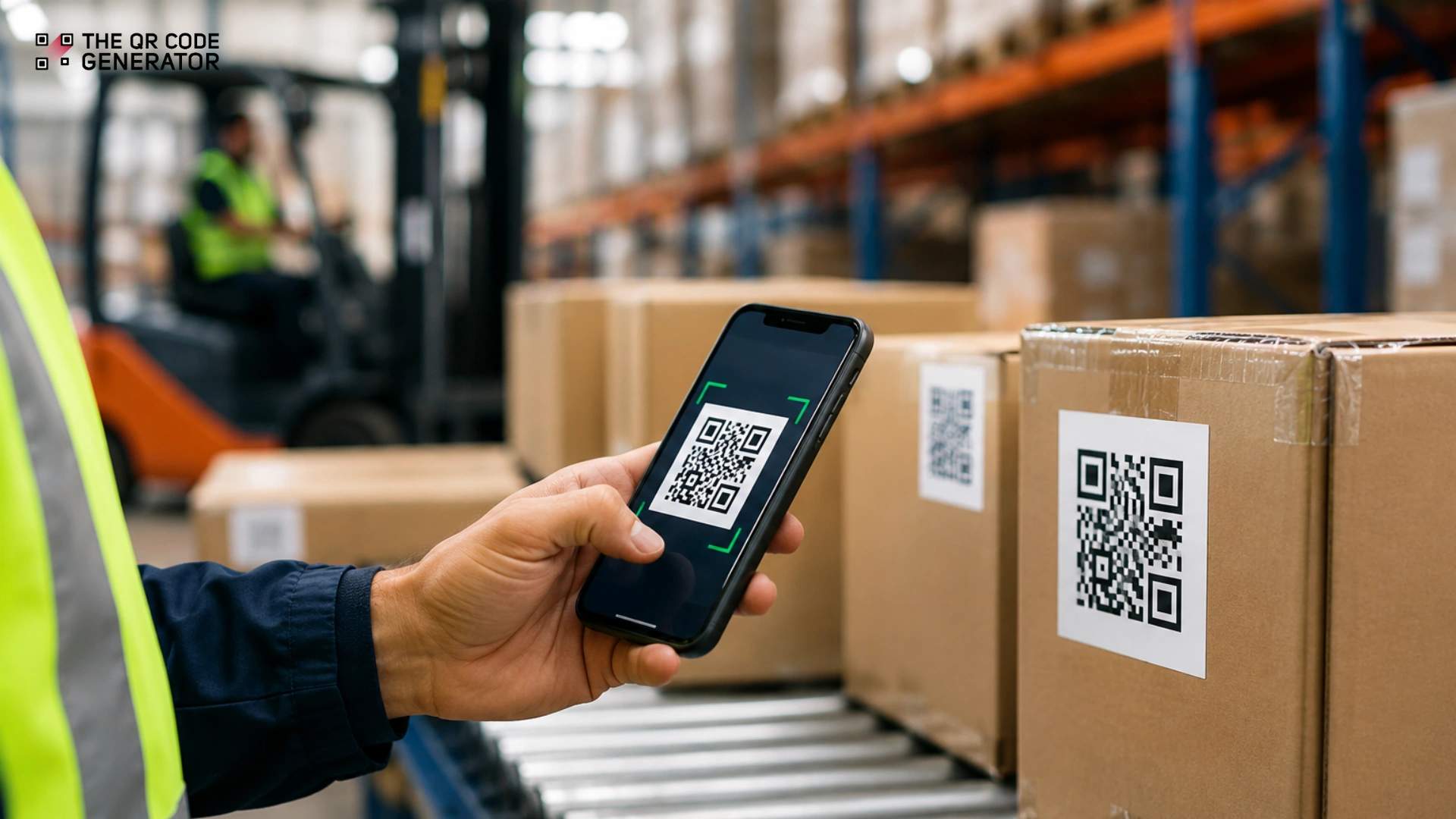
Many logistics operations still rely on outdated tracking systems, leading to lost paperwork, delayed shipment updates, inaccurate inventory records, and excessive manual data entry.
A QR Code for logistics connects shipments, pallets, and inventory to live tracking systems. Teams can scan QR Codes to update inventory records, confirm deliveries, and track shipment locations in real time. Businesses using QR Codes in inventory management report up to a 30% improvement in operational efficiency, while warehouse teams process orders faster with fewer manual errors.
This guide explains five common logistics use cases for QR Codes, how to deploy them across operations, and the best practices that help teams improve visibility and reduce errors.
The problem with manual tracking in logistics
The bigger the operation, the more expensive outdated tracking methods become. Traditional logistics systems fall short in three specific areas.
Limited visibility into shipment movements
Paper records, manual check-ins, and basic barcode scans create tracking gaps during transit. Teams often cannot see where shipments are or when delays happen until much later in the process. These gaps slow down response times, delay delivery updates, and make it harder to resolve customer issues quickly.
Manual data entry and errors
Manual data entry is one of the biggest causes of warehouse errors. According to PackemWMS, warehouse operations can see error rates between 20% and 25%.
Traditional barcodes add to the problem because they store limited information. Workers often need to manually enter shipment details, inventory counts, and location updates that should be captured automatically.
More manual work means more mistakes, slower operations, and higher labor costs.
Inadequate data for inventory and compliance
Traditional barcodes can identify a product, but they cannot store detailed information such as batch numbers, expiry dates, location history, or compliance records. This creates problems for logistics teams handling large inventories or regulated products.
Without complete tracking records, audits take longer, product recalls become harder to manage, and teams spend more time searching for missing information.
How QR Codes improve logistics tracking and operations
QR Codes help logistics teams track shipments, inventory, and deliveries in real time. A single scan can update records, reduce manual data entry, and give teams better visibility across the supply chain.
The five use cases below show where QR Codes have the biggest impact.
Real-time shipment and inventory tracking
QR Code scans update tracking systems as soon as a shipment moves. Teams can view live shipment data through warehouse management systems (WMS) and tracking dashboards without relying on manual updates.
Whether products arrive at a warehouse, move into storage, or reach the final delivery point, each scan updates the latest shipment status in real time.
For smaller operations, the same approach works at a simpler scale. A regional distributor with three dock doors can place a dynamic QR Code at each bay linked to a Google Sheet or warehouse management system (WMS). Every scan can timestamp arrivals and update records automatically without manual data entry.
Better inventory accuracy and speed
QR Code scanning reduces inventory error rates from 25% to under 5%. Teams can place QR Codes on shelves, pallets, and products to simplify receiving, storage, and inventory checks.
For example, scanning incoming stock at the loading dock can instantly update quantity and location records. During cycle counts, workers can quickly spot inventory differences before they become larger problems.
The result is faster inventory checks, fewer manual errors, and more reliable inventory data.
Richer data connectivity and traceability
QR Codes can store much more information than traditional barcodes. A single QR Code can link to serial numbers, batch IDs, expiry dates, compliance records, and shipment documents.
For example, a logistics team handling pharmaceutical shipments can scan a QR Code to view batch history, temperature logs, and compliance records without searching through paperwork.
For smaller operations, the same approach works for any business handling serialized or regulated products, including medical supplies, electronics components, or temperature-controlled goods. Teams can use batch-level QR Codes linked to a spreadsheet or inventory system URL to track product history through every stage of storage and delivery.
In many cases, the setup only requires a label printer and an account with The QR Code Generator (TQRCG). The result is a digital tracking record that does not rely on paper logs or manual filing.
Improved warehouse operations
QR Codes help warehouse teams track goods during receiving, storage, picking, packing, and dispatch. Each scan can update connected records and workflows, reducing manual checks and helping orders move faster through the warehouse.
At the parcel receiving dock, teams can scan shipments to update stock records and flag missing items early. During picking and packing, scans help confirm that the correct items are packed for the correct order. Before dispatch, a final scan verifies that the shipment is ready to leave.
For busy distribution centers, QR Code scans help reduce handling errors and keep daily operations on schedule.
Customer communication and proof of delivery
QR Codes help delivery teams confirm deliveries in real time. When drivers scan a QR Code during handoff, the system can automatically record the delivery time, location, and recipient details.
For customers, this creates better visibility into delivery status. For logistics teams, it reduces manual follow-ups, speeds up confirmation, and creates a digital record that helps prevent delivery disputes.
For smaller operations, the same process can work for deliveries and proof of delivery. A regional fulfillment business can generate a dynamic QR Code for each order and have drivers scan it during handoff. The scan can trigger a delivery confirmation workflow for the customer. QR Codes for returns also handle the last-mile logistics side.
| Challenge | Without QR Codes | With QR Codes |
|---|---|---|
| Shipment visibility | Limited tracking during transit | Real-time tracking updates |
| Data entry | Manual logging and updates | Automatic data capture |
| Error rate | Higher risk of human error | Fewer errors and faster alerts |
| Labor costs | Time spent on manual tasks | More time for operational work |
| Inventory data | Delayed stock updates | Real-time inventory accuracy |
| Item traceability | Limited product history | Full tracking and batch details |
| Compliance and audits | Manual documentation | Instant digital audit trails |
| Operational visibility | Delayed decision-making | Faster, data-driven decisions |
How to create QR Codes for your logistics operations
QR Codes for logistics help teams connect shipments, inventory, and deliveries to live tracking systems without replacing their existing setup.
Step 1: Start with your goals
First, decide what problem you want to solve. This could include improving shipment visibility, reducing inventory errors, or speeding up proof of delivery.
Many businesses start small by adding QR Codes to pallets or batches instead of labeling every item.
Step 2: Sign up to The QR Code Generator (TQRCG)
Create an account in TQRCG and choose the QR Code type that fits your workflow. Dynamic QR Codes work best for logistics because you can update links and documents without reprinting labels.
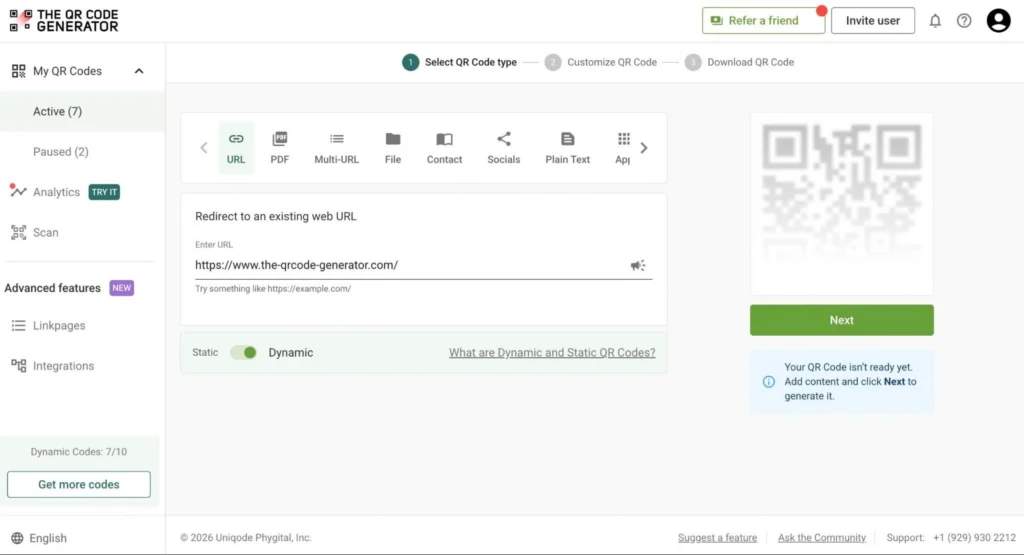
TQRCG’s free plan includes unlimited static QR Codes and two dynamic QR Codes, which are enough to test a real logistics workflow before scaling.
Step 3: Customize your QR Code
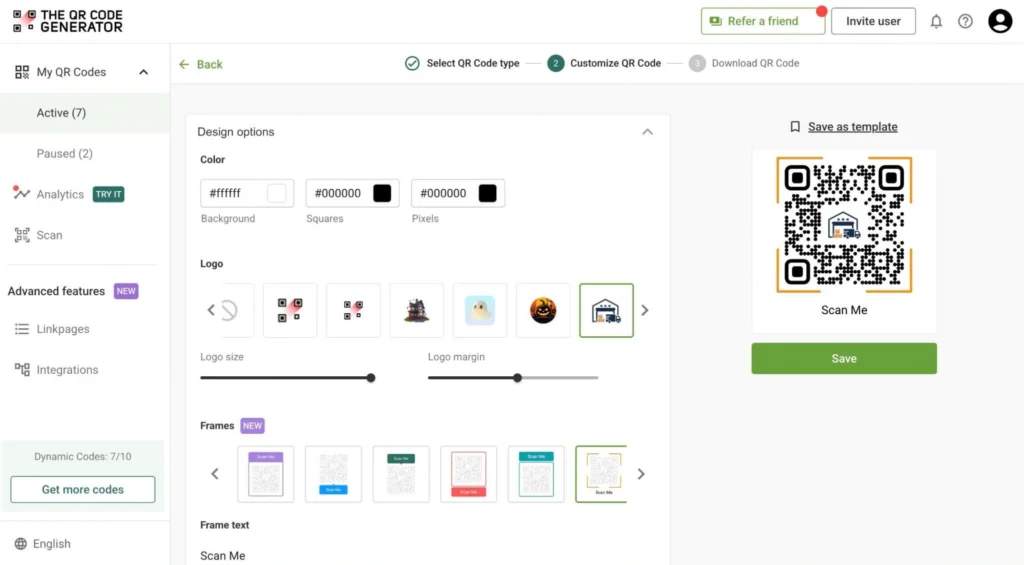
Add your logo, brand colors, and a short call to action while keeping the code easy to scan. Maintain strong contrast, avoid covering the corner markers, and test scans across Android and iOS devices before deployment.
Step 4: Download and deploy the QR Code
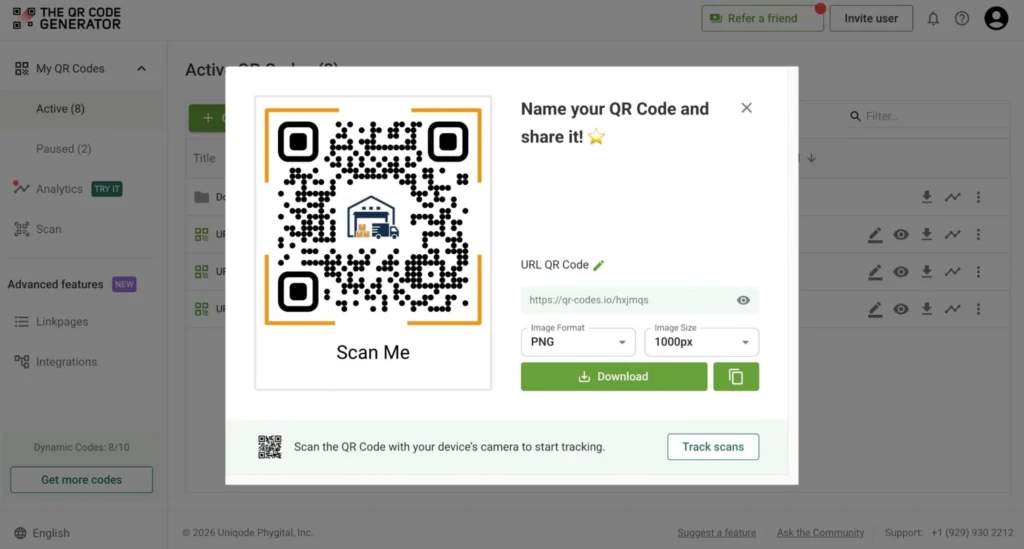
Download your QR Code and place it where teams already scan during daily workflows. Common locations include receiving docks, shelves, packing stations, delivery vehicles, and transfer checkpoints. Start with a few high-volume workflows before rolling QR Codes out across the full operation.
Step 5: Connect QR Codes to your systems
QR Codes can connect to tracking tools, inventory records, and internal workflows through URLs and automated processes. Many businesses start with simple setups such as Google Sheets, shared dashboards, or inventory pages before moving to more advanced integrations.
For larger operations, API-based integrations can connect QR Codes to warehouse management systems (WMS), transportation management systems (TMS), and ERP platforms. Businesses using TQRCG can upgrade to Uniqode for advanced API integrations and larger-scale workflow automation.
Step 6: Track and improve performance
Monitor scan activity, locations, and timing through your QR Code’s analytics dashboard.
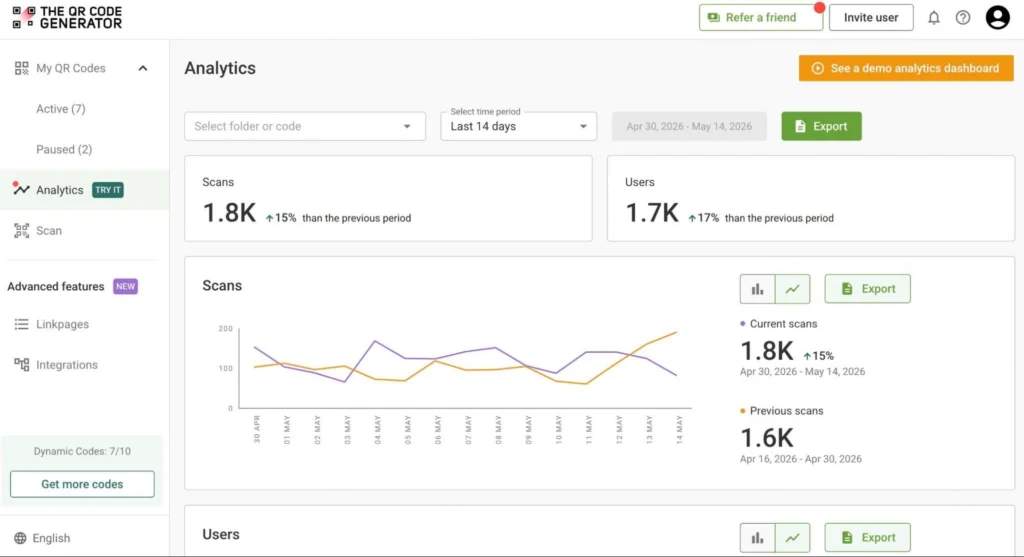
Regular reviews help identify workflow gaps, improve scan compliance, and update dynamic QR Code destinations without reprinting labels.
7 best practices for using QR Codes in logistics
QR Code implementations fail more often from execution mistakes than technology limitations. These seven practices keep deployments on track.
1. Choose dynamic over static for operational QR Codes
Dynamic QR Codes are the right choice for logistics workflows where tracking links, documents, or system integrations change regularly. Teams can update destinations without reprinting labels. Static QR Codes work best for fixed information that never changes.
2. Decide on granularity before you generate
The right level of QR Code tracking depends on the operational problem you are solving. Most logistics operations do not need a unique QR Code on every individual item.
Batch or pallet-level QR Codes reduce rollout complexity while still providing strong tracking visibility. Item-level tracking makes the most sense for regulated products or high-value goods.
3. Treat size, contrast, and print quality as non-negotiable
A QR Code that cannot be scanned reliably creates operational delays. Use the right size for the expected scanning distance and maintain a strong contrast between the code and its background.
Print QR Codes on durable materials that match the environment, especially in warehouses with moisture, heat, or rough handling.
4. Train staff on scanning workflows
QR Code adoption is a workflow challenge as much as a technology challenge. Train staff on what to scan, when to scan it, and how to handle failed scans.
Teams follow scanning processes more consistently when they understand how scans improve inventory accuracy, delivery tracking, and customer communication.
5. Add UTM parameters before you generate
Build UTM parameters into destination URLs before creating QR Codes that point to web pages or dashboards. UTM parameters help teams clearly track scan activity in Google Analytics. This visibility makes it easier to measure which locations, workflows, or delivery stages generate the most engagement.
6. Use HTTPS and authenticated destinations for sensitive data
Operational QR Codes that connect to shipment records, inventory systems, or compliance documentation should always point to secure destinations. HTTPS connections protect data during transmission, while authenticated systems prevent unauthorized access to sensitive information.
7. Combine with other technology where it makes sense
QR Codes work well across most logistics workflows, including receiving, picking, dispatch, and proof of delivery. Some large operations also combine QR Codes with RFID systems in high-volume environments where automated bulk scanning is important.
Businesses comparing RFID vs. QR Codes should consider factors such as scanning speed, hardware costs, accuracy, and deployment complexity before deciding where each technology fits best.
A hybrid approach helps businesses improve visibility without overinvesting in infrastructure.
Deploy QR Codes for logistics operations with TQRCG
QR Codes for logistics turn shipments, pallets, and inventory into live data points. QR Codes reduce the tracking gaps that create delays, manual errors, and poor visibility across supply chains.
Start with two touchpoints: one for shipment tracking and one for inventory management. Most teams can test QR Code workflows using smartphones and existing labels before expanding further.
The QR Code Generator (TQRCG) gives businesses 2 forever-free dynamic QR Codes with no time limit, which is enough to run a real pilot before committing to a larger rollout. Track scans, update destinations without reprinting labels, and maintain a clear digital record of shipment activity.
Frequently Asked Questions
What type of QR Code is best for logistics tracking?
Dynamic QR Codes work best for most logistics operations. Teams can update tracking links, documents, and system connections without printing new labels. They also provide scan analytics such as scan time, location, and device data.
How do QR Codes integrate with warehouse systems?
QR Codes connect to warehouse management systems (WMS), transportation management systems (TMS), and ERP platforms through URLs and automated workflows. When workers scan a QR Code, the system can update inventory records, confirm shipment status, or log location data in real time.
Can logistics QR Codes be used offline?
Yes. Static QR Codes that store plain text or embedded information can work without an internet connection. However, QR Codes connected to live dashboards or tracking systems need internet access for full functionality.
Are QR Codes better than barcodes for logistics?
QR Codes outperform traditional barcodes in three major areas: data storage, scanning flexibility, and system connectivity. These codes store more information, can be scanned from multiple angles, and connect directly to digital systems. QR Codes also reduce manual data entry and improve traceability across the supply chain.
How do QR Codes improve supply chain visibility?
QR Codes improve supply chain visibility by turning packages, labels, and assets into live data capture points. Each scan updates tracking systems in real time and reduces the visibility gaps created by manual processes. Over time, scan data helps teams identify delays, bottlenecks, and opportunities for workflow improvement.
Are QR Codes secure enough for logistics use?
Yes, when businesses use them correctly. Secure HTTPS links, login-protected systems, and avoiding sensitive information inside the QR Code itself help protect logistics and shipment data.