
How to Use Catalog QR Codes to Increase Sales

Harshajit
Last updated: July 31, 2026
10 min read
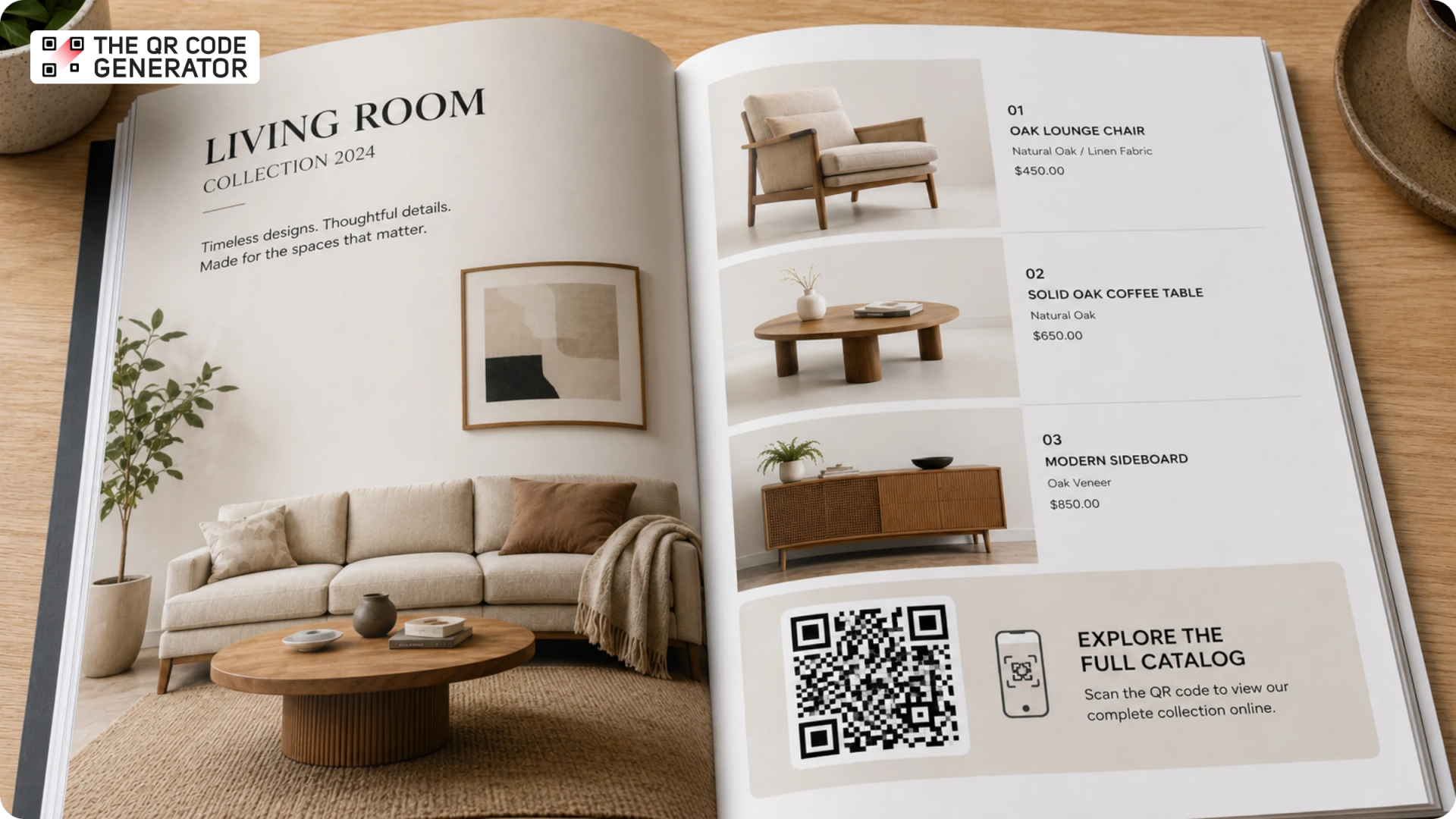
Your print catalog is one of the most expensive marketing assets your business produces. You invest in design, printing, and distribution, and then prices change, products get discontinued, and new items launch. But the catalogs are already in buyers' hands, on trade show tables, and in office drawers, and there is no practical way to update them.
A catalog QR Code is a QR Code placed in a print or digital catalog that links customers to product information, live pricing, videos, order forms, or the full digital catalog itself, with a destination you can update without reprinting.
This guide explains what a catalog QR Code is, when to use different QR Code types, how to create QR Codes with The QR Code Generator (TQRCG), and best practices to improve scan rates and track engagement.
What is a catalog QR Code?
A catalog QR Code is a QR Code you place on a print or digital catalog to link to additional content. That content can be a live PDF of your full product range, an individual product page, a demo video, an order form, or a promotional offer. The QR Code turns a static printed page into a gateway to information that would never fit on it.
What can a catalog QR Code do that a printed page cannot?
A print page holds a fixed amount of information at a fixed point in time. Once it goes to print, nothing on that page can change.
A catalog QR Code, on the other hand, removes that limit. Meaning, when a customer scans the code, they can access product videos, 360-degree views, real-time pricing, customer reviews, sizing charts, and order forms. The QR Code is not a decoration. It is the bridge between what fits on a printed page and what a customer actually needs to make a buying decision.
Scanning for more detail is already how customers behave, and Uniqode's State of QR Codes 2026 report found that 75% of consumers scan QR Codes to get more information, so a catalog QR Code fits a habit buyers already have instead of asking them to learn a new one.
Static vs. dynamic QR Codes: why it matters for print catalogs
Not all QR Codes work the same way for print, and because there are two distinct types to choose from, picking the wrong one becomes a costly mistake
- Static QR Codes lock the destination at the time of creation. If the linked page moves, breaks, or becomes outdated after you print, the code is permanently broken. There is no fix without reprinting.
- Dynamic QR Codes use a short redirect link. The destination can be changed on the dashboard at any time after printing. If your catalog goes out to 5,000 buyers and prices change two months later, you update the link in minutes. Every existing printed code now points to the new content.
Why businesses use QR Codes on catalogs
Print catalogs come with three problems most businesses recognize but rarely fix, because the fixes were never practical on paper alone, and a catalog QR Code solves all three.
Outdated information with no way to fix it
Pricing shifts, products get discontinued, and new items launch mid-season, so any change that lands after your catalog goes to print leaves every copy in circulation distributing the wrong information. The usual fix of a reprint only adds cost, since design updates, new print runs, and redistribution stack up fast.
A dynamic QR Code solves both at once: you redirect the destination whenever something changes, so a buyer scanning a six-month-old catalog still lands on your current pricing page, and you update information, promotions, or digital assets without paying to reprint anything.
Print catalogs are untrackable
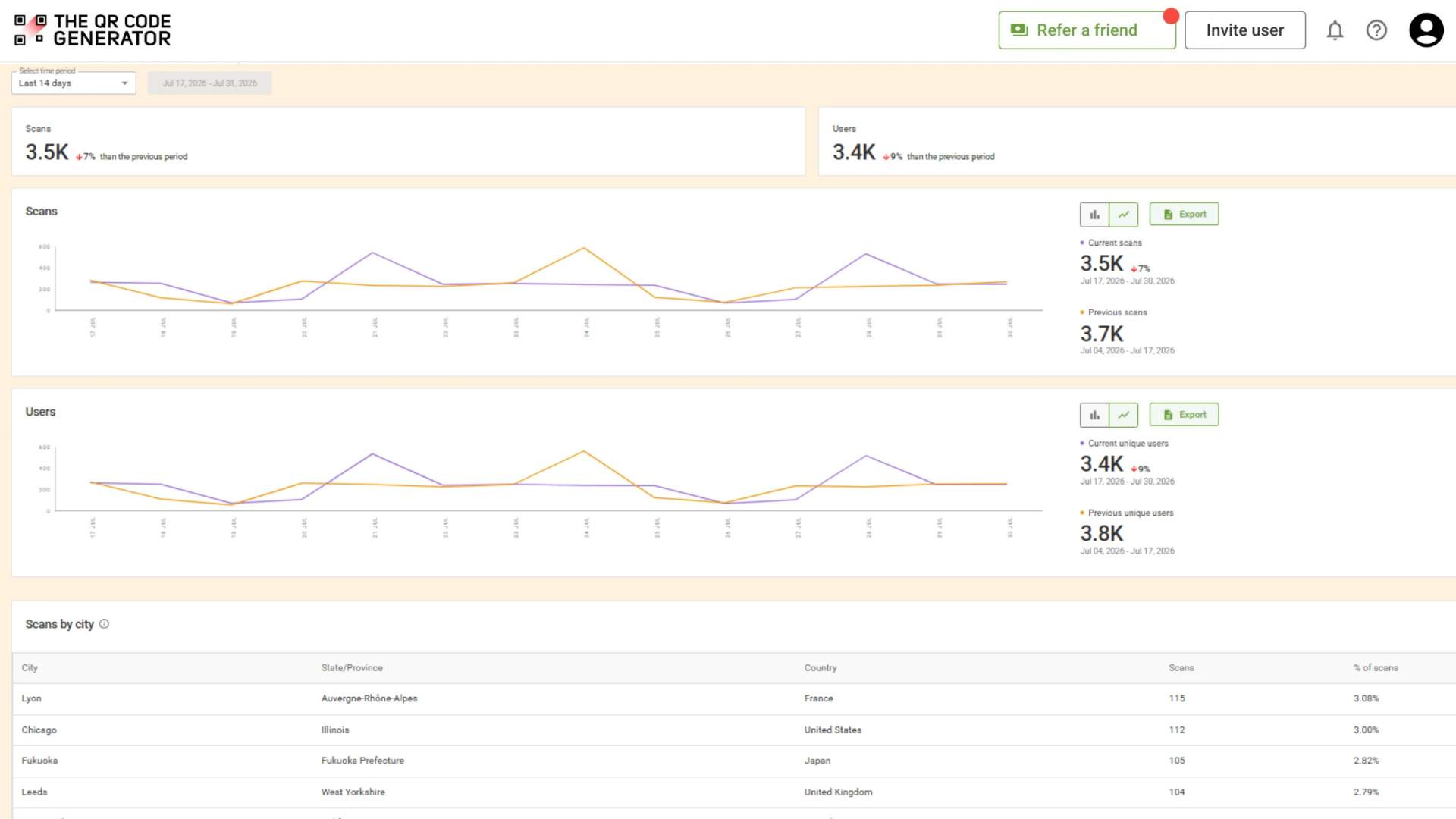
You can spend tens of thousands of dollars on a print run with no idea how many people looked at it, which products drew attention, which pages they lingered on, or whether any of it drove revenue. A catalog QR Code turns that blind spot into data, because dynamic QR Codes from The QR Code Generator (TQRCG) capture total scans, scan location, device type, and scan time, and adding UTM parameters plus a Google Analytics connection lets you track what happens after the scan.
Heavy catalogs are a burden for sales reps and trade show teams
For wholesale and B2B sales teams, printed sample books and catalogs are heavy to carry, expensive to produce, and outdated the moment pricing or inventory changes.
A single-page flyer or a business card with a QR Code linking to a live PDF catalog solves all of that. Reps carry one sheet. Buyers get instant access to the full product range. When pricing changes, the PDF updates, and every existing code delivers the current version.
7 ways to use a QR Code on a catalog
Businesses use catalog QR Codes in different ways depending on what they sell and who they sell to. Here are seven ways businesses use them across retail, wholesale, B2B, and e-commerce.
1. Link to a live digital catalog
The most direct use is a single QR Code on a flyer, mailer, or trade show display that links to your entire digital catalog, and as you update the link, every printed code automatically delivers the latest version. Sales reps can carry a single-page flyer instead of a full printed catalog, while buyers access the complete product range from their phones.
2. Link to individual product pages
A QR Code placed next to each product in a print catalog takes the customer straight to that product's page on your online store or website the moment they scan it. They can view real-time pricing, stock availability, customer reviews, product specifications, and purchasing options without manually searching for the item.
3. Link to product demo videos
Product videos show features, usage, and benefits in ways static images cannot. So, anything that performs better in motion is a natural fit here: a furniture company linking a catalog QR Code to a video of a sofa in a real living room, a consumer electronics brand linking to a hands-on walkthrough, or a beauty brand linking to a tutorial.
4. Link to an order form or checkout page
Wholesale buyers at trade shows and recipients of a B2B direct mail catalog can scan a code to reach a pre-filled order form or checkout flow. This removes the friction of writing down product codes, contacting a sales representative, or searching a website to find the correct item. The path from interest to purchase becomes much shorter.
5. Link to a coupon or limited-time offer
A seasonal retail catalog can include a QR Code that links to a current promotion. Because the destination is dynamic, one printed catalog can support multiple campaigns throughout a season. When one promotion ends and another begins, you simply update the destination. Customers scanning the same printed code always see the active offer.
6. Collect customer feedback
Add a feedback QR Code to the back page of a catalog to ask customers which products interest them most, what they want to see next season, or how they discovered your business. This feedback QR Code turns a catalog into a feedback channel and helps businesses gather product preferences, buying intent, and customer insights that would otherwise require a separate survey campaign.
7. Link to augmented reality product views
High-ticket categories such as furniture, home decor, and consumer electronics benefit from augmented reality (AR) experiences that let customers visualize products in their own space before buying. An AR QR Code can launch a 3D product view, virtual try-on experience, or product configurator directly from a smartphone. For products where visualization influences purchasing decisions, AR provides context that a printed photo cannot.
Which type of QR Code should you use for a catalog?
The term "catalog QR Code" describes what the QR Code is used for, not its type. Before creating one, choose the QR Code type that matches your goal.
| QR Code type | Best for | How it works |
|---|---|---|
| PDF QR Code | Sharing a full digital catalog | Links customers directly to an online catalog PDF. Ideal for sales reps, trade show flyers, direct mail pieces, and businesses that want to distribute a complete product catalog without printing additional copies. |
| URL QR Code | Product pages, online stores, and digital catalogs | Directs customers to any web page, including product listings, Shopify stores, wholesale portals, landing pages, or web-based catalogs. Dynamic URL QR Codes allow you to update the destination after printing. |
| Video QR Code | Product demonstrations and tutorials | Opens a product video hosted on YouTube, Vimeo, or another platform. Useful for furniture, consumer electronics, beauty products, and other categories where seeing the product in use helps customers make a purchasing decision. |
| Coupon QR Code | Promotions and limited-time offers | Delivers a discount, promotional offer, or campaign-specific deal when scanned. Dynamic Coupon QR Codes allow businesses to update offers throughout a season without changing the printed code. |
How to add a QR Code to a catalog with TQRCG
Creating a catalog QR Code with The QR Code Generator (TQRCG) takes six steps. The process works for both print and digital catalogs.
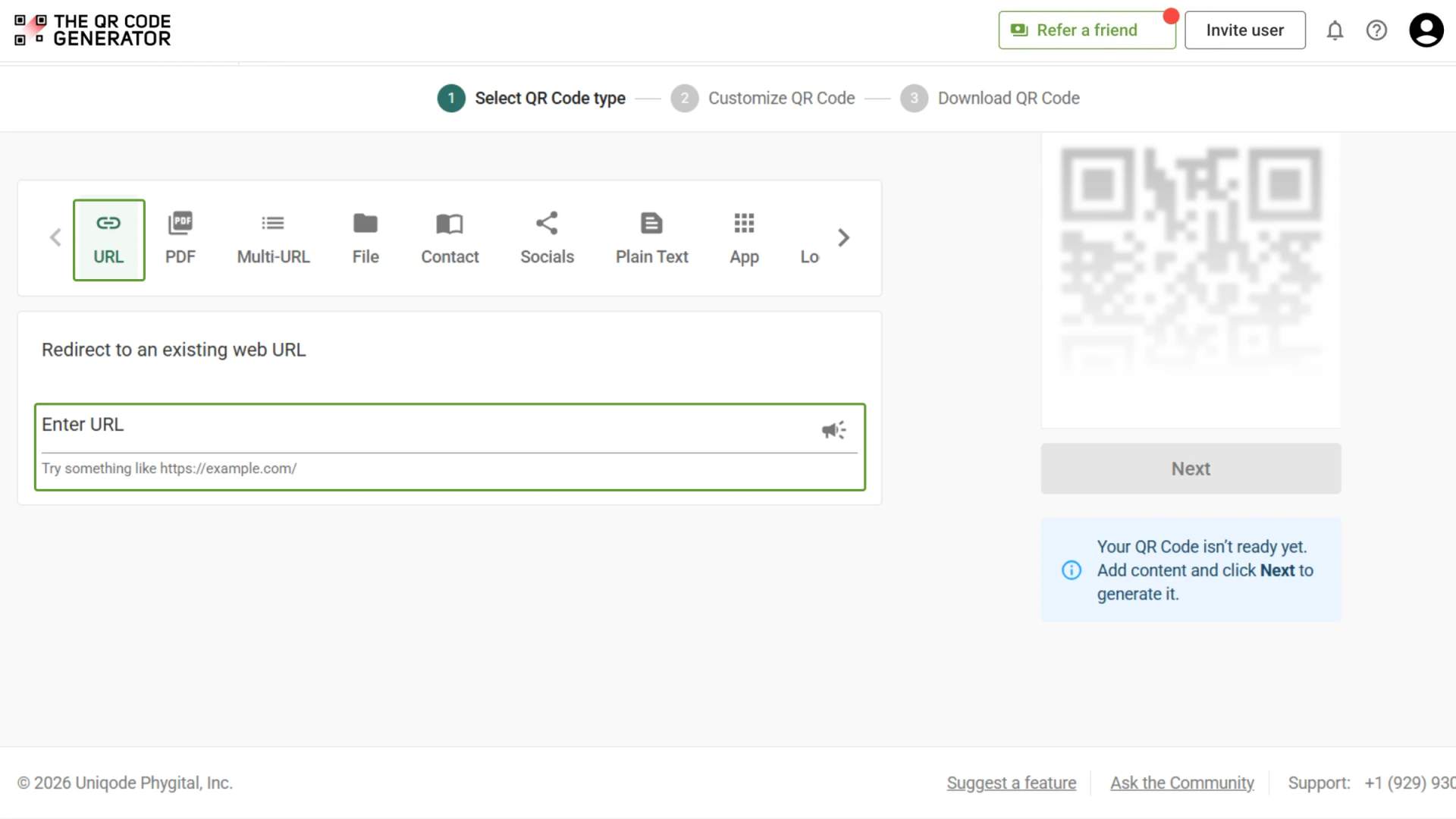
Step 1: Choose your QR Code type and add content
- Log in to the TQRCG dashboard
- Click + Create QR Code (select dynamic from the drop-down)
- Select URL QR Code type
- Enter the destination URL
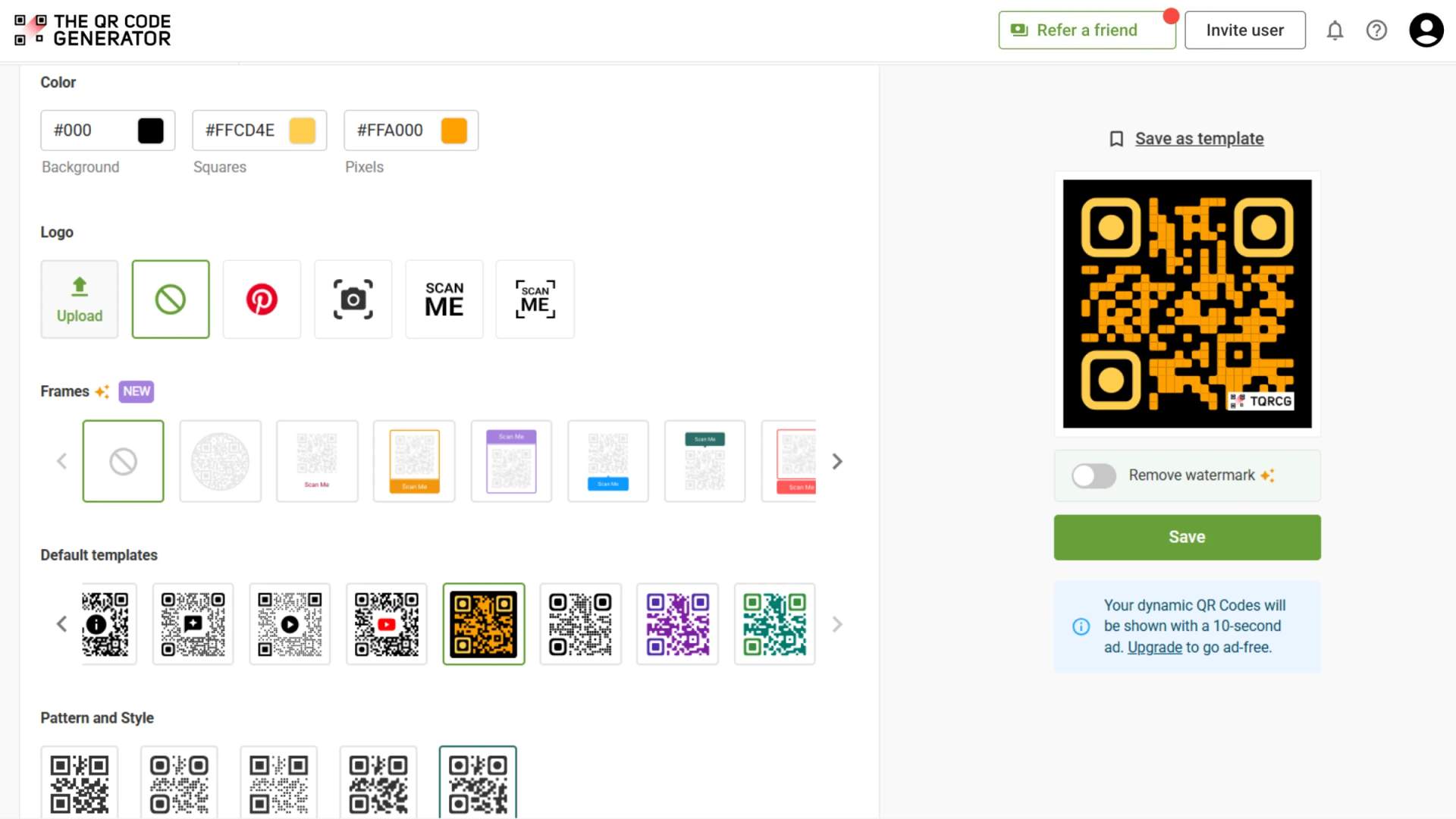
Step 2: Customize the design
- Match the QR Code to your catalog’s visual identity
- Add your brand colors, a logo, and a frame with a specific call to action
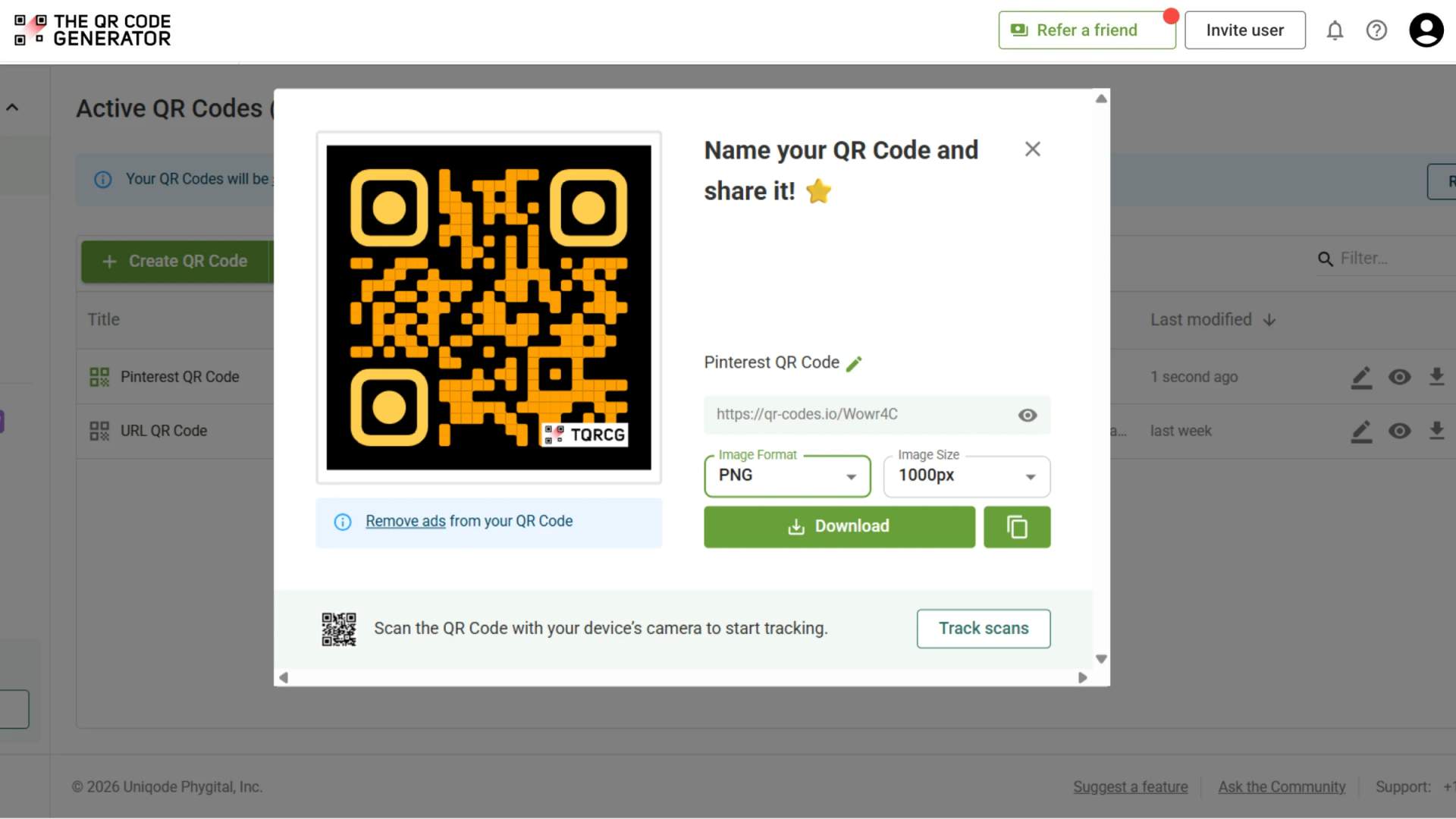
Step 3: Download in the correct format
For print catalogs, download SVG format. These file types scale to any size without losing sharpness or becoming pixelated. PNG works for digital catalogs and email use. For a catalog page scanned at arm’s length, the minimum recommended print size is 1.2 inches by 1.2 inches.
Step 4: Place the QR Code in your catalog design
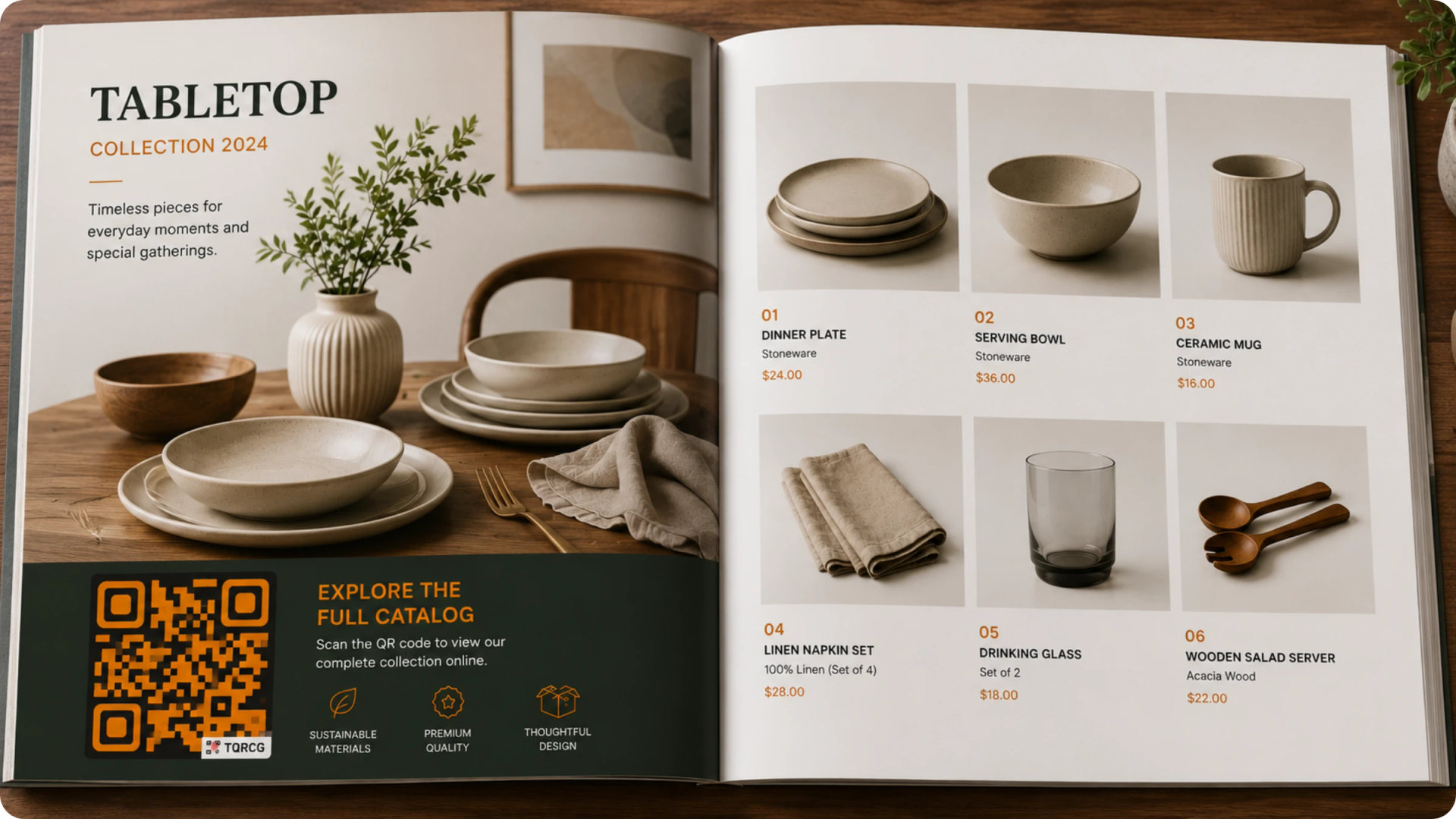
Where you put the QR Code determines whether it gets scanned. A code next to a hero product with a relevant CTA performs much better than a code buried on the back cover competing with the recycling bin.
Follow these placement rules:
- Never place the code in the gutter, which is the inner crease of a spread, because it cannot be scanned flat
- Use a high-contrast background so the code is easy for a camera to read
- Leave a quiet zone of white space around the code equal to at least four modules on every side
- Position the code near the product or content it relates to, not at the bottom of a page as an afterthought
Step 5: Track scans and update content
After the catalog goes out, monitor performance from the TQRCG analytics dashboard. You can see the total scan volume, scan location, device type, and scan time. This data shows which placements are driving engagement and which are being ignored, so you can improve placement in your next print run.
When pricing, products, or linked content changes, update the destination from the dashboard. No reprint required. Every existing code automatically delivers the current version.
Best practices for catalog QR Codes
A few small details often determine whether a catalog QR Code gets scanned or ignored.
- Use dynamic QR Codes for print: Dynamic QR Codes let you update the destination after printing, making them the best choice for catalogs.
- Write a clear call to action: Tell customers exactly what they will get, such as "Scan for pricing" or "Scan to view the full collection."
- Place the QR Code next to relevant content: Customers are more likely to scan when the code appears beside the product, offer, or information it relates to.
- Test before printing: Print a proof and test the QR Code under real-world conditions. Check scan speed, readability, and placement.
- Optimize for mobile: Make sure the destination page loads quickly and is easy to navigate on a smartphone.
- Track performance: Use separate QR Codes or UTM parameters to identify which placements generate the most scans and engagement.
Make every catalog page do more
An interactive catalog QR Code turns your most expensive static document into something that works long after it goes to print. Prices can change, products can update, and promotions can shift. Your catalog stays current because the code behind it stays current.
The key decision is simple: always use a dynamic QR Code for anything that will be printed. Dynamic codes let you update the destination any time, track every scan, and keep circulating catalogs useful for as long as buyers have them.
The QR Code Generator (TQRCG) includes a forever-free plan with two dynamic QR Codes that never expire and don’t need any credit card. You can create a QR Code, customize the design to match your catalog, update the destination after printing, and track scans from one dashboard.
Frequently Asked Questions
1. Should I use a static or dynamic QR Code for my product catalog?
Always use a dynamic QR Code for anything that will be printed. A static QR Code permanently encodes the destination at the time of creation. If the linked page changes, breaks, or goes out of date after you print, the code is permanently broken, and the only fix is a reprint. A dynamic QR Code lets you update the destination from a dashboard at any time after printing. For a catalog with a print run of hundreds or thousands of copies, this flexibility is essential.
2. What should my catalog QR Code link to?
The right destination depends on your goal. Use a URL QR Code to link to individual product pages, an online store, or a wholesale order portal. Use a Video QR Code to link to a product demo. Use a Coupon QR Code to deliver a promotional offer. Match the type and destination to what the customer needs at the moment they are holding the catalog.
3. How big should a QR Code be in a print catalog?
The minimum recommended size for a catalog page scanned at arm’s length is 1.2 inches by 1.2 inches (3 by 3 cm). For pieces meant to be scanned from a greater distance, such as a trade show booth display, the code should be larger. Always test-scan from a printed proof at real size before approving the full print run.
4. Can I use a QR Code instead of printing a full product catalog?
Yes, and for many B2B and wholesale businesses, this is the better option. A single-page flyer, a business card, or a booth display with a QR Code linking to a live PDF catalog eliminates printing costs, shipping weight, and the problem of outdated information. When you update the PDF in your dashboard, all existing printed codes automatically receive the new version. Buyers always access the current catalog without you needing to produce or distribute a new one.
5. How do I track whether my catalog QR Code is working?
Dynamic QR Codes from TQRCG include built-in scan analytics showing total scans, scan location, device type, and time. To track what happens after the scan, such as product views, add-to-cart actions, and purchases, add UTM parameters to the destination URL and connect it to Google Analytics. This closes the attribution gap between a physical catalog and an online sale, giving you data that a print-only catalog can never provide.