
How To Use QR Codes for Asset Management in Manufacturing

Shanti Nair
Last updated: May 20, 2026
13 min read
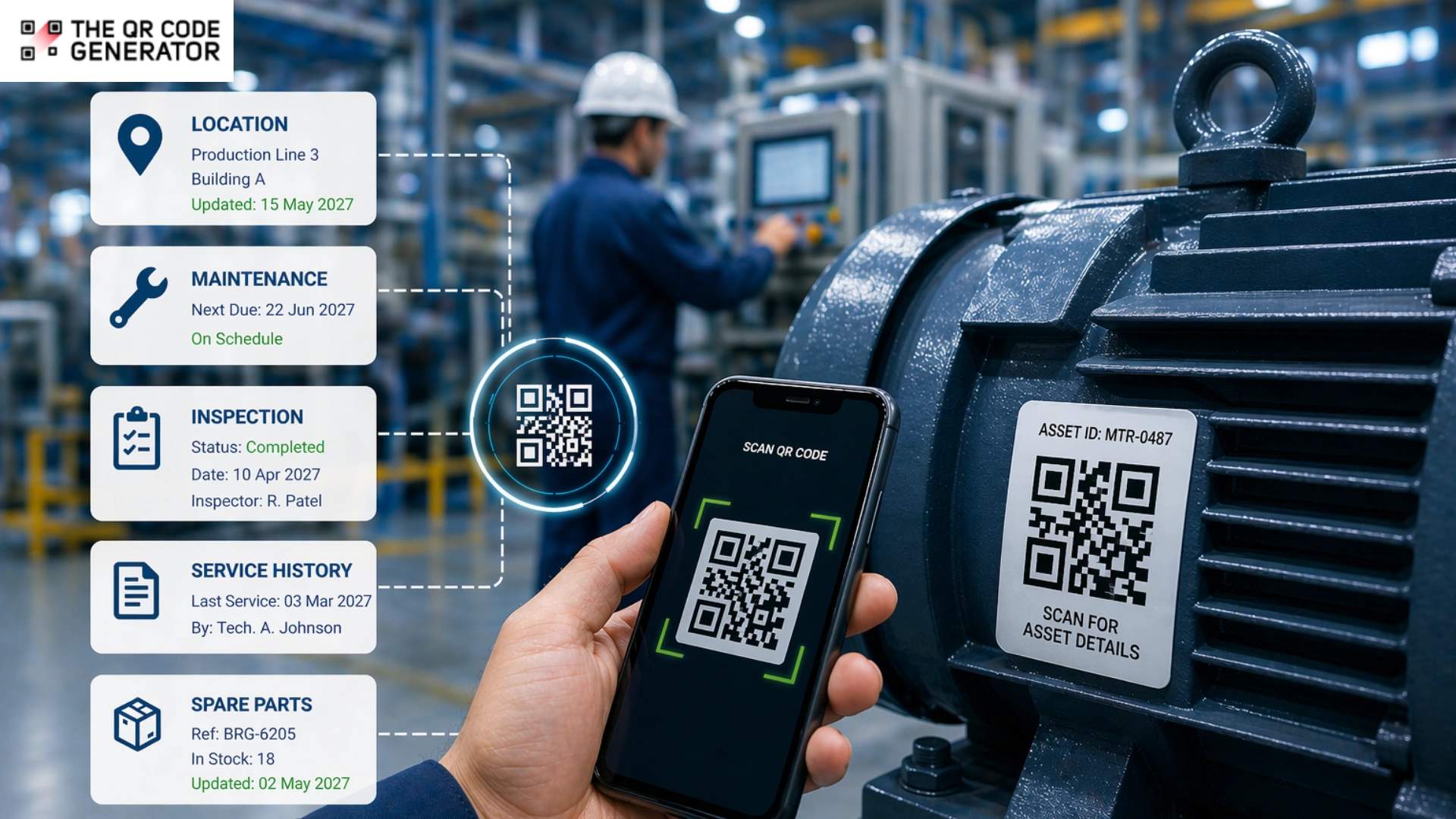
In manufacturing, poor asset visibility creates expensive problems. Tools go missing, spare equipment sits unused, forklifts end up in the wrong place, and routine audits take longer than they should. And when teams cannot quickly find or verify assets, productivity suffers.
QR Codes give manufacturers a simple way to track and manage physical assets. By attaching a scannable label to each item, businesses can instantly access records for location, ownership, inspections, service history, and availability. QR Codes for asset management in manufacturing support better maintenance planning and smarter equipment use.
This guide explains six practical ways to use QR Codes for asset management in manufacturing and how to set up a system in four steps.
Why manual asset tracking breaks down in manufacturing
Asset tracking often fails at scale because manual systems depend on the right person updating records at the right time. When that does not happen, maintenance decisions are delayed and assets are harder to use efficiently.
Three failure points consistently appear on manufacturing floors.
Spreadsheets become unreliable at scale
A shared spreadsheet can work in a small facility. But as you add more machines, shifts, or technicians, it quickly becomes unmanageable.
Records often become outdated because updating them needs a separate device and takes time that people on the floor don’t have. Duplicate entries and incorrect serial numbers are common when busy teams manage spreadsheets manually.
Over time, poor data quality leads to misplaced assets, avoidable purchases, and lower utilization of equipment already on site.
Maintenance history depends on accurate records
When a machine fails, technicians need to know: has this happened before? Finding the answer means locating the right record and hoping the notes are detailed enough to be useful.
When service history is scattered or incomplete, teams spend longer diagnosing issues and are more likely to repeat the same repairs. That increases downtime and makes preventive maintenance harder to manage.
According to a Coveo survey, the average employee spends 3.6 hours per day searching for information to do their job. On a factory floor, that lost time quickly turns into delayed decisions and poor asset visibility.
Audits expose every gap at once
Quarterly or annual audits often uncover record-keeping problems that have built up over time. Manual asset registers require every item to be checked in person and compared against records that may not reflect the current location, condition, or service status.
For manufacturers in regulated industries, incomplete records create both operational and compliance risks. Even outside regulated environments, weak audit trails make it harder to plan replacements, justify spending, or understand how assets are performing across the business.
What is QR Code asset management?
QR Code asset management is a system where each physical asset is assigned a unique QR Code label that links to its digital record. Scanning the QR Code label with a smartphone opens the record instantly without having to look up serial numbers, run system searches, or wait long.
QR Code asset management belongs to the broader category of asset tracking systems, alongside barcodes, radio frequency identification (RFID), and GPS-based tools. It sits at the practical middle: more data-capable than a barcode, significantly cheaper to deploy than RFID.
QR Codes vs. barcodes vs. RFID: a straight comparison
Choosing the right tracking technology depends on your environment and budget. The three main options each serve a different operational profile.
| Technology | Data capacity | Scanning device | Cost to deploy | Best fit |
|---|---|---|---|---|
| Barcode | Low (25 characters) | Dedicated scanner | Low | Simple asset identification |
| QR Code | High (4,296 characters) | Any smartphone | Low | Full asset records, mobile access |
| RFID | Very high | RFID reader required | High | High-speed, hands-free bulk scanning |
RFID makes sense when assets move constantly, and scan speed is the top priority. For most manufacturing teams managing equipment, tooling, and spare parts, QR Codes offer a better combination of cost, flexibility, and ease of deployment.
Learn more: RFID vs QR Code
How QR Code asset management works on the manufacturing floor
The QR Code asset management workflow has five steps.
- Tag the asset with a printed QR Code label affixed in a visible, accessible location.
- Scan the label using any iOS or Android smartphone. No dedicated scanner needed.
- View the record linked to that asset: usage locations, assigned user, inspection status, service history, manuals, or open work orders.
- Log the work directly from the device by updating service notes, marking a checklist complete, or creating a work order.
- Sync the record so every team member sees the updated information in real time.
QR Codes are popular because they solve everyday operational problems with very little friction. They are low-cost to deploy, work with smartphones teams already carry, and can be rolled out one asset category at a time.
6 ways manufacturing teams use QR Codes for asset management
Manufacturing teams use QR Codes across the full asset lifecycle, from the day a machine is tagged to the day it is replaced. The appeal is simple: faster access to information, fewer errors, and better control without expensive infrastructure.
Let’s look at how each use case below solves a common problem left open by manual tracking systems.
1. Tag and identify every asset accurately
With QR Codes for asset management, each asset gets its own QR Code linked to a digital record. Once you scan it, key details appear instantly. The details can include model number, serial number, location, purchase date, and warranty status.
For facilities with multiple similar machines or tools, QR Codes for asset management are especially useful. Technicians can confirm the correct asset before starting work rather than relying on visual checks or typing serial numbers into a system.
For example, a Midwest distribution center introduced QR Codes for equipment and inventory tracking through its warehouse management system. The result was a 30% reduction in asset retrieval times and a 20% decrease in inventory discrepancies.
Tagging also creates the foundation for every other use case in this list. An asset without a tag is an asset outside the system.
2. Access maintenance history in seconds
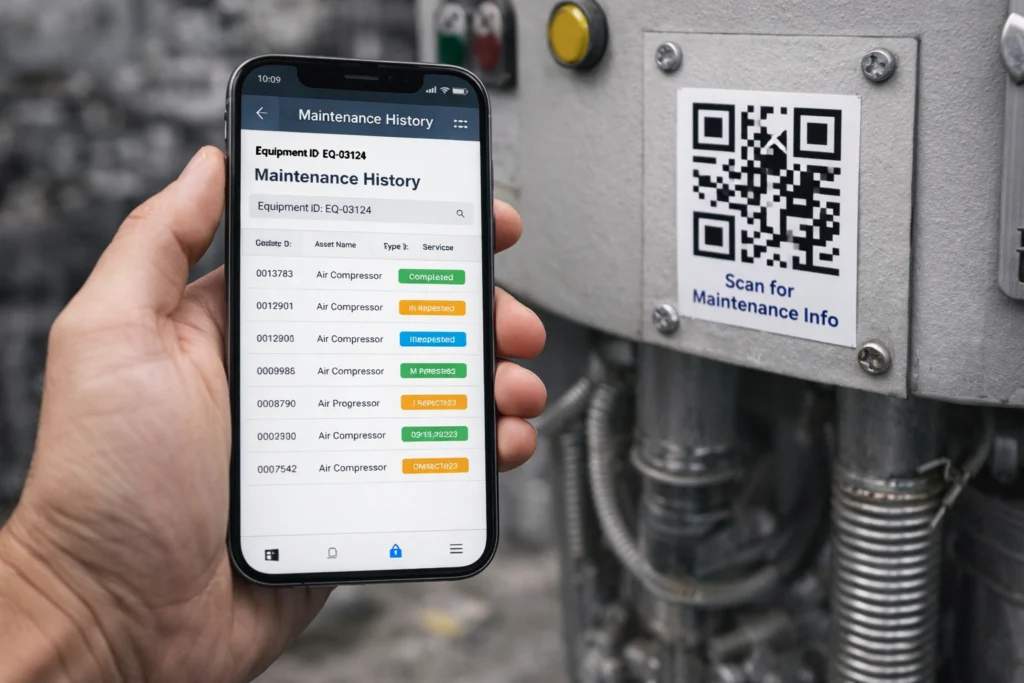
Technicians can scan QR Codes on equipment and view the complete service record without leaving the machine, opening a laptop, or asking a supervisor. Your technician now has access to previous repairs, recurring faults, manuals, inspection notes, and replacement history on the spot.
In practice, every technician starts with the same information, whether they have worked on that machine for years or are seeing it for the first time. For multi-shift operations, this consistency can be the difference between a 20-minute fix and a two-hour diagnostic loop.
According to Argos Software, a manufacturing facility that replaced manual maintenance logs with QR Code-linked records improved equipment uptime by 15% and reduced maintenance costs by 10%. This is one of the most common uses of QR Codes for manufacturing across production environments.
3. Schedule and track preventive maintenance
QR Codes can link directly to preventive maintenance checklists or computerized maintenance management system (CMMS) work order pages. When a technician scans the label, the correct form opens with the asset details already filled in.
Completed inspections are automatically logged and attached to the asset record, eliminating the need for paper sign-off sheets or later data entry.
For example, a food and beverage manufacturer running three shifts can place QR Codes on mixing and packaging equipment. Now every shift completes the same inspection checklist in the same sequence. All without missing logs, unreadable handwriting, and “I thought the last shift handled it” handoff problems.
4. Manage spare parts and inventory
QR Codes on spare parts bins, shelves, storage locations, or even directly on equipment can link to approved parts lists, stock counts, supplier details, and reorder portals. In one industrial example from Emerson, technicians can scan a QR Code at the device to quickly identify and order the correct spare part without returning to a workstation.
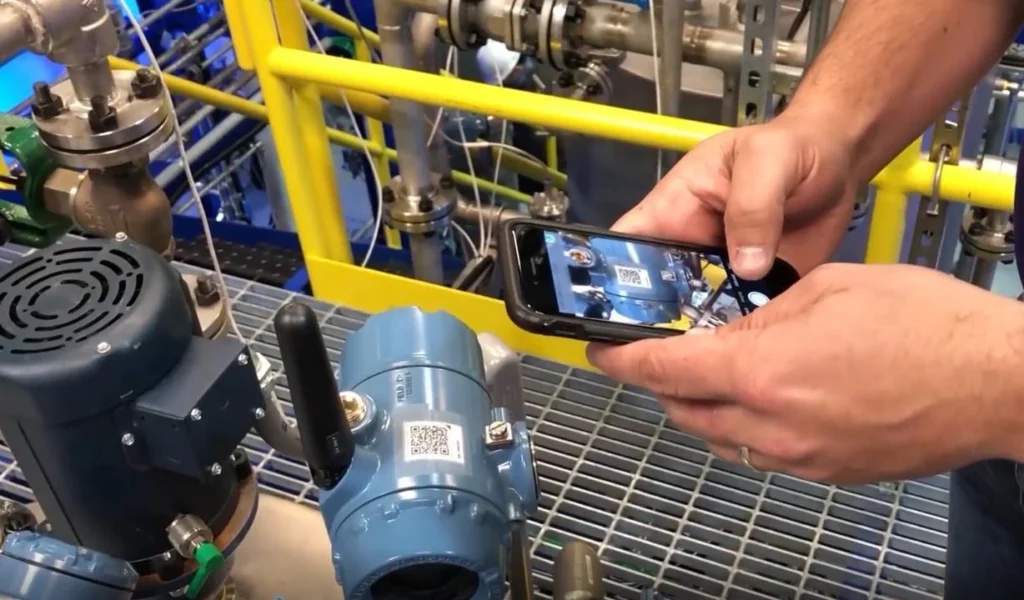
When a technician needs a part, they scan the bin or asset tag to confirm the correct component and check availability instantly. After the part is used, they scan again to update inventory records in real time. This helps prevent two common maintenance delays: ordering the wrong part and discovering a critical component is out of stock halfway through a repair.
5. Run faster, cleaner asset audits
During audits, teams can scan each asset to confirm its presence, verify its location, and check its current service status. The scan updates the asset register immediately, so results reflect the current state rather than an outdated spreadsheet.
Dynamic QR Codes make audits easier because the linked destination can be updated without replacing the label. That keeps records up to date even when systems, URLs, or workflows change.
For teams tracking depreciation, scan timestamps and service history can also support fixed asset records for finance.
6. Track shared tools with check-in and checkout
QR Codes work well for shared tool environments covering calibration equipment, portable testing devices, maintenance kits, and mobile equipment.
A technician scans the tool label when taking it out and again when returning it. This creates a clear custody trail showing who used the tool, when it moved, and which job it supported. That level of visibility helps reduce lost tools, duplicate purchases, and delays caused by missing equipment, all without the cost of RFID readers or dedicated tool crib staffing.
For many manufacturers, QR Codes are the fastest path to stronger maintenance records and less time wasted searching for the tools and equipment they already own.
How to set up QR Code for asset management with TQRCG
Setting up QR Code asset management does not require new software, a dedicated IT team, or a facility-wide rollout on day one. You can easily do it with The QR Code Generator (TQRCG).
The process has four steps, and the first one happens before you create a single QR Code.
Step 1: Build your asset register first
Before creating a single QR Code, list every asset you want to track. For each one, record the asset name, model and serial number, current location, purchase date, and the type of record it should link to, including maintenance logs, repair manuals, inspection checklists, and work order forms.
Start with your 10 highest-value or most frequently maintained assets. A full facility rollout on day one is how implementations stall. Start small, prove the system works, then expand.
Step 2: Create dynamic QR Codes with TQRCG
Dynamic QR Codes are the right choice for asset management. Dynamic QR Codes let you update the linked URL at any time without reprinting the label. This matters when records are moved, systems change, or a linked document is reorganized.
Create a QR Code in three steps using TQRCG:
- Log in to The QR Code Generator (TQRCG) and select URL as the QR Code type.
- Paste the link to the asset’s record. This can be a CMMS asset page, a Google Sheet row, an inspection form, or a cloud-hosted manual.
- Select dynamic QR Code format, customize for visibility if needed, and download in PNG or SVG format.
TQRCG includes two free dynamic QR Codes, which are enough to test the workflow on your most critical assets before committing to a wider rollout.
Step 3: Choose the right QR Code labels for manufacturing
Choosing the right QR Code labels for manufacturing is crucial, given the manufacturing environment. Standard paper labels fail on production floors because heat, oil, vibration, and cleaning chemicals destroy them within weeks. What you need are durable QR Codes.
There are four label types to consider based on environmental severity.
- Polyester labels work for most standard industrial environments. They handle moderate heat, moisture, and chemical exposure.
- Metallic (silver polyester) labels add durability for high-wear surfaces and improve scan contrast in low-light conditions.
- Laminated printed labels use a protective coating over a standard print. A practical middle ground for teams with existing label printers.
- Etched metal or anodized aluminum plates are the right choice for extreme environments: welding stations, foundries, outdoor equipment, and anything exposed to harsh chemicals.
Test any label before a full rollout. Place one in the most demanding location on your floor for two weeks. If it scans cleanly at the end of that period, it is the right choice.
Step 4: Place, test, and train
QR Code placement is very important when it comes to QR Codes. Place QR Codes where technicians naturally look during inspections or repairs: equipment panels, control boxes, and asset tags on the main machine body. Avoid surfaces that collect debris or that are regularly wiped down with solvents.
Like anything that you’re newly implementing, you must also test every code under real floor conditions before going live. Scan the QR Code in typical lighting, from the angles a technician would actually use, on both iOS and Android devices.
Lastly, training takes 15 minutes. Show the team three things: how to scan, how to read the record, and how to log an update. That covers 90% of daily use. The system only works if people use it consistently, so keep the learning curve flat.
Best practices for QR Code asset management in manufacturing
While you’ve got your QR Code system up and running, the following best practices keep it running well past the first month.
Assign QR Codes to assets, not locations
A common mistake is linking QR Codes to a location, such as Bay 3 or Station 12, rather than to the asset itself. If the equipment moves, the code no longer works and the record is lost. Always attach the QR Code to the asset so the record moves with it.
Keep linked records mobile-friendly
A QR Code that opens a desktop-only spreadsheet on a six-inch phone screen is not an improvement over a binder.
Linked records should display the most critical information without requiring the technician to scroll, zoom, or navigate multiple pages. If a record is not comfortable to read on a phone standing next to a machine, it needs to be redesigned before the QR Code gets printed.
Set role-based access for sensitive asset data
Access to an asset varies depending on the person scanning the QR Code. For example, a technician needs service history and repair manuals, while a procurement team member will need reorder links and supplier contacts.
Setting role-based access means each scan surfaces the right information for the right person, without exposing proprietary configuration data or warranty-sensitive records to everyone on the floor.
Most CMMS platforms and cloud document systems support native permission levels — use them.
Use scan analytics to spot high-attention assets
Dynamic QR Codes track how often a code is scanned, from which devices, and at what times. An asset scanned far more frequently than comparable equipment is telling you something — usually that it has a recurring problem that has not been resolved at the root cause.
Scan frequency data is not a maintenance metric most teams currently track. Still, it is one of the more honest indicators of asset reliability available without adding sensors or specialized monitoring hardware.
Tag your first asset today with TQRCG
QR Code asset management gives manufacturing teams accurate, accessible asset records without expensive infrastructure or complex software.
Start with your five most critical assets this week. Create dynamic QR Codes with TQRCG, link them to your existing records, and run the system for 30 days. Nothing about this setup is permanent, as dynamic codes can be updated, labels can be replaced, and linked records can be reorganized as your process matures.
Sign up to create your first free QR Code with TQRCG and give your team the asset visibility they’ve been waiting for.
Tag your first asset today with TQRCG
Frequently Asked Questions
What is QR Code asset management?
QR Code asset management helps track all your assets. Each asset is assigned a unique QR Code label that, when scanned, provides access to its digital file containing essential information such as service history, manuals, current work orders, and inspection reports. QR Code asset management replaces manual spreadsheets and paper logs with mobile-accessible, real-time records.
How do QR Codes help with asset tracking in manufacturing?
QR Codes give technicians, supervisors, and managers immediate access to asset information at the point of need. When you scan a label on a machine, you instantly access its complete service history, find relevant repair guides, or pull up a preventive maintenance checklist — all without having to step away or dig through a complicated system. This not only saves time when diagnosing issues but also helps prevent the same mistakes from happening repeatedly. Plus, it ensures that all records stay accurate, no matter who’s on shift.
What is the difference between a static and dynamic QR Code for asset management?
A static QR Code encodes fixed information that cannot be changed after printing. A dynamic QR Code links to a URL that can be updated at any time without reprinting the label. Dynamic QR Codes are the right choice for asset management because asset records change over time. For example, service entries are added, manuals are revised, and linked systems are reorganized. Dynamic codes also provide scan analytics, which static codes do not.
Can I use QR Codes for asset management for free?
Yes. TQRCG includes two free dynamic QR Codes, which are enough to test the system on your most critical assets before scaling. Paired with a free cloud document or Google Sheet as the linked record, small teams can run a functional QR Code asset management system at no cost.
What QR Code labels should I use for manufacturing environments?
Standard paper labels fail on most production floors within weeks. For manufacturing use, polyester or metallic labels rated for heat, oil, and moisture are the minimum baseline. In high-wear environments, such as welding stations, foundries, outdoor equipment, chemical exposure, etched metal or anodized aluminum plates are the more reliable option. Test any label in your most demanding environment for two weeks before a full deployment.
How do QR Codes connect to CMMS or ERP systems?
QR Codes do not require direct technical integration with a CMMS or ERP system to work. The simplest approach is to link the QR Code to the asset's existing page in your CMMS or ERP. When a technician scans the code, the correct asset record opens in their browser. They update it using the system's standard interface. No custom development is needed to start.