
How QR Codes on Equipment Reduce Maintenance Downtime

Shanti Nair
Last updated: March 26, 2026
8 min read
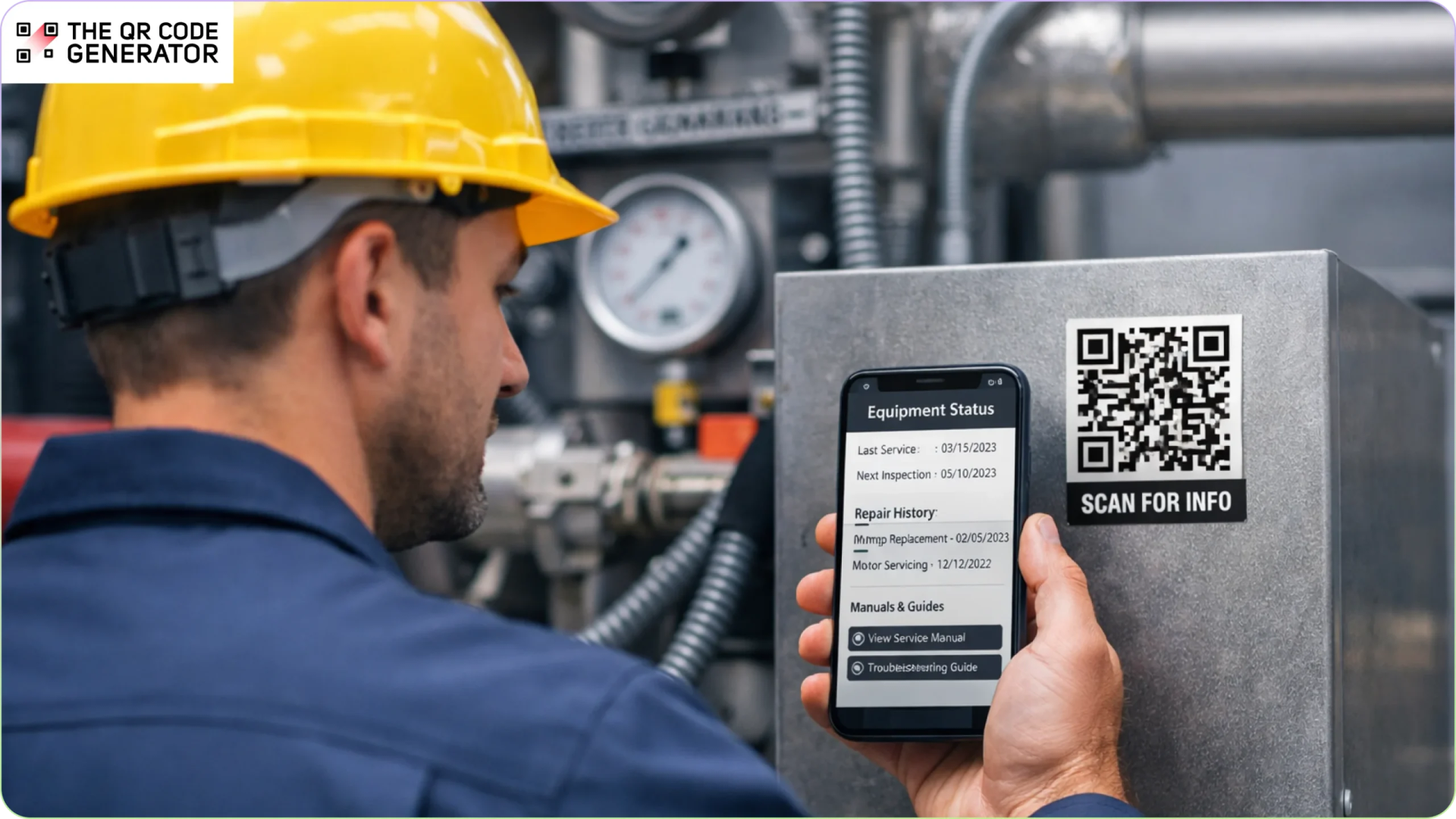
Equipment downtime in manufacturing can cost thousands of dollars per hour. Even small delays add up fast.
In many facilities, delays begin before repairs even start. Your technicians first need maintenance history, manuals, or notes from past work. But this information is often hard to find, sitting in spreadsheets, filing cabinets, or disconnected systems. This slows response time and leads to repeated mistakes.
QR Codes fix this. When placed on equipment, they link directly to digital records. A quick scan gives instant access to the information needed.
But using QR Codes well takes more than adding a label. It starts with understanding the common issues that delay repairs.
What problems do maintenance teams face without QR Codes on equipment?
Most maintenance records are designed to store information, not to support repairs. As a result, maintenance teams waste time and face common problems, such as the following.
Accessing maintenance logs
When equipment fails, technicians need to check past repairs, replaced parts, or repeat issues.
But these records are often in spreadsheets, shared drives, or separate systems. It is not always easy to find them right away. Searching for the right record takes time and delays repairs.
Finding equipment manuals
For complex machines, technicians need manuals or troubleshooting guides.
These are often stored in binders or internal systems. They are not easy to access during a repair. When instructions are hard to find, teams rely on memory or guesswork, which increases repair time and errors.
Tracking assets across systems
Large facilities have many similar machines. Without a clear way to link each machine to its records, it is hard to identify the right one. Manual checks of serial numbers or system searches take time and increase the risk of updating the wrong record.
Connecting equipment to work order systems
Maintenance teams use work orders or CMMS tools to track repairs. But these systems are separate from the equipment. Technicians must search for the asset, create tickets on another device, or enter details again. This slows reporting and updates.
QR Codes solve these problems by linking equipment to digital records. A quick scan gives access to logs, manuals, and work orders.
How maintenance teams use QR Codes on equipment to speed up repairs
Maintenance teams place QR Codes on equipment so technicians can access the right information on the spot. Instead of searching through systems or documents, a quick scan opens the exact record, manual, or work order linked to that asset.
Here are the most common ways teams use QR Codes to speed up and improve maintenance accuracy.
View maintenance history
Attach a QR Code to each asset that opens its full maintenance log, including past repairs, replaced parts, inspection results, and service dates.
A scan can reveal the equipment’s history before starting diagnostics. This helps your team understand past issues instead of starting from scratch.
With QR Codes showing the maintenance history, they can:
- Identify repeat failures faster
- Avoid repeating the same troubleshooting steps
- Help supervisors decide if repair or replacement makes more sense
Open repair guides and manuals
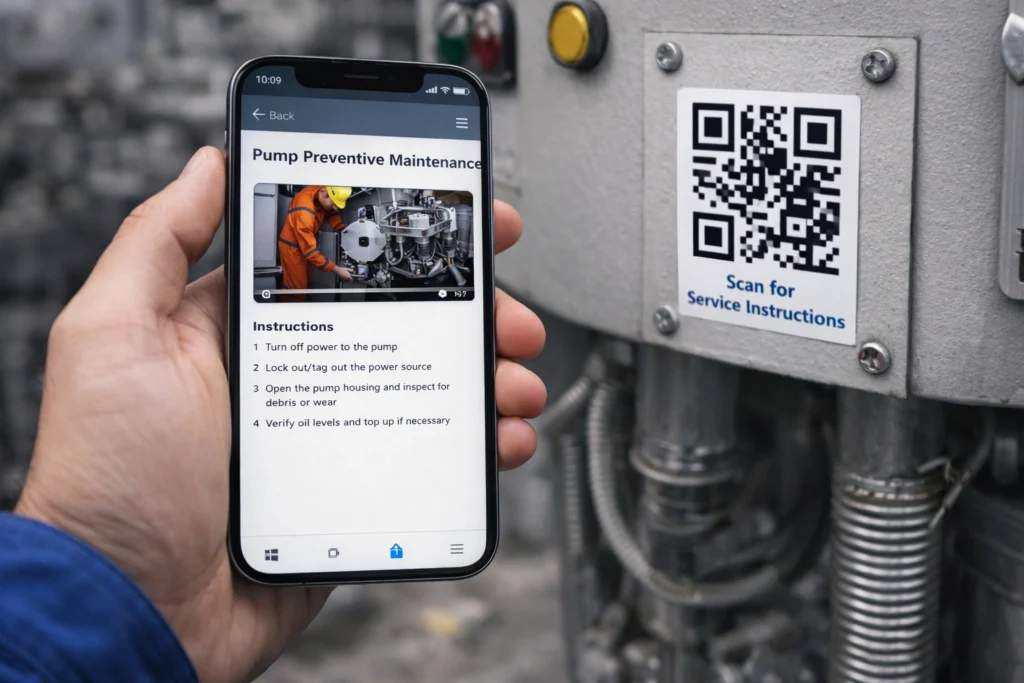
Place QR Codes on equipment that link to service manuals, troubleshooting guides, or repair videos. When scanned, the correct instructions open instantly on the technician’s device, removing the need to search through binders or systems.
Following the steps directly on the device improves accuracy and reduces guesswork, especially for newer team members.
Create and update work orders
Maintenance teams can scan a QR Code to open or create a work order linked to that asset.
Instead of searching for the correct machine in a system, the scan opens the right record instantly. From there, technicians can report issues, track progress, or log completed work, reducing manual entry and speeding up reporting.
Complete inspections and preventive maintenance
QR Codes can link directly to inspection checklists or preventive maintenance forms.
During routine checks, maintenance staff scan the code and complete the checklist on their device. The results are saved and linked to the correct asset. QR Codes replace paper logs, standardize inspections, and improve compliance with schedules.
Identify equipment quickly
In large facilities, there might be multiple machines of the same type. QR Codes help service teams identify the correct asset in seconds.
A scan can show key details such as model number, serial number, installation date, and warranty status. Now, technicians can confirm they are working on the right machine and update the correct record.
Find spare parts faster
Equipment failures often require specific parts. Finding the right part can delay repairs.
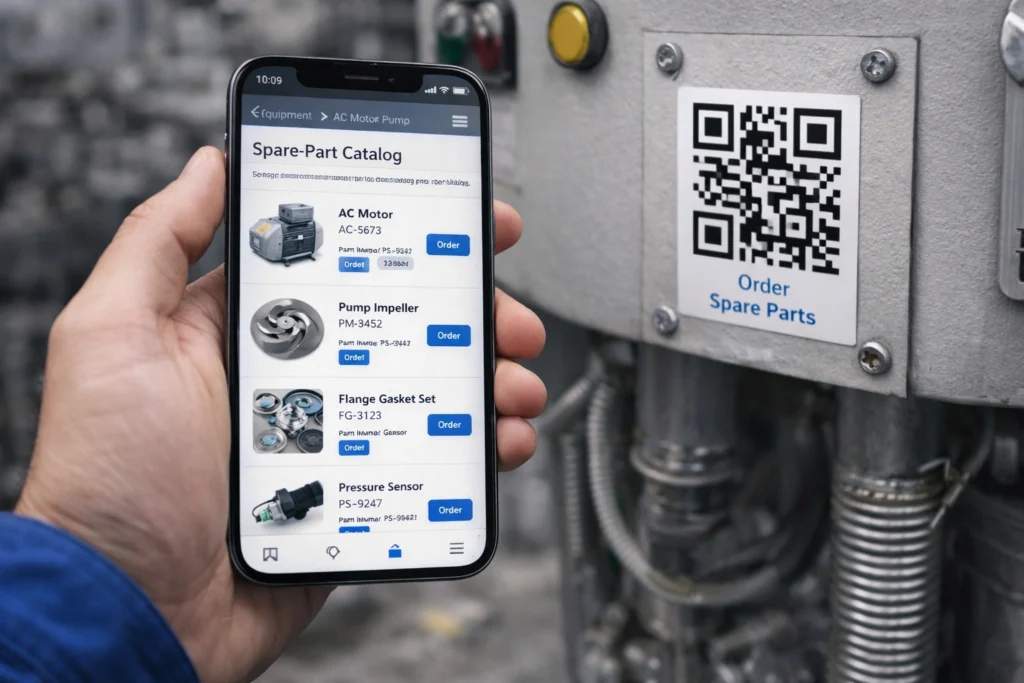
QR Codes can link directly to approved spare parts lists or supplier pages. Operators can scan the part, confirm it, and start the order process right away, reducing delays and preventing the wrong components from being ordered.
Log repairs in real time
After completing a repair, team members can scan the QR Code and update the record immediately. They can log the issue, the fix, and any parts used directly from the asset page.
Real-time updates keep records accurate, support future maintenance planning, and help track equipment performance.
How to create QR Codes for equipment maintenance workflows
Before creating QR Codes, define what you want to improve, such as faster repairs, better tracking, or easier access to manuals. That will help you decide what the code should link to.
Step 1: Create the QR Code
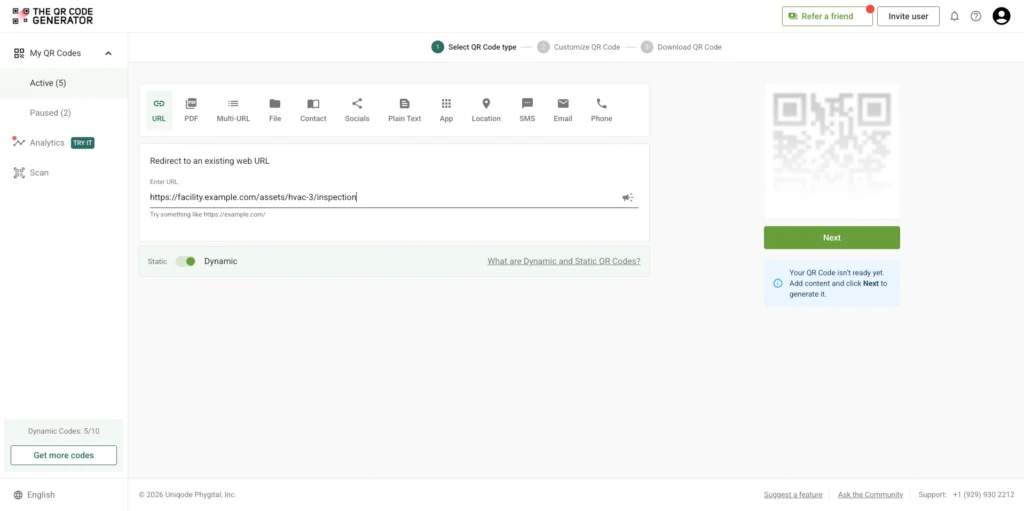
Start by choosing the right QR Code type. In most cases, a URL QR Code works best.
You can link it to:
- Maintenance logs
- Repair manuals
- Work order forms
- Inspection checklists
Use a dynamic QR Code so you can update links without replacing labels. To create your QR Code, go to The QR Code Generator (TQRCG), add your link, and click Next.
Step 2: Customize for visibility
Use high-contrast colors so the code is easy to scan in industrial environments, if you want to switch up from the standard black and white. You can add a logo or frame with a clear label.
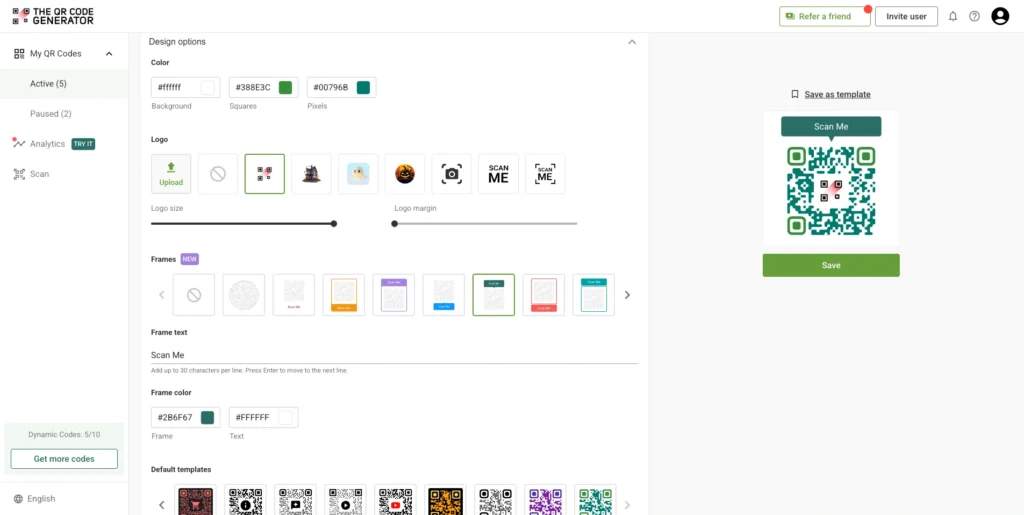
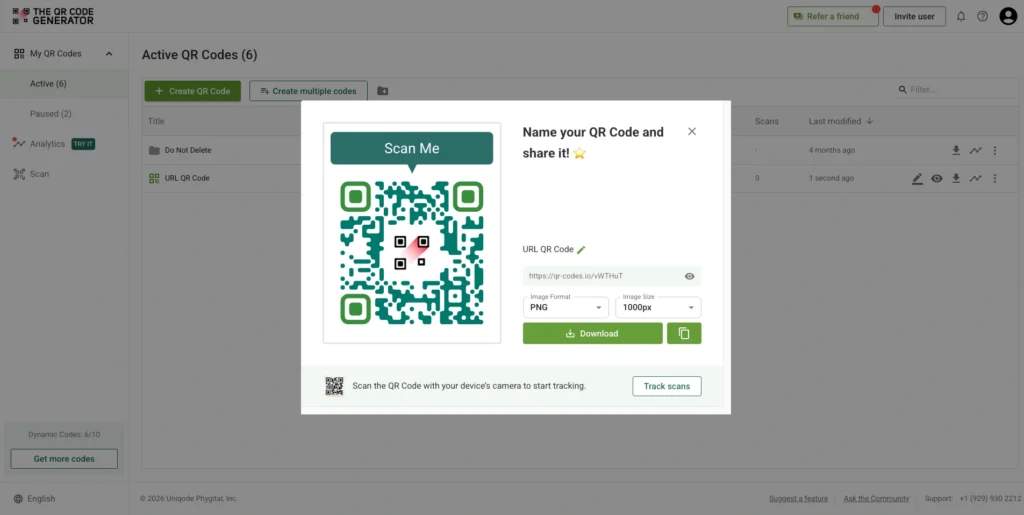
Step 3: Download and choose where to place your QR Code
After designing your QR Code, you are ready to download it. TQRCG supports high-resolution PNG and SVG (vector) downloads.
Best practices for using QR Codes in equipment maintenance
QR Codes can speed up maintenance and make it more organized. But their impact depends on how you implement them. Follow these best practices to get consistent results.
Place QR Codes for easy scanning
Place QR Codes where maintenance staff naturally look during inspections or repairs. This makes them easy to find and scan without interrupting work.
Common placement areas include:
- Equipment panels
- Asset tags
- Control boxes
- Maintenance labels
Use durable labels designed for industrial environments. QR Codes should remain scannable even in dusty, hot environments or with frequent handling. Ensure the design is clear and high contrast so staff can scan it on a mobile device.
Link QR Codes to useful maintenance information
A QR Code is only as useful as the information it opens. Link QR Codes to the resources maintenance teams need during repairs and inspections, such as:
- Maintenance logs and service history
- Repair manuals and troubleshooting guides
- Inspection checklists
- Work order forms or CMMS asset pages
Make sure the linked content is mobile-friendly and easy to read on the floor.
Keep maintenance records well-organized. Highlight crucial details, such as past repairs, replaced parts, and service dates, so your team can quickly understand the equipment’s history.
Add clear instructions for technicians
Technicians should know what to expect before scanning a QR Code.
Add a short instruction near the code, such as:
- Scan to view maintenance history
- Scan for repair instructions
- Scan to update the maintenance log
Clear instructions improve adoption and reduce confusion during routine tasks.
Use dynamic QR Codes for flexibility
Maintenance information changes over time. Dynamic QR Codes let you update the destination link without replacing labels. They also provide scan analytics. Teams can identify which equipment is accessed most often and spot assets that may need closer attention with analytics.
Connect QR Codes to maintenance systems
QR Codes work best when they integrate with your existing tools. Link them to your asset records or asset tracking systems, CMMS platforms, or work order systems.
With the integration, field teams can open the correct asset page, log updates, and track repairs without switching between systems. Make sure your team members know how to update records after scanning.
Test QR Codes in real working conditions
Always test QR Codes before full deployment. Check that they scan easily under typical lighting, work across devices, and open the correct content quickly.
Testing in real conditions helps prevent issues during actual maintenance tasks.
Simplify equipment maintenance with TQRCG
Faster access to the right information helps maintenance teams reduce delays and keep equipment running efficiently.
TQRCG makes this possible by connecting equipment to digital records through QR Codes. Instead of searching through files or systems, technicians can scan a QR Code to open maintenance logs, repair guides, checklists, or work orders. Maintenance teams can now resolve issues faster and reduce downtime.
With TQRCG’s two free dynamic QR Codes, teams can update links to manuals, forms, or work orders without replacing labels. This ensures that technicians always view the latest information.
Ready to speed up equipment maintenance? Create your first code with The QR Code Generator (TQRCG).
Frequently Asked Questions
What is a QR Code for equipment maintenance?
A QR Code for equipment maintenance is basically a handy sticker you put on machines or assets. When someone scans it, they can instantly pull up all the important information, such as maintenance logs, repair manuals, checklists, or work orders related to that specific piece of equipment.
How do QR Codes help with equipment repairs?
QR Codes give technicians direct access to maintenance information on the equipment. By simply scanning the code, they get immediate access to all the maintenance details they need. This means they can quickly check records, dive into troubleshooting guides, or update repair logs without wasting time looking for information. It really speeds up the diagnosis and repair process.
Can QR Codes improve asset tracking?
Absolutely! QR Codes enhance asset tracking by connecting physical equipment to its digital records. A quick scan reveals essential information, such as maintenance history and the model number. This helps teams easily identify the right equipment and keep accurate records.
Where should QR Codes be placed on equipment?
It's best to place QR Codes where maintenance teams can easily spot and scan them. Common spots include asset tags, equipment panels, control boxes, or maintenance labels. Just make sure the QR Code is visible and protected from wear and tear.
What are dynamic QR Codes used for in equipment maintenance?
Dynamic QR Codes are useful because they allow you to update the information linked to the code without needing to print a new one. For example, if you want to update a manual or inspection form, you can do that without changing the actual QR Code. This ensures that your technicians always have the most current information at their fingertips.
Do QR Codes work for facilities and property management?
Definitely! Facilities and property managers use QR Codes for various equipment, such as HVAC systems, elevators, and electrical units. When technicians scan the code, they can find service records, inspection reports, and maintenance requests for that specific asset. It's a great way to keep everything organized and accessible.