
QR Codes for Home Repairs and Maintenance

Harshajit
Last updated: August 26, 2026
10 min read
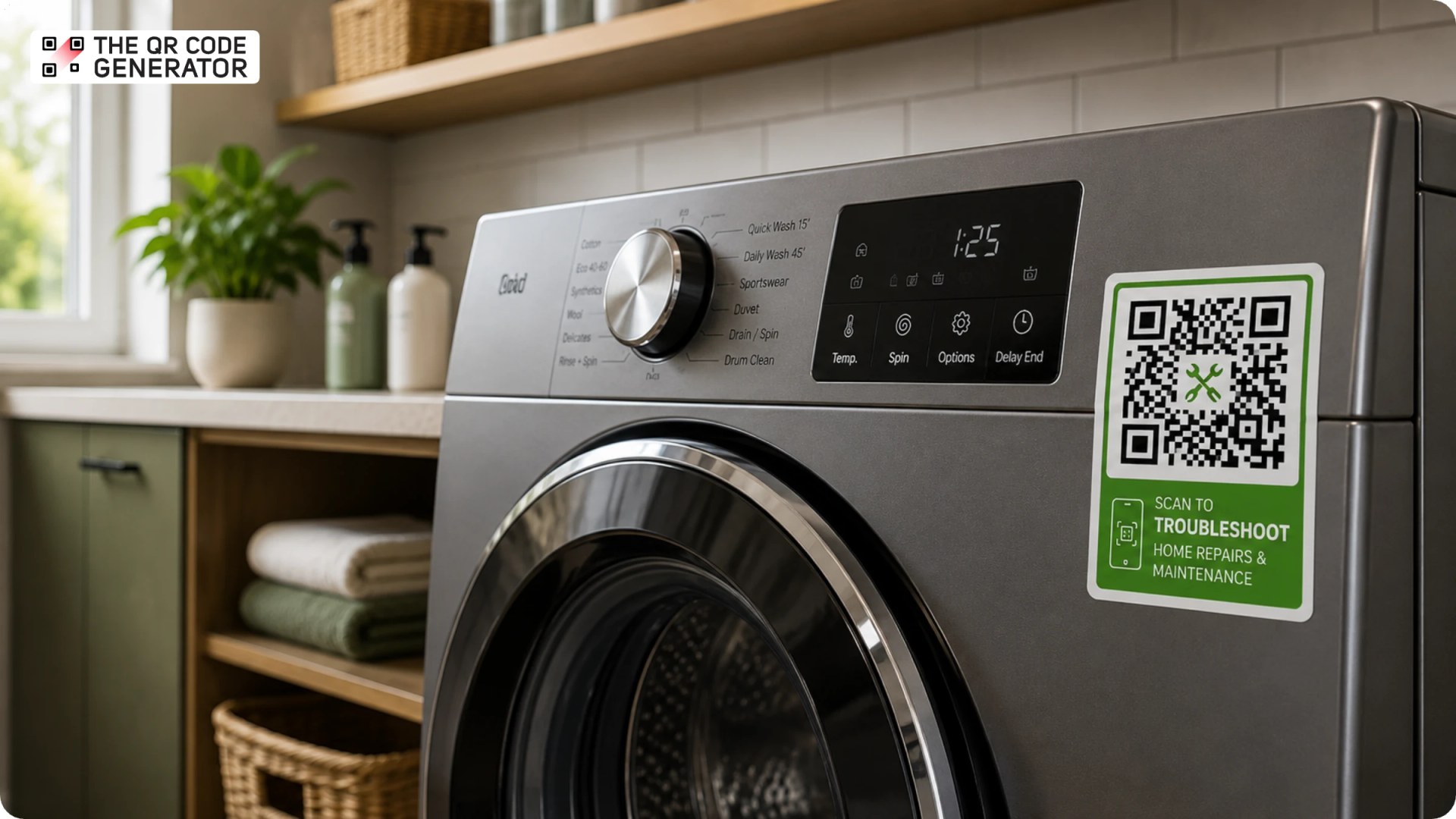
Not everyone wants to wait a day or two for a technician to come and fix their television. Owners may want to check the manual, follow a troubleshooting video, and see if they can get the problem fixed themselves, and if they are unable to, then book a service visit themselves.
A QR Code is a boon in exactly these cases. A QR Code for home repairs and maintenance is a scannable code that connects an owner to the exact manual, setup video, troubleshooting guide, or service booking for their product. Manufacturers print it on the nameplate or inside the box, and home service businesses add it to the units they install and maintain.
This guide covers how both groups use QR Codes, when to choose a static or dynamic code, how to set one up, and four best practices for deploying them at scale.
What is a QR Code for home repairs and maintenance?
A QR Code for home repairs and maintenance is a scannable code placed on an appliance, a serviced unit, an invoice, or a sticker that links a customer or technician to the right document or action with a single scan.
A QR Code for home maintenance can give owners and technicians quick access to the information or action they need at the point of service. For example, a code on an appliance can open its latest manual or maintenance schedule, while a code on a serviced unit can open its maintenance log or warranty form. A code on an invoice or service sticker can take the homeowner directly to a booking page to schedule the next visit.
Appliance manufacturers embed them at the point of manufacture, on the nameplate, the packaging, or inside the printed manual. Home service businesses add them at the point of service, on unit stickers, invoices, and door hangers. The format follows the destination: a URL QR Code opens a web page, a PDF QR Code opens a document, and a video QR Code opens a clip.
Static vs dynamic QR Codes for maintenance
A static QR Code embeds the destination directly into the pattern, so changing where it points means generating and printing a new code. A dynamic QR Code stores a short redirect you can edit anytime, so the code on the label stays the same while the page behind it changes.
For home repairs and maintenance, a dynamic QR Code is usually the better choice. Manufacturers can update manuals, warranty information, or support pages without changing the product QR Code, while service businesses can update booking pages, pricing, or maintenance content without reprinting labels. Use a static QR Code when the destination is permanent and will not need to change after the code is printed.
Why home service businesses and appliance makers are adopting QR Codes
Home service businesses and appliance makers adopt QR Codes because a single scannable label does the work of a manual, a service desk, and a booking line at once. The payoff shows up as lower costs, fewer calls, and repeat customers, all without new hardware. Adoption comes down to six drivers.
- Lower install and repair costs: A linked setup video lets an owner mount the new TV or swap a filter without a scheduled visit, saving the company a truck roll and the associated field labor. Every installation an owner finishes alone is a job the business never has to staff.
- Fewer support calls: A QR Code that opens a manual, a how-to video, or a filter-replacement guide answers the questions that would otherwise tie up a call center. Support teams keep their time for the problems that actually need a person.
- Faster rebooking and reviews: A scan routes a homeowner to a booking form or a review page while the technician is still on site, capturing the next job and the review in one visit.
- Service history that travels with the unit: A code on the equipment stores the maintenance log, so the next technician or homeowner sees exactly what was done.
- Measurable reach: Scan analytics show which stickers, manuals, and campaigns are used, so the company focuses its efforts on the touchpoints that drive scans.
How home service businesses use QR Codes
Home service businesses can use QR Codes in various places, such as service stickers, invoices, door hangers, technician badges, equipment labels, and printed quotes to connect homeowners with rebooking, reviews, contact details, maintenance logs, pricing, and troubleshooting resources.
Service and rebooking stickers on the unit
Leave a QR Code sticker on the serviced HVAC unit or water heater, and the homeowner scans it to book the next visit when the season turns. The sticker category already exists for this: EZQR sells plumber "re-book" stickers, and Strong Asset Tags prints HVAC service stickers built to carry a scannable code.
Review collection
Print a QR Code on the invoice or a leave-behind card that opens a Google review page in one tap. The customer rates the job while the good impression is still fresh, which lifts the company in local search without a chain of follow-up emails days after the visit.
Digital business cards for technicians
Put a digital business card QR Code on the van decal, the technician's badge, or the email signature. The homeowner saves the name, number, and license details to their phone in a single scan, and any later changes to those details are reflected on the saved card.
Maintenance logs and service history
Fix a QR Code to the equipment that opens a running maintenance log. Every technician who arrives reads what the last visit covered before picking up a tool, and the homeowner keeps timestamped proof of service to attach to a warranty claim.
Quotes, price sheets, and financing
Hand over an estimate or door hanger carrying a PDF QR Code that opens current pricing or financing terms. Rates shift often, so a scannable link shows a prospect the numbers in effect today instead of whatever was printed last quarter.
How-to and troubleshooting videos
Link a video QR Code to a 60-second clip that guides an owner through a small fix, for example, relighting a water heater pilot, resetting a tripped breaker, or swapping a clogged HVAC filter. The owner resolves it on the spot, and the after-hours call never reaches the dispatcher.
How appliance manufacturers use QR Codes
Appliance manufacturers place QR Codes into the product at the point of manufacture, printed on the nameplate or the packaging, so one code serves the owner for the full life of the product.
Manuals and setup guides
Print a QR Code on the nameplate or inside the box that opens the current manual, so the owner never has to hunt for a paper booklet. GE Appliances publishes a QR Code guide that points owners to manuals and support, and Toro prints a code on the serial-number decal that opens the operator's manual, parts catalog, and warranty details.
Warranty and product registration
Place a QR Code on the product or packaging that opens a registration form pre-filled with the model, so more buyers register than a mailed card ever captured. Whirlpool runs appliance registration through this path, and QR-based warranty registration is a documented pattern across consumer brands.
Spare parts and consumables reordering
Tie a QR Code to the model number that links straight to the exact filter, belt, or bag for that unit. The owner orders the part that fits on the first try instead of guessing from a catalog.
Maintenance reminders and schedules
Link a code to a model-specific schedule that tells the owner when to change the filter or descale the machine before performance drops. Following that schedule also keeps the appliance in the condition required by the warranty.
Service booking and support
Route a QR Code to the brand's authorized service network or a support chat, keyed to the serial number, so the agent already knows the exact unit. The owner reaches out to first-party support without digging up a model number or a receipt.
How to create a QR Code for home repairs and maintenance
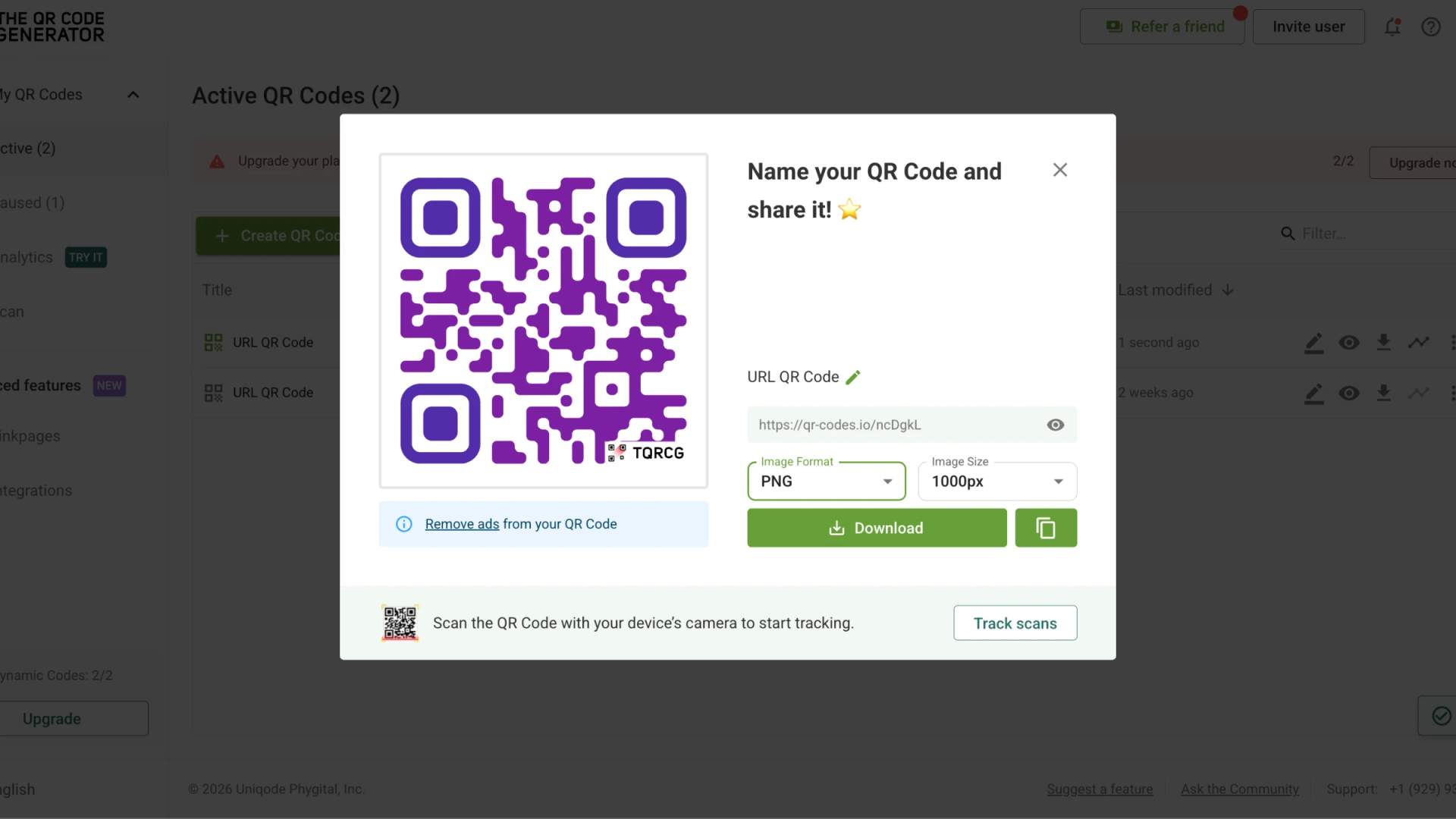
Create a QR Code for home repairs and maintenance with a dynamic QR Code generator, then point it to your manual, maintenance log, or booking page. A free option, such as TQRCG, can work well for a simple use case. Its free plan offers unlimited static QR Codes and 2 free dynamic QR Codes that never expire. If you need more dynamic QR Codes or advanced features, you can choose a paid plan that best suits your requirements.
Here is how to create a QR Code for home repairs and maintenance with TQRCG:
Step 1: Log in to your TQRCG dashboard.
Step 2: Click + Create QR Code, then select dynamic from the dropdown beside it.
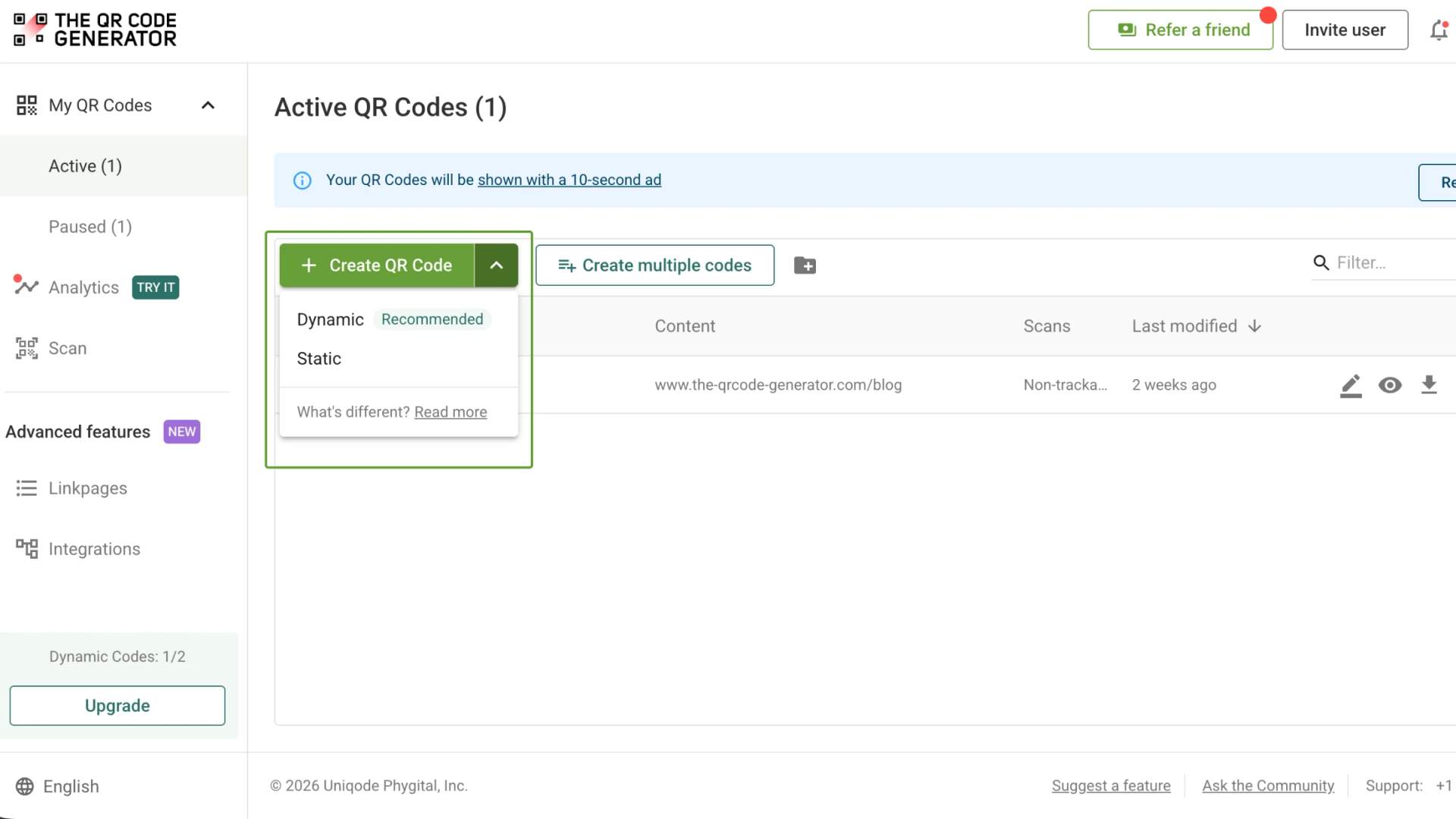
Step 3: Select the QR Code type, whether URL, PDF, Video, or another format.
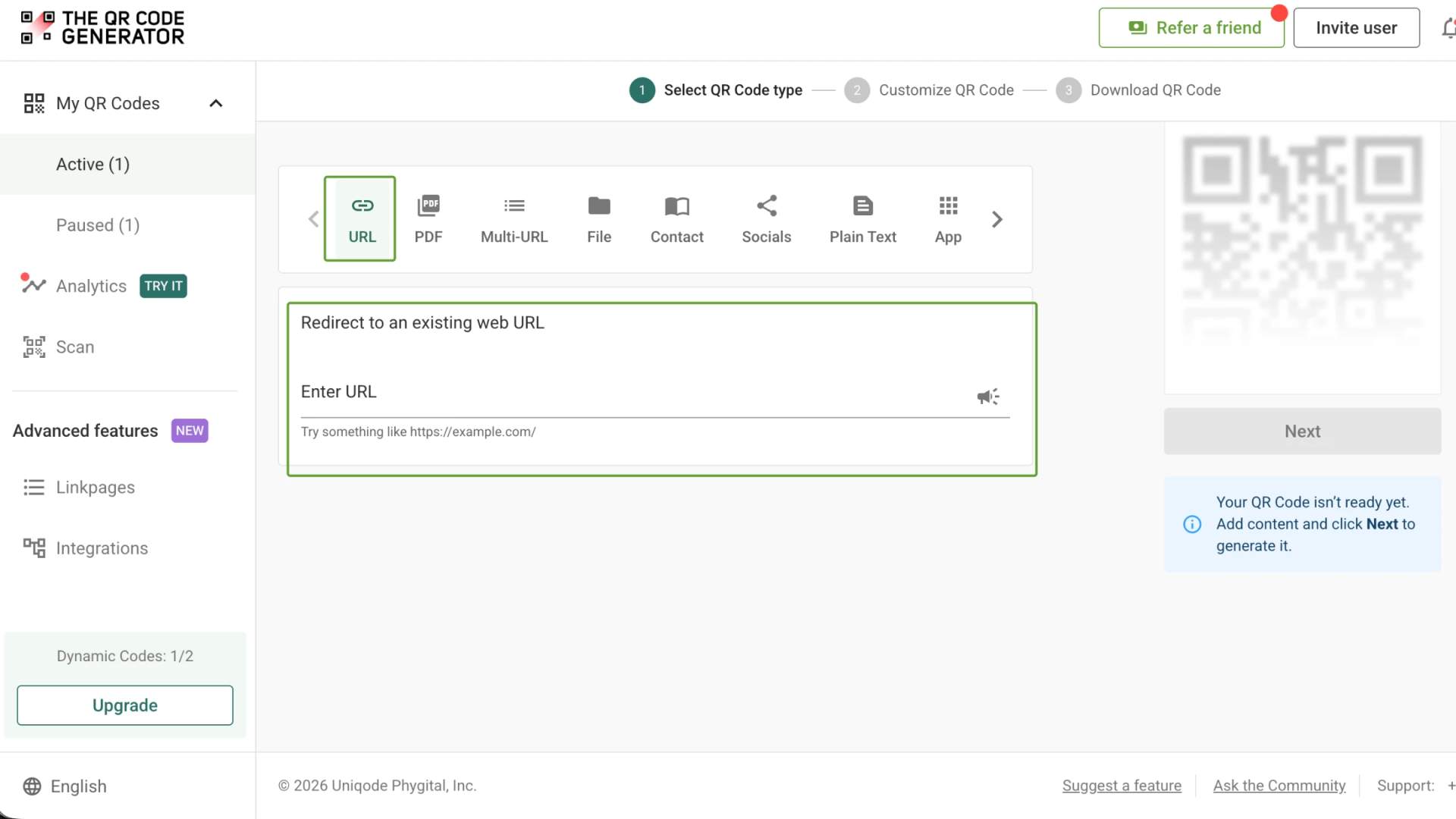
Step 4: Paste the destination link for a URL QR Code, whether that is the manual page, the booking form, or the maintenance log.
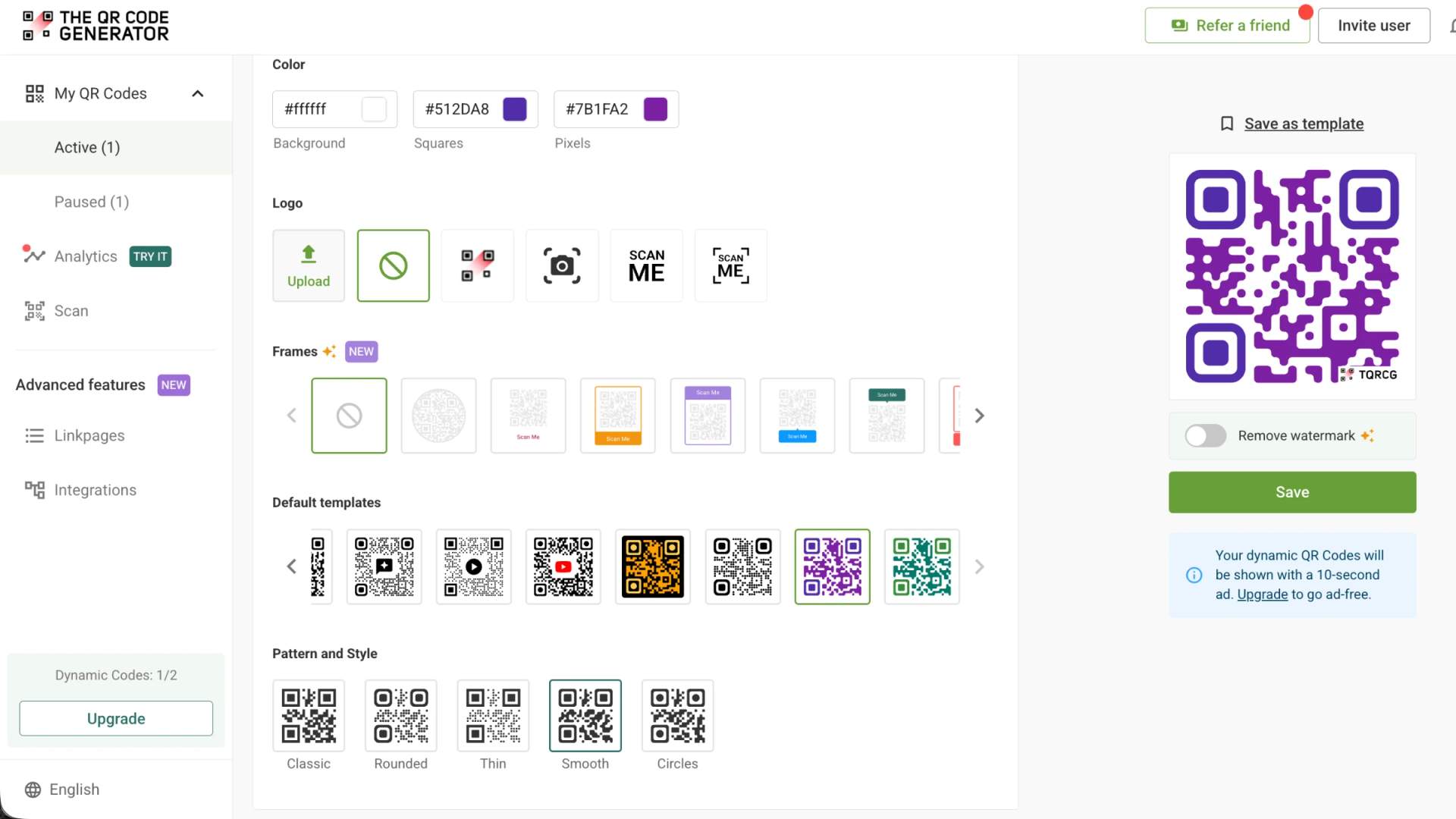
Step 5: Add your brand logo, colors, and a frame so customers recognize the code as legitimate.
Step 6: Download the QR Code as a PNG or SVG, then test the scan before it goes to print.
Best practices for QR Code deployment
As you add QR Codes across more products, service units, labels, and print runs, keeping every code accurate, consistent, and useful becomes more important. A code that leads to outdated information, is difficult to scan, or no longer matches your branding, can frustrate customers and weaken trust in the business.
These four practices can help you manage QR Codes at scale while keeping them current, measurable, and reliable.
Create QR Codes in bulk
A CSV upload generates every unit sticker or product-line code in one pass, so a fleet of service vans or a full product catalog receives consistent, on-brand codes at once through bulk QR Code generation, rather than a batch built by hand.
Track every scan
Scan analytics turn a printed sticker into a reportable channel, showing how many owners actually used it and when. Pro tip: connect your codes to track QR Code scans in Google Analytics once the program grows, so you see which units and manuals earn the most scans.
Design the label for the environment
Size the code for the distance it will be scanned from, and print on durable, weatherproof labels for outdoor units like condensers and water heaters.
Update the content, not the label
Edit the destination once when a manual or price sheet changes, and keep every printed code current without a reprint order. Follow general QR Code best practices to keep your codes reliable throughout the product's life.
Create your first QR Code for home maintenance today
QR Codes for home repairs and maintenance offer businesses an easy way to provide lasting access to product info, service tools, and support. Whether applied to serviced equipment or manufactured appliances, a single QR Code links customers to updatable, measurable content without the need to reprint labels. Branded QR Codes on custom domains also assure users of scan safety.
Start small with a single high-value use case, such as a water heater sticker, review invoice, or manual link. Choose dynamic QR Codes for long-term maintenance so you can update destinations without reprinting.
Once you have chosen the format, create the QR Code with TQRCG and track its scans over the next few weeks. The results can show whether customers are actually using the resource and which touchpoints are worth expanding. From there, you can scale the approach with QR Code best practices that keep your QR Codes consistent, measurable, and reliable as more products and service jobs use them.
Frequently Asked Questions
Can QR Codes be used to track equipment?
Yes. A QR Code on a unit links to its maintenance log and service history, so any technician can scan it to see past work and log new visits.
Is there a free QR Code tool for inventory management?
The QR Code Generator (TQRCG) is a free QR Code generator. Its free plan offers unlimited static QR Codes and 2 free dynamic QR Codes that never expire.
Can appliance manufacturers put QR Codes on products in bulk?
Yes. A CSV upload generates a code per model or serial number in a single pass, so the full product line receives consistent codes tied to the correct manual and warranty. Tools like TQRCG and Uniqode are a good choice for generating QR Codes in bulk.
Do QR Codes for home maintenance expire?
A static QR Code never expires, because the destination lives inside the pattern itself. A dynamic QR Code remains active as long as the account that manages it does. However, TQRCG's 2 free dynamic QR Codes that come with the free plan never expire.
Which QR Code type is best for linking a product manual?
Use a PDF QR Code to link a product manual. It opens the document straight from the scan without hosting the file on a separate web page, which suits manuals, spec sheets, and warranty terms. Choose a URL QR Code instead when the manual already lives on a page you maintain online.