
How QR Codes for Manufacturing Reduce Delays and Data Gaps

Harshajit
Last updated: May 20, 2026
11 min read
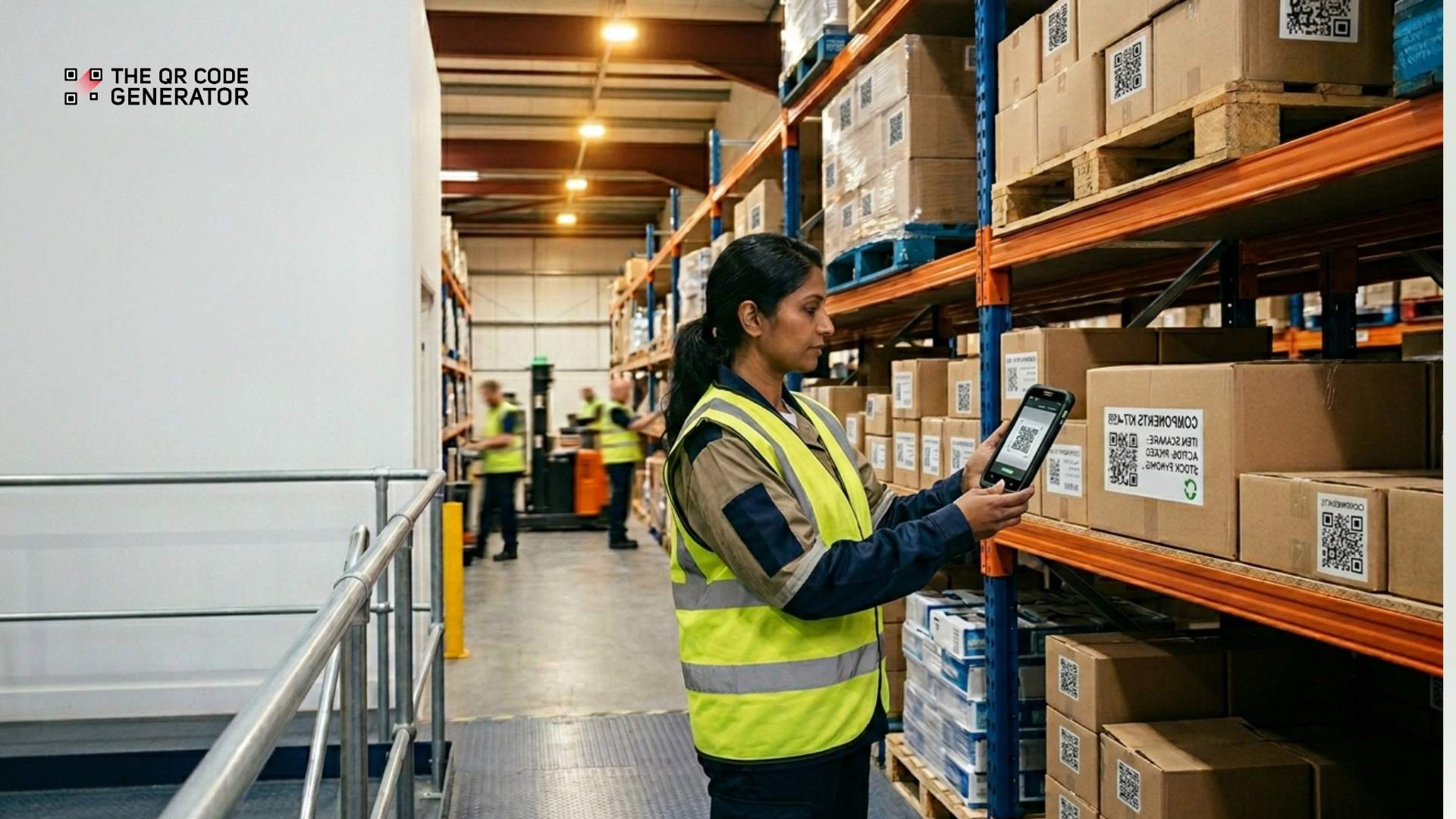
Your production floor runs all day, and your team handles repairs, inventory updates, and inspections during every shift. But many factories still record those updates hours later through manual logs or spreadsheets. That delay creates visibility gaps, leading to growing downtime. Unplanned downtime costs manufacturers up to $50 billion each year, according to industry estimates.
QR Codes for manufacturing are scannable labels that connect machines, pallets, workstations, and job cards to live digital records. For example, QR Codes for equipment maintenance reduce downtime by giving workers instant access to maintenance logs, inventory updates, and inspection records.
This guide explains the main ways manufacturers use QR Codes, a four-step setup process, and the most common mistakes that lead to QR Code project failures.
Why manual tracking creates downtime in manufacturing
According to a 2024 survey from the Manufacturing Leadership Council, 70% of manufacturers still collect operational data manually. Manual tracking creates downtime because it separates the moment work happens from the moment data gets recorded. That separation has four consistent failure points on the shop floor.
Information is unavailable at the point of work
A technician starts a repair and needs the machine’s service history. The service history is stored in a spreadsheet or a shared drive rather than on the machine. The technician leaves the workstation to find it, the machine stays idle, and the repair takes longer.
The same delay happens when standard operating procedures (SOPs) are unavailable at the station. The technician either stops work to find the instructions or continues from memory, which may be outdated.
System data lags behind floor activity
A technician reports an issue during a repair, but the system does not update until the end of the shift or after an inspection. Until then, supervisors still see the machine as available and continue assigning work to it.
Inventory creates the same problem. Planners schedule production based on system stock levels, but those numbers may no longer reflect what is actually on the shelf.
Manual entry creates errors that slow repairs
Operators often write notes during the task and enter them into the system later. A missing update or wrong batch number makes problems harder to trace.
Teams spend extra time checking records before they can fix the issue. That delay increases repair time and slows production.
Traceability breaks down during audits
When a problem occurs, teams need a clear record of what happened and when. Manual systems spread that information across paper logs, spreadsheets, and incomplete records.
In regulated industries, auditors expect complete and time-stamped records. Missing records create compliance risks and can stop production during inspections.
6 ways manufacturing QR Codes reduce downtime across workflows
QR Codes in manufacturing close the data gap by connecting machines, inventory, and workstations to live digital records. Workers scan once and access or update information without leaving the task.
QR Codes reduce downtime because they remove the two slowest parts of manual tracking: finding the record and updating the system later. Each scan automatically creates a time-stamped record, so teams can track work in real time without extra paperwork.
Manufacturing teams use QR Codes across six main workflows, and each workflow solves a specific operational problem.
1. Equipment maintenance
QR Codes on equipment reduce repair time by giving technicians instant access to service history, manuals, and open work orders directly at the machine.
A technician scans the QR Code on the asset and opens the maintenance log, previous repairs, replacement history, and open tasks on their device. The technician can start the repair more quickly because the diagnostic step is already complete. Emergency repairs also become less common because maintenance teams catch problems earlier through preventive maintenance checks.
QR Codes on equipment also connect technicians to preventive maintenance checklists and digital work order forms. Technicians complete the repair and update the record from the same scan. Teams that want to build preventive maintenance workflows can use these same workflows with QR Codes on equipment.
2. Inventory and asset tracking
QR Codes for inventory management and tracking reduce stock errors by updating records as materials move through the facility.
A storekeeper scans the QR Code when moving materials or picking items from a shelf. The inventory system updates immediately, rather than waiting for a manual count at the end of the shift. Production planners work from accurate stock levels, and shortages become visible before production stops.
QR Codes also improve asset management across the full equipment lifecycle. Manufacturing teams use QR Codes to tag tools, track spare parts, manage equipment checkout, and maintain audit records without manual reconciliation. Warehouse studies show that QR Code-based inventory systems reduce inventory counting time by 60% to 70% and improve data accuracy by replacing manual entry with real-time scanning.
3. Live production monitoring
QR Codes for production monitoring help supervisors detect bottlenecks in real time, rather than discovering delays after the shift ends.
Operators scan the QR Code on a job card or workstation each time a batch moves to the next stage. Supervisors see live production status inside the system and identify where work starts slowing down.
When a bottleneck occurs, supervisors reassign operators, change job sequences, or immediately move work to another line. Manual systems make this difficult because production updates often happen after the work is already complete. By the time delays appear in a spreadsheet, teams may already lose hours of production time.
4. SOP access and compliance
QR Codes for SOP access reduce compliance gaps by giving every operator the latest work instructions directly at the workstation.
An operator scans the QR Code before starting a task. The correct SOP opens instantly on their device. The operator follows the current process instead of relying on printed instructions or memory.
Each scan also automatically creates a time-stamped record. In regulated manufacturing environments, these records support compliance tracking and simplify audits. When teams update an SOP, workers see the latest version during their next scan, so process changes reach the production floor immediately.
5. Quality inspection
QR Codes for quality inspection improve traceability by recording inspection results at the part or workstation level in real time.
An inspector scans the QR Code on a part or workstation and opens the correct inspection checklist. The inspector records results and flags defects immediately, rather than filling out paper forms for later entry.
Boeing applied this approach during 777X wing production. Each composite shim carried a QR Code that tracked the part from order placement through installation, replacing a manual labeling process that created traceability gaps.
Real-time inspection records help quality teams identify defects earlier in the process. Early detection reduces rework costs because teams solve the issue before the part moves further down the production line.
6. Supply chain and logistics tracking
QR Codes for supply chain tracking improve traceability by creating a time-stamped record of movement at every stage of production, packaging, and distribution.
Workers scan these logistics QR Codes as products move through the facility. Each scan automatically records the batch location, movement time, and shipment status.
When a quality issue arises, teams trace the affected batch immediately rather than review incomplete logs or spreadsheets. Faster traceability limits recalls to the affected products, rather than disrupting the entire operation.
Why use QR Codes in manufacturing instead of barcodes
QR Codes work better than traditional barcodes in manufacturing because QR Codes connect workers to live operational data instead of only identifying an item. That difference matters on the shop floor because workers need to access records, update tasks, and track activity from the same scan.
The table below compares how QR Codes and barcodes perform across common manufacturing requirements.
| Feature | QR Codes | Barcodes |
|---|---|---|
| Data capacity | Store up to 4,296 characters of data | Usually store about 20–25 characters |
| Main function | Connect assets to live digital records | Identify an item or product |
| Information access | Open maintenance logs, SOPs, inspection forms, and inventory systems directly | Require a separate system lookup after scanning |
| Scanning angle | Scan from multiple angles | Usually require direct alignment |
| Damage tolerance | Remain readable even if up to 30% damaged | Often fail if scratched or partially damaged |
| Device compatibility | Work with most smartphones and tablets | Often require dedicated barcode scanners |
| Shop floor reliability | Perform better in dusty, worn, or low-visibility environments | Become harder to scan in harsh conditions |
| Workflow impact | Let workers access data and update records in one step | Add extra steps between scanning and updating records |
QR Codes reduce downtime because workers complete the task directly from the scan. A technician scans the code on a machine, opens the maintenance history, updates the repair log, and closes the work order from the same device. A barcode usually requires another system lookup after the scan, adding extra steps and slowing the workflow.
How to create and implement QR Codes for manufacturing
Create and implement QR Codes for manufacturing in four steps. Define the workflow problem first, as this determines what each code links to and where it gets placed.
Step 1: Create the QR Code
Sign up with The QR Code Generator (TQRCG). Select URL as the QR Code type, then paste the link to the record that the code should open. Use a dynamic QR Code so the destination can be updated without reprinting the label.
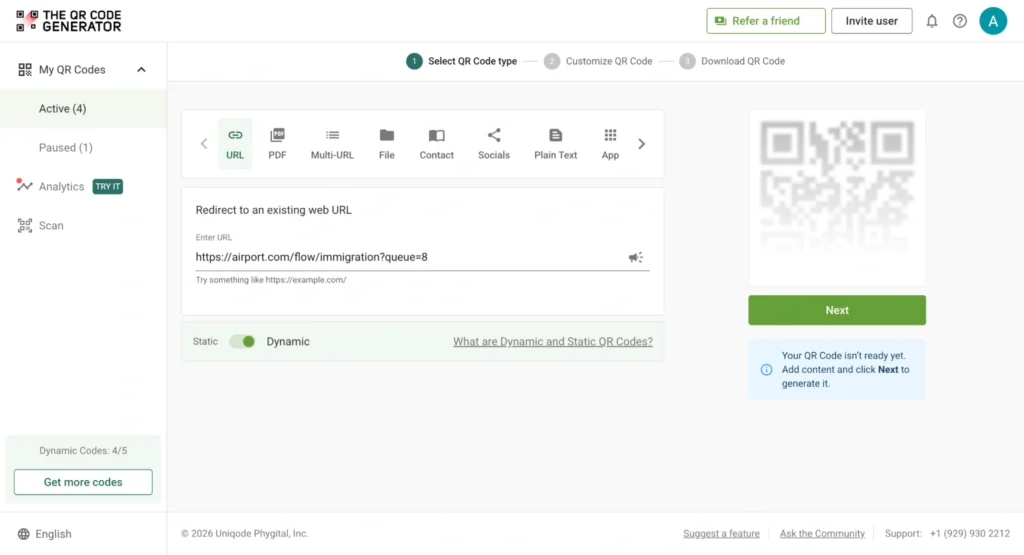
Link the QR Code to one of the following targets, depending on the workflow problem being solved:
- Maintenance logs and service history
- Inventory records or stock management systems
- Work orders and production tracking tools
- SOPs and safety instructions
- Inspection checklists and quality forms
Step 2: Customize for visibility
Customize the QR Code for shop floor conditions before downloading. Use high-contrast colors so the code remains scannable in low light or dusty environments. Add a label or frame that states the purpose, such as “Scan for SOP” or “Scan to update inventory.” Include a logo to help workers identify codes across different workflows at a glance.
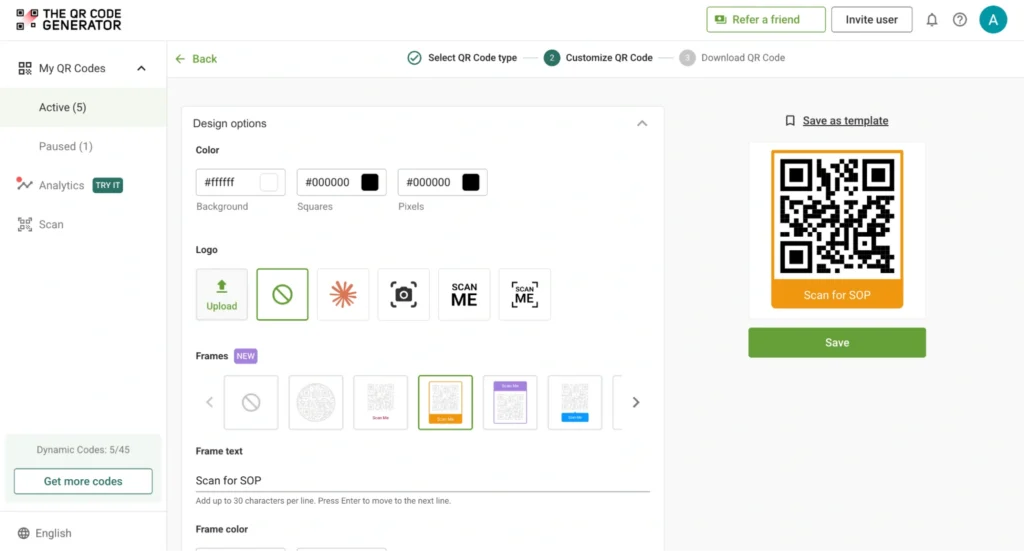
Step 3: Download in the right format
Download in PNG for standard label printing. Download in SVG for large-format labels or machine surfaces where the code needs to scale without losing resolution. Size the code to the scanning distance. QR Codes on machines or storage racks require a minimum of 1 × 1 inch for close-range scanning, and larger for any distance beyond arm’s reach.
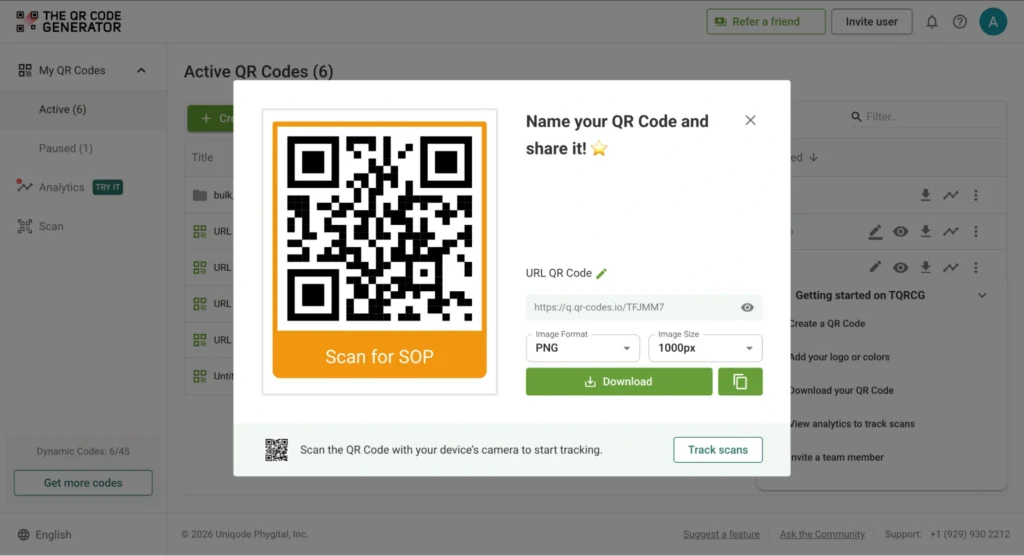
Step 4: Test before full deployment
Test every QR Code under real floor conditions before attaching it to a machine or rack. Scan it on multiple devices, both iOS and Android. Confirm it loads the correct content at typical working distances and angles. Fix broken links or contrast issues before rolling out.
Start with a single machine, workstation, or workflow. A focused pilot on one use case (maintenance or inventory, not both at once) reveals what works and what doesn’t before the labels are on 50 machines. TQRCG includes two free dynamic QR Codes with no time limit, which is enough to run a real pilot before scaling.
What are the mistakes that make QR Code rollouts fail in manufacturing?
Most QR Code failures in manufacturing come from deployment errors, not the technology itself. These are the six mistakes that consistently reduce adoption and impact on the floor.
Mistake 1: Using static QR Codes for content that changes
Static QR Codes encode a fixed destination. When SOPs, logs, or linked instructions are updated, the code still points to the old version. Every update requires printing and replacing the label. Fix this by using dynamic QR Codes, as the destination updates without touching the label.
Mistake 2: Placing codes away from the point of work
A QR Code placed on a wall or kiosk, away from the machine, forces workers to leave their task to scan it, which defeats the purpose. Place codes directly on equipment panels, control boxes, storage bins, and workstations. Basically, wherever the task actually happens.
Mistake 3: Leaving codes without context
A code with no label looks like decoration. Workers do not scan it. Label every code with its specific purpose: “Scan for machine service log,” “Scan for inspection checklist,” or “Scan to update stock.” Make the action obvious before the worker picks up their phone.
Mistake 4: Using low-quality labels on the shop floor
Standard paper labels fail within weeks under heat, dust, oil, and cleaning chemicals. Once a code becomes unreadable, it gets skipped and records stop updating. For durable QR Codes, use industrial-grade polyester or metallic labels rated for the operating environment, and test them in the harshest area of the floor before full deployment.
Mistake 5: Skipping worker onboarding
Workers do not scan codes they do not understand. Run a 15-minute walkthrough for workers, showing when to scan, what opens, and how to log an update. Make scanning a documented step in the relevant SOPs from day one, and reinforce it through supervisors for the first two weeks.
Mistake 6: Not tracking scan data
Some QR Codes get ignored because of poor placement or unclear purpose, but without monitoring, those gaps stay invisible. Track scan frequency per code using TQRCG’s analytics. QR Codes with low scan rates signal a placement or labeling problem. Fix the issue and measure whether the change improves adoption.
Deploy QR Codes on your manufacturing floor today
QR Codes in manufacturing work because they put information and data capture at the exact moment and location where work happens, not an hour later at a workstation or during a shift handover.
Start with one workflow. Pick the area where delays cost the most, usually equipment maintenance or inventory accuracy, and run a 30-day pilot on a single machine or station using The QR Code Generator’s (TQRCG) two free dynamic QR Codes. Measure what changes before expanding.
Frequently Asked Questions
What happens if a QR Code doesn't scan on the shop floor?
If the QR Code doesn’t scan, it's too small, too low-contrast, or physically worn. Increase label size, improve color contrast, and replace any label showing visible damage. Test every replacement under real floor conditions before relying on it.
Can workers use a screenshot of a QR Code instead of the physical label?
A screenshot works if the image is clear and the code is static. Dynamic QR Codes update their destination — a screenshot from three months ago may open outdated content. Physical labels at the point of work are always the more reliable option.
Do QR Codes work without internet on the manufacturing floor?
The scan works offline, but the linked content does not load without an internet connection unless it is stored locally on the device. Ensure stable connectivity in all key work areas before deploying QR Codes that link to live systems.
What happens when the information linked to a QR Code changes?
Static QR Codes require a new label every time the destination changes. Dynamic QR Codes allow the destination to be updated from the TQRCG dashboard at any time without reprinting the label.
How damaged can a QR Code get before it stops scanning?
QR Codes remain scannable if up to 30% of the code surface is damaged. Beyond that threshold, scanning becomes unreliable. Inspect high-wear labels regularly and replace them before they reach the point of failure.