
How To Use QR Codes for Hospital Registrations

Kritika
Last updated: March 2, 2026
10 min read
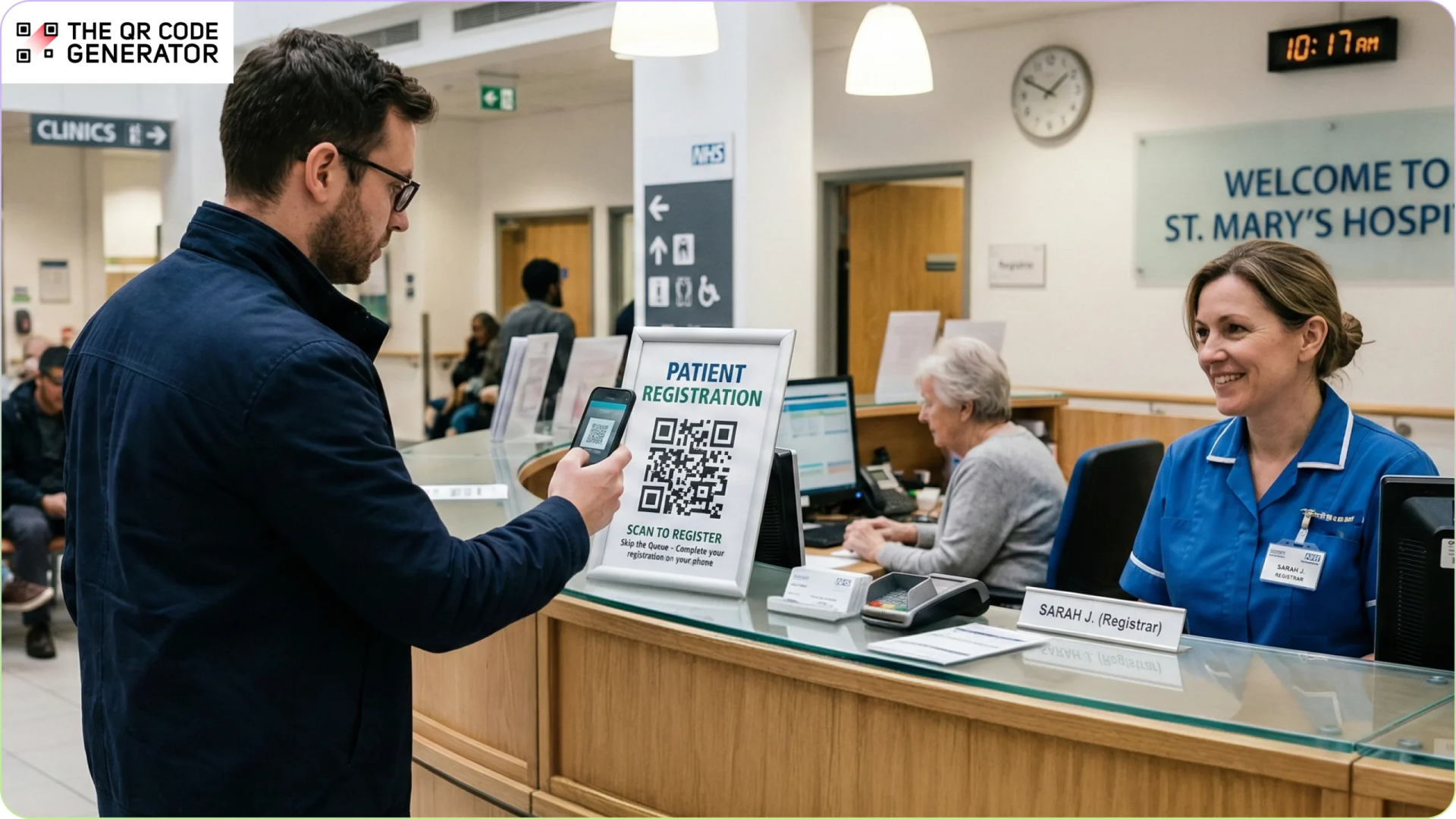
Hospital registration desks are the front door to patient care. Yet many patients still wait in long lines just to share basic information.
Traditional check-in relies on staff collecting details one patient at a time. The process is slow, repetitive, and often uncomfortable. Patients may have to share sensitive information within earshot of others. By the time they reach a clinician, frustration has already set in.
Registration QR Codes offer a simple fix. With a quick scan, patients can complete forms, upload insurance details, and confirm information directly from their phones. This reduces wait times, minimizes manual data entry, and creates a smoother, more private experience.
In this guide, you’ll learn how QR Codes for hospital registration help reduce check-in bottlenecks, improve patient satisfaction, and increase operational efficiency across departments.
Why traditional hospital registration counters struggle at scale
As patient volumes increase, manual intake processes can strain operations across departments. What works for a small clinic often breaks down in a busy hospital.
Manual intake limits speed and capacity
Paper forms and manual data entry take time, lengthening patient check-in times, especially in outpatient departments and walk-in clinics. Staff must collect and enter details for each patient individually. This makes the process slow during peak hours, leading to longer lines, staff feeling rushed, and patients growing impatient.
Administrative work reduces care time
Registration is the first step in a hospital visit. If this step feels slow or confusing, it affects the entire experience.
Also, 64% of adults want healthcare providers to spend more time understanding their needs. However, when staff spend more time on paperwork, they have less time to spend with patients.
Open desks reduce patient privacy
Most registration counters sit in open areas. Patients often need to share personal and medical details while others are nearby. This can make patients uncomfortable and less open. Incomplete or hesitant responses can affect the quality of the collected information.
Front-desk delays disrupt hospital flow
Slow check-ins do not just impact the front desk. They affect the whole hospital. Doctors will have to run behind schedule, or billing teams might have to wait for insurance details. Small delays at registration can create bigger problems throughout the day. Over time, these delays reduce the number of patients a hospital can serve efficiently.
Check-in friction shapes first impressions
The check-in process shapes the tone of the visit. A slow or confusing start creates stress before treatment begins. In healthcare, trust and calm matter. When the first interaction feels inefficient, it weakens the overall patient experience.
Adding a patient registration QR Code can significantly reduce bottlenecks in various ways. Let’s look at how.
How hospitals can use QR Codes at registration counters
QR Codes replace fragmented intake workflows with secure, self-service digital registration. Here’s how hospitals can use them at the front desk.
Scan-to-register forms reduce manual data entry
Place QR Codes at registration counters that link to mobile-friendly digital forms with your hospital’s branding and required fields.
Patients scan and enter their details on their own devices, then submit securely. This removes paper forms and reduces typing work for staff. It also lowers the risk of incomplete forms and missing signatures, which often slow down intake.
Many Indian public hospitals now use QR Code–based registration under the Ayushman Bharat Digital Mission. Patients scan a QR Code at the counter, verify their details digitally, and receive a token without paper forms, reducing errors and speeding up patient flow.
Self-service check-ins increase front-desk capacity
QR Codes allow walk-in and outpatient patients to complete check-in steps without waiting for staff assistance. This helps hospitals manage higher patient volumes during peak hours without adding more staff. In one study, patients using kiosks were identified in around 1.4 minutes compared with 9 minutes via traditional front-desk check-in. Facilities with kiosk check-in saw wait times roughly 57% shorter than those without.
Many hospitals and emergency departments now deploy self-check-in kiosks that let patients register and confirm their details themselves. For example, North York General Hospital in Canada introduced a digital check-in process where patients scan a QR Code on arrival or use digital kiosks to begin registration, reducing congestion at the reception desk.
Appointment tools improve visit coordination
Patients can scan to confirm appointments, reschedule visits, or check department and doctor details. For high-volume facilities, QR Codes can also support digital queue systems that generate token numbers and show estimated wait times. This reduces confusion in waiting areas and keeps patient flow organized.
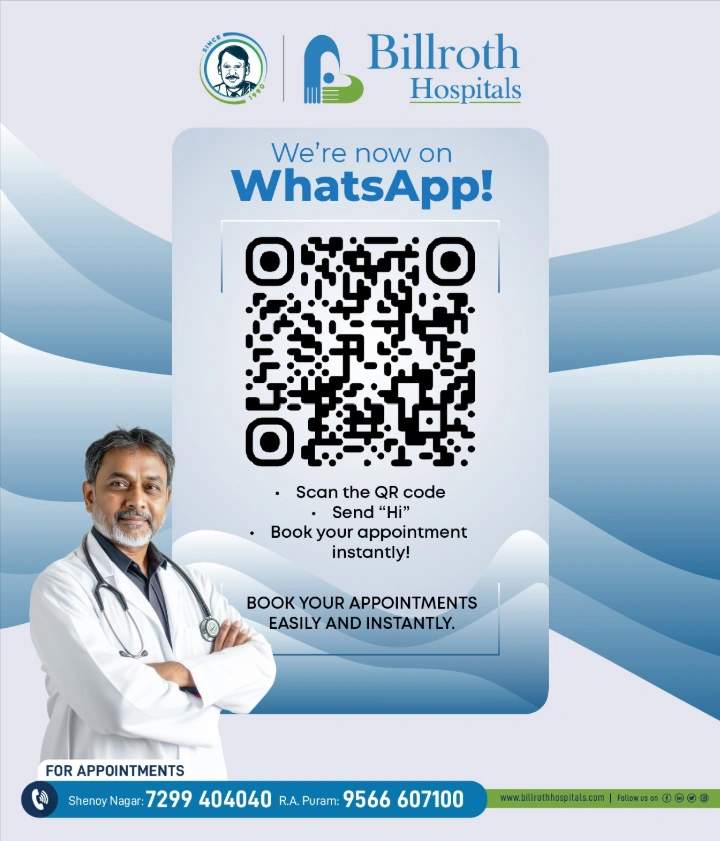
For example, Billroth Hospitals allows patients to scan a QR Code to open a WhatsApp chat and instantly book or confirm appointments. This reduces inbound calls and pre-visit confusion, helping registration teams manage arrivals more efficiently.
Digital data captures improve record accuracy
QR Code-linked forms can send patient information directly to electronic medical records (EMRs) systems and hospital management systems in real time. This reduces transcription errors and removes the need to re-enter data later. Clinicians receive clear and structured records before the consultation begins, which supports faster and more confident decision-making.
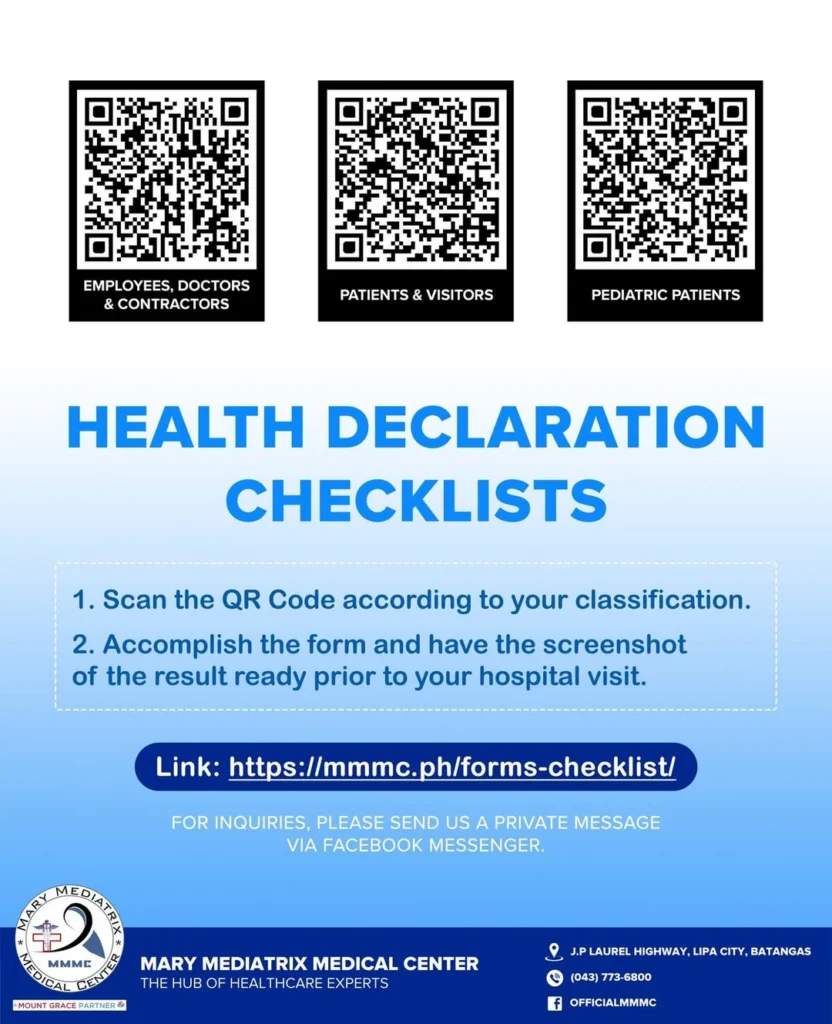
For example, Mary Mediatrix Medical Center in the Philippines introduced QR Codes that allow patients to complete a digital Health Declaration Checklist before arriving at the hospital. Collecting this information electronically reduces manual transcription and improves data accuracy at the point of entry.
Structured insurance captures speed billing workflows
QR Code forms can collect policy numbers, provider names, and coverage details in a structured format. Patients can upload images of insurance cards from their phones. Capturing accurate insurance information upfront reduces claim rejections and reimbursement delays.
The SMART Health Insurance Card initiative enables patients to present insurance details via QR Code. Healthcare providers can scan these QR Codes during check-in and ingest directly into administrative systems. This reduces manual transcription and supports cleaner claims submission.
When used strategically, QR Codes do more than shorten lines. They improve data quality, protect privacy, and create a smoother experience for both patients and staff.
How to create QR Codes for hospital registration counters
Let’s walk through the steps to create and deploy QR Codes effectively in a clinical setting.
Step 1: Create the QR Code
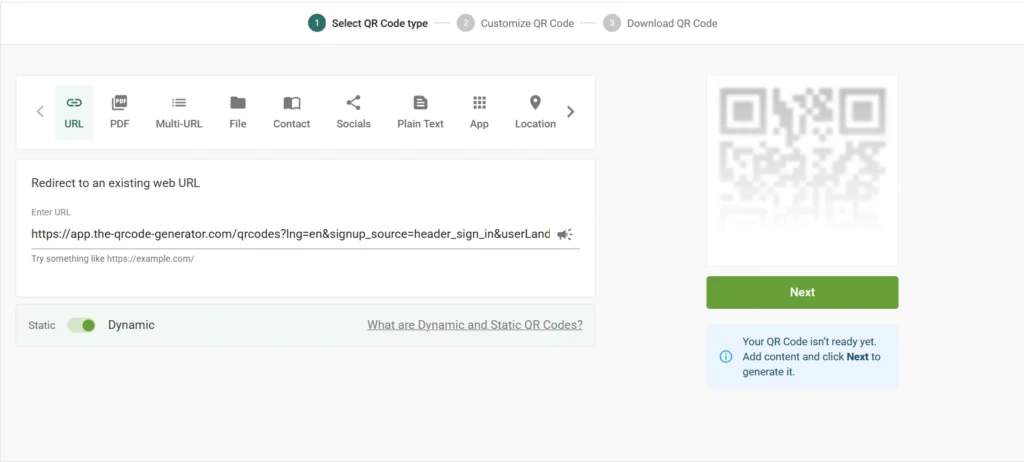
Start by choosing the right QR Code type based on your hospital’s workflow. In most cases, a URL QR Code works best, as it can link directly to a secure digital intake form, insurance submission form, payment page, or queue management system.
For hospital environments, it is strongly recommended to use a dynamic QR Code. Dynamic QR Codes allow you to update the linked form or system without reprinting signage, which is especially useful when departments change or compliance updates are required.
To generate your QR Code, navigate to The QR Code Generator (TQRCG) and paste the secure link to your intake form. Click Next to proceed.
Step 2: Customize the QR Code for visibility and trust
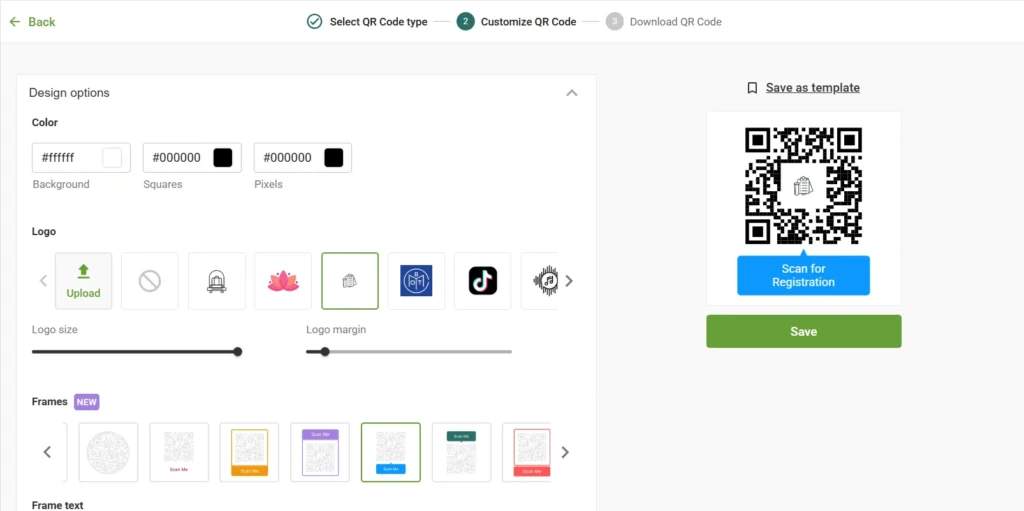
Customize your QR Code using high-contrast colors, so it scans easily under indoor lighting. You can add your hospital logo in the center to reinforce credibility. Include a QR Code frame with a clear call to action, such as “Scan to Check In” or “Scan to Register.”
Step 3: Download and test across devices
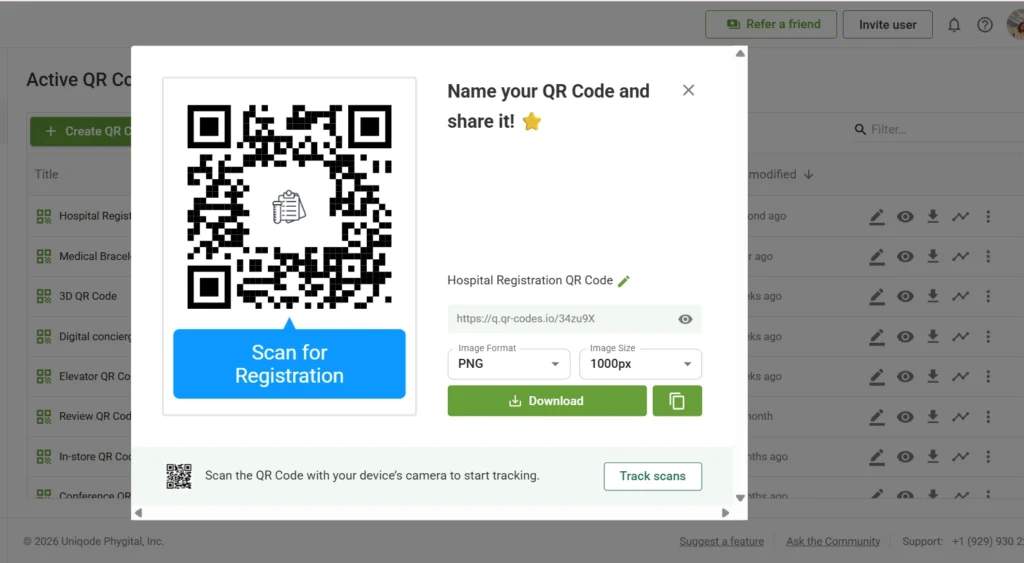
Before deploying the QR Code hospital-wide, test it thoroughly. Confirm that the form loads quickly on mobile networks and displays correctly across both Android and iOS devices.
Make sure the layout is fully mobile-optimized and that submitted data flows reliably into your EMR system or hospital management system.
Step 4: Optimize placement and scanning context
Place hospital QR Codes at eye level on registration counters, at hospital entrances, and in waiting areas where patients naturally pause. Ensure there is adequate lighting and avoid placing the QR Code on reflective surfaces that could interfere with scanning.
Adding a short instruction line below the QR Code explaining what happens after scanning, such as “Complete your registration in under 2 minutes,” can significantly improve adoption. Use trackable QR Codes to see where the codes perform best and update placement accordingly.
Expert best practices for QR Code registration in hospitals
QR Codes can speed up intake. But only if they are easy to use and well supported. Here’s how to get it right.
Make scanning easy for everyone
Not every patient is tech-savvy.
Place clear instructions next to the QR Code. Use simple steps like:
- Open your camera
- Point it at the code
- Tap the link
Train front desk staff to help quickly when needed. Keep a kiosk or staff-assisted option available for patients who cannot scan. For example, North York General Hospital employs volunteers to assist patients during specific hours, ensuring that digital check-in does not create confusion or delays.
Keep forms short and simple
Long forms slow people down.
Only ask what you truly need at registration. Use smart logic available on certain QR Code platforms to ensure patients see only relevant questions. For example, if they select “No allergies,” do not show follow-up allergy questions.
Break longer forms into small steps with a clear progress bar. Make buttons large and easy to tap. Test everything on real phones, not just desktops.
Let staff see submissions instantly
Once a patient submits a form, the staff should know right away.
Set up alerts or dashboards that show new check-ins in real time. Flag urgent responses such as severe symptoms so they can be reviewed immediately. Route submissions automatically to the right team to avoid manual forwarding.
Protect patient data
Registration involves sensitive information.
Use secure, encrypted forms with HTTPS. Make sure to use HIPAA-compliant data-handling tools, such as TQRCG, if you operate in the U.S. Clearly inform patients how their data will be used. Transparency builds trust.
Integrate forms to your existing systems
Avoid creating a second system that staff have to manage.
Choose QR Code tools that integrate with your hospital’s EMR or information system so data does not need to be re-entered. Train staff on the digital intake process, including how to help patients who get stuck.
When clinicians can see intake information before the visit, consultations move faster.
Plan for outage
Digital systems fail sometimes.
Keep a simple fallback process ready. That may include printed forms or a temporary manual intake sheet. Make sure staff know when to switch and how to log data later.
Test your QR Code regularly across different phones and network conditions to prevent broken links.
Create secure hospital registration QR Codes with TQRCG
Hospital registration desks are often the first point of friction in the patient journey. QR Codes offer a practical way to reduce paperwork, shorten lines, and capture accurate information from the start.
By replacing manual intake with secure digital forms, hospitals can reduce front-desk congestion, improve data accuracy, and simplify billing workflows. When implemented well, QR Codes help ensure information is captured clearly, routed correctly, and available before the consultation begins.
With a platform like The QR Code Generator (TQRCG), hospitals can create dynamic, secure QR Codes that support encrypted data collection and system integrations. This allows registration counters to operate more efficiently without adding complexity for staff.
Sign up and create your hospital registration QR Code with TQRCG today!
Frequently Asked Questions
Are QR Codes safe for hospital registration?
Yes, QR Codes are safe for hospital registration when implemented correctly. The QR Code itself does not store sensitive patient data; instead, it securely redirects users to protected digital forms or portals.
How do QR Codes support HIPAA compliance?
QR Codes support HIPAA compliance by acting as secure access points rather than data containers. When paired with HTTPS encryption, authentication layers, audit logs, and role-based access controls, QR Codes can safely guide patients to compliant registration systems without exposing protected health information (PHI).
Can QR Codes integrate with EMRs and hospital systems?
Yes, QR Codes can integrate smoothly with electronic medical records (EMRs) and hospital information systems. Dynamic QR Codes can link to registration workflows, pre-fill patient data, trigger appointment check-ins, or sync directly with EMR systems via APIs, reducing manual data entry and errors.
What if patients don’t have smartphones?
Hospitals must always offer alternative registration options, such as kiosks, tablets, front-desk assistance, or paper forms. A hybrid approach ensures inclusivity for elderly patients or those without smartphones.
Should hospitals use static or dynamic QR Codes for registration?
Hospitals should use dynamic QR Codes for registration. Dynamic QR Codes allow you to update the destination URL, manage access, track usage, and enhance security without reprinting the QR Code. This flexibility is essential for evolving workflows, compliance updates, and system integrations in healthcare environments.