New Dynamic QR Code
  New Static QR Code
 To enable tracking, create a Dynamic QR Code





Link a PDF document to share easily
Show multiple links in a webpage
Share contact details easily
Display a short message
Redirect to app download based on the device OS
Link phone number to send a text message quicker
Link an email address to open the email app ready to go
Link a phone number for quick calls
Link a phone number for quick calls

Remove The QR Code Generator watermark by signing up for the Flex plan



 No credit card required






How QR Codes on books help publishers improve reader engagement and sales
How to create and use QR Codes for book publishing
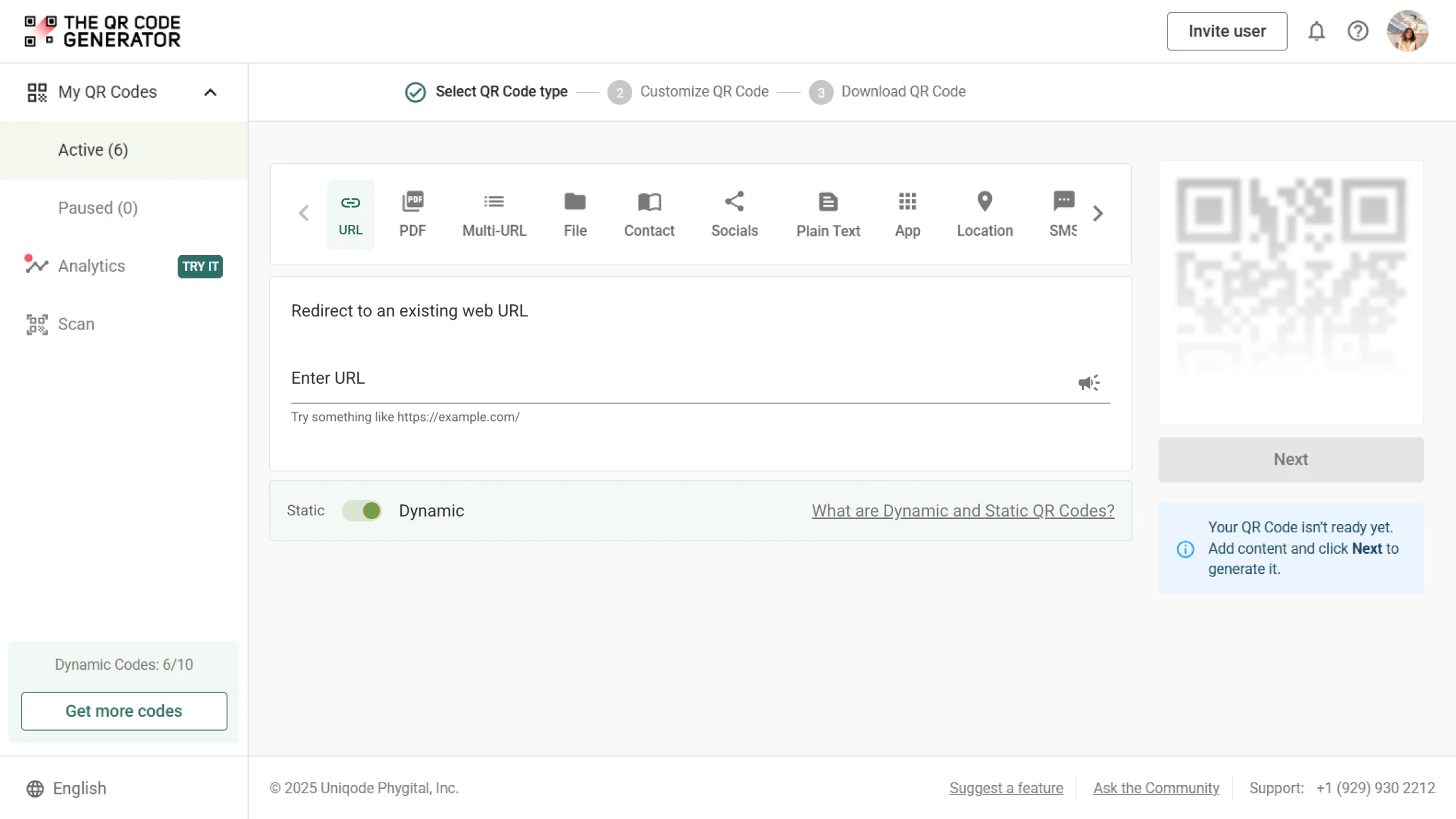
Step 1
Log in and select the right QR Code type
Log in to The QR Code Generator (TQRCG) and choose the QR Code type that fits your goal. Such as URL, PDF, or Socials, depending on whether you want to link to your book page, bonus content, reviews, or an author’s website.
Step 2
Add your book or campaign link
Enter the destination you want readers to access. This could be a bookstore product page, a sample chapter, or a reader giveaway, then click Next.
Step 3
Design and customize your QR Code
Customize your QR Code with your book cover, publisher logo, or book colors. Choose a frame and add a clear CTA like “Scan for a Free Chapter” or “Explore Bonus Content.” Once satisfied, click Save.
Step 4
Name your QR Code and download
Name your QR Code based on the book or campaign. Select a file format, such as PNG or SVG, to download it. Test the QR Code before placing it in books or marketing materials.
What are the most effective QR Code placements for book publishers?
1. QR Codes on book covers
Place a QR Code on the back cover or inside flap to help readers access bonus chapters, watch author interviews, pre-order other books, or join the author’s mailing list. Publishers can use QR Codes on book covers to capture reader interest at the very beginning.

2. QR Codes in book advertisements
Track offline marketing in real time by adding QR Codes in book advertisements. Link directly to order landing pages, exclusive discounts, or book preview pages.

3. QR Codes in book club editions
Book club readers are already highly invested, and QR Codes in book club editions can help deepen that relationship. Publishers can invite readers to exclusive discussions, bonus reading guides, author Q&A sessions, or private communities.

4. QR Codes inside physical books
Integrating QR Codes inside physical books helps print editions compete directly with e-books through richer, interactive experiences. Publishers can enhance specific chapters with worksheets, teaching guides, videos explaining key concepts, glossaries, translations, or read-aloud versions.

5. QR Codes in bookmarks and inserts
QR Codes on bookmarks and printed inserts offer ongoing visibility long after the book is purchased. Publishers can use these placements to share behind-the-scenes content, loyalty programs, or future release alerts.

6. QR Codes at book launch and author signing events
Publishers can place QR Codes on event signage, table tents, or signed bookplates to promote pre-orders, event-only offers, or newsletter sign-ups. Using QR Codes at book launch events and author signings can turn in-person interest into measurable and long-term audience growth.

What makes The QR Codes Generator (TQRCG) ideal for publishing teams?

Deploy QR Codes that can be updated anytime
With The QR Code Generator (TQRCG), your QR Codes last as long as your books do. Dynamic QR Codes from TQRCG can be edited at any time without reprinting a single book. Change where your QR Code points, update promotional links, and refresh bonus content at any time.

Get deeper reader insights
The QR Code Generator's analytics dashboard shows you exactly how many people scanned your QR Codes, where they scanned from, what devices they used, and when engagement peaked. This data proves ROI and helps you make informed decisions for your future marketing efforts.

Support multiple content formats
Readers enjoy a seamless experience regardless of what content you're sharing. With a single QR Code, you can deliver bonus chapters, videos, promotional landing pages, or author details, all optimized for mobile viewing.

Always get high-quality print output
Get high-resolution prints in your desired size that print cleanly on all your materials, whether print or digital. TQRCG offers multiple file formats, customizable colors, and frame options that smoothly integrate with your book design.
Frequently asked questions
Publishers should use dynamic QR Codes because they enable links and content to be updated at any time without requiring the reprinting of books or marketing materials. Dynamic QR Codes also enable tracking, helping publishers measure reader engagement across campaigns.
No, QR Codes do not disrupt book aesthetics when they are designed thoughtfully. Using branded colors, subtle placement, clean frames, and strong contrast ensures QR Codes blend naturally into book layouts without distracting from the reading experience.
No, QR Codes cannot replace barcodes. Barcodes remain essential for inventory management and retail scanning, while QR Codes complement them by adding interactive and digital experiences for readers.
Yes, QR Codes work internationally and can be scanned anywhere in the world. Because QR Codes are device-agnostic, they support global book distribution, multilingual campaigns, and international marketing efforts without additional setup.
Not every book needs a QR Code. Publishers should add QR Codes only when they provide clear value, such as linking to sample chapters, worksheets, bonus content, promotions, or author resources that enhance the reader experience.
Yes, QR Codes are highly suitable for self-published books. They help self-publishers build an author brand, link to reviews, promote ebooks or audiobooks, grow mailing lists, and connect print readers to digital platforms.