
QR Codes on Vehicles: How to Use and Create One

Harshajit
Last updated: September 3, 2026
11 min read
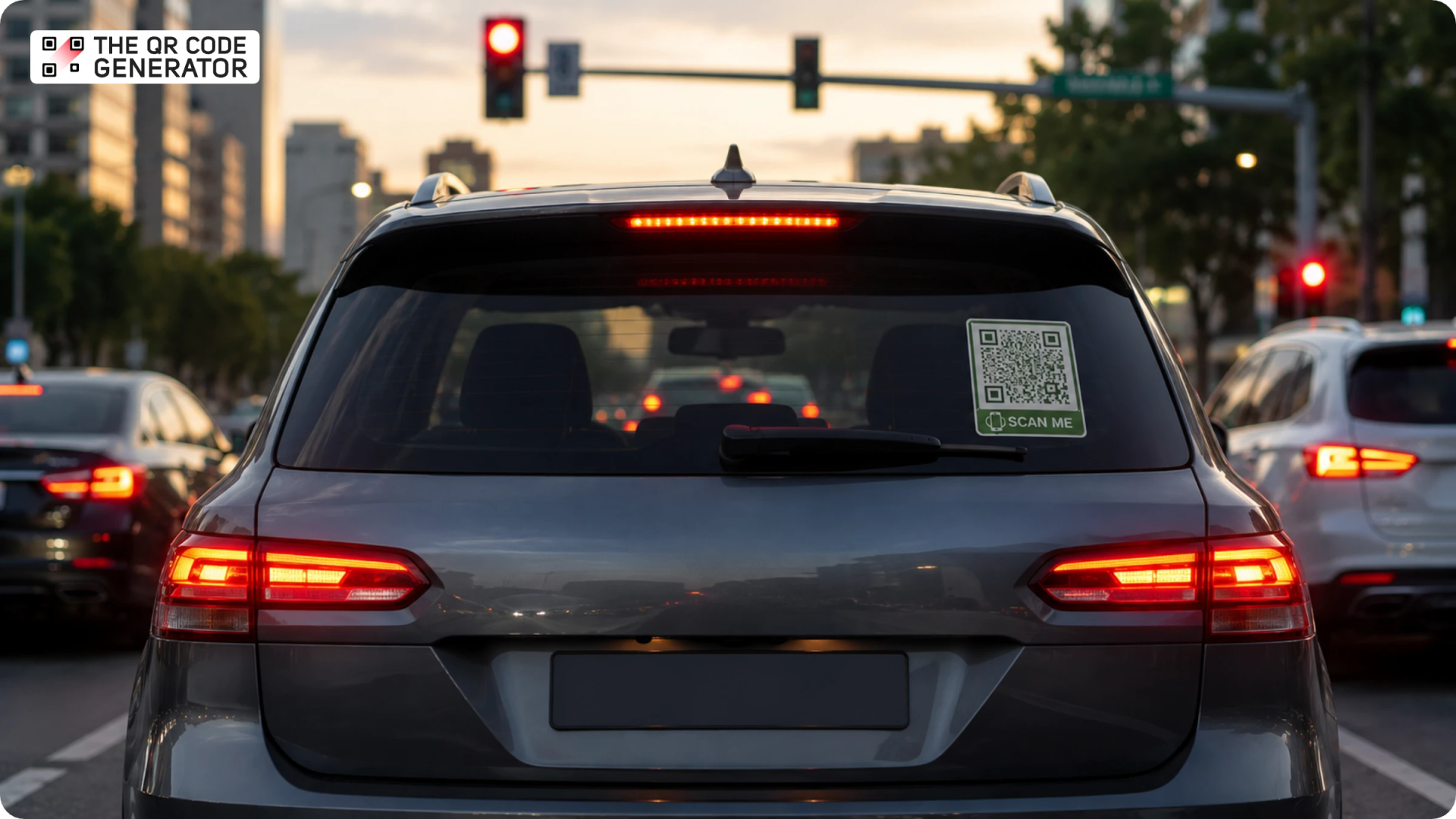
You are idling at a red light behind a sleek SUV, and its rear window reads "This one is for sale. Interested? Scan here," with a QR Code beside the text. You scan it out of curiosity. Up comes a clean page with the full spec sheet, the asking price, the mileage, and the owner's number, everything you would want to know about the car. Additionally, the same QR Code could just as easily promote a new shop, showcase a business, collect reviews, or lead people to any other destination.
And that’s exactly what a QR Code for vehicles is and does. It is a scannable code you place on a car, van, or truck that connects the vehicle to a digital destination, from a sale listing to a phone number.
If you're looking to know more about how to use QR Codes on vehicles, including placement rules and essential safety tips, you're in the right place.
What is a QR Code for vehicles?
A QR Code for vehicles is a scannable barcode you attach to a vehicle so people open a linked web page by pointing a phone camera at it. A vehicle QR Code suits anything that carries an audience: a delivery van, a work truck, a rideshare car, a food cart, a boat on a trailer, or a display bike in a shop window. The vehicle becomes a doorway to something online.
The scan does what a painted phone number or a printed name cannot. It hands the viewer a tap-through to the full story: a landing page, a vCard with your contact, a Google review link, a social profile, or a listing with photos and price.
Because high-visibility moments on vehicles are fleeting, capturing quick attention is essential. Whether someone sees the vehicle parked, at a loading dock, or in a trade show booth, the code secures that engagement before the opportunity slips away.
Which type of QR Code is best for vehicles?
A dynamic QR Code is the better choice for almost any vehicle, because a dynamic QR Code lets you change the destination content without reprinting the QR Code. Meaning, a vehicle carries the same code for months or years, while the destination behind the QR Code keeps changing.
This is possible because a dynamic QR Code encodes a short redirect that forwards to your real destination. The redirect also reports every scan by date, location, and device, so you can tell whether the wrap or window sticker actually pulls.
A static QR Code, on the other hand, encodes the destination directly in the pattern, so changing it means generating a new QR Code and re-applying it to the vehicle. A static code suits a permanent target like your main website, and it keeps working even if you close the account you made it with.
7 ways to use QR Codes on vehicles
The best way to use a QR Code on a vehicle depends on what you want people to do after they scan. You can use the same space to promote a business, sell a vehicle, share your contact details, provide emergency information, collect payments, offer service or delivery information, or help customers access dealership and rental details.
Advertise on a moving vehicle
Use the QR Code to advertise a product, service, store, or limited-time offer. For example, a local café could place a QR Code on its delivery van that opens a page for a 20% discount on the first order. You can also link it to your social media profile to turn passing attention into followers and engagement. Place the code large and low on the rear and passenger side, where people can see it clearly when the vehicle is parked or stopped in traffic. Give each vehicle its own tracking link so you can see which vehicles and routes generate the most scans.
Sell a vehicle from the rear window
Link to a single listing page with the asking price, mileage, VIN, a full photo set, and a service-history PDF, so a buyer qualifies themselves before calling. Use a short contact form in place of a raw phone number to screen out spam and tire-kickers. Add a walkaround video link so an out-of-town buyer sees the car run before driving over.
Hand out your contact without a card
Create a digital contact card with your business name, phone number, email address, website, and other relevant details, then generate a QR Code that opens that contact card when scanned. Place the QR Code where people walking past or stopping near the vehicle can easily see it, and add a clear CTA such as “Scan to save our contact.” This works well for plumbers, HVAC technicians, electricians, and other service businesses that want potential customers to save their details for future work.
Link emergency and medical details on the glass
Store emergency contacts, blood type, allergies, and other critical medical details on a login-free page that a responder can open by scanning the QR Code. Put QR Code sticker on the driver-side window where paramedics check first. For example, if a driver is unconscious after an accident, a passerby or first responder can scan the QR Code to quickly access their emergency information and contact the right person.
Collect tips or payments in a rideshare or taxi
Create a payments QR Code that opens your preferred payment method, such as Apple Pay, Venmo, Cash App, or PayPal, when a passenger scans it. For example, a rideshare driver can place the QR Code on the seat-back headrest at eye level with a CTA like “Scan to tip” so passengers can quickly leave a tip before getting out. You can also use it to collect payments for taxi fares or other vehicle-based services.
Put delivery and service info on the vehicle
Link to a live tracking or proof-of-delivery page so a recipient confirms a drop without calling dispatch. For a service fleet, point it at a work-order or booking form the customer fills in from the curb. A field-service crew can print the code on the tailgate so a client books the next visit on the spot.
Show dealership and rental details on each car
Use a window sticker whose code opens that specific car's specs, price, financing terms, and a test-drive slot, so a shopper self-serves after hours. On a rental, link to check-in steps, the fuel policy, and a damage-report form the renter uses at pickup. Platforms like Dealerware already scan vehicle QR Codes to log cars in and out at handoff, which points to the code your own car may carry from the factory.
How to create a QR Code for your vehicle
Several QR Code generators handle this, and TQRCG is one of the free ones worth trying. The free plan gives you 2 dynamic QR Codes that never expire plus unlimited static QR Codes, and you can step up to a paid plan as your needs grow.
Follow these five steps to create a vehicle QR Code:
Step 1: Log into the TQRCG dashboard, click + Create QR Code, and select dynamic from the type dropdown
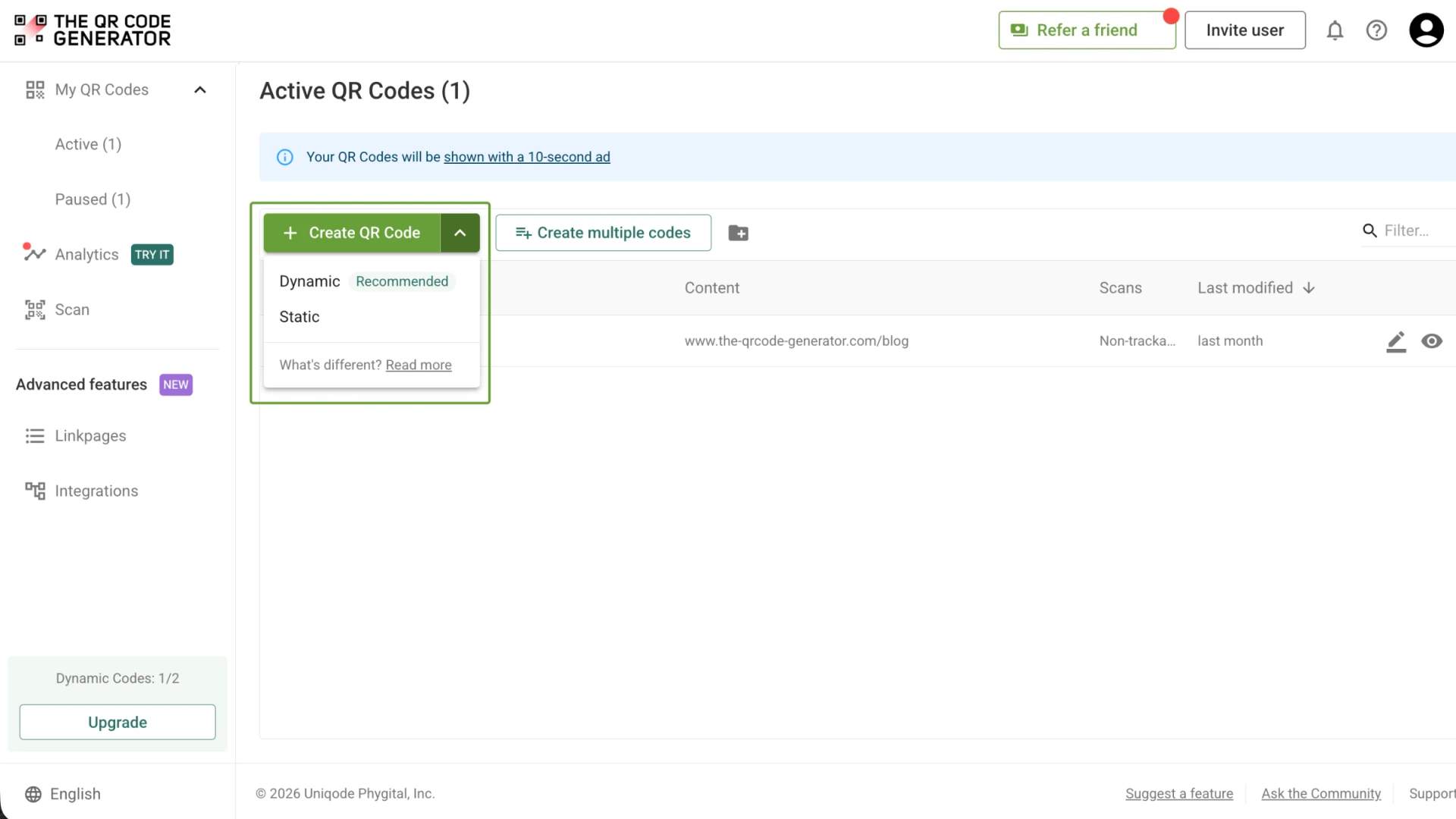
Step 2: Pick the QR Code type that fits your destination, such as URL, PDF, or Social
Step 3: Paste your destination link for a URL code, then click Next

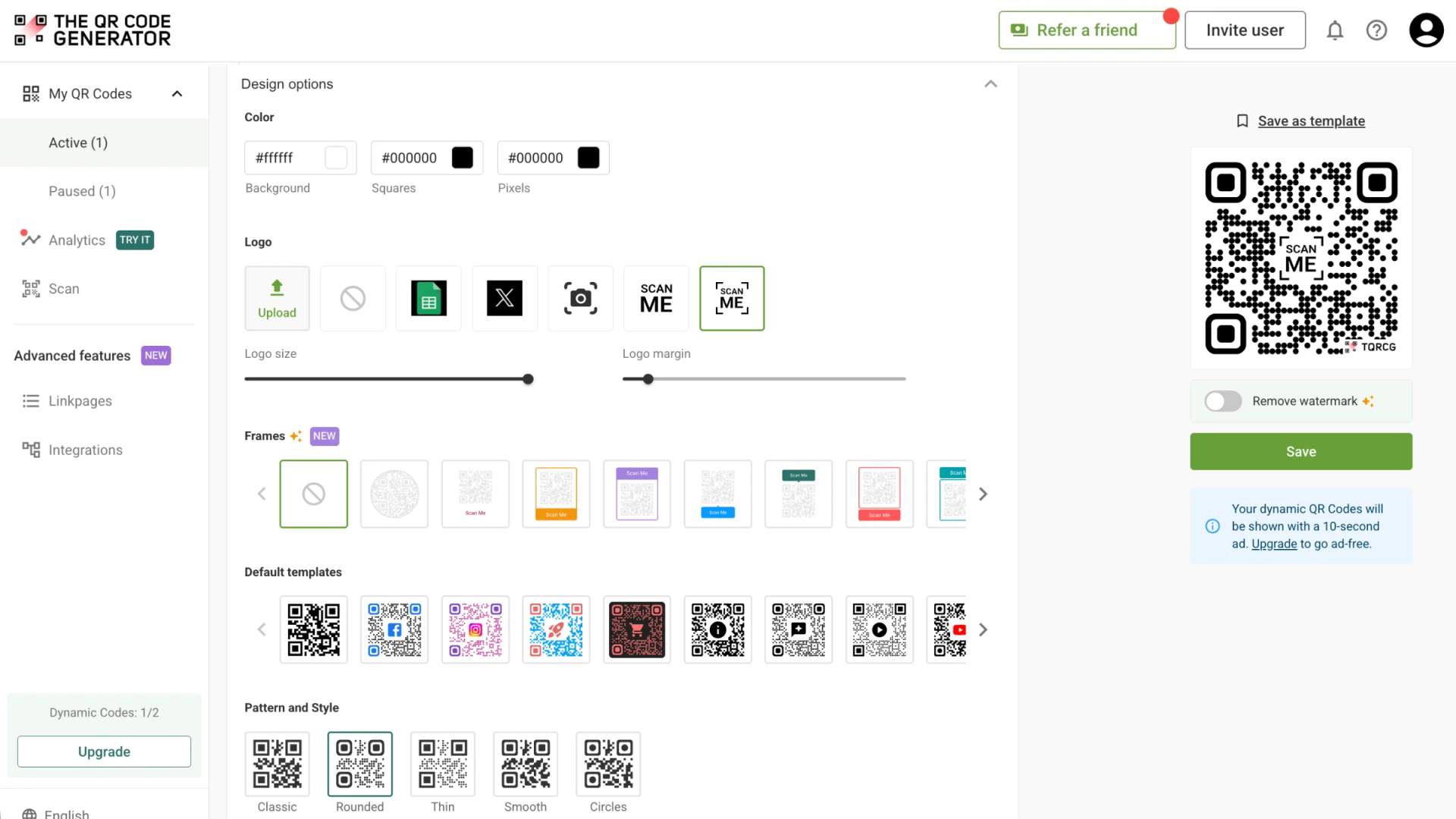
Step 4: Customize the QR Code with your brand color, a logo in the center, a frame, and a CTA that prompts people to scan
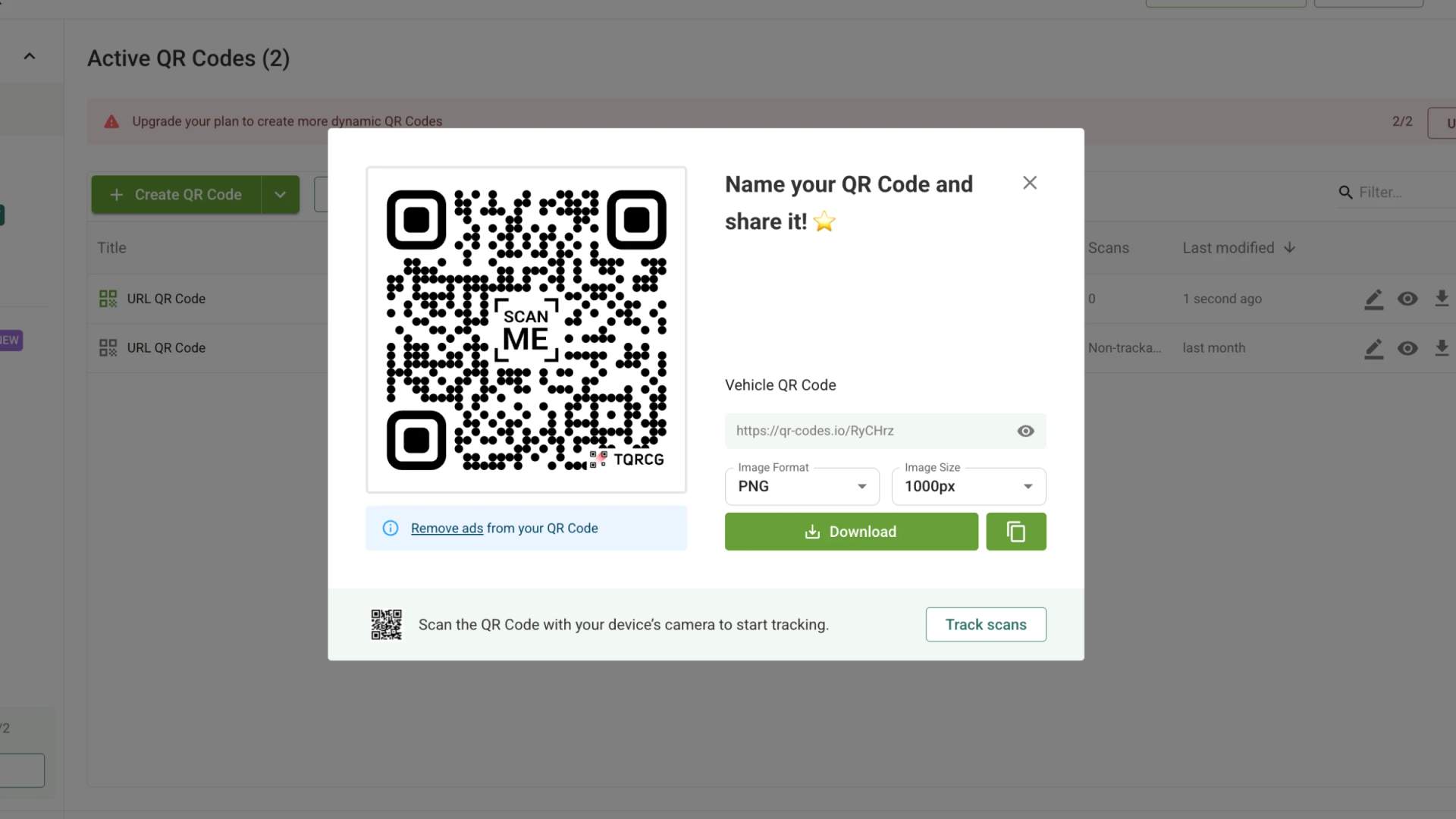
Step 5: Download the finished QR Code as a PNG or SVG, and choose SVG for large wraps that must stay sharp at any size
Best practices for QR Codes on vehicles
A vehicle QR Code performs when it scans on the first try, sits on the right material, and stays clear of the plate, the driver's view, and the codes your car already carries. Follow these pointers.
- Make the QR Code big enough for the distance people scan from. A safe rule is 1:10, so if drivers read it from about 10 feet back, print it close to a foot wide.
- Stick with a dark QR Code on a light background. Reversed or low-contrast colors look slick but trip up a lot of phone cameras, and a code that hesitates is a code people give up on.
- Give the code room to breathe by leaving a clear margin on all four sides. Artwork crowding the edges is one of the most common reasons a scan quietly fails.
- Turn error correction up to the highest level your generator offers. Road grime, a scratch, or a peeling corner is a matter of when, not if, and high correction keeps the code readable through it.
- Tell people what they get before they scan. A short line like "Scan for a quote" pulls far more scans than a bare code that gives no reason to bother.
- Test the printed code, not just the version on your screen. Scan it with a couple of different phones first, so a broken link does not ride around town for weeks before you notice.
- For anything permanent, go with a laminated vinyl QR Code sticker or decal. It shrugs off rain, sun, and repeat car washes in a way a paper print never will.
- If you want the freedom to remove it, a magnet is the smarter buy. It comes off in seconds, which suits a leased car, a rental, or part-time branding.
- For a short-lived code like a "for sale" listing, an inside-glass window cling does the job. It stays protected behind the glass and peels off cleanly once the car sells.
- Whatever you print, add a UV laminate on top. An unprotected outdoor code fades within a season and stops scanning, usually right when a good lead tries it.
- Check your local rules before you commit to a spot, since vehicle-marking and windshield laws vary by state, city, and country. A quick look at your motor-vehicle authority's site is worth the minute.
- Keep the code well clear of your license plate, VIN, and registration tags, and off any glass that blocks your view of the road. Those are the placements most likely to earn a ticket.
- Running a commercial, taxi, or rideshare vehicle means extra signage rules, so confirm what applies to you and anything your HOA or parking operator asks for.
- Leave the factory QR Codes your car came with alone. Keep your own sticker away from the codes in the manual, on the door jamb, and in the infotainment setup so neither gets covered.
Track and improve your vehicle QR Code performance
QR Code scan tracking turns vehicle wraps and stickers into measurable marketing channels. Dynamic QR Codes log every scan with timestamps, approximate locations, and device types, showing total engagement, peak activity times, and top-performing placements, routes, or vehicles.
Because dynamic QR Codes update in real time, you can optimize offers or designs without reprinting. Basic scan tracking is included across all TQRCG plans, including free options, while paid tiers offer extra features like GPS tracking, CSV exports, and API access for fleets.
QR Code tools like TQRCG offer 60 days of scan analytics with its free plan. The Flex plan keeps that and lets you turn on GPS location tracking for an added charge, while the Core and Plus plan (powered by Uniqode) extend the analytics window and offer other advanced options.
Put your first vehicle QR Code to work
A vehicle QR Code turns a passing glance into action: a lead, sale, saved contact, or tip. Setup takes minutes, working whether parked or driving. So, select a vehicle and goal, link a dynamic QR Code, and print a sized, laminated sticker or magnet. Track initial scans and refine your link or placement based on performance data.
You can build your first QR Code free with TQRCG. The free plan gives you 2 dynamic QR Codes that never expire, which is enough to prove the idea on a real vehicle before you scale it across a fleet. Create your first free dynamic QR Code, then keep an eye on your scan data so every wrap, decal, and window sticker tells you exactly what it brings back.
Frequently Asked Questions
Can I put a QR Code on my car?
Yes, you can put a QR Code on your car. Keep it clear of your license plate, VIN, and any glass that blocks your view, and check your local vehicle-marking rules first. A sticker, decal, or magnet on the rear window or a side panel is the usual spot.
How do I scan a QR Code on a car?
Open your phone's camera app and hold it steady on the QR Code for a second. A link banner appears at the top of the screen, and you tap it to open the destination. Most phones scan QR Codes natively, so you rarely need a separate app.
How do I create a QR Code for a vehicle?
Log in to the TQRCG dashboard, click on + Create QR Code, select dynamic QR Code, and paste the link you want it to open. Customize the color, logo, and frame, then download the file as a PNG or SVG. Print it on a laminated sticker or magnet sized for the distance people scan from.
Is it safe to put a QR Code on your car?
Yes, a QR Code is safe to put on your car as long as it does not obstruct your view, cover your license plate, VIN, registration tags, or existing vehicle QR Codes. For digital safety, link it to a page you control, use a recognizable domain, and add a clear label that tells people where the scan leads. When scanning a QR Code on someone else's vehicle, check the destination before opening it and avoid entering sensitive information on an unfamiliar page.
What size should a QR Code be on a vehicle?
Size the QR Code to the distance people scan from, using a 1:10 ratio. A code read from about 10 feet away needs to be close to 1 foot wide. Go larger on a moving vehicle or a busy road, where viewers have less time to line up the shot.
Is TQRCG free to make a vehicle QR Code?
Yes, TQRCG is free to make a vehicle QR Code. The free plan includes 2 dynamic QR Codes that never expire plus unlimited static QR Codes. You can move to a paid plan when you need more QR Codes or deeper analytics.
Do QR Codes made with TQRCG expire?
No, static QR Codes made with TQRCG never expire. The 2 dynamic QR Codes included with the free plan also never expire, so you can keep using them without replacing the code on your vehicle. Paid plans give you access to more dynamic QR Codes and additional features as your needs grow.
Can I change where a vehicle QR Code points after printing it?
Yes, a dynamic QR Code lets you change the destination anytime from the TQRCG dashboard without reprinting. Update the link when a price drops, a promo ends, or a listing sells, and the printed code stays exactly the same.
Can I track scans on a vehicle QR Code with TQRCG?
Yes, every TQRCG plan reports scans by date and device. The free plan includes 14 days of scan analytics, and the paid plans add GPS location, CSV export, and longer reporting windows.