
The QR Code Generator (TQRCG) vs QRCode Monkey: Which Free Tool to Use?

Harshajit
Last updated: July 31, 2026
8 min read
Key Takeaways
- TQRCG includes 2 dynamic QR Codes free forever, letting you edit a code's destination after printing and track scan counts, locations, devices, and scan times from the dashboard.
- QR Code Monkey generates unlimited static QR Codes for free, supports logos, gradient fills, and custom shapes, and exports to PNG, SVG, PDF, and EPS without requiring an account.
- TQRCG holds SOC 2 Type II, ISO 27001, and GDPR certifications, which support enterprise procurement and regulated-industry requirements for audited vendor compliance.
- QR Code Monkey handles dynamic codes, editing, and scan tracking through a separate paid product, QR Code Generator PRO, where plans start at $5 per month.
- Your choice depends on several factors: whether you'll change the destination after printing, whether you want to track scans, how much design control you need, and whether your use case demands compliance certification.
When you're just starting out, a new business, a first-time entrepreneur, or a small team watching every dollar, the first thing you look for in any tool is a free option, and a QR Code generator is no exception. And when you search for one, QRCode Monkey and The QR Code Generator (TQRCG) keep landing on the same shortlist, and the choice between them decides more than you'd expect.
QRCode Monkey wins on static QR Code design: gradient fills, custom eye shapes, and no login, ideal for a one-time print job. TQRCG wins on everything a marketing campaign actually needs: dynamic codes, scan tracking, post-print editing, and audited compliance. Pick wrong, and you either reprint every asset or watch a code go dark partway through a campaign. This article breaks down each feature head-to-head, so you can match the right tool to your situation before you commit.
TQRCG vs. QRCode Monkey: Quick verdict
QRCode Monkey is a no-login static QR Code generator with free design tools. TQRCG is a full QR Code generator with dynamic codes, scan analytics, and compliance certifications on the free tier. For static one-time codes, QRCode Monkey covers the need. For codes that need to be trackable, editable, or backed by compliance certification, TQRCG offers those capabilities on its free tier.
Explore how the two tools compare against other best free QR Code generators to see where each fits in the wider landscape.
| Feature | TQRCG | QRCode Monkey |
|---|---|---|
| Free dynamic QR Codes | 2 free (never expires) | None |
| Free static QR Codes | Unlimited | Unlimited |
| Scan analytics | Included in the free dynamic QR Codes | None on free tier |
| Logo upload | Yes | Yes |
| Export formats | PNG (SVG - Flex plan onwards) | PNG, SVG, PDF, EPS |
| Account required | Yes (for dynamic QR Codes) | No |
| UTM builder | Yes, included | No |
| Compliance certifications | SOC 2 Type II, ISO 27001, GDPR | None listed |
| Paid entry point | TQRCG Flex plan ($5/mo) | QR Code Generator PRO Starter plan ($5/mo) |
What is QRCode Monkey?
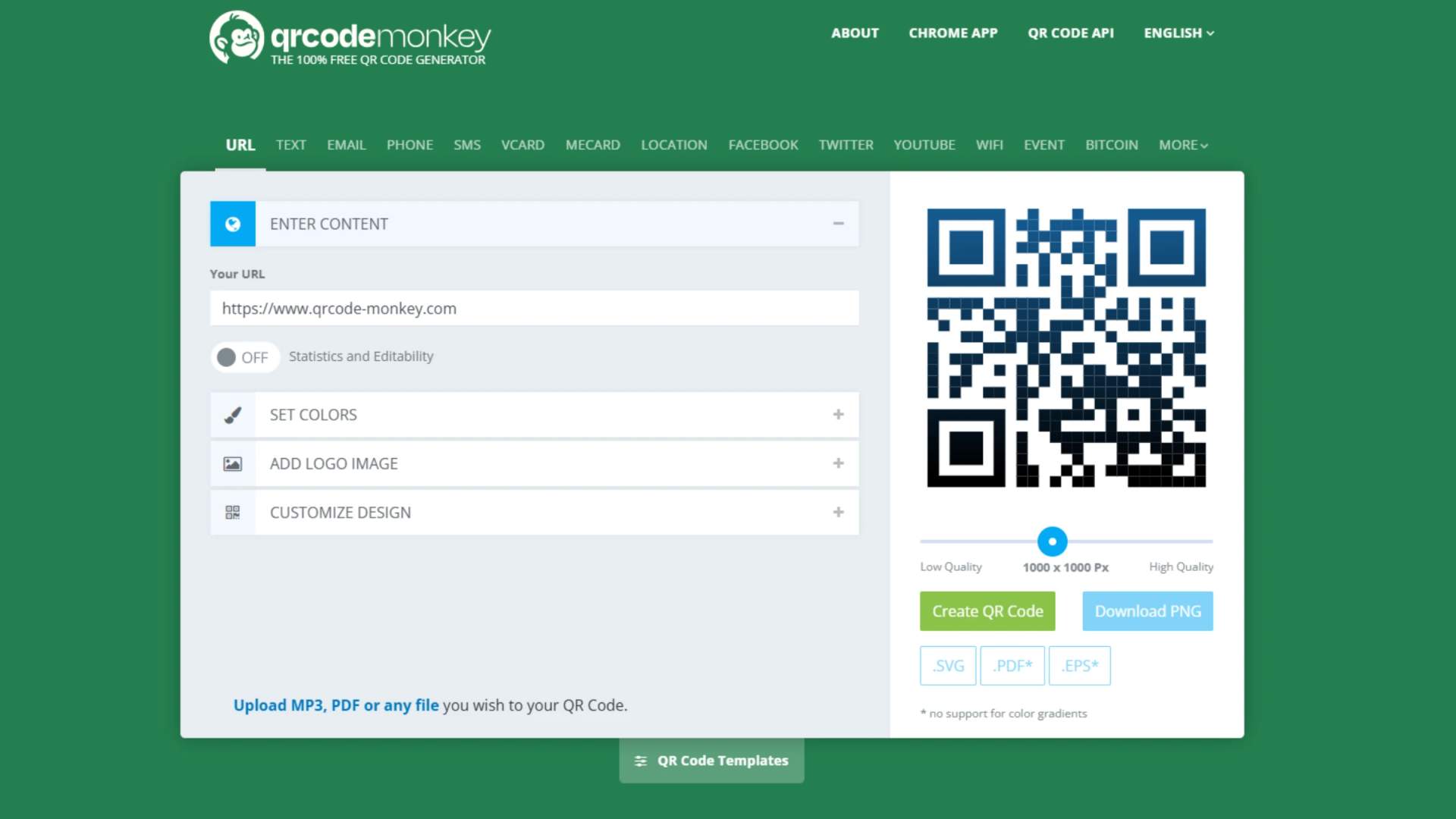
QRCode Monkey is a free static QR Code builder that requires no account or signup. QRCode Monkey lets you generate a code, add a logo, customize eye shapes and module shapes, apply gradient colors, and download the result as a PNG, SVG, PDF, or EPS.
The tool's free tier covers:
- Unlimited static QR Codes, no per-code or per-month cap
- Logo upload, embed a brand mark or icon inside the code frame
- Gradient fills and custom colors, solid fills, gradients, and background transparency
- Eye and module shape customization, more visual variety than most free tools offer
- PNG, SVG, PDF, and EPS downloads, usable for both digital and print
- No account required, generate and download without creating a profile
What is The QR Code Generator (TQRCG)?
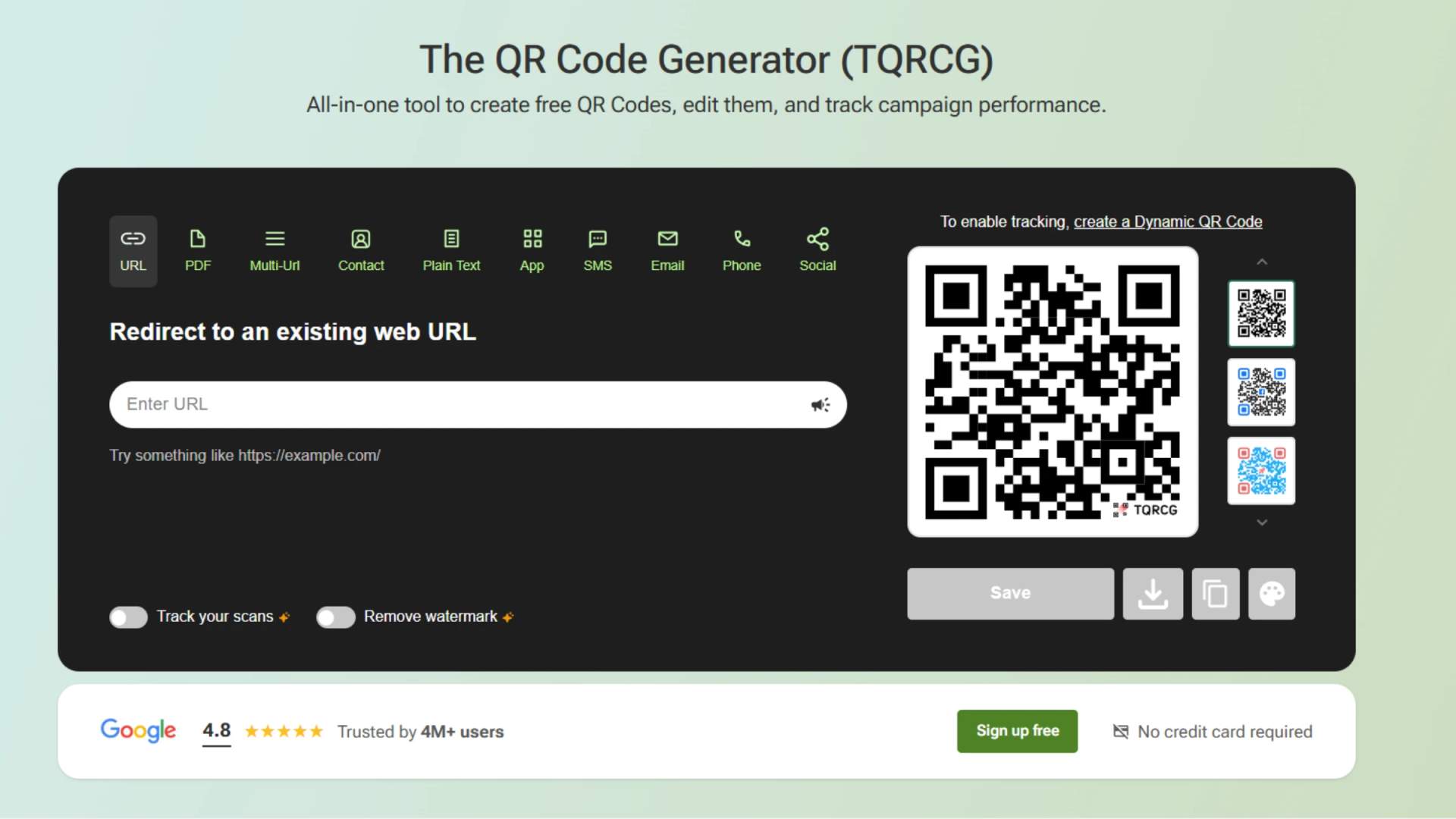
The QR Code Generator (TQRCG) is a free QR Code generator for creating, customizing, and tracking QR Codes. It offers unlimited free static QR Codes and 2 free dynamic QR Codes that never expire. No credit card required.
What sets TQRCG apart is that it includes features in the free tier that many tools reserve for paid plans. TQRCG's free tier includes:
- Unlimited static QR Codes, same as QRCode Monkey's free offering
- 2 permanent free dynamic QR Codes, editable destination, active as long as the account exists
- Scan analytics on free dynamic codes, scan count, scan location, device type, and time-of-scan data
- Built-in UTM parameter builder, tag campaign source, medium, and content without leaving the dashboard
- Google Analytics integration, pipe scan data into Google Analytics 4 (GA4) for unified campaign reporting
- Logo upload and color customization, brand the code on the free tier
- SOC (Service Organization Control) 2 Type II, ISO 27001, and GDPR certifications, independently audited compliance
QRCode Monkey vs. TQRCG: Feature comparison
TQRCG offers more functionality on its free tier, while QRCode Monkey focuses on static QR Code creation and design flexibility. Here's how the two tools compare across the features that have the biggest impact on usability and long-term value.
Static vs. Dynamic QR Codes
The fundamental difference between these two tools lies in their approach to dynamic QR Codes. QRCode Monkey only offers static QR Codes that encode the destination directly and cannot be changed after printing (this also determines whether a QR Code expires).
TQRCG, on the other hand, offers 2 free dynamic QR Codes. The codes include a short URL redirect layer, so you can update the destination after printing without issuing a new code, and both codes stay active without a paid subscription.
Design customization and export formats
Design depth on the free tier is the one dimension where QRCode Monkey holds a genuine edge. QRCode Monkey supports gradient color fills, a wider range of eye shape variants, and custom module shapes, all available without a paid plan. TQRCG matches QRCode Monkey on logo embed, eye shapes, and color customization.
Regarding export formats, QRCode Monkey’s free tier offers PNG, SVG, PDF, and EPS, though only PNG and SVG retain design settings; its PDF and EPS outputs are standard codes without gradients. TQRCG's free tier exports PNGs; SVG are available on paid tiers.
For print production, QRCode Monkey has the edge in both design variety and free vector output; its SVG, PDF, and EPS files are all available at no cost, which supports large-format printing without a paid plan.
Scan analytics and UTM tracking
QRCode Monkey offers no native tracking across any tier of its free product. It requires upgrading to the paid QR Code Generator PRO to access any tracking. TQRCG's free dynamic codes, on the other hand, include scan count, scan location by city and country, device type breakdown, and time-of-scan data, all accessible inside the dashboard without a third-party integration. The built-in UTM parameter builder lets you tag campaign source, medium, and content before generating the code, so every scan flows into Google Analytics with clean attribution.
When choosing a QR Code generator for business, native analytics without an additional paid tool is one of the highest-value differentiators available.
Pricing
QRCode Monkey's paid plans run through QR Code Generator PRO, which ladder from Starter to Advanced, Professional, and Enterprise. TQRCG pricing plan moves from its free plan to the Flex individual plan, then into Uniqode's Core, Plus, and Enterprise business tiers.
The tier-by-tier breakdown is below.
| Tier | TQRCG | QRCode Monkey (via QR Code Generator PRO) |
|---|---|---|
| Entry / Individual | Flex — $5/mo: 5 dynamic codes, 1 user, 60 days scan analytics | Starter — $5/mo: 2 dynamic codes, 10,000 scans, 1 user |
| Mid | Core (Uniqode) — 250 dynamic codes, 90 days analytics, GPS scan location, QR Code API, advanced customization | Advanced — $12.50/mo: 50 dynamic codes, unlimited scans, 100 bulk, 3,000 API requests, 2 users |
| Higher | Plus (Uniqode) — 500 dynamic codes, 3 users, 180 days analytics, custom domain option | Professional — $37.50/mo: 250 dynamic codes, unlimited scans, 500 bulk, 10,000 API requests, 5 users |
| Enterprise | Custom (Uniqode Sales) | Custom |
*Pricing verified in July 2026
Security and compliance
Static QR Codes from TQRCG and QRCode Monkey are safe by design: the destination is encoded at creation and can't be redirected afterward, so no one can alter it after download.
However, for organizations handling customer data or running procurement that requires vendor certification, that gap is the deciding factor.TQRCG holds SOC 2 Type II, ISO 27001, and GDPR certifications, each independently audited, while QRCode Monkey lists none publicly.
For a deeper look at QR Code risks, see QR Code phishing and safety.
When to use QRCode Monkey
QRCode Monkey works best when a code needs to be printed once and never touched again, and where design matters more than tracking. In practice, that points to a handful of clear situations.
Use QRCode Monkey when:
- The destination will never change: Wi-Fi signs, business cards with a permanent URL, product packaging with a fixed landing page, or event placards for a one-day venue map
- You don't need tracking: You care that the code scans correctly, not how many people scanned it, from where, or when
- You don't want an account: You need a code in two minutes without creating a login
- Design is the priority: You want gradient fills, specific eye shapes, or module shape variety that most free generators don't offer
- It's a one-time print job: You print once, the job is done, and the code never needs to change
Two things to keep in mind: if you use QR Code Generator PRO for dynamic codes and the subscription lapses, those codes stop redirecting, so QRCode Monkey isn't the fit for campaigns where the destination may change. And because it lists no public compliance certifications, it won't clear procurement in regulated industries or anywhere GDPR, SOC 2, or ISO 27001 is required.
When to use TQRCG instead
TQRCG fits best when the code needs to do more than just scan correctly. TQRCG's 2 free dynamic QR Codes that never expire are the single most compelling feature for small businesses and freelancers who want campaign flexibility without a paid subscription.
Use TQRCG when:
- The destination will change post-print: Restaurants updating menus, retailers changing seasonal promotions, event organizers swapping venue maps mid-run
- Scan analytics are needed: You want scan count, scan location, device type, and time-of-scan data without an additional tool
- UTM tracking is part of the campaign setup: TQRCG's built-in UTM builder tags every scan for Google Analytics attribution before the code is generated
- 2 free dynamic QR Codes with no expiry are enough: Freelancers, small businesses, and solo marketers with a lean setup get permanent dynamic QR Codes at zero cost
- Compliance is a vendor requirement: GDPR, SOC 2 Type II, or ISO 27001 certification is needed for enterprise sales or data handling agreements
- Bulk creation or API integration: QRCode Monkey's API generates static codes only, with no dynamic-code or bulk management; TQRCG's paid tiers include API access and bulk generation for dynamic codes
- Google Analytics integration: Pipe scan data directly into GA4 for unified reporting alongside other marketing channels
Which QR Code generator should you choose?
The right tool depends on whether the code needs to do anything after printing.
| Use case | Winner | Reason |
|---|---|---|
| One-time static print | QRCode Monkey | Free, no account, rich design customization |
| Marketing campaign | TQRCG | Dynamic QR Codes, post-print edit, no expiry |
| Scan tracking and UTM | TQRCG | Native analytics + UTM builder on free tier |
| Design-first static codes | QRCode Monkey | Gradient fills, eye shapes, module shapes, all free |
| Compliance-sensitive use | TQRCG | SOC 2 Type II, ISO 27001, GDPR |
| Budget-conscious dynamic codes | TQRCG | 2 free dynamic codes, no expiry, no paid trial |
The right choice comes down to what you actually need the code to do. If it's a permanent, design-led static QR Code, QRCode Monkey covers it; if you need to track scans, edit the destination after printing, or meet compliance requirements, TQRCG's free dynamic QR Codes are built for that.
When you're weighing the two, the simplest test is to run a small campaign on each, generate a code, check the design and export options, and see how tracking and editing work in practice, so you can commit to the one that fits how you work before rolling it out at scale.
Frequently Asked Questions
1. What is the main difference between QRCode Monkey and The QR Code Generator?
QRCode Monkey is a static-only QR Code generator focused on design customization, no dynamic codes, no analytics, and no account required. TQRCG offers both unlimited static QR Codes and 2 permanently free dynamic QR Codes, each with scan analytics and post-print destination editing. TQRCG also holds SOC 2 Type II, ISO 27001, and GDPR certifications.
2. Does TQRCG offer free dynamic QR Codes?
Yes, TQRCG offers 2 free dynamic QR Codes that never expire. A dynamic QR Code lets you edit the destination link after the code is printed and read scan data such as total scans, location, and device. You keep both free dynamic QR Codes for as long as your account stays active, with no trial countdown and no forced upgrade.
3. Is QRCode Monkey really free?
Yes, QRCode Monkey is free. It lets you create unlimited static QR Codes with logo customization, gradient colors, and vector downloads at no cost, with no account required. Dynamic QR Codes (editable, trackable) are not available on QRCode Monkey. Dynamic QR Codes require QR Code Generator PRO, with plans starting at $5 per month.
4. Is QRCode Monkey safe to use?
Yes, QRCode Monkey is safe for basic static QR Codes. It does not require an account sign-up. Static QR Codes embed their destination directly in the code; they cannot be redirected to malicious content after creation. For business use requiring compliance verification (GDPR, SOC 2, ISO 27001), TQRCG holds all three certifications and is a good choice.
5. Can I track scans with QRCode Monkey?
No. QRCode Monkey has no native scan analytics or tracking on its free tier. Tracking requires upgrading to QR Code Generator PRO. TQRCG includes scan count, location, device type, and time-of-scan data on its 2 free dynamic QR Codes.
6. Do QR Codes made with TQRCG or QRCode Monkey expire?
Static QR Codes from both tools never expire and can be scanned indefinitely. The difference is dynamic QR Codes. QRCode Monkey only offers static QR Codes. TQRCG offers 2 free dynamic QR Codes that never expire.
7. Can I edit and track a QR Code after it's printed?
Only if it is a dynamic QR Code. A dynamic QR Code lets you change the destination and track scans after printing, while a static QR Code locks both the moment it is downloaded. TQRCG includes 2 free dynamic QR Codes, so you can redirect a printed code to a new link and watch scan count, location, and device from the dashboard. QRCode Monkey produces static codes only, so editing or tracking there requires its separate paid product, QR Code Generator PRO.
8. Do you need an account to create a QR Code?
Not for static QR Codes. Both TQRCG and QRCode Monkey let you create and download static QR Codes without signing up. Dynamic QR Codes are different, because they link to a dashboard for editing the destination and reading scan analytics. TQRCG includes 2 free dynamic QR Codes with a free account. QRCode Monkey has no dynamic codes.