
QR Codes for Government: Use Cases, Safety, and Setup

Harshajit
Last updated: August 7, 2026
10 min read
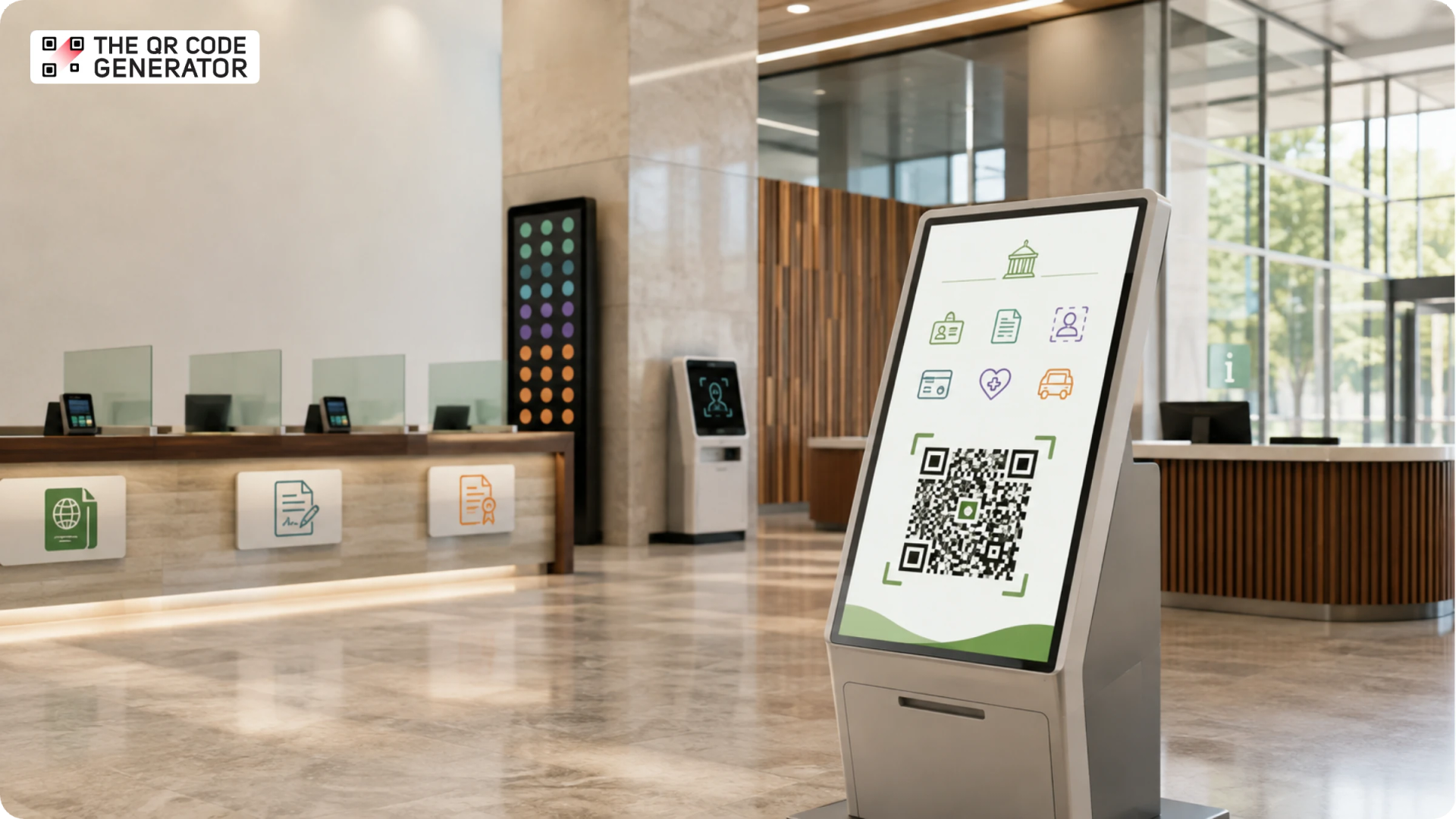
QR Codes are everywhere now, from restaurant menus to product packaging to event check-ins. Governments use them too, for everything from permit counters to public notices, yet plenty of agencies still haven't tapped into what QR Codes for government can really do.
However, this isn't a new idea. In 2014, research examined how QR Codes improve government services, such as enabling the effective distribution of information to the public and enhancing citizen interaction and engagement.
In this guide, we'll walk through the real use cases across federal, state, and local agencies, answer the safety question, and show you how to set up a QR Code correctly.
What is a government QR Code?
A government QR Code is simply a QR Code created and used by a government agency to give citizens quick access to official information, public services, forms, payments, or documents with a simple scan. Instead of typing long URLs or filling out paperwork, people can scan the QR Code using their smartphone to instantly reach the intended government resource.
Plenty of public bodies already use QR Codes, and they span every level of government. Federal agencies operate nationwide and often set the standards other offices follow, so a single code format stays consistent from coast to coast. State and regional bodies, such as motor vehicle departments, health departments, and licensing boards, serve entire states or districts. Municipal and local government sit closest to residents, from city councils and public libraries to parks departments and transit authorities.
The IRS, for example, prints QR Codes on its CP14 balance-due notices, the letters it sends to more than 8 million taxpayers a year. Scanning the QR Code takes a taxpayer straight to their account on IRS.gov to set up a payment plan or reach the Taxpayer Advocate Service.
Why government agencies are adopting QR Codes
Government agencies are adopting QR Codes because they make public services more accessible, cut administrative costs, and improve citizen engagement, all without new infrastructure. Residents already carry the only hardware they need in their pockets, so a QR Code on a sign does the work a new kiosk or app used to.
The pull comes down to five recurring drivers:
- Lower printing and paperwork costs: Instead of reprinting brochures, applications, and manuals, agencies link to digital versions that stay up to date, reducing both costs and paper waste.
- Content that updates without a reprint: A dynamic QR Code lets an agency change the linked page, form, or document after a sign is already posted, so citizens always reach the latest version. If you are weighing your options, here is the difference between static and dynamic QR Codes.
- Accessibility and language access: A single QR Code can point to translated pages, captioned videos, audio instructions, or screen-reader-friendly content, making public services more inclusive by default.
- Measurable reach: Scan analytics show how many residents actually used a notice or campaign, turning one-way print into a channel an agency can report on.
- Meeting citizens on their phones: A quick scan replaces the need to hunt through a government website or stand in line, which sets up the specific use cases in the next section.
How government agencies use QR Codes
Government QR Codes earn their place at seven public-facing touchpoints, each one a spot where a resident already stops, waits, or picks up a piece of paper. Here are the seven use cases agencies rely on most.
Digital business cards for staff
Public-facing staff, from case workers to inspectors to permit officers, hand out paper cards that go stale the moment someone changes desks or extensions. A digital business card QR Code on a badge or email signature fixes that: contact details update once and stay current wherever the code lives. For a department onboarding a full roster, a single batch upload creates every card at once rather than one by one.
Constituent feedback surveys
Agencies often collect resident input through paper forms or not at all. A feedback QR Code posted at a service counter or exit turns a passing visit into structured, real-time input.
Appointment and document preparation
Residents show up to appointments without the documents they need, forcing a second trip. A PDF QR Code on the appointment confirmation lists exactly what to bring, from proof of address to a signed form. Fewer people arrive unprepared, and counters move faster because staff spend less time turning visitors away.
Policy education videos
A video QR Code on a brochure or notice links to a short explainer that a resident can watch on the spot. People get the context they would otherwise call in for, which eases pressure on phone lines and front desks.
For example, to provide helpful apps and resources, the U.S. Department of Veterans Affairs plays a short loop video featuring an onscreen QR Code across 85 VA Medical Centers and 30 Community-Based Outpatient Clinics.
Civic events, town halls, and elections
Civic events and voting information both live or die on accurate logistics. An event QR Code on a town-hall flyer includes the date, time, and location, plus a calendar-save option, while a code on a voter notice can link to a live elections page with polling locations and deadlines. Residents stop acting on outdated printed details.
Office hours and visitor sign-in signage
Paper visitor sign-in is slow and leaves no usable record. A QR Code at the entrance lets people check in or read current office hours without new hardware. The Virginia Department of Motor Vehicles uses this approach: appointment holders scan a QR Code to notify the DMV they have arrived, then wait in the lobby rather than at an information desk. This helps speed up check-in and keeps the staff’s digital record clean.
Emergency alerts and public safety notices
Emergency guidance changes faster than any printed sign can keep up with, whether it’s an evacuation route, a boil-water notice, or a shelter location. A dynamic QR Code on public signage always resolves to the current alert page, so a resident scanning an old notice still reaches accurate information. The sign never changes, but what it points to always can.
Are government QR Codes safe to scan?
Government QR Codes are safe to scan when the QR Code is genuine and points to an official government domain. That distinction lies at the heart of the warning most people have heard.
In January 2022, the FBI's Internet Crime Complaint Center reported that criminals were tampering with legitimate QR Codes to send people to fraudulent sites built to steal payments and login credentials (Alert I-011822-PSA). The alert describes an attack on trust, not a flaw in the QR Code format. A scannable code is only ever as safe as the destination behind it, so the source of a code matters far more than the code itself.
Here is a plain-language look at whether QR Codes are safe if you want the full breakdown.
The scams that prey on public trust
Scammers go after the places residents already believe are official. They stick counterfeit QR Code overlays on parking meters and public kiosks, print fake codes on letters dressed up as tax or fine notices, and post flyers that copy real signage.
Each trick leans on the same assumption, that a QR Code sitting on something official must be official too. A single tampered QR Code can route a resident to a convincing payment page that quietly collects card details and then vanishes.
What a legitimate government QR Code looks like
A trustworthy government QR Code gives itself away in three ways. Its link opens an official .gov domain rather than a shortened or unfamiliar address, its branding is printed as part of the sign instead of a sticker layered on top, and it matches the locations where the agency says its codes appear. Agencies make this easier when they brand every code and publish where those codes live, which doubles as sound QR Code security practice.
How to create a government QR Code
There are multiple QR Code generators (both free and paid) available on the market. Start with a generator built for your particular requirements.
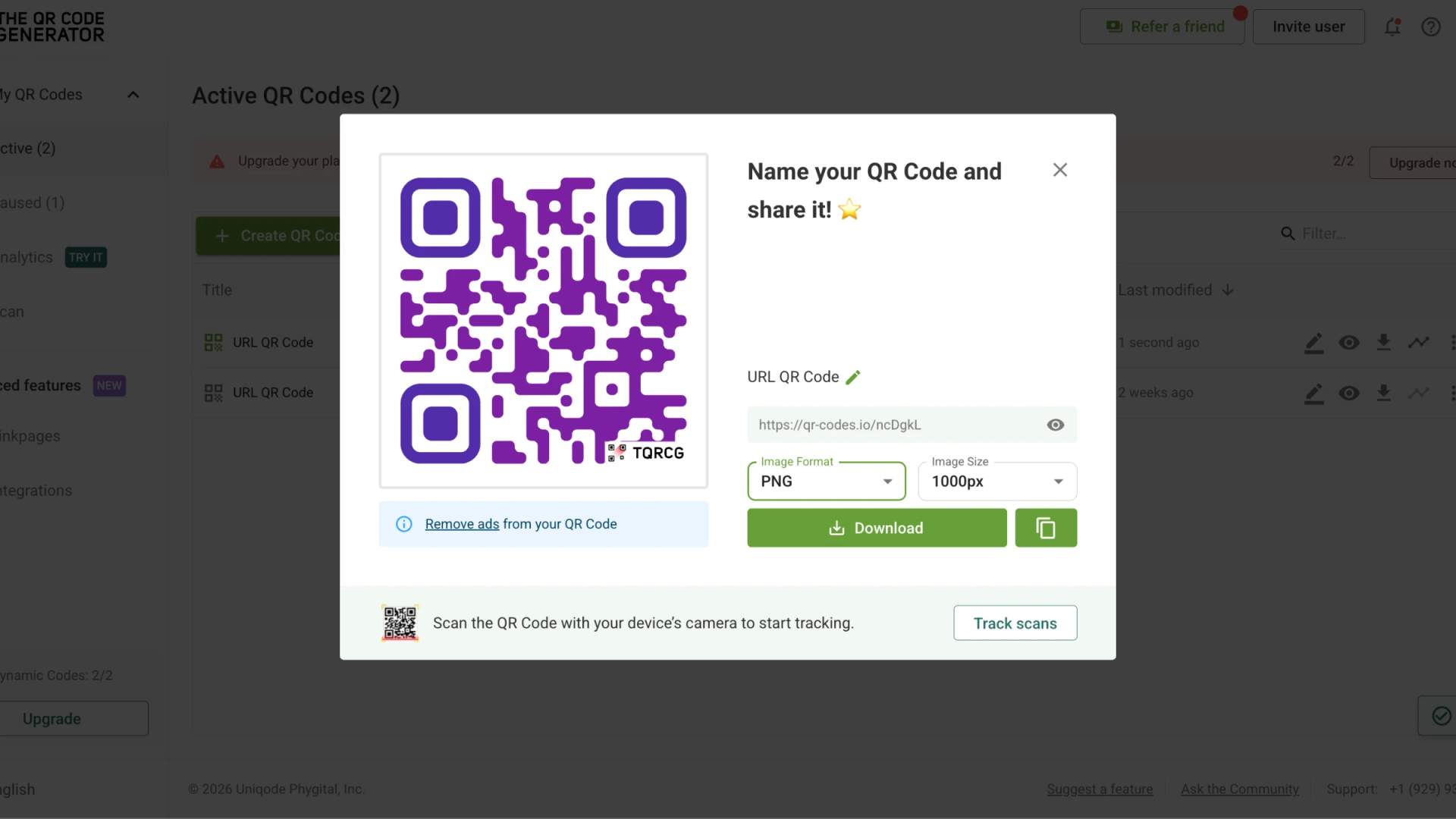
The QR Code Generator (TQRCG) is a strong fit, one of the best QR Code generators, with unlimited static QR Codes and two free dynamic QR Codes that never expire.
Here’s how you can create a government QR Code with TQRCG:
Step 1: Log in to your TQRCG dashboard
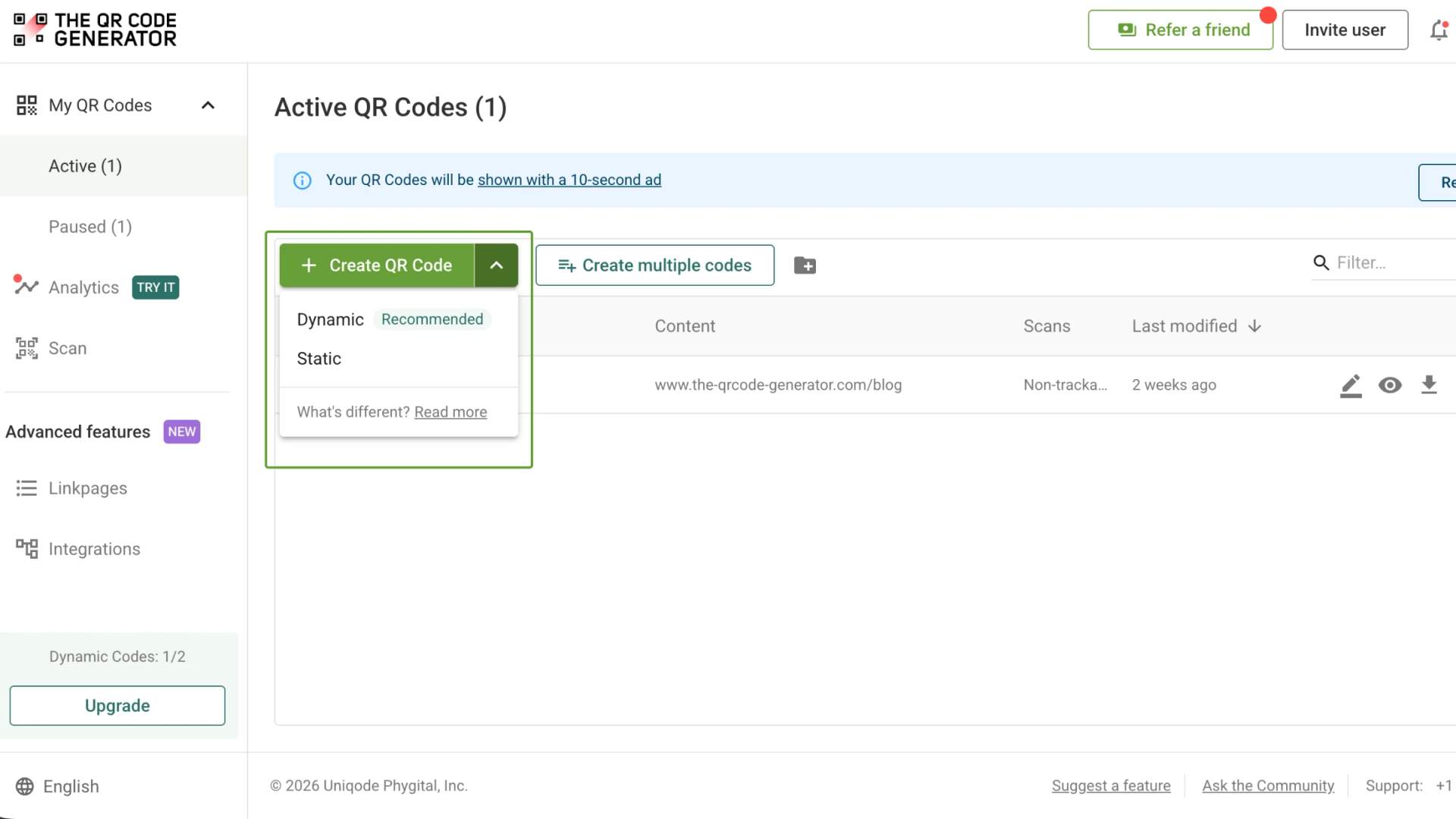
Step 2: Click + Create QR Code (from the dropdown next to it, select dynamic)
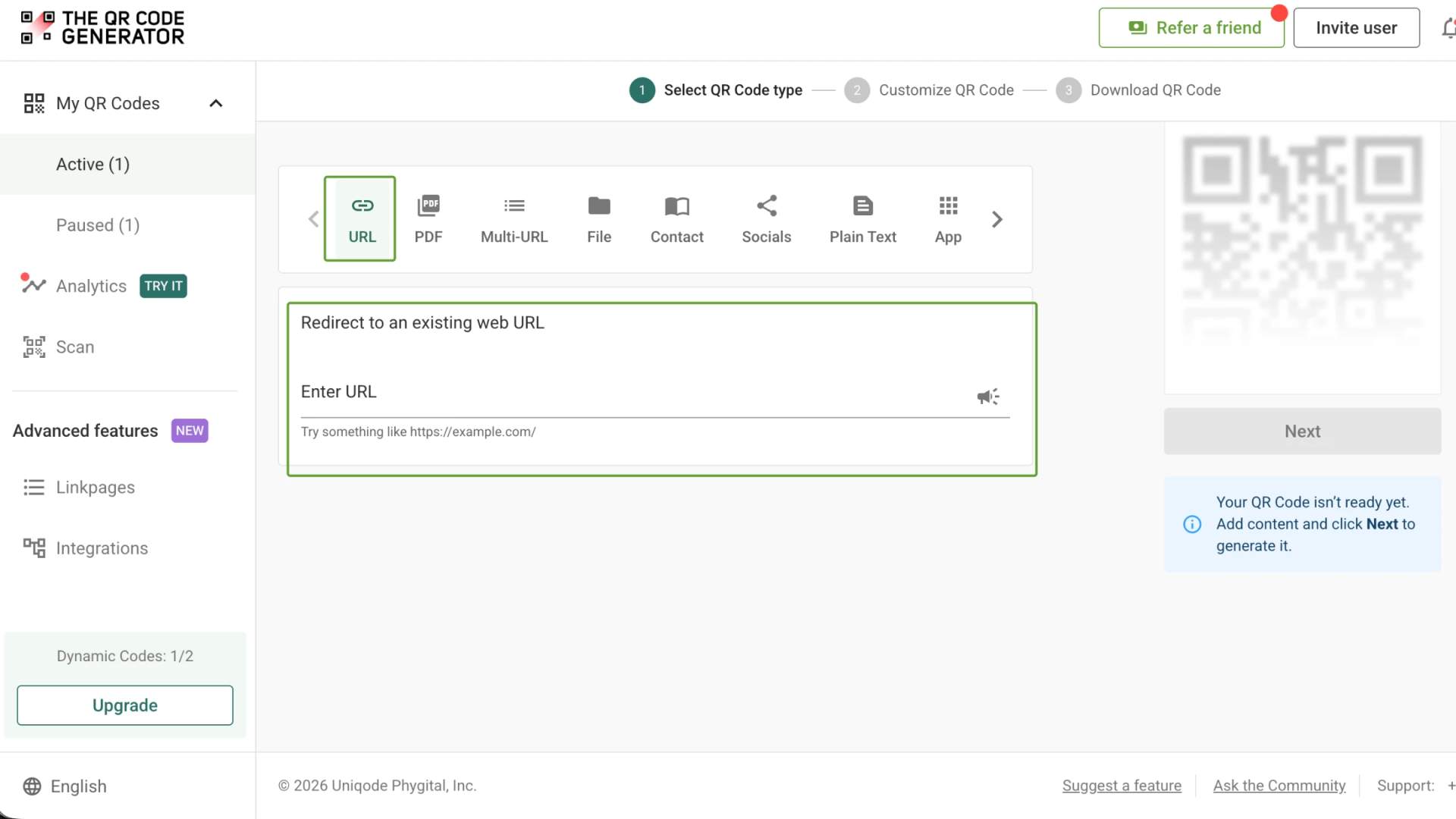
Step 3: Select QR Code type, whether URL, PDF, Video, or another format
Step 4: For a URL QR Code, paste the destination link
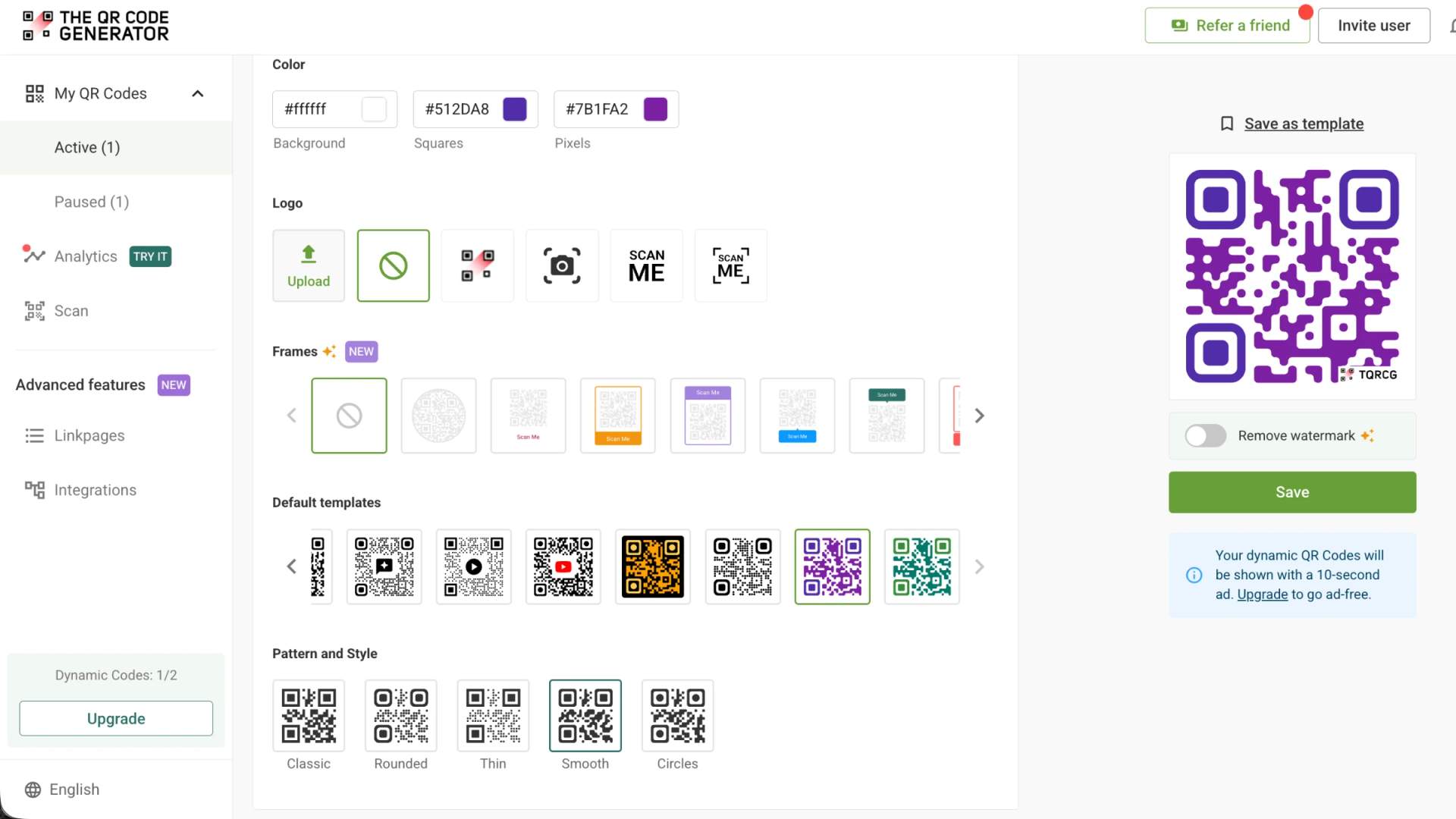
Step 5: Add your agency logo, colors, and a frame so residents can recognize the code as legitimate
Step 6: Download the QR Code as a PNG or SVG, then test the scan before it goes to print
Best practices for government QR Code deployment
Getting one QR Code onto one sign is easy. Things get harder for a government team once those codes are scattered across departments, buildings, and print runs, with no single person keeping an eye on them. At that scale, a QR Code with a dead link or off-brand design stops being a convenience and quietly chips away at the trust you worked to build. The four practices below keep a growing program in order, so every code stays consistent to look at, measurable in what it returns, and current long after it leaves the printer.
Create QR Codes in bulk
Onboarding a full staff roster card by card wastes hours. A CSV upload generates every digital business card QR Code in a single pass, so a department of 200 employees gets consistent, on-brand codes at once instead of a patchwork built by hand.
Track every scan
A printed notice on its own tells you nothing about who used it. Scan analytics turn that notice into a reportable channel, showing scan counts and timing so leadership sees the real reach of a campaign.
Design for accessibility and language access
Placement, size, and contrast decide whether a QR Code is usable or just decoration. Position codes at a scannable height, keep them large enough to read at arm's length, and point them to pages that offer translated versions for residents with limited English proficiency.
Update the content, not the signage
The payoff of choosing a dynamic QR Code shows up at scale. When a policy PDF or an office-hours page changes, edit the destination once, and every printed code stays current, with no reprint order and no procurement cycle. Follow the general QR Code best practices to keep your codes reliable over time.
Create your first government QR Code today
Government QR Codes come down to a simple trade: one printed touchpoint, connected to something you can update, measure, and stand behind. That holds whether you work at a federal agency, a state office, or a local city department, and even the safety question has a straightforward answer, a branded code that resolves to an official domain.
The surest way to trust all of this is to watch it work. Pick one high-traffic touchpoint, maybe a permit counter, a feedback sign, or a public notice, and run it as a small campaign.
Build it as a dynamic QR Code on TQRCG, track scans for a few weeks, and see if it fits your requirements.
Frequently Asked Questions
Are QR Codes safe to use for government services?
Yes, QR Codes are safe when they come from a trusted source and resolve to an official government domain. The risk lies in tampered or fake codes, not in the format. Confirm the link before entering any personal information, and look for consistent agency branding around the code.
What is the FBI warning about QR Codes?
In January 2022, the FBI's Internet Crime Complaint Center warned that criminals tamper with or replace legitimate QR Codes to route people to malicious sites that steal money or login details (Alert I-011822-PSA). The warning is not about QR Code technology itself, but about codes from unverified sources. For government signage, that makes agency branding and an official destination domain your strongest defense.
Can government agencies create QR Codes in bulk for employees?
Yes. A CSV upload lets an agency generate hundreds of digital business card QR Codes in one pass, far faster than building each one by hand. This is how a department onboards a full staff roster with consistent, on-brand codes.
What is the difference between a static and a dynamic QR Code for government use?
A static QR Code contains permanent information encoded directly into its pattern, meaning you cannot change the destination once the QR Code is created. A dynamic QR Code lets you edit the destination at any time without touching the printed QR Code, which suits policy PDFs, office hours, and emergency notices that change often.
Why are government agencies using QR Codes more often?
Government agencies use QR Codes to cut printing costs, update information without reprinting, and give residents faster access to services from their phones. They also add scan analytics, so a printed notice becomes a channel that leadership can actually measure.
Are government QR Codes subject to data privacy or public-records rules?
Often, yes. When a QR Code leads to a form or survey that collects personal details, that data can fall under the agency's privacy obligations, and scan data or submissions may count as public records with retention schedules. Point codes to agency-controlled pages and collect only what you need.