
How to Use QR Codes in Black Friday and Cyber Monday Campaigns

Harshajit
Last updated: October 8, 2026
12 min read
Black Friday and Cyber Monday are among the busiest periods of the holiday shopping season, with shoppers moving quickly between stores, websites, emails, and social feeds to find the best deals. For businesses, that makes every promotional touchpoint an opportunity to move shoppers closer to a purchase.
Black Friday and Cyber Monday QR Codes connect those touchpoints to digital offers, product pages, coupons, giveaways, and other campaign destinations. A QR Code on a flyer can lead to a sale page, while one on a receipt can bring a customer back for a Cyber Monday offer. Dynamic QR Codes also let businesses update destinations after printing and track scans throughout the campaign.
This guide covers practical Black Friday marketing ideas using QR Codes. It also explains how to create a Black Friday QR Code for free with The QR Code Generator (TQRCG) and measure scans during the sale.
Why QR Codes work for Black Friday and Cyber Monday
Black Friday and Cyber Monday campaigns often involve changing discounts, rotating product promotions, and offers that continue into Cyber Week. QR Codes connect these promotions to digital destinations where shoppers can browse products, redeem offers, or complete purchases.
The mobile nature of holiday shopping makes this connection particularly useful. In 2025, 57.5% of Cyber Monday online sales, worth $8.2 billion, came through mobile devices, according to Adobe. A QR Code gives shoppers a direct path from physical marketing materials such as shop windows, flyers, posters, receipts, and product packaging to a mobile destination.
Dynamic QR Codes add flexibility when a promotion changes during the sale period. Businesses can update the destination after printing, allowing the same QR Code to lead to an early-access offer before Black Friday and to a different promotion when the sale begins. QR Code platforms with scan analytics can also show how many times a QR Code was scanned and, depending on the platform, provide details such as scan time, location, and device.
How to use QR Codes for Black Friday and Cyber Monday
QR Codes can connect Black Friday and Cyber Monday promotions to the digital destination where shoppers can take action. Businesses can use them to distribute discounts, promote sale products, run giveaways, capture leads, offer early access, and bring Black Friday shoppers back for Cyber Monday.
Seven practical uses include:
- Black Friday discounts and coupons that shoppers can access from their phones.
- Sale products, collections, and bundles that shoppers can reach directly from campaign materials.
- Early access to Black Friday deals before the sale officially begins.
- Giveaways and scan-to-win contests that let shoppers enter from their phones.
- Email, SMS, and loyalty signups that turn seasonal shoppers into future customers.
- Cyber Monday offers that bring Black Friday shoppers back for another purchase.
- Online campaigns connected to physical marketing across flyers, posters, packaging, receipts, and other materials.
10 Black Friday and Cyber Monday QR Code ideas that work
The ideas below turn those use cases into specific campaign plays, with practical guidance on what the QR Code should lead to, where to place it, and how to use the resulting scan data.
1. Open your doors early with a shop-window QR Code
Build a single early-access page that lists your 5 to 8 strongest deals, then point a dynamic QR Code at it. A window gets scanned from a few feet back, so size the printed QR Code around 4 to 6 inches, following the rough 10-to-1 rule of one inch of QR Code for every ten inches of scan distance, and tape it inside the glass at chest height with the line Scan for tonight's early deals.
Set the page live on the Monday of Black Friday week so evening passersby can shop the list after you close. On Friday morning, repoint the same QR Code to your live sale without touching the window, and read the hourly scans to see when your street actually fills up.
→ Related: What is the Ideal QR Code Size for Every Use Case?
2. Put a scannable coupon on in-store signage
Create a dedicated coupon page or a shopping cart with the discount already applied, then link the page to a dynamic QR Code. Place the QR Code on shelf-edge strips, endcap headers, or entrance signage with instructions that tell shoppers what they will receive after scanning. Give different store locations or placements their own QR Codes when you want to compare scan activity. Update the destination when the promotion changes during the weekend.
3. Make every flyer and mailer trackable
Create a Black Friday landing page and generate a separate dynamic QR Code for each mail batch you want to measure, such as a ZIP code, customer segment, or design version. Place the QR Code alongside a clear call to action and the promotion's end date. Compare scan activity across the different QR Codes after the campaign to identify which audiences or geographic areas responded most strongly. You can also redirect an old QR Code to a new campaign after the original promotion ends.
4. Turn shelf-talkers into product deep-dives
Pick your 5 to 10 hero products and build a short page for each one that carries the review score, a 30-second demo video, and the bundle price, then point a dynamic QR Code on every shelf-talker to its matching product page. Add the line “Scan for reviews” and the bundle so a hesitating shopper gets proof without hunting for staff.
When a product sells out mid-day, switch its QR Code to a See similar deals page so nobody scans into an empty shelf. The scan counts per product also tell you what to restock or feature again on Cyber Monday.
5. Run a scan-to-win giveaway
Set up one entry form that captures an email and an optional phone number, connect it to your email tool, and name a clear prize with an end time, such as Winner drawn Cyber Monday at 6pm ET. Point a dynamic QR Code at the form and print it on receipts, a counter card, and shopping bags with “Scan to enter”. Tag the form source per placement so you know whether the receipt or the bag pulled more entries, then export the list on Friday night and send every entrant a Cyber Monday offer. Add a one-line "no purchase necessary" note and link to your full rules to keep the giveaway clean.
6. Hand out a QR Code gift guide
Build a gift-guide page that groups products into price bands; for example, under $25, under $50, and under $100, with each tile linking straight to that product's cart, and point a dynamic QR Code at the page. Print it on entrance signage, catalog pages, and table tents with Scan for our gift picks, and update the tiles as items sell through so the guide always reflects live stock. Watch which band draws the most scans to see where shoppers are anchored on price, then lead with those products in your Cyber Monday email.
7. Build a countdown that changes daily
Print one dynamic QR Code across all your November signage and ads under the line Scan for today's deal, then repoint it every morning: Thursday to early access, Friday to doorbusters, Saturday to the weekend sale, and Monday to Cyber Monday. Write the switch into opening duties so whoever unlocks the store updates the destination by 7am.
The printed QR Code never changes, so a poster from November 1 still sends shoppers to the right deal three weeks later. Pull the day-by-day scan graph afterward to see which day drove the most interest, and plan next year's stock and staffing around it.
8. Bring Black Friday buyers back on Cyber Monday
Build a Cyber Monday preview page, point a dynamic QR Code at it, and print that QR Code on Friday receipts and packaging inserts with Scan Monday for an extra 15% off your next order. Keep the page on a countdown through the weekend, then flip it to the live offer on Monday morning. These shoppers already bought from you, so the return traffic costs almost nothing to earn. Track Monday's scans against your Friday receipt count to measure how many first-time buyers came back, and compare that group's second order with that of a fresh Cyber Monday shopper.
9. Bridge print, email, and social to one cart
Point one dynamic QR Code at your main sale page, then place it in print ads, email footers, and social posts. Give each channel its own code or a UTM tag, such as utm_source=flyer or utm_source=instagram, so the scan and traffic data separate the channels cleanly. Add Scan to shop the sale wherever the QR Code appears. After the weekend, line up scans and orders by source to see whether the flyer or the feed earned its spot, and drop the channel that did not pull its weight next time.
10. Grow your list with a loyalty or SMS signup
Create a signup page that gives an extra 10% for joining, wired to your email or SMS tool, and point a dynamic QR Code at it. Print the QR Code on the packaging, a counter card, and the receipt. Scan, save 10% today and hear about drops first, and make sure the discount applies on the spot so the value is immediate. Track signups per placement to see which surface converts, then send the new list a January offer so the holiday spike turns into year-round revenue instead of a one-weekend bump.
How to make a Black Friday QR Code for free
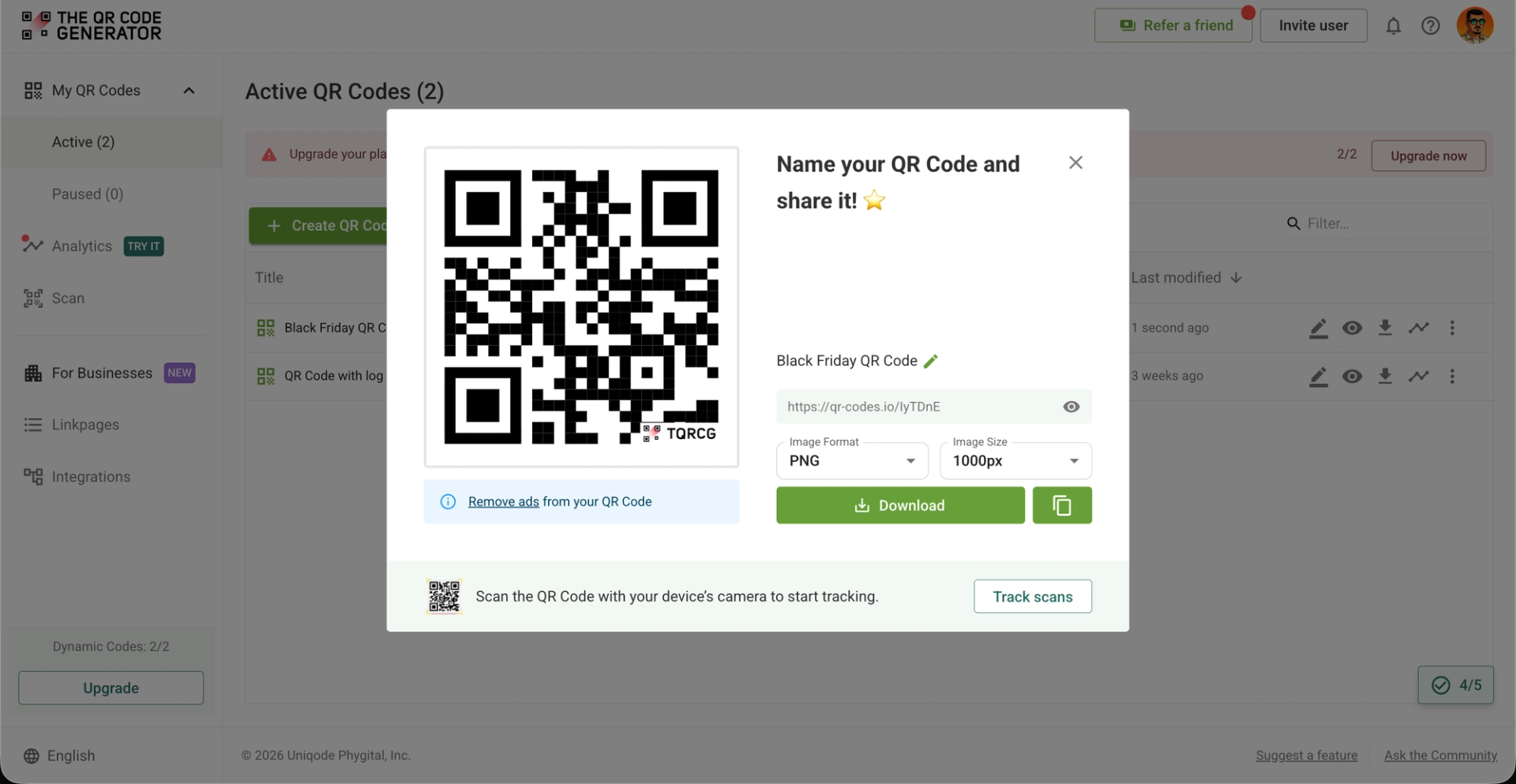
You can create a Black Friday QR Code for free in about two minutes, and the whole process runs inside the TQRCG dashboard. Make it a dynamic QR Code, so it can carry the sale, change destinations through the weekend, and report every scan.
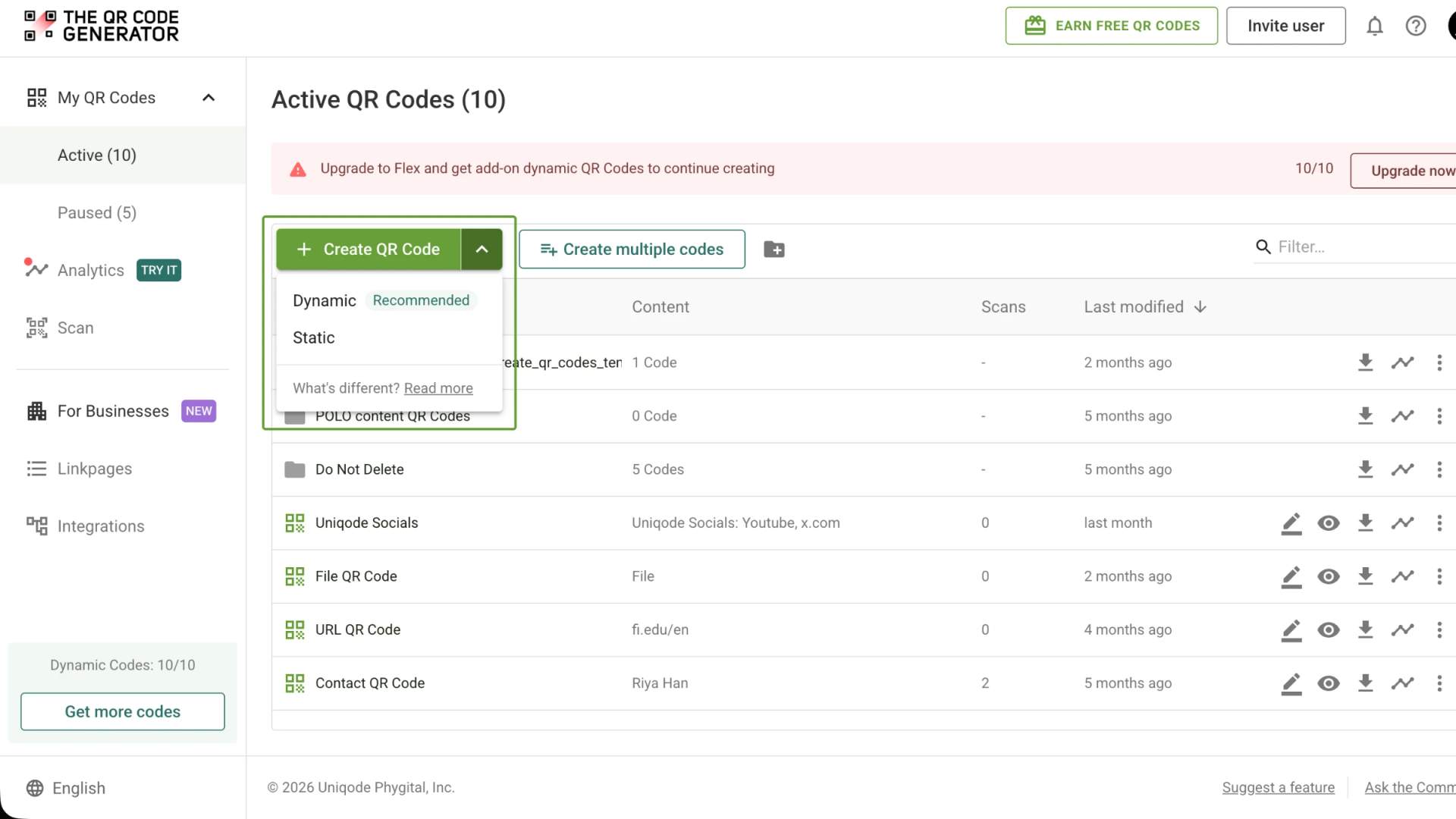
Step 1: Log in to the TQRCG dashboard
Step 2: Click + Create QR Code. You can also open the dropdown beside the button and choose Dynamic QR Code
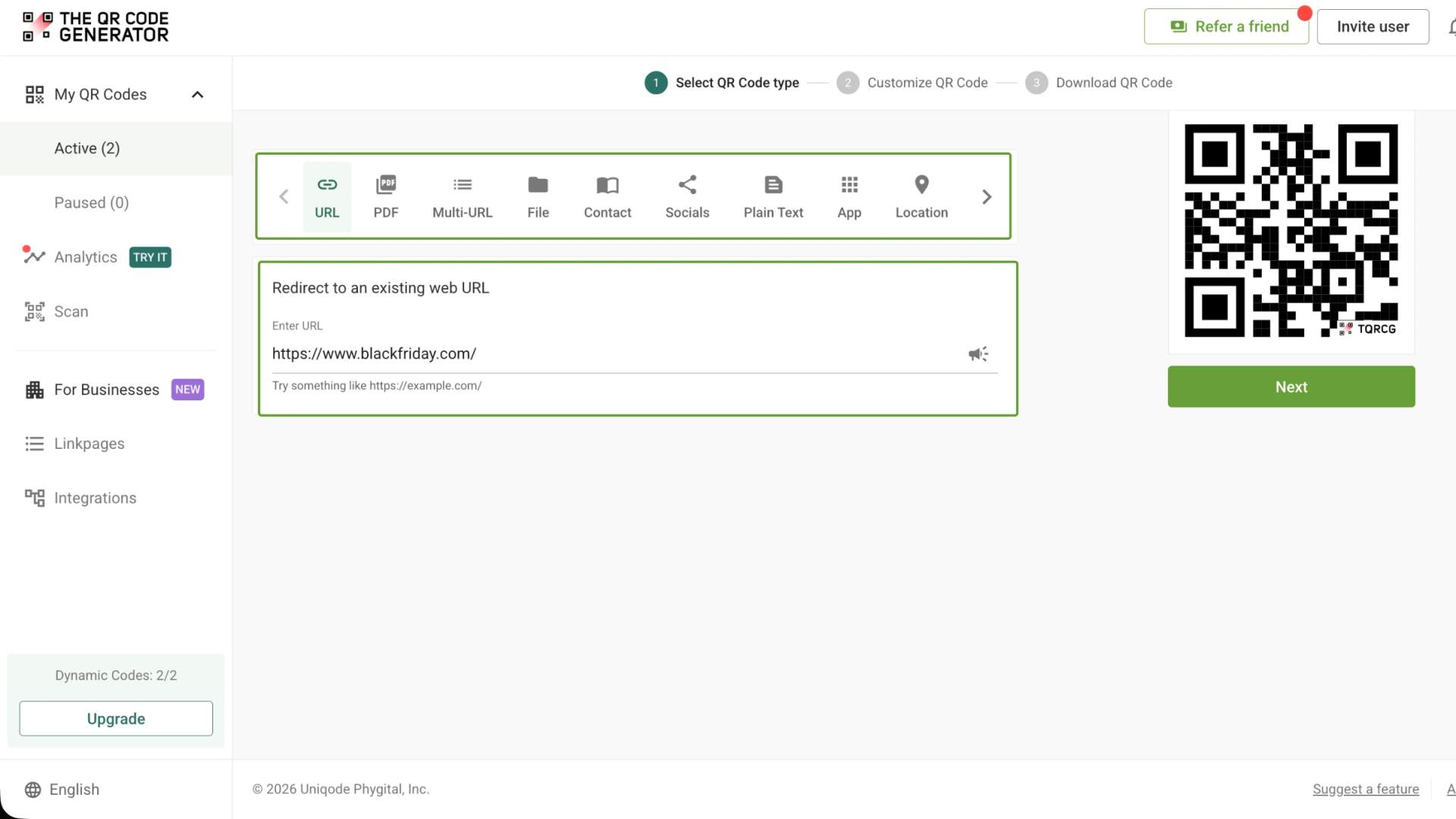
Step 3: Pick the QR Code type. For a sale or landing page, choose URL
Step 4: Paste your Black Friday landing page URL, then click Next
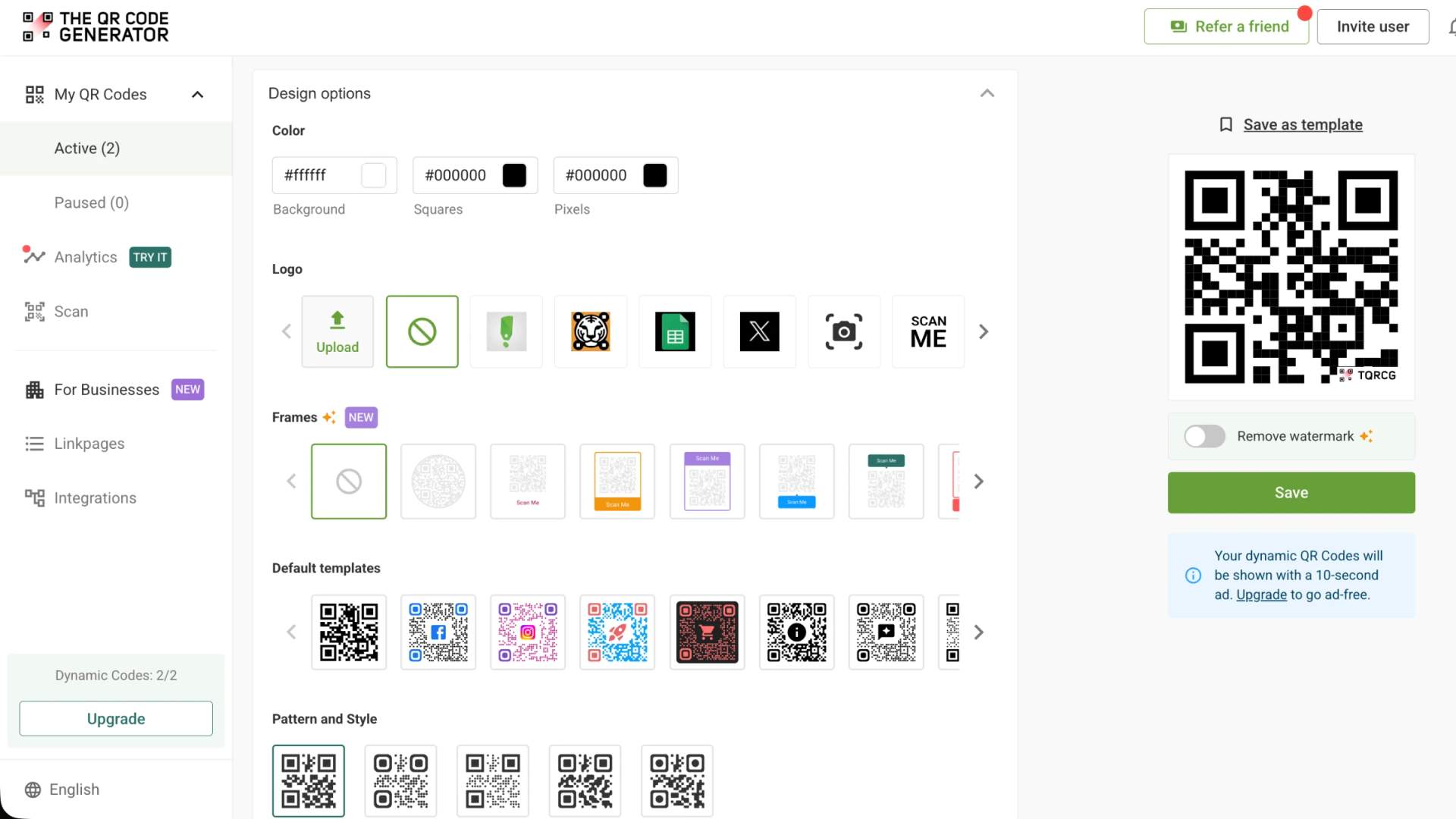
Step 5: Customize the QR Code by adding your brand colors, your logo, a frame with a CTA, and a pattern and corner style
Step 6: Download the finished QR Code as a PNG or as an SVG
How to track QR Code scans during the sale
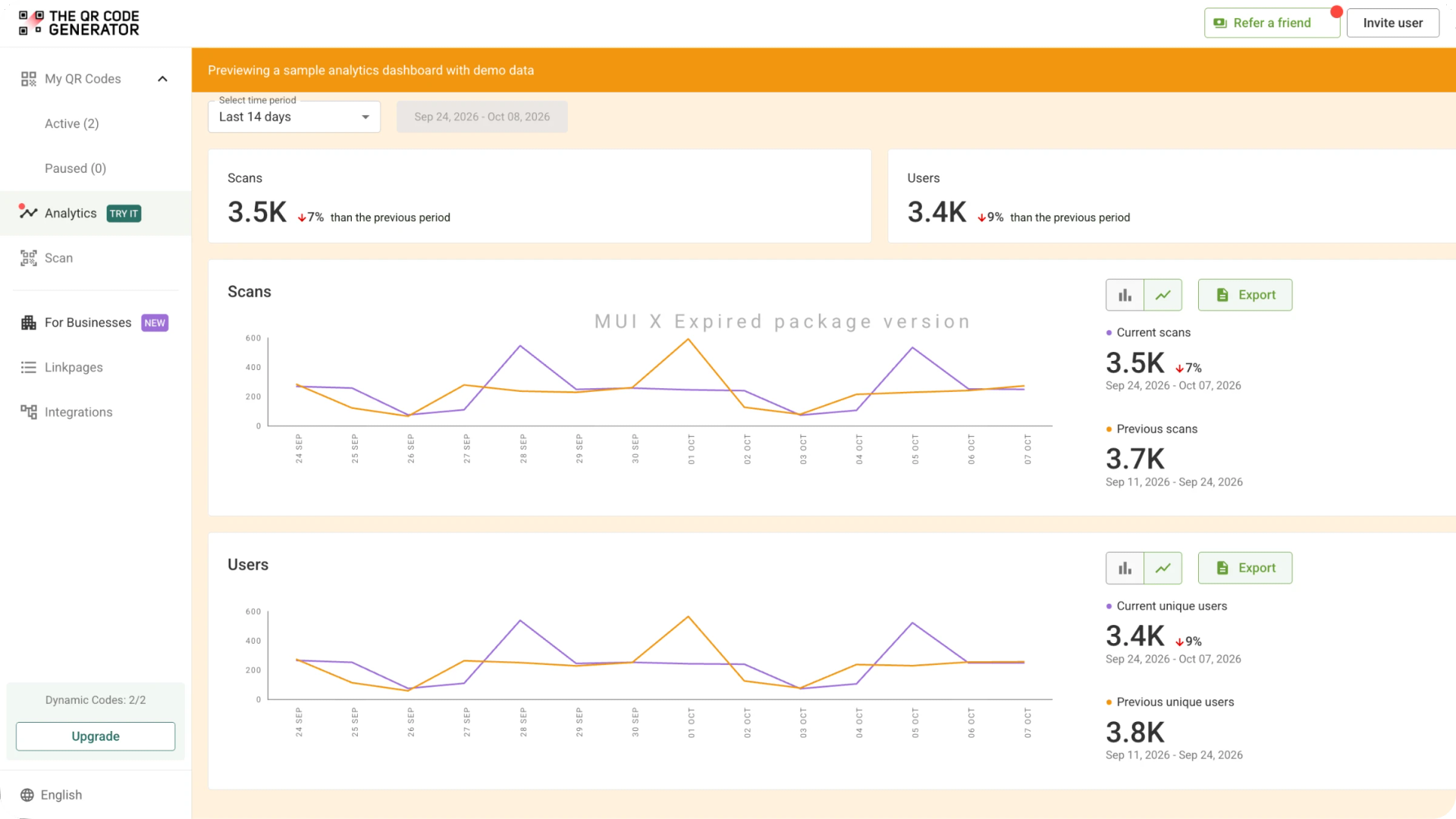
A dynamic QR Code reports every scan to your TQRCG dashboard, so you can watch the Black Friday campaign working in real time instead of guessing after the weekend. Open the analytics for each QR Code and work through the numbers that matter and the moves they point to.
The numbers to watch
Read the ones that tell you the most:
- Total scans count every scan and show the overall reach
- Unique scans count individual devices, which is closer to the number of real people you reached
- Scans over time plot the campaign by hour and by day
- City or region shows where each scan happened
- The device and operating system show what shoppers used to scan
Read the scans-over-time graph live
Keep this graph open through the weekend, because it tells you when to move. When the shop-window QR Code spikes at 8PM, extend the evening offer by another hour. When a flyer zone goes quiet by Saturday, shift that budget into the placement still climbing. The QR Code is dynamic, so you repoint it the moment the data asks you to.
Use one QR Code per placement
Keep one QR Code per placement so the numbers stay readable. A separate QR Code on the window, the endcap, and the receipt lets you rank them by scans and send next weekend's spend to the winners. Unique scans show real reach while total scans show repeat interest, and the gap between them tells you whether shoppers keep returning to the same offer.
Connect scans to sales with UTMs
For scans that should end in a purchase, add a UTM tag to each destination, such as utm_source=window or utm_source=flyer, so the visit is recorded in Google Analytics alongside your sales. The QR Code tracks the scan, and the UTM follows the shopper to checkout, closing the loop from poster to order.
Keep the data before it expires
The free plan keeps 14 days of scan history, enough to cover the whole Black Friday and Cyber Monday window and the week around it, with longer retention on the paid tiers when you want to compare this year to last. Export or screenshot the key graphs before that window closes so you hold a record for next year's plan.
Try TQRCG with your next Black Friday campaign
The easiest way to evaluate a QR Code platform is to put a real QR Code into a real campaign and see how it performs. The QR Code Generator (TQRCG) gives you 2 free dynamic QR Codes that never expire, so you can test a Black Friday promotion, coupon, giveaway, or Cyber Monday campaign without committing to a paid plan.
Create a dynamic QR Code, put it on an actual flyer, sign, receipt, or campaign asset, and track the scans as shoppers interact with it. If the campaign works and you need more QR Codes or additional capabilities, you can upgrade to a paid plan as your requirements grow.
Frequently Asked Questions
What is the cheapest way to get a QR Code?
The cheapest way to get a QR Code is a free QR Code generator like TQRCG. A static QR Code costs nothing to create or download and never expires, and TQRCG's free plan gives you 2 free dynamic QR Codes that never expire. For a Black Friday sale, that means you run a trackable campaign for free and upgrade only when you need more than 2 dynamic QR Codes.
What is the FBI warning about QR Codes?
In January 2022, the FBI warned that cybercriminals tamper with QR Codes to send people to malicious sites that steal login or payment details, sometimes by sticking a fake QR Code over a real one. Scan only QR Codes you trust, check printed QR Codes for a sticker placed over the original, and confirm the web address looks right before you enter any details. For your own Black Friday signage, point every QR Code to your verified domain and monitor scan data for anything unusual, so shoppers can trust what they scan.
Is The QR Code Generator (TQRCG) free for Black Friday and Cyber Monday?
Yes. The QR Code Generator (TQRCG) is a free QR Code generator, and the free plan includes 2 dynamic QR Codes that never expire. That is enough for a focused Black Friday and Cyber Monday campaign, with one QR Code for your main sale and one for a coupon or giveaway. The paid tiers add more dynamic QR Codes when you scale up.
Do Black Friday QR Codes made with TQRCG expire after the sale?
No. The 2 dynamic QR Codes on the free plan keep working after the sale ends and never expire, so the QR Code you print this year runs next Black Friday again once you repoint it. On the paid tiers, your dynamic QR Codes stay active for as long as the plan is active. A static QR Code never expires, either, though you cannot edit it or track its scans.
What is the best free QR Code generator for a Cyber Monday promotion?
The QR Code Generator (TQRCG) is one of the best free QR Code generators for a Cyber Monday promotion. It lets you start for free with 2 dynamic QR Codes that never expire. And when your QR Code requirements increase, it offers and practical upgrade path to paid tiers.
How much does a dynamic QR Code cost on TQRCG?
TQRCG offers a free plan that gives you 2 dynamic QR Codes that never expire. Paid plans begin with the Flex plan at $5 per month, billed yearly. The Core and Plus plan (powered by Uniqode) handle higher volumes for business campaigns. Check the live pricing page for the current limit on each tier.