
Are Self-Hosted QR Code Generators Worth It in 2026?

Harshajit
Last updated: March 25, 2026
9 min read
According to Uniqode’s State of QR Codes 2026 report, 98% of marketers say QR Codes have a positive impact, and 71% of consumers find them helpful in daily life.
QR Codes are no longer experiments. They are infrastructure.
And once QR Codes become infrastructure, a new question emerges: Should you rely on a third-party platform, or run everything yourself?
That’s the premise behind self-hosted QR Code generators. These tools let you create and manage QR Codes on your own server, without depending on another company’s uptime. It sounds ideal. But self-hosting also means handling servers, security, and ongoing maintenance yourself.
This guide breaks down how self-hosting works, when it makes sense, and what to consider before choosing it.
What is a self-hosted QR Code generator?
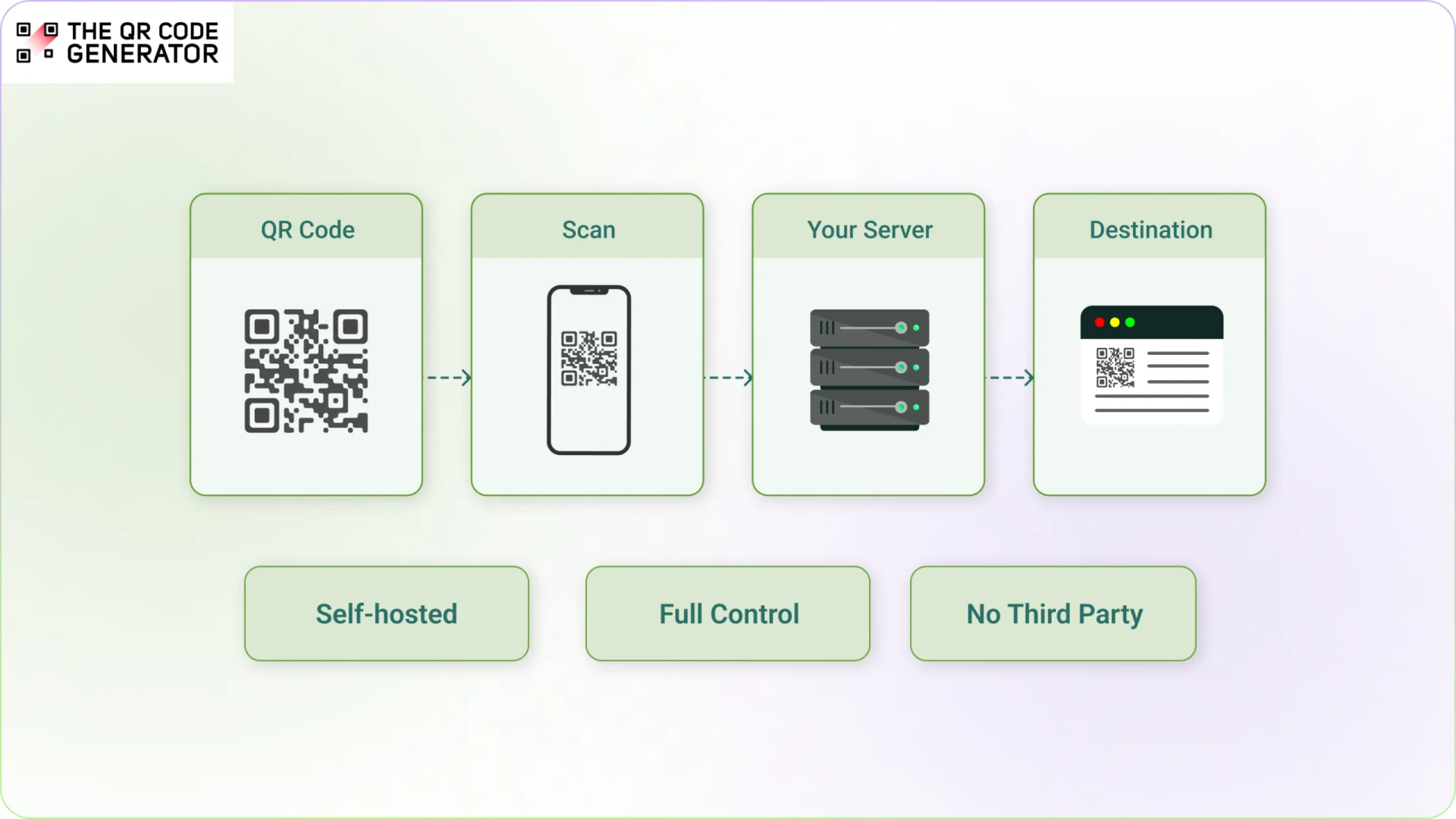
A self-hosted QR Code generator runs on servers you control instead of a third-party platform. This QR Code generator creates the code and handles scan redirects using your own setup.
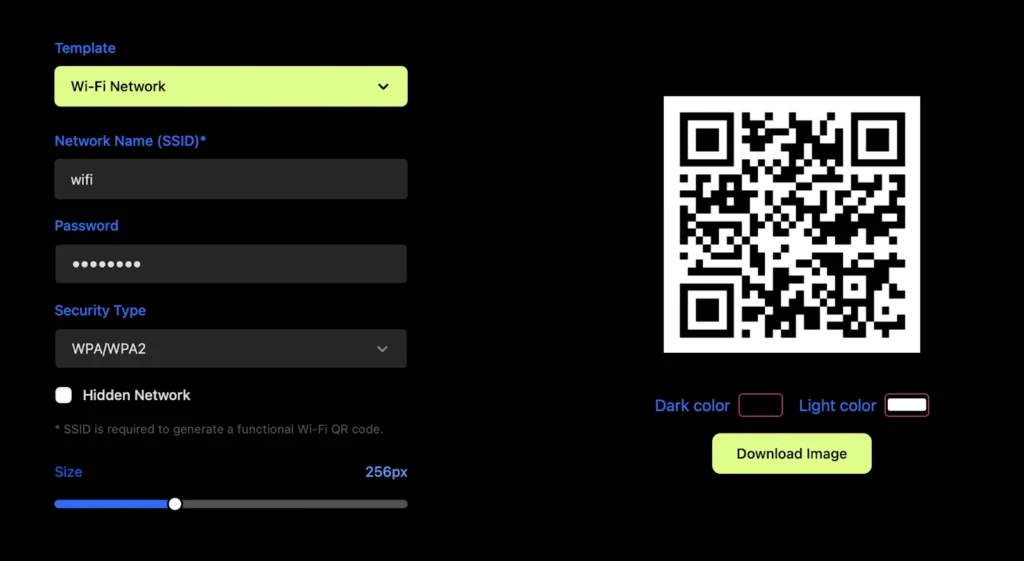
(Screengrab of QRding, a self-hosted QR Code Generator on GitHub)
Most QR Code tools work as hosted services. You visit a website, paste a link, and the provider generates the QR Code for you. The provider also handles what happens when someone scans it. This model is simple and convenient, but it means your QR Codes depend on that provider’s uptime and policies.
Self-hosting removes that dependency. You generate the QR Code, store the data, and control where scans are routed.
In practice, this can look different.
- Install an open-source QR Code generator from GitHub
- Write a simple script to generate QR Codes
- Build QR Code generation into your own app or internal tool
In each case, no external service is required to create or manage the QR Codes.
Because of this, self-hosted QR Code generators are usually built for technical setups, not everyday business use. They focus less on point-and-click interfaces and more on flexibility and control.
For most individual users and small teams, the priority is simpler: create a QR Code quickly, update it later, and track basic performance without managing servers. Self-hosting solves a different problem than that.
How do self-hosted QR Code generators work?
Self-hosted QR Code generators work by routing every scan through a system you control. They store the destination and decide where users are sent after scanning.
There are two types of QR Codes, and the difference matters here:
- Static QR Codes: The final URL is built into the code. Once created, it cannot be changed, and no server is involved when someone scans it.
- Dynamic QR Codes: The code contains a short link that points to a server. When someone scans it, the server redirects them to the final destination.
Self-hosting mainly affects dynamic QR Codes. With static QR Codes, both self-hosted and hosted tools behave almost the same.
With dynamic QR Codes, the flow looks like the following.
- Generate the QR Code: The system creates a QR Code that points to a link controlled by your server.
- Store the destination: The destination URL is saved on your system, not inside the QR Code itself.
- Handle the scan: When someone scans the code, the request goes to your server, which then redirects them to the final page.
- Log the scan data: Because the scan passes through your system, you can track data, such as time, device, and location.
This setup gives you full control, but also puts all responsibility for reliability on you. For individuals and small teams, the main tradeoff is gaining more control over redirects and data at the cost of managing everything yourself.
What are the benefits of self-hosted QR Code generators?
Self-hosting QR Codes become valuable when control, customization, or data ownership are critical. The main benefits apply in the following situations.
Keep full control over your scan data
When you use a hosted platform, scan data is stored on the provider’s infrastructure, even if you access it through a dashboard.
With self-hosting, all scan data stays within your own system. You decide what to collect, how long to store it, and who can access it. This level of control is important in regulated environments, such as those governed by GDPR or HIPAA, where data-handling requirements are strict and clearly defined.
Avoid dependency on a provider
Dynamic QR Codes created on hosted platforms rely on the provider’s redirect infrastructure. If the service changes pricing, removes features, or shuts down, QR Codes linked to that system may stop working.
With self-hosting, QR Codes point to infrastructure you control, so their reliability depends on your own setup rather than a third party’s decisions.
Create QR Codes without per-code limits
Many QR Code platforms charge based on the number of active QR Codes, scans, or features used.
With self-hosting, you can generate QR Codes without per-code limits because the system runs on your own server. So, whether you generate 10 QR Codes or 10,000, the underlying hosting costs remain largely the same. The primary cost shifts to hosting and infrastructure rather than usage.
Build custom redirect behaviour
Hosted QR Code platforms let you update destinations and apply rules based on device, location, or time.
Self-hosting gives you full control over the redirect logic itself. You can connect scans to internal systems, apply multi-step logic, or build custom workflows beyond what a dashboard supports.
The difference is flexibility. Platforms offer structured rules, while self-hosting lets you define everything.
Link to private or internal resources
Hosted QR Codes typically point to public URLs. With self-hosting, you can route scans to resources inside private networks, such as company intranets, internal tools, and restricted documents. This makes self-hosting useful for internal operations where access is controlled.
The benefits of self-hosted QR Code generators come from having more control. But that control also means you’re responsible for keeping everything running.
What are the drawbacks of self-hosted QR Code generators?
Self-hosting QR Codes requires ongoing effort to keep your QR Codes working reliably over time. The following are the most noticeable of those disadvantages.
You manage uptime, maintenance, and costs
Self-hosting means your server must stay online and respond quickly every time someone scans your QR Code. If your server goes down, your QR Codes stop working.
Keeping the system running requires ongoing work, including monitoring performance, applying updates, fixing issues, and maintaining backups. These are not one-time tasks.
Self-hosting also shifts costs. Instead of subscription fees, you pay for hosting, infrastructure, and the time spent maintaining the system. As usage grows, both infrastructure and maintenance effort can increase.
You rely on hosting infrastructure
Even with self-hosting, you rely on a hosting provider or cloud service to run your server. That means you still need to choose and configure hosting, manage storage and bandwidth, and handle traffic spikes.
The dependency shifts from a QR Code platform to infrastructure management.
You need technical expertise
Self-hosted setups often need developer involvement beyond the initial setup. You may need to troubleshoot server issues, update configurations, and maintain databases or tracking systems.
If something breaks, you are responsible for diagnosing the issue, fixing it, and restoring functionality. This can be especially challenging when QR Codes are tied to live campaigns or printed materials.
You build your own analytics
Most self-hosted setups only log basic scan activity by default. To get deeper insights, such as location, device type, or campaign performance, you need to build or integrate your own tracking system.
Self-hosted vs. cloud-based QR Codes: A quick comparison
Self-hosted and cloud-based QR Codes look the same to the end user, but work very differently behind the scenes. The key differences are below.
| Self-hosted | Cloud-based | |
|---|---|---|
| Setup time | Hours to days, depending on setup | Minutes |
| Cost model | Infrastructure and maintenance costs | Subscription or usage-based pricing |
| Uptime responsibility | You manage uptime and reliability | Provider manages uptime |
| Analytics | Basic by default or custom-built | Built-in dashboards and reporting |
| Customization | Full control over logic and behavior | Advanced, but within platform limits |
| Data privacy | Full control over data storage | Data managed by the provider |
| Scalability | Requires planning and resources | Handled automatically by the platform |
| Long-term code reliability | Depends on your infrastructure | Depends on provider stability |
How to create a QR Code without the complexity of self-hosting
Self-hosting gives you full control. But in most cases, what matters is simple: your QR Code works, can be updated, and is easy to track.
A managed platform like The QR Code Generator (TQRCG) provides that without the need to set up or maintain infrastructure.
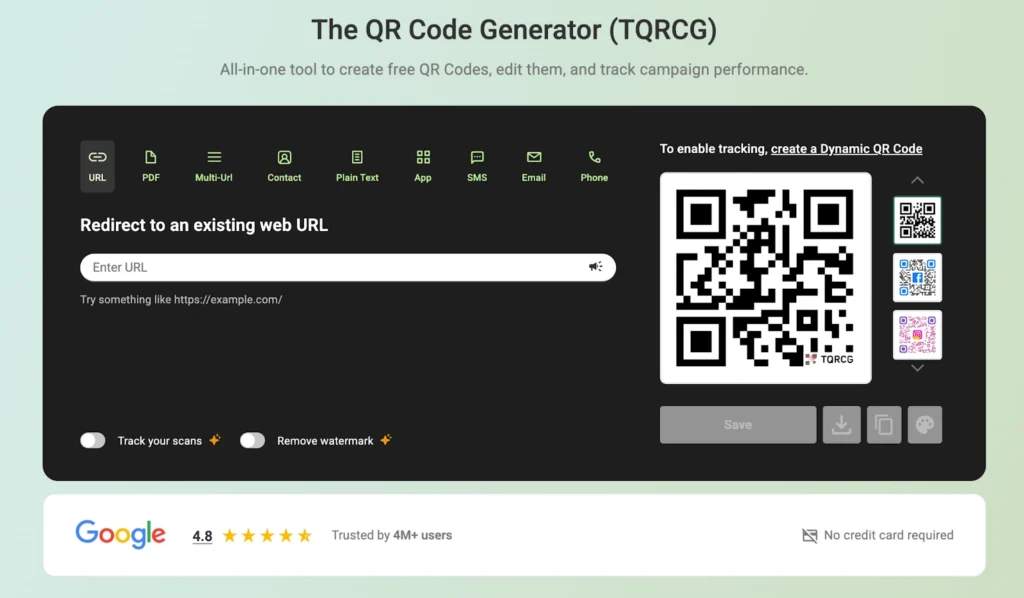
Here’s how to get started.
Step 1: Choose your QR Code type
Go to TQRCG and log in with your account.
Select the QR Code type that matches your use case, such as PDF, Wi-Fi, or multi-URL QR Codes.
This is also where you decide between a static QR Code vs. a dynamic QR Code. You’re better off with a dynamic QR Code because a static one would offer no flexibility should you need it later.
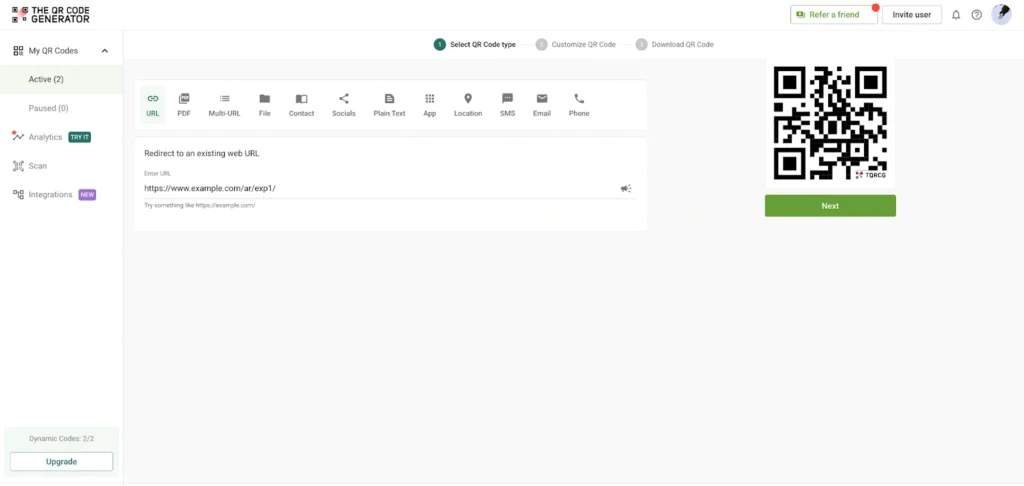
Each type automatically pinpoints the right fields, so you only fill in what matters for your specific goal.
Step 2: Customize the design of your QR Code
Once your content is set, move on to designing your QR Code. You can add your brand colors, upload a logo, select from multiple dot and shape styles, and apply a custom frame.
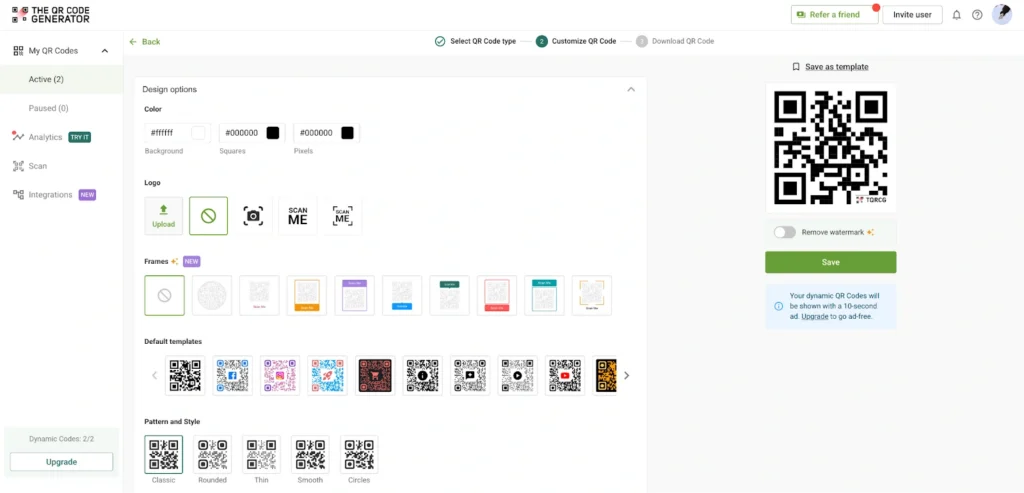
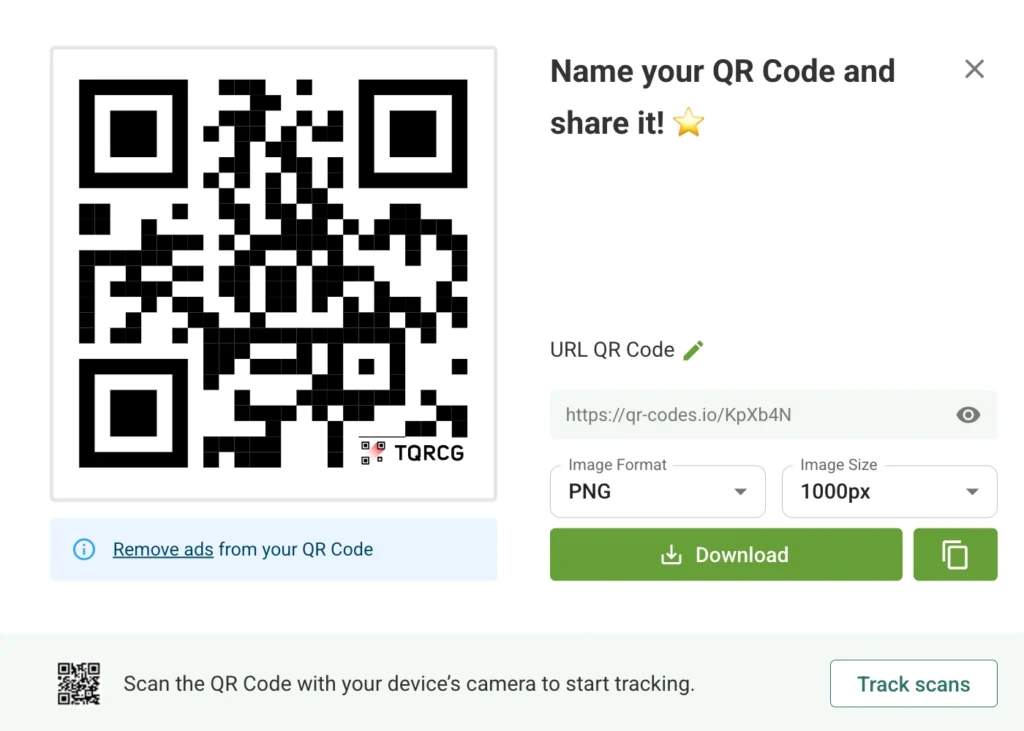
Step 3: Generate and download your QR Code
When the design is ready, click Next. Your QR Code is created instantly and available for download.
Step 4: Track the performance of your QR Code
Once your code is live, head to the Analytics tab in your TQRCG dashboard.
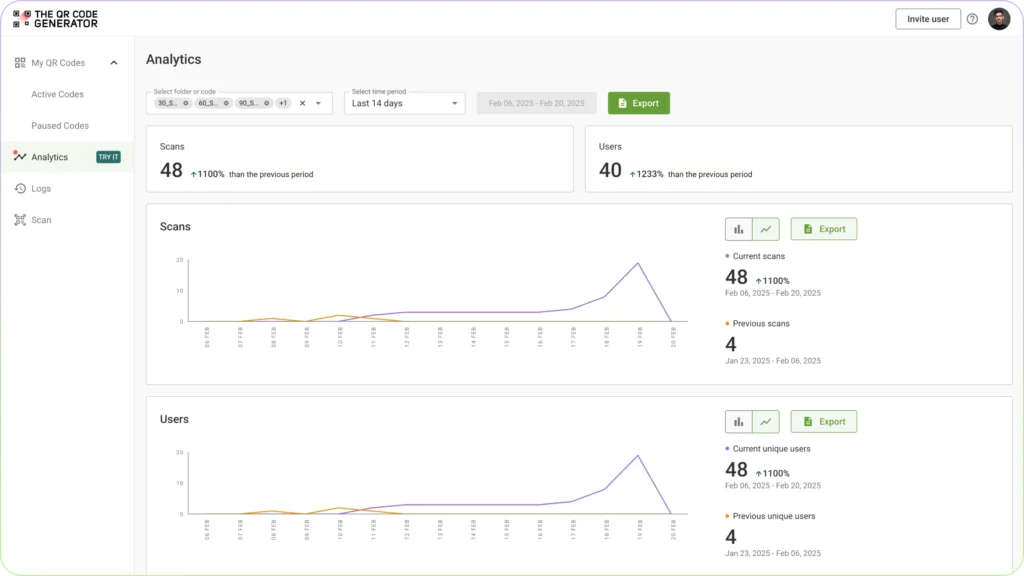
Within the QR Code analytics, you will find a breakdown of total scans, unique users, device types, locations, and scan trends over time, all collected automatically.
With a managed platform like TQRCG, the infrastructure is handled for you, so you can focus on using the QR Code instead of setting it up.
Self-hosted or managed: what’s the better choice?
Self-hosting QR Codes gives you control, but it also turns QR Codes into something you have to run, not just use. It makes sense in a few specific cases, such as internal tools, strict data requirements, or highly customized workflows. But outside of these scenarios, the added complexity rarely pays off.
For many teams, the goal is simpler: launch quickly, update easily, and understand what’s working after the scan.
A managed platform like The QR Code Generator (TQRCG) handles the infrastructure for you, so you can create, update, and track QR Codes without managing servers.
Start with a QR Code, test what works, and scale from there.
Frequently Asked Questions
Do you actually need a self-hosted QR Code generator?
Most businesses do not require a self-hosted QR Code generator. Managed QR Code platforms provide easier setup and reliable infrastructure without the need to manage servers. They also include built-in features such as QR Code analytics and QR Code design customization.
Do self-hosted QR Codes expire?
Self-hosted QR Codes do not have a built-in expiration date. They continue to work as long as the server, domain, and redirect system remain active and properly maintained.
Can I migrate my QR Codes if I switch platforms later?
Migration depends on how the QR Codes were created. Dynamic QR Codes can be redirected to a new destination if you control the redirect URL or domain. Static QR Codes cannot be changed and may require replacing printed materials.
Are there security risks specific to self-hosted QR Codes?
Self-hosted systems can introduce security risks if servers are poorly configured or not regularly updated. Weak access controls, unsecured endpoints, or outdated software can allow unauthorized changes or expose sensitive data.
Can I run a self-hosted QR Code generator on a Raspberry Pi or low-cost hardware?
A self-hosted QR Code generator can run on low-cost hardware for testing or small internal projects. However, these setups may lack the reliability, uptime, and performance required for public-facing or high-traffic use.
Do I need a static IP address or a dedicated server to self-host QR Codes?
Self-hosting QR Codes does not always require a static IP address or a dedicated server. Many setups use a domain name with cloud hosting or dynamic DNS to manage redirects and server access.