









 New Dynamic QR Code
  New Static QR Code
Scanning a QR Code has become as common as clicking a link. People use QR Codes to pay bills, access services, and share information and the process usually takes only a few seconds. But a single scan can sometimes lead to a fake website built to steal data. That’s the idea behind quishing attacks.
Quishing is a form of phishing that uses QR Codes to trick people into visiting fraudulent websites. These scams often target login credentials, payment information, and business accounts.
This guide covers how quishing works, why attackers use it, and the groups most at risk. You’ll also find practical tips to avoid common scams and learn how quishing fits into the broader conversation around whether QR Codes are safe.
Table of contents
- What is quishing?
- Quishing by the numbers: how fast the threat is growing
- How a quishing attack works
- Why quishing bypasses traditional email security
- Real-world quishing examples
- Who do quishing attacks commonly target?
- How to protect your organization against quishing
- Maintain control over the QR Codes your business creates
- Frequently asked questions
What is quishing?
Quishing is a type of phishing attack that hides a malicious URL within a QR Code image rather than a clickable text link. The name is a blend of “QR Code” and “phishing,” and the goal is the same as any phishing attack: get you to a fake website so attackers can steal your login credentials, install malware, or collect your payment details.
What makes quishing different is the delivery method. The malicious URL is embedded in a QR Code that your phone camera reads. It does not sit in the body of an email where security filters can scan it.
Quishing attacks increased by 587% in 2023, according to Keepnet, making QR Code phishing one of the fastest-growing phishing techniques in use today.
Quishing sits alongside three related attack types in the phishing family.
| Attack type | Primary vector | Delivery method | Security tool that normally catches it | Why quishing evades it |
| Phishing | Clickable text link | Email security filters and URL reputation checks | N/A (baseline) | |
| Smishing | SMS | Text message with link | Mobile carrier filtering and mobile threat detection tools | N/A |
| Vishing | Voice call | Phone call with social engineering | Caller ID screening and voice fraud detection tools | N/A |
| Quishing | Email, printed materials, or physical surfaces | QR Code image embedded in an email, PDF, poster, invoice, or sign | Many email security tools focus on visible URLs, links, and text-based indicators | The malicious URL is hidden inside a QR Code image and is often opened on a separate mobile device outside the organization’s security controls |
The table above matters because quishing exploits a gap that many traditional phishing defenses were not originally designed to address. Instead of asking victims to click a visible link, attackers hide the destination inside a QR Code image. In many cases, the scan then takes place on a separate mobile device, outside the security controls that normally inspect web traffic.
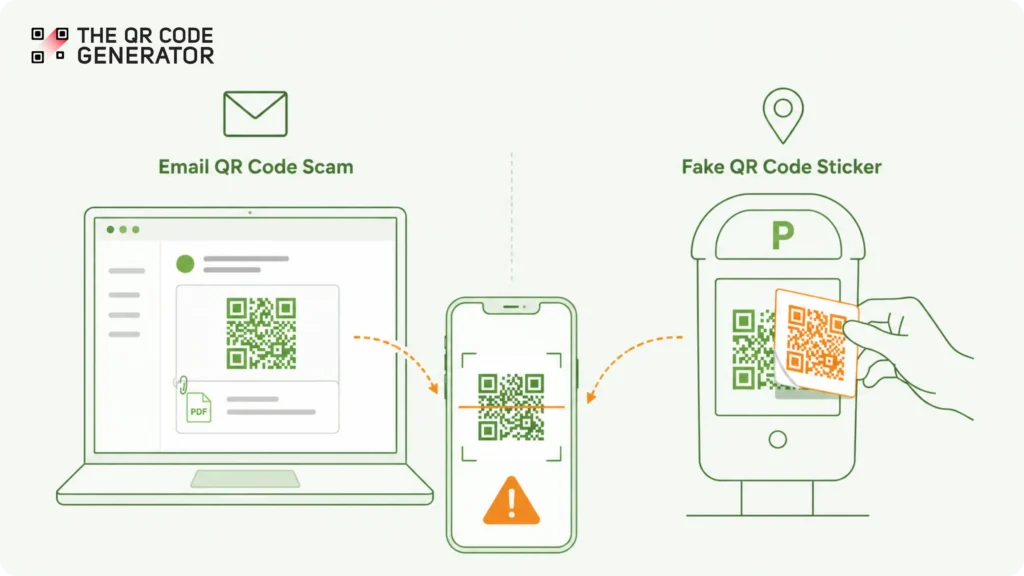
Quishing attacks most commonly appear through two channels.
- The first is email, where an attacker embeds a QR Code in a message, attachment, or PDF and encourages the recipient to scan it.
- The second is the physical world, where a fake QR Code sticker is placed over a legitimate one on a parking meter, café table, lobby kiosk, or public noticeboard. Both approaches rely on the same behavior: scanning a code without first verifying where it leads.
Quishing by the numbers: how fast the threat is growing
The rise of quishing isn’t a future risk. It’s already happening at scale. According to a Keepnet Labs analysis, quishing attacks surged 587% in 2023, making QR Code phishing one of the fastest-growing cyber threats in recent years.
Several other statistics point to the same trend:
- 4.2 million QR Code-based threats were detected in the first quarter of 2025 alone.
- 89.3% of QR Code-based attacks were designed to steal login credentials.
- 42× more quishing attacks targeted C-suite executives than non-executive employees.
- 26% of malicious links delivered through email were embedded in QR Codes rather than presented as traditional hyperlinks.
- Microsoft reports blocking more than 18 million unique phishing emails containing a QR Code in the email body on average each week, and around 3 million unique QR Code phishing emails per day.
The data also reveals how attackers operate. Nearly 9 out of 10 QR Code-based attacks focus on credential theft, often by directing victims to fake login pages that mimic trusted brands and business tools. According to Abnormal Security’s H1 2024 Email Threat Report, executives are a preferred target because they have access to sensitive systems, financial approvals, and company data.
According to cybersecurity company NordVPN, 73% of Americans scan QR Codes without verification, and more than 26 million have already been directed to malicious sites. By hiding the destination inside an image, attackers can encourage victims to switch from a monitored work device to a personal phone, where security controls may be weaker.
The growth of quishing closely follows the growth of QR Code adoption. Contactless menus, mobile payments, event check-ins, and authentication flows made QR Code scanning a routine part of daily life. As scanning became a trusted habit, attackers gained a new way to deliver phishing campaigns without relying on traditional links.
How a quishing attack works
A quishing attack unfolds in six stages. The critical security gap opens between step three and step four.
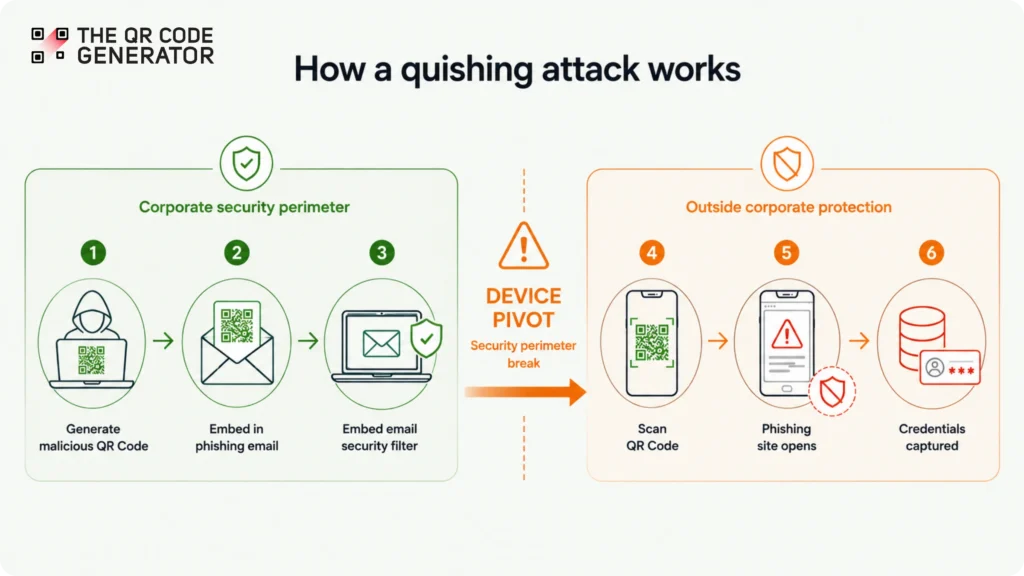
Step 1: Attacker generates the malicious QR Code
The attacker creates a QR Code that points to a malicious URL. This is often a credential-harvesting site, a malware download page, or a fake payment portal. Attackers may use dynamic QR Codes at this stage. A dynamic QR Code stores the destination on a server rather than in the code itself. Now the attacker can swap the destination URL after distribution to stay ahead of URL blacklists.
Step 2: Embed the QR Code in the lure
The attacker inserts the QR Code image as a PNG or JPG inside a phishing email. A more sophisticated version embeds the code within a PDF attachment, such as an invoice, HR document, or compliance notice. PDF-embedded images receive even less scrutiny from automated scanners.
Step 3: The email passes corporate security filters
The victim receives the email on a corporate laptop or device. Standard email security tools scan message bodies for known malicious URLs, suspicious text links, and flagged domains. The QR Code is an image. The malicious URL inside the image is invisible to text-parsing filters. The email lands in the inbox.
Step 4: The victim scans with a personal mobile phone
The email instructs the recipient to scan the code with their phone. The lure might claim the link is more convenient on mobile, or it mimics a multi-factor authentication (MFA) reset that requires a phone. The victim picks up their personal device and scans.
Step 5: The mobile browser opens the phishing page
The personal mobile phone sits outside the corporate security perimeter. Mobile device management (MDM) software is absent on most personal devices. The corporate virtual private network (VPN) is not active. The browser follows the decoded URL and renders the attacker’s page.
Step 6: Credential harvest or malware install
The victim enters credentials on the fake login page, completes a fake payment, or downloads an app that appears to be required. The attacker captures the data.
The device pivot, which is the handoff from a corporate device to a personal mobile phone between steps three and four, is the structural reason quishing works where standard phishing fails. The attack exploits two separate security perimeters, and neither one catches the full chain.
| 📝Note: The quishing threat is a separate problem from how legitimate businesses use QR Codes. A business creating QR Codes for menus, events, or documents needs its own security framework. The framework must include verified domains, scan analytics, and controlled destination URLs. As a result, QR Code security for businesses extends beyond scam prevention and includes decisions about platform selection, code management, and deployment policies. |
Why quishing bypasses traditional email security
Most phishing emails contain a clickable link. Security tools can inspect that link, check its reputation, and block it if it looks suspicious. Quishing works differently. Instead of placing the link in the email, attackers hide it inside a QR Code.
Here are three reasons quishing can be harder to detect than traditional phishing.
1. The malicious URL is hidden inside an image
Email security tools are designed to scan text, links, and domains. A QR Code is an image, so the destination URL may not appear anywhere in the email’s visible text.
Security vendors now use image analysis to detect these threats. For example, Microsoft reports blocking roughly 1.5 million QR Code-based attacks per day. But not every email security tool has the same level of QR Code detection.
2. The scan often happens on a different device
Many people scan QR Codes with their phones, even when the email arrives on a work computer.
When an employee clicks a link on a company laptop, security tools can often inspect and monitor that activity. But when the same person scans a QR Code with a personal phone, the visit may happen outside the organization’s normal security controls. This gives attackers another path to reach their target.
3. Attackers can change where a QR Code leads
Some quishing campaigns use dynamic QR Codes. A dynamic QR Code points to a destination that can be updated later. This allows attackers to change the final URL after the QR Code has already been delivered. In some cases, they may use a harmless destination at first and switch to a malicious one later, making detection more difficult.
The result is simple: a phishing email that contains a visible malicious link is often easier for security tools to analyze. A QR Code hides that destination behind an image and adds extra steps between the victim and the malicious website.
Real-world quishing examples
Quishing attacks can appear anywhere people use QR Codes. Some arrive through email, while others appear on signs, posters, and payment stations in public places. The examples below show how attackers use QR Codes to hide malicious websites behind a simple scan.
Austin parking meter scam (2022)
In 2022, scammers placed fake QR Code stickers on 29 parking meters across Austin, Texas. Drivers scanned the codes to pay for parking, but the QR Codes led to a fraudulent payment website instead. Anyone who entered their payment details risked giving that information directly to the scammers.
The attack worked because the fake stickers looked legitimate. Most drivers had no reason to suspect that the original QR Codes had been replaced.
Microsoft 365 account verification scams
Many quishing emails impersonate Microsoft 365. The message may claim that your password is expiring, your account needs verification, or your MFA settings must be updated.
Instead of including a link, the email asks you to scan a QR Code. The QR Code then opens a fake Microsoft sign-in page designed to steal usernames and passwords. Some campaigns also attempt to capture session information that helps attackers gain access to accounts.
Because the malicious URL is hidden inside the QR Code, the email can appear safer than a traditional phishing message at first glance.
Invoice and payment scams
Businesses are another common target. In these attacks, scammers send emails that look like invoices, payment requests, or account statements from a trusted vendor.
The email contains a fake QR Code that supposedly leads to payment details or supporting documents. After scanning the QR Code, the victim lands on a fake website and is asked to enter payment information, banking details, or account credentials. The goal is to steal money, sensitive information, or access to business systems.
A common theme across these attacks is trust. People expect parking meters, Microsoft login pages, and vendor invoices to be legitimate. Attackers exploit that trust by hiding malicious websites behind QR Codes. Physical overlay attacks are especially effective because a fake QR Code sticker can blend into an otherwise legitimate sign, menu, kiosk, or payment station.
The challenge for users is knowing whether a QR Code is safe before they scan it. Understanding that difference starts with knowing whether QR Codes are safe and what steps you can take to verify a destination before opening it.
Who do quishing attacks commonly target?
Attackers do not target everyone equally. They focus on industries that handle money, sensitive information, or large numbers of documents. They also target employees whose jobs involve approving payments, managing accounts, or reviewing requests.
Industries targeted by quishing attacks
| Industry | Common QR Code lure |
| Energy | Vendor invoices, compliance documents, supplier requests |
| Financial services | Account verification, payment approvals, secure documents |
| Manufacturing | Shipping documents, supplier invoices, procurement requests |
| Insurance | Policy documents, client portal logins, account verification |
| Technology | MFA resets, document sharing, software downloads |
These industries share one thing in common: many employees regularly work with invoices, forms, approvals, and account notifications. Attackers take advantage of those everyday workflows by making malicious QR Codes look like routine business communications.
Roles commonly targeted by quishing attacks
While certain industries face higher risks, attackers often focus on specific employees who have access to money, sensitive data, or important business systems.
Executives
Executives are among the most targeted groups. According to Abnormal Security, C-suite leaders receive 42 times more quishing attacks than other employees. Attackers often use urgent requests, approval documents, or account verification notices because executives have access to sensitive information and financial systems.
Finance teams
Finance staff are a common target for invoice fraud and payment scams. Their job requires them to review invoices, approve payments, and work with vendors. Attackers know this and often disguise malicious QR Codes as payment requests or financial documents.
IT teams
IT employees regularly deal with password resets, MFA updates, and security alerts. Quishing emails often copy these messages and use QR Codes to direct victims to fake login pages.
HR teams
HR staff work with resumes, onboarding forms, benefits documents, and employee records. Attackers may disguise quishing emails as hiring documents or employee requests to gain access to company systems.
Frontline and field workers
Employees in warehouses, factories, retail stores, and other physical locations face a different risk. Attackers can place fake QR Code stickers on equipment, kiosks, signs, or payment stations that workers use every day.
The common thread across all of these targets is trust. Attackers look for situations where scanning a QR Code feels normal. The more familiar the workflow, the more likely someone is to scan first and ask questions later.
How to protect your organization against quishing
Quishing works because attackers hide malicious links inside QR Codes and convince people to scan them. To reduce the risk, organizations need defenses that cover both email security and QR Code security. The six controls below can help.
1. Use email security tools that can inspect QR Codes
Traditional email filters are designed to scan links and text. Quishing attacks hide the destination inside a QR Code image.
Modern email security tools can decode QR Codes in emails and attachments, then check whether the destination is safe. Without this capability, malicious QR Codes may pass through security controls unnoticed.
Email authentication standards such as DMARC, SPF, and DKIM are still important, but they only verify the sender. They do not inspect the QR Code itself.
2. Strengthen account protection with phishing-resistant MFA
Many quishing attacks aim to steal usernames and passwords. Strong MFA reduces the risk that a stolen password leads to account compromise.
Whenever possible, use phishing-resistant methods such as security keys or passkeys. These methods make it much harder for attackers to access accounts, even if an employee enters their password on a fake website.
3. Limit what compromised accounts can access
No security control is perfect. Organizations should assume that some attacks will eventually succeed.
Limiting access based on job responsibilities helps reduce the damage. If attackers gain access to one account, they should not be able to move freely across systems, data, and applications.
4. Train employees to recognize QR Code scams
Most security awareness programs focus on suspicious links. Employees should also learn how quishing works.
Training should cover common warning signs, such as unexpected QR Codes in emails, urgent account verification requests, and QR Code stickers placed over existing signs or payment stations.
5. Include quishing in security and compliance programs
Federal agencies, including the Federal Trade Commission (FTC), the Federal Bureau of Investigation (FBI), and the Cybersecurity and Infrastructure Security Agency (CISA), have all warned about QR Code phishing.
Organizations should review their existing security policies and make sure quishing is included in employee training, risk assessments, and incident response procedures. This is especially important for regulated industries that already follow cybersecurity and compliance frameworks.
6. Create a response plan for mobile-device incidents
Many quishing attacks move users from a work device to a personal phone.
Organizations should have a clear process for investigating reports of malicious QR Code scans, identifying exposed accounts, resetting credentials, and monitoring for suspicious activity.
Quishing differs from traditional phishing because it hides malicious links inside QR Codes and often moves users from a work device to a personal phone. These tactics can make attacks harder to detect and reduce the effectiveness of security controls designed to inspect text-based links and email content.
As QR Code use continues to grow, organizations need to treat quishing as a distinct security risk. Companies that combine QR Code-aware email security, strong MFA, employee training, and clear response procedures are better prepared to prevent attacks and limit the damage if one succeeds.
Maintain control over the QR Codes your business creates
Not all QR Codes are threats. Businesses use QR Codes every day for payments, documents, customer experiences, and operational workflows. The challenge is making sure users can trust where those QR Codes lead.
The QR Code Generator (TQRCG) helps businesses create QR Codes that are trackable, editable, and connected to verified destinations. This gives organizations greater visibility into how their QR Codes are used and where they direct users.
TQRCG also supports enterprise security requirements through SOC 2 Type 2 and ISO 27001 certifications, as well as GDPR compliance. Combined with features such as scan tracking and destination URL management, these controls help businesses maintain stronger QR Code security while reducing the risk of misuse.
Frequently asked questions
Quishing is a type of phishing attack that uses a QR Code instead of a regular link. When someone scans the QR Code, it can send them to a fake website designed to steal passwords, payment details, or other sensitive information. The term combines the words “QR Code” and “phishing.”
Traditional phishing uses clickable links in emails, text messages, or websites. Quishing hides the malicious link inside a QR Code. Both attacks have the same goal: tricking people into visiting a fake website. The main difference is that quishing uses a QR Code to hide the destination.
Scanning a QR Code by itself does not install a virus. A QR Code simply directs your device to a destination, such as a website. The risk comes from what happens after the scan. If the QR Code leads to a malicious website, that site may try to steal your information or convince you to download harmful software.
Many security tools are designed to inspect links and text. A QR Code is an image, which can make it harder to analyze. Quishing attacks also often move users from a work computer to a personal phone. This can make it more difficult for organizations to monitor and block malicious activity.
Common examples include fake QR Code stickers placed over real QR Codes on parking meters, phishing emails that pretend to be Microsoft 365 account alerts, and fraudulent invoices that contain QR Codes leading to fake payment pages. In each case, the attacker uses a QR Code to hide a malicious website behind a seemingly normal request.
Organizations can reduce their risk by using email security tools that inspect QR Codes, enforcing strong MFA, limiting access to sensitive systems, and training employees to recognize QR Code scams. A clear incident response plan is also important so teams know what to do if someone scans a malicious QR Code or enters credentials on a fake website.
A fake QR Code often redirects users to a suspicious website that imitates a legitimate brand. Before entering any information, check that the website URL matches the brand’s official domain. Be cautious if the page contains spelling mistakes, asks for sensitive information, or looks different from the company’s usual branding.
