
How QR Codes on Corporate Brochures Increase Event ROI

Kritika
Last updated: December 18, 2025
15 min read
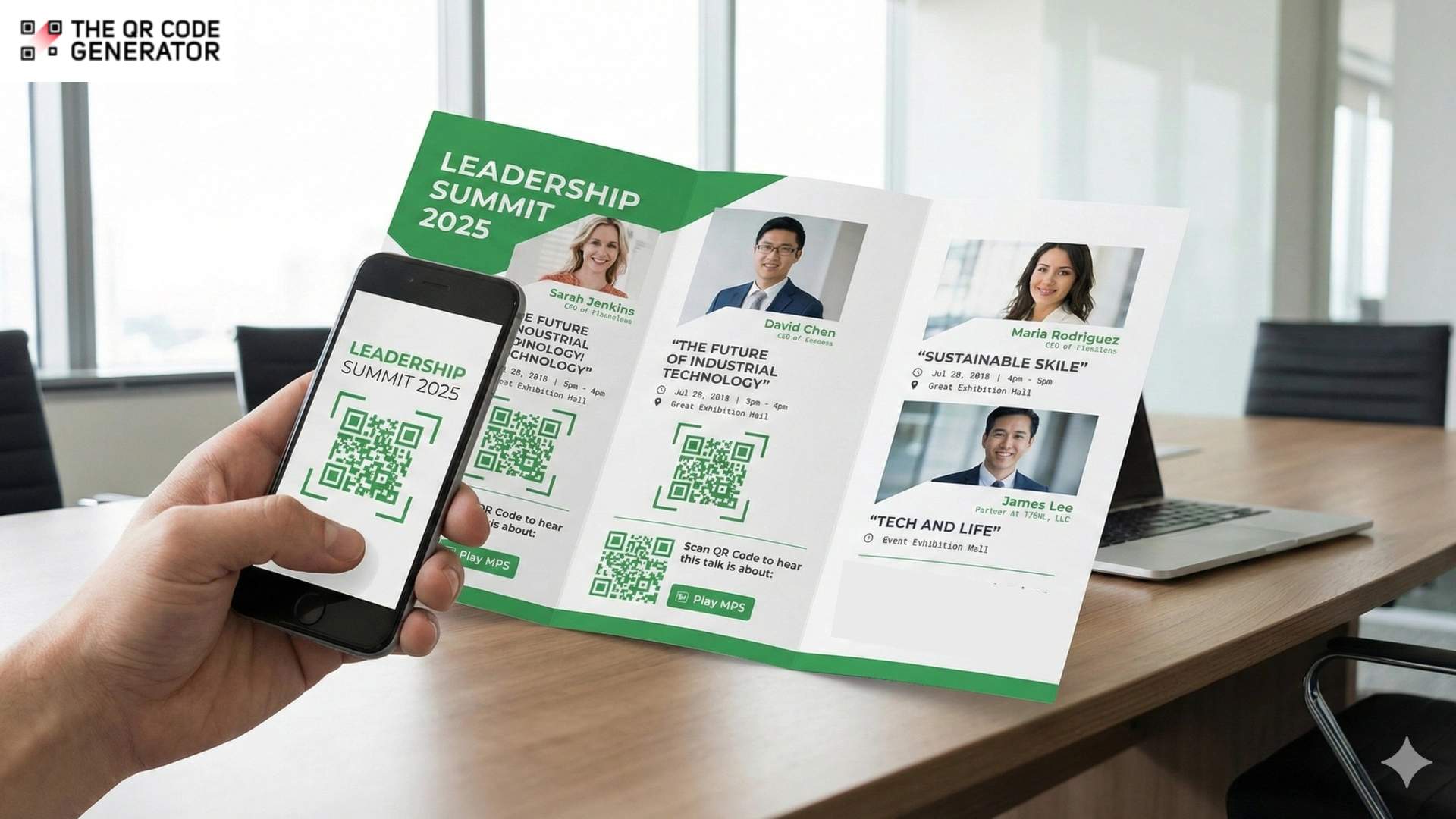
Corporate brochures are not cheap.
Think about the sheer effort you pour into a brochure. Polishing the brand voice, getting it approved, and finalizing the printing logistics can take weeks.
It’s a massive investment. Yet, once those brochures hit the trade show floor, the data disappears.
While you track every digital click and scroll, your print collateral is essentially invisible. You don’t know which pages resonate or if they drove a sale. It looks great on the table, but functionally? It’s a black box.
That is where QR Codes save the day.Just adding a simple QR Code to your corporate brochures makes it a trackable digital touchpoint. Now you can:
- See how many times a brochure was scanned
- Understand which events or regions generated those scans
- Track which content led to demo requests, sign-ups, or sales
Read on as we find out why QR Codes on brochures work better, and learn how to implement them in a simple, practical way.
Where do corporate brochures fall short without QR Codes?
While using QR Codes for marketing is nothing new, traditional printed marketing materials have served businesses well for decades. However, this is because businesses haven’t fully considered the limitations of relying solely on static handouts and brochures. That’s where they miss out on numerous opportunities for engagement and measurement.
Here’s what you’re missing out on with traditional, printed handouts.
Lack of insights from distribution efforts
Suppose a salesperson attended five major trade shows in a year. They used three versions of the corporate brochure and shipped hundreds of copies to each venue.
Sure, multiple cartons of brochures were distributed, but at the end of the year, it’s tough to determine:
- Which trade show drove the most interest
- Whether the new brochure layout worked better than the old one
- If a particular section got noticed
Traditional brochures are just informative. You can track prints and shipments, but not actual engagement. This leads to blind budgeting, where marketing funds are allocated without performance data. Moreover, it’s impossible to determine which events, salespeople, or regions drive engagement.
Risk of providing outdated content
Once a brochure is printed and distributed, there is no easy way to correct or update it. You either keep using slightly outdated material and hope no one notices, or rush a reprint and waste the previous stock.
Both are costly. Outdated information can confuse prospects and even cause awkward sales conversations. Static printed materials offer no flexibility for real-time updates or access to dynamic content that can be refreshed as needed.
Disconnected offline and online customer journeys
Your brochure might be beautifully written and designed, but if there is no quick path to continue the journey online, you are relying on people to manually type in a long URL.
The audience at an event usually remembers the brand name. Still, when they consider making a purchase, they might not know how to contact you, misplace the brochure, or just forget about the interaction. Essentially, a lot of that intent evaporates. The person is interested in the moment, then gets distracted, and closes the folder.
Traditional brochures create friction in moving prospects from offline interest to online engagement, whether that’s accessing a vCard, requesting a demo, viewing product walkthroughs, or using pricing calculators.
Inability to segment the audience and personalize follow-ups
If you cannot track which brochure someone engaged with or what they showed interest in, you cannot follow up in a targeted way. Most companies either use generic remarketing or rely entirely on their sales representatives’ memory.
Without digital tracking capabilities, it’s impossible to create audience segments based on engagement. For example, you can’t distinguish between:
- Prospects from the Dubai Expo booth
- Leads from the APAC roadshow
- Contacts who viewed product pricing
This type of intent data would be highly valuable for sales and marketing. Without it, your follow-ups are broad, repetitive, and often irrelevant.
With these drawbacks in mind, let’s now shift our focus to how QR Codes can actually make your brochures more effective. We’ll also share some practical tips on how you can use them in brochures for the best results.
How QR Codes on corporate brochures track and boost conversions
QR Codes are simple to create and implement, yet highly effective. Adding a QR Code to print materials has several benefits:
- It shortens the time it takes for people to see your product
- It bypasses the limitations of traditional print media and makes it interactive
- It reduces the effort it takes to memorize a URL and search for it
Now, let’s look at it from an engagement and conversion lens. By tracking the performance of QR Codes, you can actually drive better results from brochures at events.
Turn brochures into instant product demo launchpads
Corporate brochures are a great way to launch a demo of the product or service you are trying to sell.
You can place a QR Code next to each key product or solution block with a label such as:
“Watch a 90-second walkthrough.”
When scanned, it opens either a short product demo or a feature overview video. And because each brochure version and product information QR Code is unique, you can see:
- Which product generates the most interest
- Which event or territory generated those scans
- Whether people rewatch or share the URL
A good example comes from B/S/H Turkey, the company behind Bosch and Siemens home appliances.
By adding QR Codes to their printed product brochures and catalogues, users can access up-to-date product information and user manuals.
It’s the same idea you can apply to your own brochures: use QR Codes to turn each product block into a doorway to richer demos and content, while quietly collecting data on what people choose to explore.
Compare performance by region, event, and sales team
QR Codes on brochures make it easy to see how different distributions perform relative to one another.
When each location or event has a distinct QR Code on its brochure, all of those codes can still lead to the same landing page, yet the analytics remain separate.
This setup will tell you:
- Which region or event generated the most scans
- What time of day did engagement peak
- How many scans came from new visitors versus returning ones
In practice, brochures act like tagged touchpoints, so performance by territory, event, or team can be compared side by side using real scan data.
As a case in point, Juniper Networks used QR Codes at one of its customer conferences, resulting in 1,921 QR Code scans, 1,238 unique visitors, and 7,325 page views on its mobile microsite, with an average visit time of 5 minutes and 32 seconds.
That level of detail revealed to the team which sessions and assets drove genuine engagement.
Turn content into lead magnets with gated downloads
Corporate brochures often reference more in-depth content, such as technical whitepapers, industry benchmark reports, and detailed case studies. The chances that someone will later visit your website and manually hunt for these assets are slim. Instead, you can turn each asset into a trackable lead magnet.
Here is how it can work:
- Add a QR Code next to a short teaser of the asset in your brochure
- The QR Code opens a landing page with gated content
- After submitting their details, the visitor gets instant access to the resource
With this, you can get a verified lead and context into their topic of interest. And because you can create different QR Codes for different assets, you also see which topics generate the most leads and which ones are only nice to have in the brochure.
Let prospects book meetings directly with your brochures
Even a strong interest can fade once someone walks away from your booth. A brochure alone relies on them remembering to email or call later, which often never happens.
You can use a Calendly QR Code on your brochure that lets users choose a time that’s convenient to them. This ensures a confirmed meeting and engagement point for interaction ahead.
Collect quick feedback and optimize brochure content
What’s the quickest way to know if your messaging hits the mark? Just include a QR Code linking to a quick feedback form or poll. After all, you need feedback to determine if your brochure has influenced prospects and to identify any messaging gaps that may cause hesitation or confusion.
A simple QR Code solves this without complicating the brochure. You can collect essential feedback using a Google Form QR Code, where visitors can share what they found useful, what felt unclear, or what information they expected but didn’t see.
It also allows you to confirm whether your value proposition makes sense or understand which parts of your brochure had the most impact on them.
It’s clear how QR Codes make your corporate brochures more effective, interactive, and functional. Now, let us share with you the easiest way to create such QR Codes.
How to create QR Codes for corporate brochures
Once you’re ready to place QR Codes on your brochure, you must look for an affordable and efficient way to create high-quality QR Codes that you can customize to your heart’s content.
We recommend The QR Code Generator (TQRCG) as it helps you create free static and dynamic QR Codes, customize them to match your brand, and track their performance, all from one simple dashboard. Here’s how you can do it:
Step 1: Decide what each QR Code should do
First, plan and determine what you want to use QR Codes for. Decide on how they can maximize the experience for readers. Plan what each QR Code scan will lead readers to.
For example, you might want to
- Send readers to a product or solutions page
- Open a PDF with a detailed catalog or price list
- Show a simple mobile landing page with multiple links
- Share a sales rep’s contact card
- Open a calendar booking link for consultations
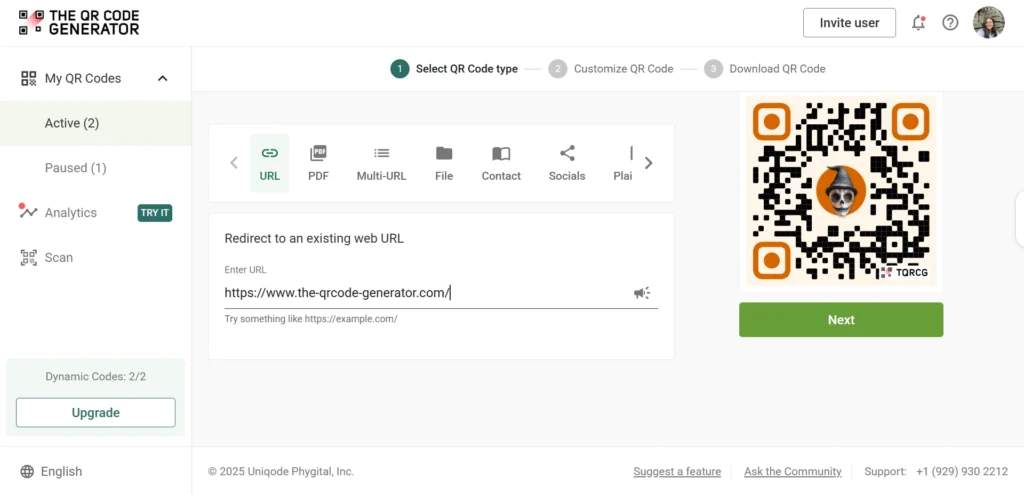
The QR Code Generator supports different types of QR Codes, such as URL, PDF, multi URL, contact (vCard), plain text, email, and phone, so you can match the correct QR Code to your brochure.
Step 2: Choose static or dynamic codes in The QR Code Generator (TQRCG)
Next, choose whether each brochure QR Code should be static or dynamic.
- Static QR Codes are unchangeable at a later time. They are perfect when the destination will never change, for example, a permanent “About the company” page.
- Dynamic QR Codes provide the flexibility to change the destination at any time in the future. They are the better choice for brochures because you can edit the destination later and track scans over time.
Dynamic codes from TQRCG also unlock QR Code analytics, so you can see when, where, and on which devices people are scanning your brochure.
Step 3: Create and customize your QR Codes to match your brand
Most QR Codes, by default, look the same. However, they don’t necessarily need to. You can create a code unique to your brand identity. You are free to use one that uses your brand colors and incorporates your brand logo.
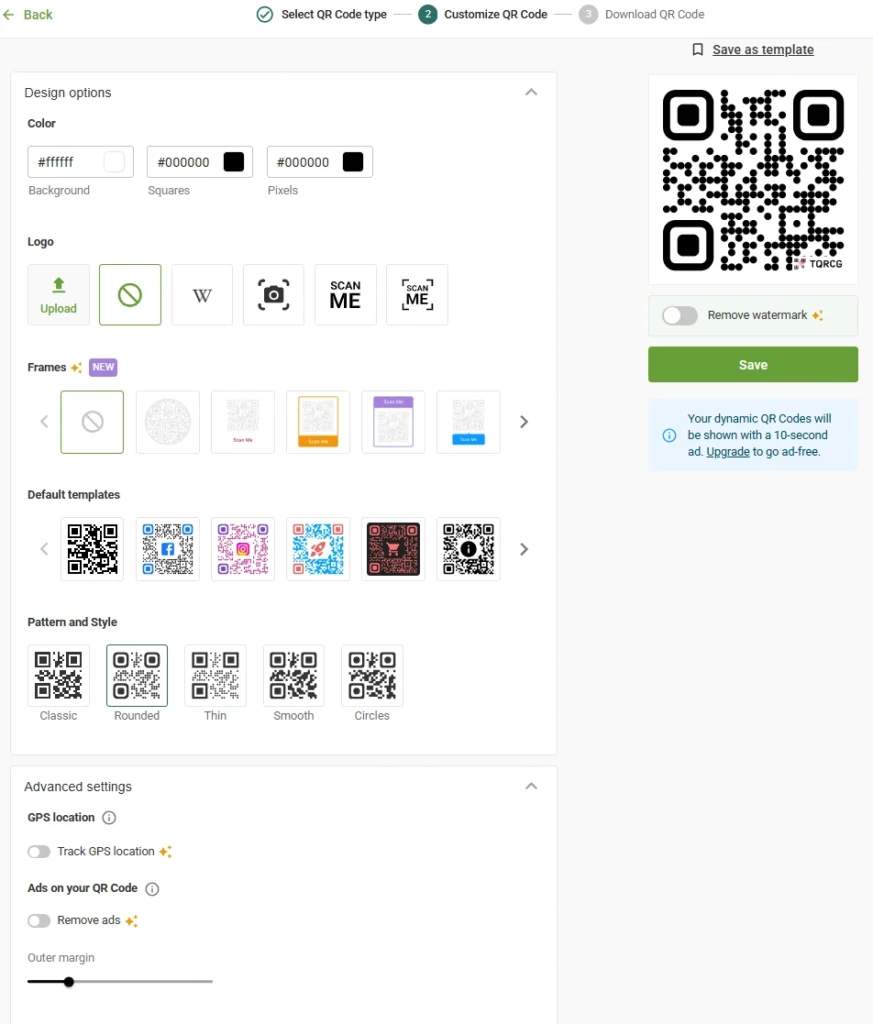
To customize your QR Code, you can:
- Pick a style for the code pattern, such as classic, rounded, thin, smooth, or circles
- Adjust foreground and background colors to match your brand palette
- Add your QR Code logo in the center for dynamic codes
- Tweak outer margins and preview the design in real time
The nice touch is that TQRCG has real-time scannability feedback for dynamic codes. As you experiment with colors and patterns, it warns you if your design might become hard to scan.
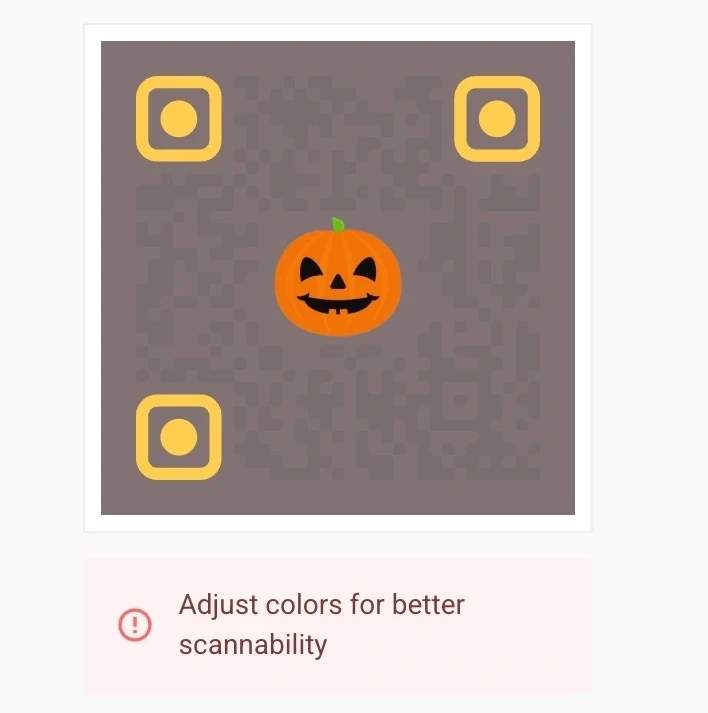
That protects you from the common mistake of creating a code that looks beautiful but does not work well once printed on a brochure.
While customizing your QR Code, keep these simple QR Code best practices in mind:
- Use a strong contrast between code and background.
- Avoid placing the QR Code on very busy artwork.
- Leave a clear white space around it so phone cameras can scan it easily.
Step 4: Download print-ready files for your design team
Once your QR Codes look right and scan correctly, you can download them from The QR Code Generator. TQRCG supports various QR Code formats, including PNG or SVG, with multiple resolutions up to 2,000 px.
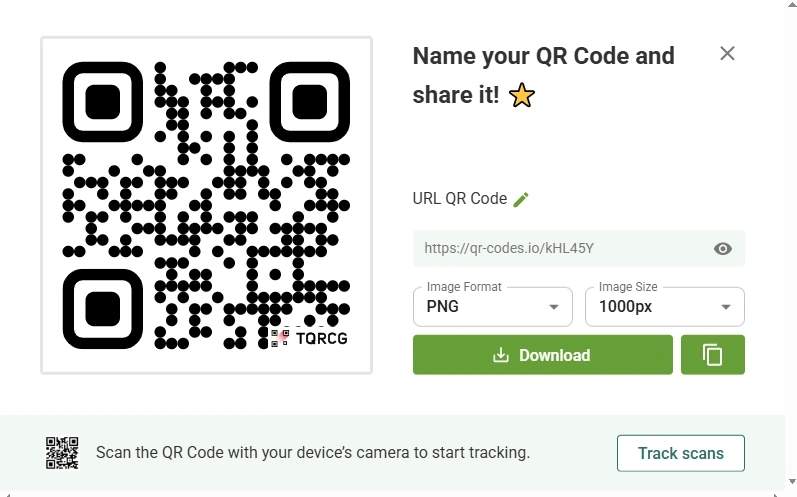
For corporate brochures, SVG or another vector format is often the safest choice because it scales cleanly for high-resolution printing without getting blurry.
Next, share those files with your designer and place each QR Code:
- Near the relevant section or callout
- With a short, clear label such as “Scan to watch a demo.”
- At a size that is easy to scan from arm’s length, not a tiny corner detail
Step 5: Turn your brochure QR Codes into trackable campaigns
TQRCG’s dynamic QR Codes come with analytics so you can track scans by time, location, and device type, then compare how different brochures or events perform.
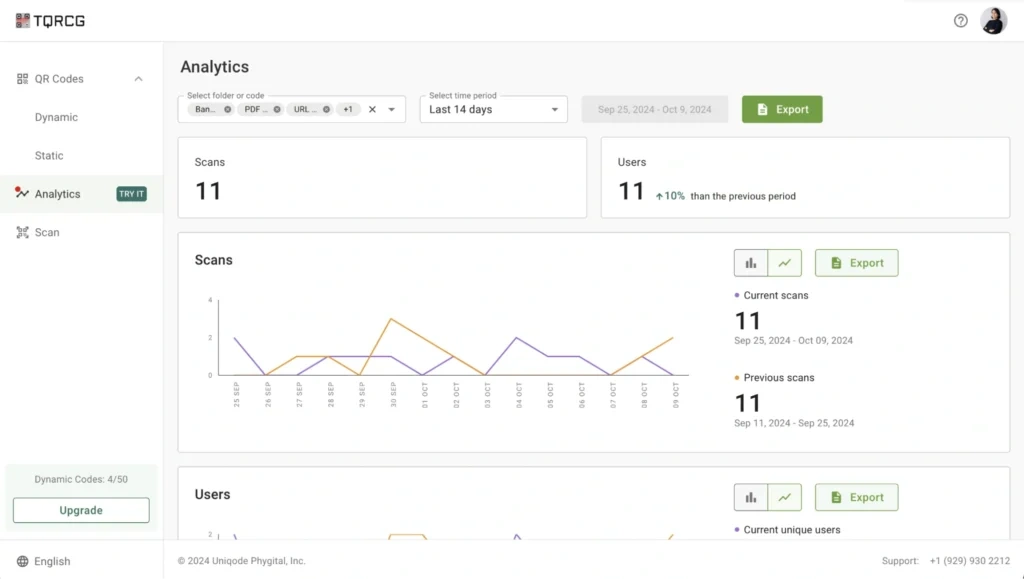
If you already use tools such as Google Analytics, you can go one step further and use the built-in Campaign URL Builder inside TQRCG.
It allows you to add UTM parameters to track QR Code campaigns, such as campaign source, medium, and name, to your brochure links before they are encoded, ensuring that brochure scans appear clearly in your analytics reports as their own traffic source.
For example, your QR Code link from the “Q1 Solutions Brochure” could carry a utm_source such as brochure_q1 and a utm_medium like print, which makes it obvious how much traffic and how many conversions came from that specific brochure.
Step 6: Test before you print the whole batch
Before sending a brochure to the printer, create a small test run with your QR Codes in place.
Scan them with different phones and camera apps, even in poor lighting conditions, to check that each one lands on the correct page or form. Once your first run is live, use the scan data to refine content, reposition QR Codes, and make each new brochure print into a smarter version of the last.
But that’s not all. Here are some best practices for making the most out of a QR Code on your brochure.
Best practices to follow while adding QR Codes to corporate brochures
Adding QR Codes to your brochures isn’t tricky, but doing it the right way makes all the difference. You need to consider the placement, messaging, attribution, and follow-up systems.
Here are some best practices businesses swear by:
1. Structure brochure-specific CTAs
Generic CTAs, such as Scan Here, are wasted opportunities. Your call-to-action should communicate clear value.
Instead of Scan to learn more, try Watch our product demo or View custom pricing.
Place codes near relevant content with CTAs. Make codes at least 1 × 1 inch with high-contrast backgrounds. Add a short URL beneath as backup; it signals legitimacy and provides a fallback option.
2. Set up multi-channel attribution tracking
To see which brochures and channels really drive results, create separate dynamic QR Codes in The QR Code Generator for each placement, such as “Trade show brochure,” “Sales leave behind,” or “Partner mailer.” Dynamic codes from TQRCG can track scans by time, location, and device type in a single dashboard.
Before generating the QR Code, add UTM parameters to your URL so that scans appear as clearly labeled traffic in tools such as Google Analytics. TQRCG makes it easy to manage multiple QR Code campaigns within the same dashboard so that you can create them for different team members or events.
3. Export and analyze scan data for lead follow-up
Export comprehensive scan data weekly, including location coordinates, timestamps, device types, and import it into your CRM to enrich lead records.
This enables powerful follow-up: “I noticed you scanned our brochure at the Austin summit and watched our security demo. Here’s how we helped a similar company.”
Ensure that landing pages are mobile-optimized, load quickly, and align with your CTA promise. If your brochure says, “Download our pricing guide,” direct them there, not to your homepage.
4. Establish regular performance review cycles
You have to treat brochure QR Codes like a campaign. A practical review cycle could resemble:
- Weekly Check scan volume and any sudden spikes
- Spot any broken links or underperforming CTAs
- Compare results across events, regions, or brochure versions
- Look at which assets or CTAs convert best
- Tie brochure scans to downstream metrics such as form fills, meeting bookings, or opportunities created.
- Adjust print quantities, event choices, and messaging based on real performance.
The QR Code Generator provides scan analytics and exportable reports, allowing you to combine that data with CRM and revenue numbers, which helps you connect brochures to your pipeline and ROI.
Convert your corporate brochures into lead magnets with QR Codes
Corporate brochures do not have to be silent, untrackable assets. With QR Codes, every scan tells you something useful about your audience and your messaging.
With The QR Code Generator (TQRCG), you can create branded QR Codes, track how and where they are scanned, and keep your brochure content flexible even after printing. You also get two dynamic QR Codes for free, which is more than enough to test your next brochure campaign without any risks.
Create, track, and optimize your next QR Code brochure campaign with The QR Code Generator.
Frequently Asked Questions
Q1: Should I use static or dynamic QR Codes on printed brochures?
Always use dynamic QR Codes for printed brochures. Dynamic codes let you update the destination URL after printing, which is important when prices change, promotions end, or products get discontinued.
Q2: How do I track which brochures generate the most leads?
Create unique QR Codes for each distribution channel and event using The QR Code Generator's dashboard. Assign different codes to each trade show, sales rep, or region. The platform tracks scans per code, showing exactly which brochures drive engagement.
Q3: Can I update the content a QR Code links to after brochures are printed?
Yes, that's the advantage of dynamic QR Codes. The physical code on your brochure never changes, but you can instantly update the destination URL through your dynamic QR Code.
Q4: What's the best call-to-action for QR Codes on corporate brochures?
Brands consistently see 3-4x higher conversion rates with personalized CTAs compared to generic ones. Instead of "Scan to learn more," use "Watch our 90-second demo," "Download free industry report," or "Book your consultation now." The CTA should communicate what happens after scanning and why it's worth the prospect's time.
Q5: How do I measure the ROI of QR Codes on corporate brochures?
To measure the ROI from QR Codes on brochures, you must use trackable QR Codes and then combine scan data with your CRM or analytics data. To determine an exact number, compare the revenue or pipeline from QR Code-driven leads with your brochure print and distribution costs.
Q6: What scan data can I track from corporate brochure QR Codes?
Dynamic QR Codes created with TQRCG can track total and unique scans, scan location, time of scan, and device type, and let you export this data as CSV for deeper analysis.