









 New Dynamic QR Code
  New Static QR Code
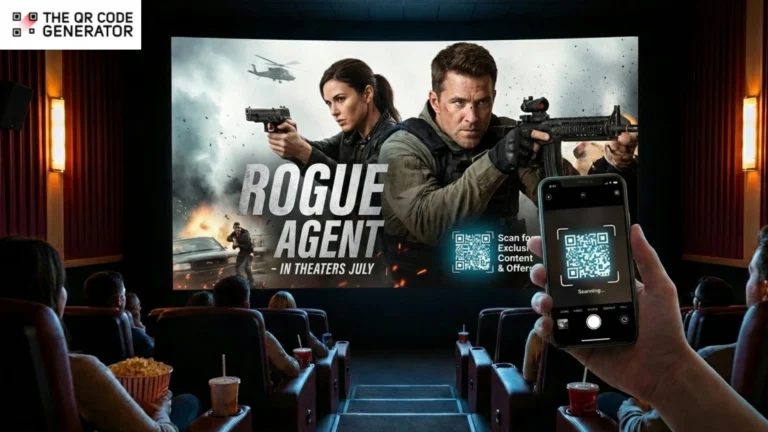
If you grew up in the late ’80s, ’90s, or early 2000s, the bouncing DVD logo is instantly familiar. It appeared on television screens when a DVD player was left idle, drifting across a black background while viewers waited for a movie to start.
Coinbase, a crypto exchange company, tapped into this familiarity for its Super Bowl ad. It was nothing but a sixty-second colorful QR Code moving on a black screen. The single ad drove millions to their landing page in a minute and launched the Coinbase mobile app from 186th place to second on the App Store.
A similar audience may be sitting in a dark theater waiting for their movie to start, when they view your cinema advertisement with a QR Code that they can engage with. This flip in your advertising strategy comes at a fraction of the cost while delivering a high ROI. Read on to learn how you can implement it in your next campaign.
Table of contents
- Why cinema audiences are perfect for QR Code based marketing
- How QR Codes for cinema advertising actually work
- High-impact use cases for cinema QR Code campaigns
- How to create QR Codes for cinema advertising
- 4 Best practices to make your cinema QR Codes more effective
- Turn cinema attention into measurable data with QR Codes
- Frequently asked questions
Why cinema audiences are perfect for QR Code based marketing
According to a study by Lumen Research, cinema ads draw attention scores 4-7 times higher than those for TV, social, and digital ads. People actually watch them.
However, traditional cinema advertising captures attention but loses the trail immediately after. There’s no action from the viewer. This worked fine when marketing was focused on recall. But today, you have to know exactly where your money went and what it bought.
QR Codes transform how you advertise in cinema entirely. Everyone checks their phone regularly during the movies. QR Codes redirect that behavior towards scanning the QR Code and engaging with your brand.
Here are all the other reasons why QR Codes make perfect sense for cinema advertising.
Second-screen behavior is common
The industry sometimes treats phone usage during pre-show as a problem to solve. That’s not necessarily true. People are going to check their devices anyway. The question is whether you give them something worthwhile to engage with or let them scroll until the lights dim.
QR Codes are great here because they don’t require audiences to adopt new habits.
Every mobile device can scan QR Codes natively through the camera app. There’s no app download barrier or a learning curve. If you design a QR Code with a clear CTA, chances are you’ll receive hundreds of scans with every show.
QR Codes convey intentionality and build trust
Context matters for QR Code engagement. A QR Code on a random street poster might feel suspicious, but a QR Code in a polished cinema ad feels intentional.
Even though phones are meant to be on silent and not used during the screenings, they’re accessible more often than not. On a Reddit discussion, a filmmaker actually encourages artists to add QR Codes to their movie’s end credits or as a part of the movie, the way product placements work.
Viewers don’t find QR Codes gimmicky when they’re well-integrated. They find them gimmicky when they’re poorly executed (e.g., shown for 2 seconds or leading to a broken mobile site).
Advertise to a high-intent audience
Moviegoers typically fall into higher-income brackets with significant disposable income and strong purchasing power. They’ve already made the conscious decision to spend money on entertainment, which puts them in an active spending mindset.
Now, let’s figure out what the scan-to-buying action journey looks like.
How QR Codes for cinema advertising actually work
A QR Code is a visual shortcut to a URL.
When someone scans a QR Code with their phone camera, they’re instantly redirected to the destination you choose as the advertiser. That destination could be a landing page for a movie trailer, a signup form for a discount, a contest entry, or even an app download.
Connect offline media to online conversions
Cinema advertising exists in a unique space. It’s displayed on screens and often managed digitally, but the audience experience can’t be traced online. But, with QR Codes, you can capture specific data points, such as the time of scan, theater location, device type, and even conversions.
This creates a direct line of attribution from your cinema ad spend to measurable business outcomes. You can retarget your offerings to these new leads that you’ve acquired with the ad. It’s an easy way to extend the impact of your cinema and well beyond the theater.
Dynamic QR Codes allow much more flexibility
If you’re running a one-time promotion, a static QR Code works okay as the URL is baked in permanently. But for longer campaigns, especially cinema ads that might run for weeks, dynamic QR Codes are a must.
Dynamic QR Codes let you change the destination URL after the code has already been printed or distributed. This matters for cinema because creative changes are expensive, but dynamic QR Codes solve that problem.
By combining them with viewer behavior analytics, you gain measurable results from your cinema advertisements.
Lionsgate, the film studio behind franchises such as John Wick and Hunger Games, built this kind of tracking infrastructure using dynamic QR Codes for its promotional campaigns. According to a case study, the studio tracked over 12,000 campaign engagements across 65 different cities.
Mike Caballes, a digital marketing consultant at Lionsgate, noted that the ability to change QR Code destinations without reprinting was a huge relief:
“We printed a QR Code on a movie poster promoting a release six months ago. Ultimately, we decided to redirect that QR Code to another type of promotion. But since the QR Code lacked a dynamic aspect, we couldn’t do it. That spurred me to find a solution with dynamic capabilities so that we could continually update our target URLs. Once we print out a poster, we don’t want to re-print it again to accommodate for the URL change.”
With this context in mind, let’s see where QR Codes in cinema ads shine in practice.
High-impact use cases for cinema QR Code campaigns
The obvious use case is promotional offers, but the potential goes much deeper.
1. Movie trailers and pre-roll ads
Studios have started embedding QR Codes directly into trailers to unlock extended cuts or behind-the-scenes content. This works exceptionally well for franchise films with dedicated fan bases who want more than the standard two-minute preview.
The Iron Man 2 promotional campaign pioneered this approach by integrating QR Codes directly into movie posters. Scanning the code led viewers to a mobile-optimized site with exclusive photos and trailer content.
The Inception campaign took it further by distributing posters with QR Codes that led to mysterious blogs about the film’s dream concepts. It perfectly matched the movie’s psychological thriller tone.
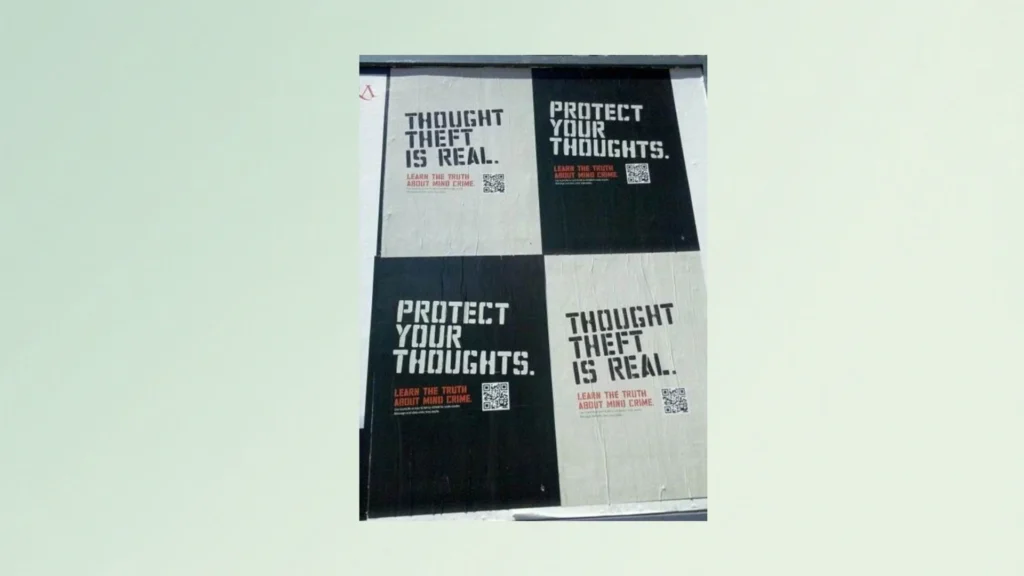
These campaigns worked because they gave fans a reason to engage beyond passive viewing. The QR Code became part of the experience rather than an interruption.
2. Post-credit experiences
Savvy marketers know that the end of a movie is prime time for engagement. Audiences are emotionally invested. They’re talking about what they just watched. A well-timed QR Code during the credits can capture that moment.
Film festivals use this for Q&A session signups. Studios use it for exclusive content drops. Some campaigns have experimented with ARG (alternate reality game)-style experiences that extend the narrative beyond the screen.
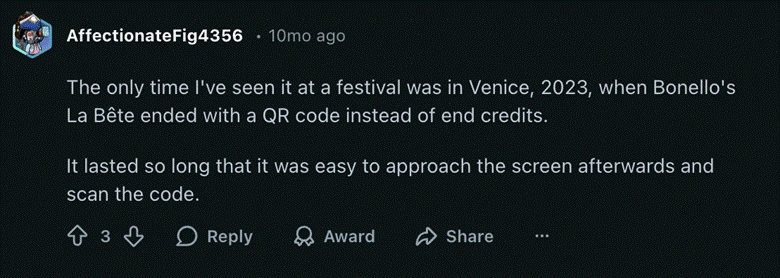
The timing makes sense. People are already reaching for their phones as soon as the movie ends. A QR Code gives them a destination.
The psychology is that someone just watched a two-hour film they enjoyed. They’re in a positive emotional state, and they want more of that experience. A QR Code offering behind-the-scenes content or director commentary taps directly into that desire.
3. Concession and lobby placements
The big screen isn’t the only real estate in a theater. QR Codes on branded merch, such as popcorn boxes, beverage cups, lobby posters, and even seat backs, create additional touchpoints throughout the cinema experience.
A restaurant chain running a pre-roll ad can reinforce the message with a QR Code on the concession stand menu boards. Similarly, a streaming service promoting a new series can place codes on bathroom mirror ads. Each placement extends the campaign’s reach beyond that single 30-second spot.
Some cinema chains have experimented with QR Codes that let viewers order concessions directly from their seats. The infrastructure exists; advertisers just need to think creatively about how to use it.
Now, let’s see how you can create your own QR Codes for your cinema ads.
How to create QR Codes for cinema advertising
You don’t need an enterprise platform or a big budget to run a cinema QR Code campaign. The QR Code Generator (TQRCG), makes it affordable and easy to create professional trackable codes in minutes.
Here’s how to build your campaign step by step.
Step 1: Plan and define your campaign goal
Before generating a QR Code, decide what you want viewers to do after scanning it.
Common cinema QR Code goals include:
- Watch an extended trailer or behind-the-scenes content
- Sign up for an email list or loyalty program
- Download an app
- Claim a discount or promotional offer
- Enter a contest or sweepstakes
Pick one goal per code. Trying to accomplish multiple objectives with a single scan dilutes effectiveness. If your ad promotes an exclusive trailer, the landing page should serve that trailer immediately and not force the user through navigation steps to find it.
Step 2: Build your mobile landing page
Your destination page needs to be live before you generate the code. This sounds obvious, but many campaigns work backwards and regret it.
The page must be mobile-optimized. Every scan happens on a phone, so slow load times kill conversions, and your landing page should have a single clear action in the first fold.
Step 3: Generate your QR Code
Head to TQRCG and select the appropriate QR Code type. For cinema campaigns, choose a dynamic URL code. This gives you the flexibility to update destinations later and access scan analytics.
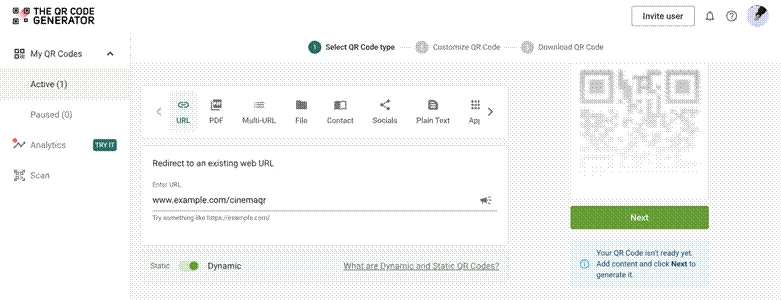
Next, enter your landing page URL. The platform generates your code automatically.
Step 4: Customize your QR Code for your brand
TQRCG lets you style your code to match your brand identity. You can use custom QR Codes to adjust colors, add frames, and include custom call-to-action text around the code.
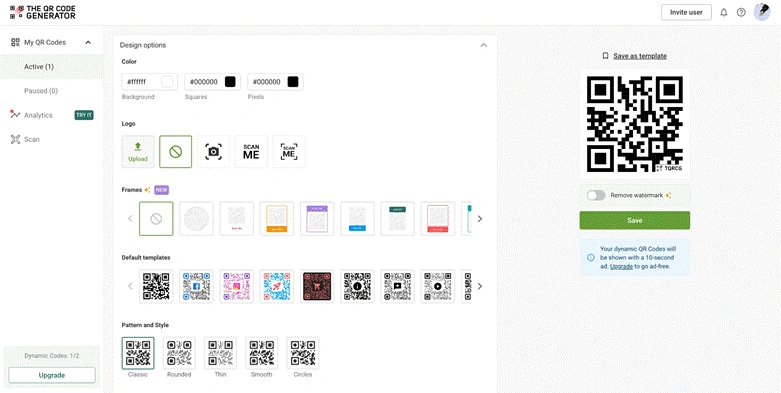
The best QR Code design rules for cinema include:
- High contrast between code and background (dark code on light background works best)
- Including plenty of white space around the code edges
- Avoid placing codes over complex imagery or gradients
- Keeping the code simple; heavy customization can reduce scannability at a distance
Step 5: Add tracking parameters to the QR Code link
Before downloading, append UTM parameters to your destination URL for proper attribution tracking. A properly tagged URL might look like this:
yoursite.com/promo?utm_source=cinema&utm_medium=qr&utm_campaign=summer2025
This lets you track cinema QR Code performance in Google Analytics alongside your other marketing channels.
Step 6: Download and test your QR Code
Download your code in high-resolution. For cinema projection, you want the largest file size available. QR Codes will be displayed on screens 40 feet wide and viewed from 50+ feet away.
Now test thoroughly. Print the code and scan it from across the room. Test in dim lighting conditions similar to a theater and verify it works on both iPhone and Android devices.
If possible, request a projection test at the actual theater before the campaign launches.
Step 7: Monitor and optimize your QR Code
Once your campaign runs, check your QR Code analytics dashboard regularly.
TQRCG gives you real-time data on scan counts, unique users, geographic distribution, and device types.
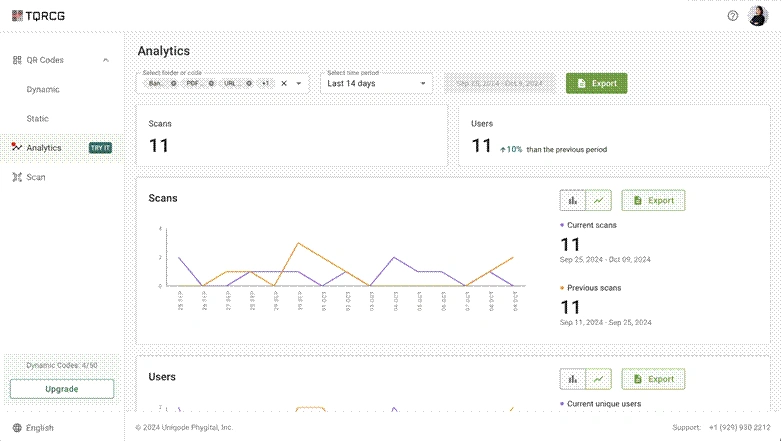
If performance falls short of expectations, you can simply update the destination URL without changing the code itself.
Sometimes your landing page needs simplification, and other times the offer isn’t compelling enough. Dynamic codes let you iterate without reprinting or re-editing the creative.
Some of the insights you should be looking at include when moviegoers scan the QR Code during the cinema experience, how many drop off immediately after landing, and whether they interact with the offer shown on screen.
Now, if you really want the best results on the first try, here are a few best practices.
4 Best practices to make your cinema QR Codes more effective
Even with a perfect QR Code, its execution kills more campaigns than a bad strategy. Here are some placement tips that actually work.
- Show your QR Code for a good chunk of time: Keep QR Codes on screen for at least five to seven seconds. Longer static frames, such as end cards or countdown screens, perform best. Some campaigns display the code in a corner throughout the entire ad.
- Use clear, no-nonsense CTAs: The call to action needs to tell viewers exactly what they’ll get. Ambiguity kills conversion. People won’t scan something if they don’t know what’s on the other side. Use clear CTAs such as “Scan to Unlock X” or “Scan to get a free popcorn”. Avoid vague phrases such as “Experience the Journey.”
- Don’t overcrowd the screen. One QR Code per ad is plenty; multiple QR Codes create confusion and reduce scans across all of them. If you want to guide users to multiple links, you can always use a multi-URL QR Code for more functionality out of a single code.
- Test in real conditions. What works on your laptop won’t necessarily work from row 20 in a dark theater. That’s why it’s important to test your QR Codes thoroughly and ensure they work in a cinema hall’s lighting and angles, from various distances.
Turn cinema attention into measurable data with QR Codes
Cinema advertising isn’t going away. The environment offers something scarce in today’s fragmented media landscape, focused attention from people who aren’t multitasking.
QR Codes are perfect for cinema advertising. They turn a passive viewing experience into an active engagement moment. They create data trails where none existed before, and they give performance marketers the attribution models they need to justify spend.
Moreover, the technology is already mature, and audience behavior is established. People know how to use QR Codes. They expect to see them. So what’s next?
Start small by running a pilot campaign with a single theater chain or regional placement, and use The QR Code Generator to create trackable dynamic codes.
Frequently asked questions
Yes, QR Codes work well in cinemas for advertisements. With proper contrast (dark code on light background or vice versa), sufficient size, and adequate on-screen time, QR Codes scan reliably even in dim theater lighting.
Pre-roll ads and end credits consistently outperform mid-content placements. Viewers have their phones accessible during these moments and aren’t distracted by the main feature.
Dynamic QR Codes support detailed analytics, including scan counts, unique users, geographic distribution, device types, and time stamps. Append UTM parameters to connect cinema data with your marketing attribution models.
They support both but excel when paired with a specific CTA. Pure awareness campaigns can use QR Codes to extend storytelling. But conversion-focused campaigns should link directly to lead capture forms or purchase paths.
Dynamic QR Codes are best for cinema campaigns. They allow destination changes without reprinting materials, provide tracking analytics, and offer flexibility for multi-week runs. Static codes work only for one-time activations where you’ll never need to modify the link.
