









 New Dynamic QR Code
  New Static QR Code
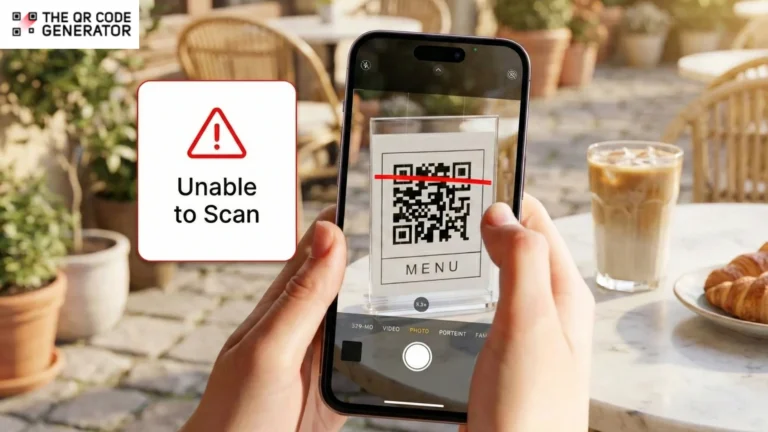
QR Code campaigns fail when business owners don’t understand how expiration actually works.
A restaurant owner prints a thousand menus with QR Codes linking to daily specials. Six months later, customers scan and see “QR Code Inactive.” A retail brand launches packaging with QR Codes for product tutorials. A year later, the QR Codes redirect to a generic service page. An event organizer prints billboards with QR Codes for ticket sales, but when the free trial expires, the QR Codes stop working while the billboards remain visible for months.
And, when a QR Code stops working, customers see error messages instead of your content. Your printed materials become useless overnight. Restaurant menus, product packaging, billboards, and brochures all become dead ends that frustrate customers and waste your marketing investment.
The problem is preventable once you understand what causes QR Codes to stop working. Most failures occur because businesses rely on free services that shut down, subscription platforms that expire, or shortened URLs that become invalid over time.
Understanding how QR Code expiration works and how to prevent it can save your business from costly mistakes and protect your brand reputation.
Table of contents
- What does “QR Code expiration” actually mean?
- The complete breakdown on why QR Codes stop working
- How to create a QR Code that doesn’t expire
- Best practices to avoid QR Code downtime
- Which QR Code type should your industry use to avoid expiration?
- Use TQRCG to create QR Codes that never expire
- Frequently asked questions
What does “QR Code expiration” actually mean?
The most common misconception is that QR Code images expire. They don’t. A QR Code is simply an image containing encoded information. The pattern of squares remains readable indefinitely as long as the image stays intact. What expires is the content QR Codes point to.
This could mean three things: the destination URL becoming inaccessible, the hosting service behind a dynamic QR Code becoming inactive, or the physical QR Code image deteriorating beyond scannability.
Let’s look at how this works out for static and dynamic QR Codes.
Do static QR Codes expire?
Static QR Codes embed data directly into the pattern. When you create a static QR Code with a URL, that exact URL is encoded into the image. It doesn’t require a redirect service or subscription. This means static QR Codes remain functional indefinitely.
However, static QR Codes can stop working if the destination URL breaks, the website hosting expires, linked files are deleted, domains aren’t renewed, or the printed QR Code physically degrades due to sunlight, scratches, or poor print quality.
For example, a restaurant prints menus with a static QR Code that points to a free short link service. Six months later, the short link expires because the free plan has limits. Similarly, a retail product is linked to assembly instructions on the company’s website. After a site redesign, that page no longer exists, and customers see error messages.
Another common scenario is when an event organizer creates flyers with a QR Code linking to a Dropbox file containing the schedule. After the event, they clean up their Dropbox and delete the file. The flyers remain posted around the venue for weeks, with QR Codes that scan but lead nowhere.
All of these scenarios can be resolved if you use a dynamic QR Code, which allows for updating the destination URL at any time; however, these can be subscription-based.
💡 Pro tip: Use TQRCG, which offers two free dynamic QR Codes that are not subscription-based and are free forever. It is the only platform that allows for unlimited edits of your QR Code destination without any costs. These QR Codes never expire.
Do dynamic QR Codes expire?
Dynamic QR Codes don’t expire by default, but their functionality depends on the QR Code generator service. The QR Code contains a short redirect URL pointing to a server managed by your QR Code provider. That server redirects scans to your actual destination, which you can update without needing to change the printed QR Code.
The redirect server must remain active, and your subscription (if applicable) must be up to date. When any of these factors change, the QR Code stops working.
What determines dynamic QR Code activity? Subscription plan status, trial period ending, scan limits being reached, account status, and provider policies all control functionality.
When the subscription lapses, the exact behavior varies by provider, which might create confusion for users who don’t understand what went wrong. Most commonly, scans redirect to a service page from the QR Code provider explaining that the QR Code is inactive and prompting account reactivation. This is actually preferable because users understand what happened. Some providers simply return error messages, leaving users seeing “Page Not Found” or “Unable to Load” without explanation.
In the worst-case scenario, scans lead to blank pages with no indication of the problem or to some other website.
Additionally, tracking stops immediately. Even if the QR Code continues redirecting, analytics cease capturing data. You lose visibility into scan data, geographic information, and device types. Historical data might remain accessible, but new scans don’t register, preventing you from measuring ongoing campaign performance.
These expired dynamic QR Codes can be restored by renewing your subscription. Once your account returns to an active status, the redirect service resumes immediately, without requiring any physical changes to printed materials.
However, the gap between lapse and reactivation creates problems, as any scans conducted during the inactive period fail, potentially damaging customer trust.
Now that it’s clear that both QR Code types can fail, let’s understand all potential failure points.
The complete breakdown on why QR Codes stop working
QR Code failures stem from several distinct categories. Understanding why a QR Code is not working helps you quickly identify the cause and apply the correct fix.
URL or content failure
Broken links occur when pages are moved or deleted during site redesigns. Domain expiration happens when registration renewals are forgotten. 404 errors result from deleted pages or incorrect URLs. File deletion affects QR Codes linking to documents on cloud services. Changed file-sharing links from Dropbox or Google Drive often expire after set periods. This is link rot: the gradual process in which URLs become inaccessible as content moves or disappears.
Server downtime or hosting issues
Provider outages affect all dynamic QR Codes simultaneously when the redirect service experiences downtime. Poor-quality free generators often use unreliable shared hosting with frequent outages. Server misconfigurations can cause redirect failures even when the server is technically online and functioning correctly. Web hosting problems affect static QR Codes when your own website host suspends service due to payment issues.
Physical degradation
Fading from sunlight affects outdoor QR Codes on signage and vehicle wraps. Scratches and damage occur on high-touch surfaces such as table tents. Low-contrast printing makes QR Codes difficult to scan from the start. Insufficient resolution happens when QR Codes are printed too small or at low DPI. Folding through the QR Code area distorts the geometric pattern.
Scan limits on free tools
Many free generators impose monthly scan caps (often 50-100 scans per month), total lifetime limits (typically 500-1000 scans in total), or time-based expiration, where QR Codes are active for 30-90 days before becoming inactive. Some tools also force branding or inject advertisements, creating expiration-like behavior when providers change policies.
Account and subscription issues
Lapsed subscriptions, failed payments, account deletion, inactivity policies (QR Codes deactivating after 60-90 days without account logins), or policy violations can simultaneously take all your QR Codes offline.
Understanding these failure points helps guide you in creating QR Codes that resist common problems and remain functional in the long term. Let’s now examine the practical steps for creating QR Codes that meet your needs and avoid common pitfalls.
How to create a QR Code that doesn’t expire
To make a QR Code that stays active for the long run, you need to set it up with the right structure from the start. A few simple choices can prevent broken links and keep your campaigns running smoothly.
Step 1: Choose a static or dynamic QR Code
Use static QR Codes only if you are certain that the destination URL will never change or be modified, and do not want QR Code analytics. Use dynamic QR Codes when you need to update destinations, track analytics, or run time-sensitive campaigns requiring redirect flexibility.
| 📝Note: Use a reliable QR Code generator. Quality providers ensure no forced expiration, strong uptime guarantees, stable redirect services, and clear policies about what happens if subscriptions lapse. The QR Code Generator (TQRCG) offers two free dynamic QR Codes and unlimited static QR Codes that never expire, alongside unlimited static QR Codes, eliminating concerns about trial expirations. |
Step 2: Choose your destination
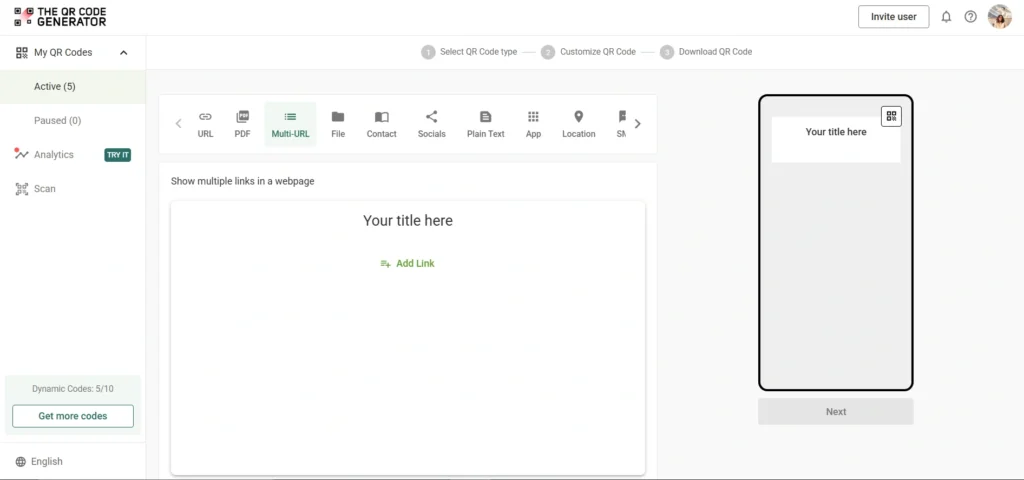
Decide where you want to direct people. This can be to your website, social media promotional landing page, event registration form, digital coupon, or PDF download.
Step 3: Select your QR Code type
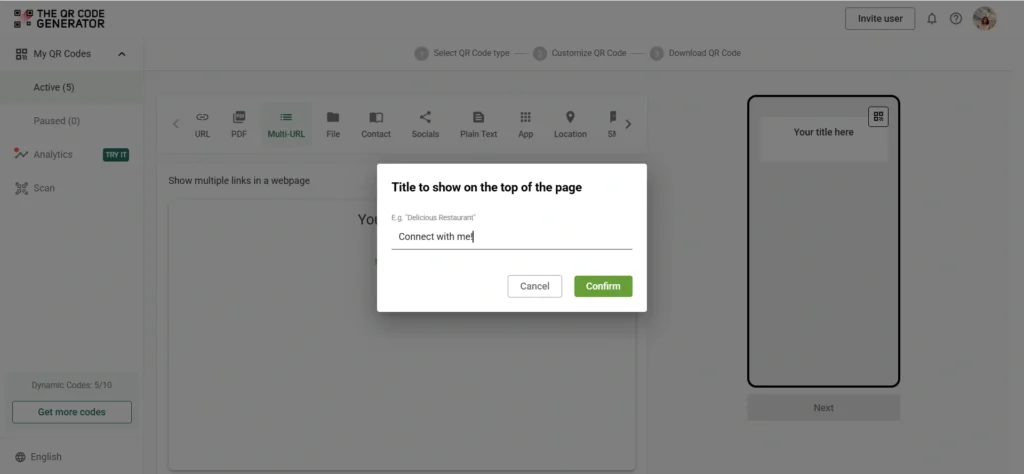
Sign up for The QR Code Generator (TQRCG) for free and click + Create QR Code. Choose URL QR Code for websites, PDF QR Code for downloadable content, or Multi-URL QR Code for linking to multiple touchpoints. We’ll use a multi-URL QR Code for this example.
Step 4: Customize your design
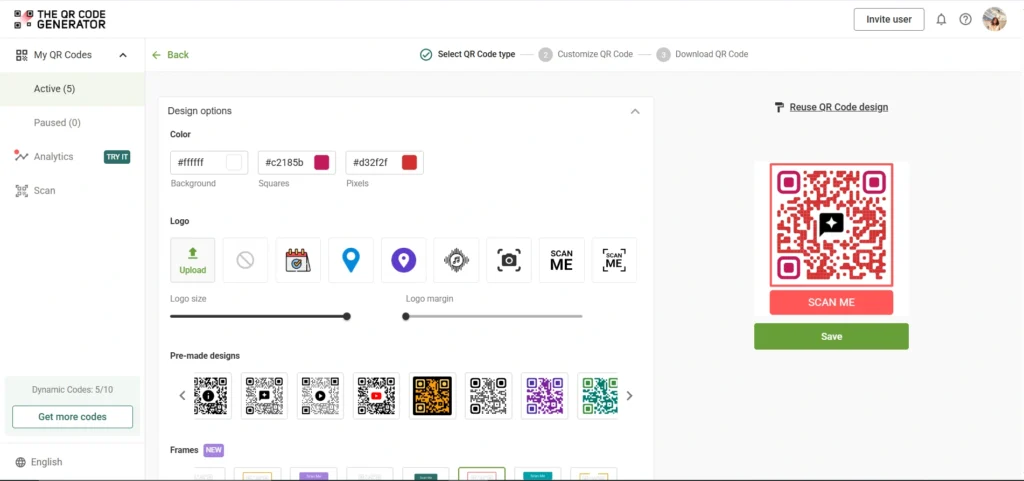
Add your brand colors, logo, and a clear call-to-action frame.
Step 5: Download and test
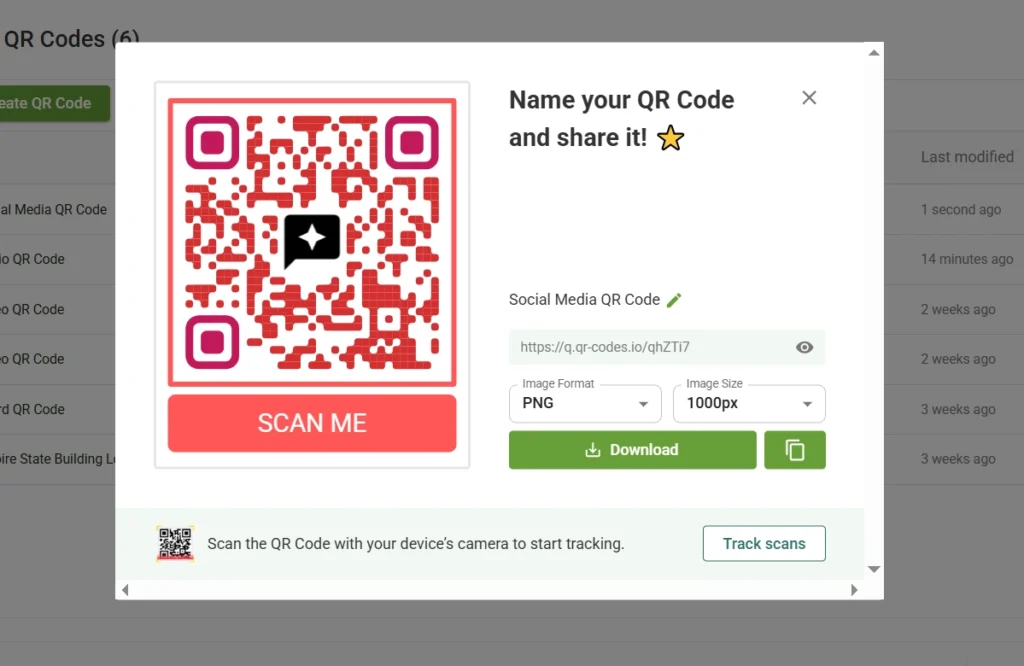
Download in high-resolution format (PNG, SVG, or EPS) for print. Test scanning with multiple devices before printing to ensure it works perfectly.
Once you’ve created your QR Code, follow these best practices to mitigate most issues and ensure long-term reliability.
Best practices to avoid QR Code downtime
Active management prevents QR Code expirations and maintains campaign effectiveness. Here are some of the best practices to follow:
| Best Practice | Key Details |
|---|---|
| Use permanent links you control | Own your domains rather than relying on free services. Avoid temporary file-sharing URLs from Dropbox or WeTransfer. Host content on stable platforms and test links before printing. |
| Choose unlimited scan plans for your volume | Monitor usage if on limited plans and set alerts before reaching caps. Plan for scale from the start and read the provider’s terms carefully to understand what “unlimited” really means. |
| Protect printed QR Codes from degradation | Use weatherproof printing for outdoor use and ensure a minimum size of 0.8 × 0.8 inches. Maintain high contrast, choose durable materials for high-touch surfaces, and test samples before mass printing. |
| Enable automatic domain renewals and audit regularly | Document all QR Code destinations, audit URLs quarterly, and test changes before deployment to prevent broken links caused by expired domains. |
| Track analytics and set up alerts | Watch for sudden drops in scan rates, set zero-scan alerts, periodically test physical QR Codes, and monitor server uptime for all dependent domains. |
| Test before, during, and after printing | Test scans on multiple devices and lighting conditions before printing. Scan actual printed materials after production and continue periodic testing throughout the campaign. |
| Store files and maintain detailed records | Keep original high-resolution QR Code files, document destinations and campaign details, maintain version control for dynamic QR Codes, and note each campaign’s purpose and lifespan. |
Which QR Code type should your industry use to avoid expiration?
Different industries have different needs when it comes to QR Code permanence and flexibility.
Restaurants: Menus change frequently, making dynamic QR Codes ideal for table tents and menu displays. However, ensure that subscriptions stay current, as these QR Codes are scanned daily. For permanent signage, such as “Scan to see our story” on walls, use static QR Codes that point to stable pages unlikely to change.
Retail and packaging: Product packaging has a long shelf life. A bottle of sauce might sit on store shelves for a year, then in someone’s pantry for another year. Use static QR Codes for product information, instructions, or recipes that won’t change. Use dynamic QR Codes only if you need to track campaign performance and can commit to maintaining the subscription for a minimum of two years.
Events and conferences: Event materials become obsolete after the event ends, but they often remain visible for weeks or months. Use dynamic QR Codes so you can redirect to recap content, photos, or following event information after the current event concludes, rather than leaving QR Codes pointing to expired registration pages.
Marketing campaigns: Time-sensitive campaigns benefit from dynamic QR Codes, as you can update destinations as campaigns evolve or redirect to new offers when current ones expire. This prevents the waste of leaving static QR Codes pointing to outdated promotions on materials that remain in circulation.
Business cards: Business cards circulate for years, often outlasting job changes, phone number updates, or company rebrands. Dynamic QR Codes are ideal in this scenario because they enable you to update your contact information, portfolio links, or vCard details without reprinting thousands of cards. Utilize providers offering free-forever dynamic QR Codes so you maintain flexibility as your career evolves, while tracking which networking events drive the most scans.
Use TQRCG to create QR Codes that never expire
Static QR Codes are always free and permanent because the data is embedded directly in the image without requiring ongoing services.
Free dynamic QR Codes typically include restrictions such as scan limits, trial time limits, or inactivity timeouts. To identify reliable free tools, read terms of service for mentions of expiration or limits, check for scan caps in plan descriptions, and choose established providers with transparent business models.
The QR Code Generator offers two free dynamic QR Codes that never expire, plus unlimited static QR Codes at no cost. This provides the flexibility of dynamic QR Codes for campaigns that require tracking and updates, alongside permanent static QR Codes for all other purposes.
Create free-forever QR Codes now
Frequently asked questions
Yes, QR Codes can expire if they are dynamic and linked to a subscription. A static QR Code can also expire if the destination URL stops working. This leads to frustrated customers, wasted marketing investments, and damaged brand credibility.
Static QR Codes never expire, even the ones provided by free generators. Free dynamic QR Codes may have expiration built into free trials, scan limits, or inactivity policies. Always read the terms of service to understand what “free” includes and whether there are hidden time or usage limits.
For dynamic QR Codes, yes. Reactivating your account typically restores all QR Codes immediately, without the need for reprinting. For static QR Codes, you must fix whatever broke at the destination (restore files, renew domains, fix URLs), which might require reprinting if the destination changed permanently.
Use a static QR Code with a reliable, permanent destination URL you control and intend to maintain. For dynamic QR Codes, choose a provider with no forced expiration and maintain an active account. The QR Code Generator offers two free dynamic QR Codes that never expire, plus unlimited static QR Codes.
Common causes include the destination URL changing, a page being deleted, a subscription lapsing, a web hosting expiring, exceeding scan limits, deleting a linked file, a domain registration expiring, or physical code damage occurring. Check if the destination loads in a browser, verify your account is active, and test the printed code scans properly.
This varies by provider. Some immediately redirect to service pages explaining inactivity. Others provide grace periods of 7-30 days before deactivation. A few continue redirecting, but stop tracking analytics. The QR Code Generator maintains your dynamic QR Codes with two free QR Codes that never expire, eliminating this concern for initial campaigns. Always check your provider’s specific policies about subscription lapses.
This happens when a dynamic QR Code’s subscription has lapsed or the account is inactive. The provider’s redirect service recognizes that the code is no longer active and sends scans to their service page instead of your intended destination. This typically prompts you to reactivate your account. To resolve the issue, please renew your subscription or contact the QR Code provider to restore access.
