
How QR Codes on Gym Equipment Improve Member Experience

Kritika
Last updated: December 29, 2025
15 min read
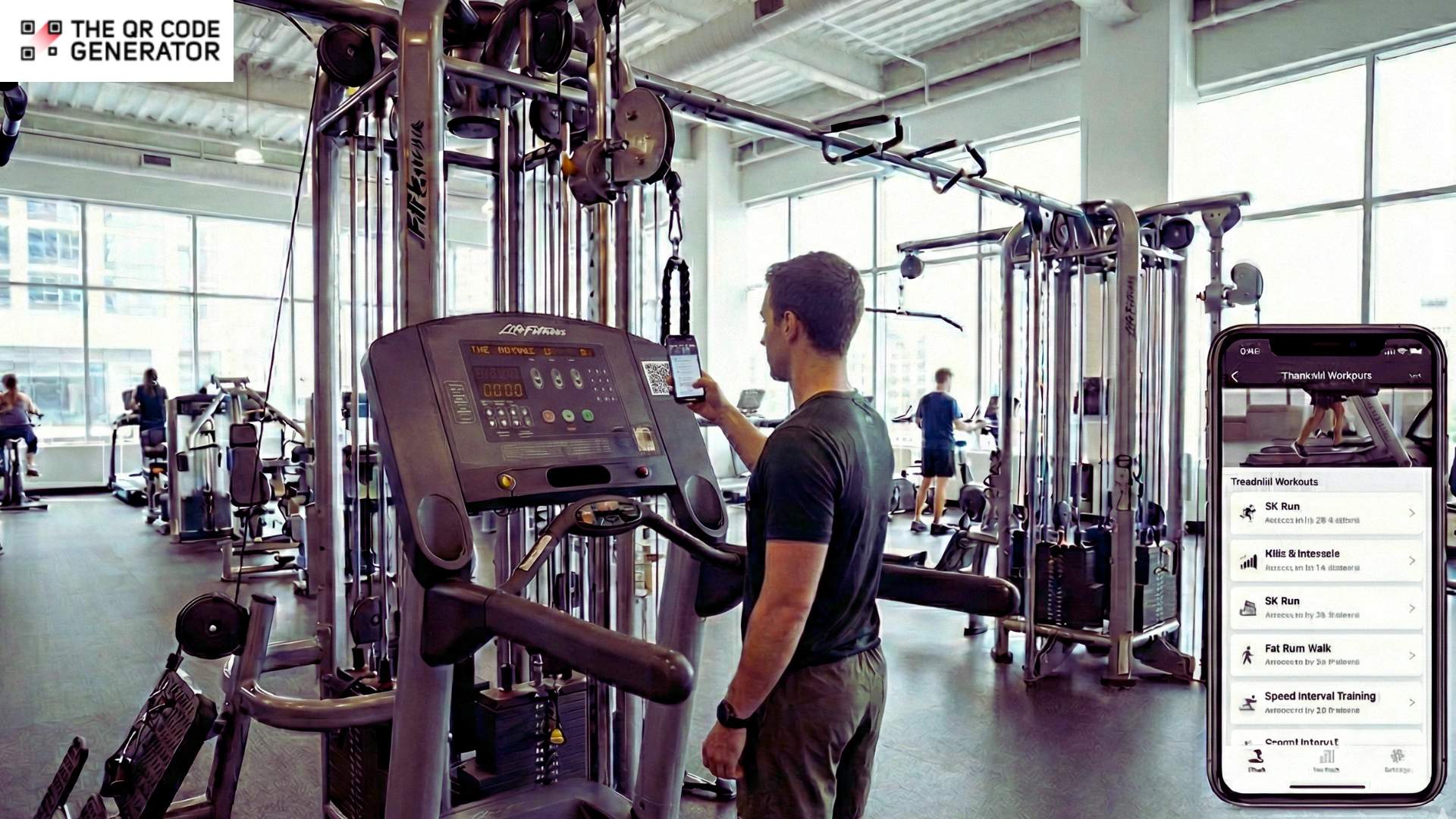
Ever seen a newcomer pause at the leg press machine because they were unsure about how to use it? Or witnessed someone second-guess their form doing chest press after a long break from the gym? This is a common problem. Even confident lifters sometimes run into equipment with unfamiliar attachments.
However, the average gym just has 3 or 4 trainers to assist. Over time, this can create a subtle drag on the overall gym experience, with members limiting themselves to what feels safe and comfortable. Moreover, equipment, if mishandled, is prone to wear and tear, as well as safety issues.
But what if every piece of equipment came paired with clear, explanatory videos detailing how to use it, what form to pick, precautions, and more?
QR Codes make this possible. Placed right, QR Codes can change the way gym members interact with equipment and exercise.
This guide walks you through practical steps for placing QR Codes on gym equipment. We also cover its benefits and tips for getting the best results.
The problems you face without QR Codes on gym equipment
The thing about QR Codes is that they are no longer niche. In a survey of European consumers, 75% said they’d scanned a QR Code on a food or drink product, and nearly half do it regularly. Moreover, nearly 100 million Americans use smartphone QR Code scanners today, with usage still on the rise.
Gyms and fitness centres that have still not embraced QR Codes are lagging, and here’s why:
Beginners skip machines due to confusion or fear of injury
When you don’t have easily accessible resources that explain the setup or demonstrate the correct technique for using equipment, you deter members from actually using them. That’s because most people would rather avoid the machine than risk hurting themselves or looking out of place.
Over time, they fall into a narrow routine, using only the equipment they already understand, even though they joined to explore more and build real progress.
Trainers can’t assist everyone during busy hours
When the gym is crowded, there are more people needing help than there are trainers to give it. In many gyms, a single trainer might be juggling 15 to 25 clients or even more across their schedule. Even with a skilled team, it’s impossible to give every member the attention they need in those moments.
This limited access reduces the value of trained staff. It leaves members to fend for themselves. Over time, this leads to slower progress and can increase the risk of injury.
Paper-based instructions wear out and are rarely read
Many gyms tape laminated sheets or printed guides directly onto strength machines.
These usually sit on the side panels, near the weight stack, or on the frame. While they look neat at first, they don’t last long. This is because sweat, cleaning sprays, and regular equipment movement can cause the edges to peel and the print to fade.
Even when the sheet is in good condition, most people skip it, as static text blends into the background and offers little clear explanation of technique or adjustments. It also can’t be updated easily when equipment changes or training standards evolve.
Increased dropout rates from members feeling left out
When members don’t enjoy easy access to guidance on machines, it can leave them feeling lost or excluded:
- Beginners may skip workouts
- More experienced members might avoid machines that require extra instruction
Over time, this sense of frustration and isolation can push members to stop coming altogether.
Fortunately, QR Codes solve all of these challenges by turning every machine into an on-demand instructor. They bridge the gap between offline equipment and digital guidance, enabling data collection.
Here’s how that looks in action.
How QR Code for gym equipment supports safer, smarter training
Fitness habits have gone firmly digital.
McKinsey reports that the share of people using apps for health and fitness jumped from about 50% before COVID to 75%, and over 60% of Americans who exercise regularly now plan to split workouts between the gym and home.
Seen in that light, QR Codes in gyms are a natural fit. They act as a simple bridge between the physical machine and the digital coaching members already use and trust.
Here are the main benefits that QR Codes on gym equipment can unlock:
Provide instant video demos for each machine
Placing QR Codes on your gym machines transforms how members interact with equipment.
For example, a quick scan of a video QR Code can send members to step-by-step video tutorials that show the correct setup, posture, range of motion, and common mistakes to avoid. This makes intimidating machines approachable, so that everyone, from beginners to seasoned gym-goers, uses them safely and effectively.
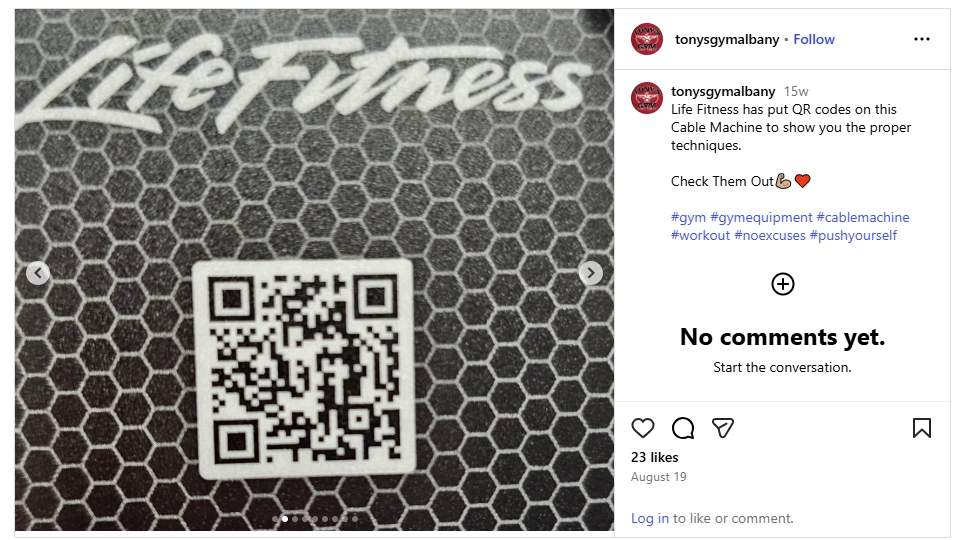
Life Fitness, for example, has put QR Codes on its entire gym equipment range and linked those to tutorials and proper techniques.
How it helps: Members get guidance exactly when and where they need it, and trainers can spend less time repeating instructions. Even the risk of injury goes down.
Display correct posture and muscle group focus
QR Codes can help you clearly demonstrate proper form and highlight the muscles being worked for every exercise.
For example, a pec fly machine can be challenging for beginners, who might shrug their shoulders or use incorrect arm angles. By scanning the QR Code, gym members and see an animated video of the movement, emphasizing:
- keeping the shoulders down
- elbows slightly bent,
- and chest engaged throughout the motion.
It can also visually highlight the pectoral muscles being targeted.
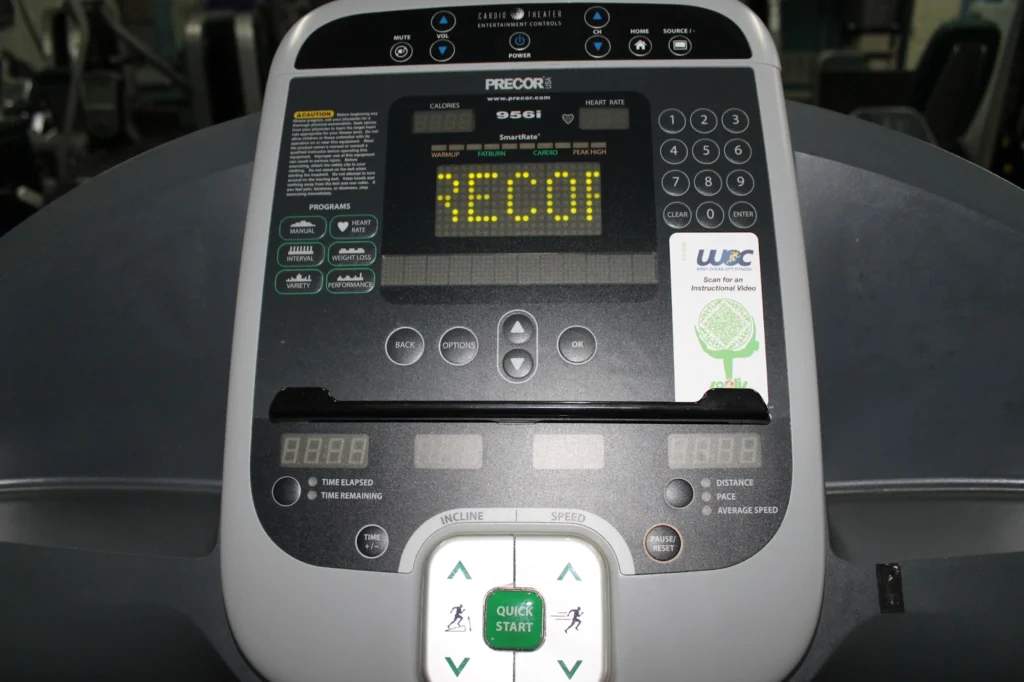
After realizing this, soOlis created custom instructional QR Codes for commercial equipment like Precor treadmills and installed them in 24-hour facilities such as WOC Fitness. Scanning opens a detailed instructional video so unstaffed gyms can still give safe guidance.
How it helps: Such visual guides make complex exercises easier to understand. Members no longer have to rely on memory, paper instructions, or watching others guess. They can observe the correct posture, range of motion, and tempo in real-time.
Link to personalized programs or progression levels
QR Codes can make each machine feel like it’s speaking directly to the member. Scan a chest press or leg extension, and instead of a static diagram, members can see a workout tailored to their current level.
For example, beginners start with lighter weights and higher repetitions, while more advanced users receive suggestions for heavier loads and tempo variations. It’s like having a personal trainer in your pocket, guiding you step by step.
How it helps: This approach enables members to follow a clear progression without needing to ask staff for guidance constantly. They can track what they’ve done and understand how each exercise fits into their larger goals. Over time, this makes everyone feel that the gym is truly built around them, keeping motivation high and reducing confusion.
Enable maintenance logs or “machine out of order” alerts
QR Codes can make reporting equipment issues immediate and straightforward.
Rather than relying on staff to notice a broken cable or malfunctioning display, members can scan a code and submit a maintenance request instantly. You can also build systems that allow members to attach photos or videos showing the exact problem.
With this real-time reporting, issues can be logged as soon as they occur. This reduces downtime and keeps your gym safer and more reliable. Facility managers can track patterns and even schedule preventative maintenance based on frequent alerts.
How it helps: Reducing equipment downtime lowers member frustration and allows staff to focus on coaching rather than inspecting machines. These improvements boost operational efficiency and create a safer and more enjoyable workout experience for everyone.
Integration with marketing and retention strategies
QR Codes on gym equipment can do more than guide workouts. They can actively support your marketing and member retention efforts.
By linking codes to personalized content, challenges, or special offers, you can engage members in ways that feel helpful rather than intrusive. For example, scanning a machine could unlock a short video tutorial plus a tip to try a new class, a reward point, or a progress badge.
You can also use scan data to understand which machines are most popular, which exercises members struggle with, and how often content is accessed. This insight can feed targeted campaigns, loyalty programs, or even in-gym events.
How it helps: QR Codes can increase engagement and reinforce retention programs by rewarding participation. They turn everyday equipment into touchpoints for building stronger connections between your members and your gym.
Sync QR Codes with fitness tracking apps
How cool would it be if every time you scanned a machine, your workout stats were logged automatically?
QR Codes on gym equipment can do precisely that by syncing with fitness tracking apps. A simple scan can record sets, reps, or weights used, and update your progress in real time without any manual input.
This integration can also deliver personalized recommendations. For example, scanning a pec fly machine could prompt the app to suggest complementary chest or shoulder exercises or provide form tips based on your past sessions. This transforms every piece of equipment into a smart, interactive tool.
How it helps: Syncing QR Codes with apps makes tracking uninterrupted and workouts more personalized. Members stay motivated seeing tangible results, and trainers understand usage patterns and performance trends.
QR Codes for group program discovery
Imagine every machine in your gym becoming a gateway to your premium offerings.
Scanning a loyalty program QR Code can instantly show members the paid programs you offer, from personal training packages to specialized group classes and seasonal challenges. It can also give a brief preview of the session, highlight key benefits, or provide instructor tips, helping members decide whether to enroll.
For example, a member scanning a rowing machine could see a short clip of a paid full-body conditioning class, along with its schedule, intensity level, and an option to reserve or pay directly. They might also discover related programs, such as HIIT or strength-circuit sessions, making it easy to explore offerings that complement their workouts.
How it helps: QR Codes turn equipment into direct touchpoints for promoting paid services. Members can easily discover and sign up for programs that align with their goals, while gyms can increase revenue, drive engagement, and enhance retention.
How to create QR Codes for gym equipment
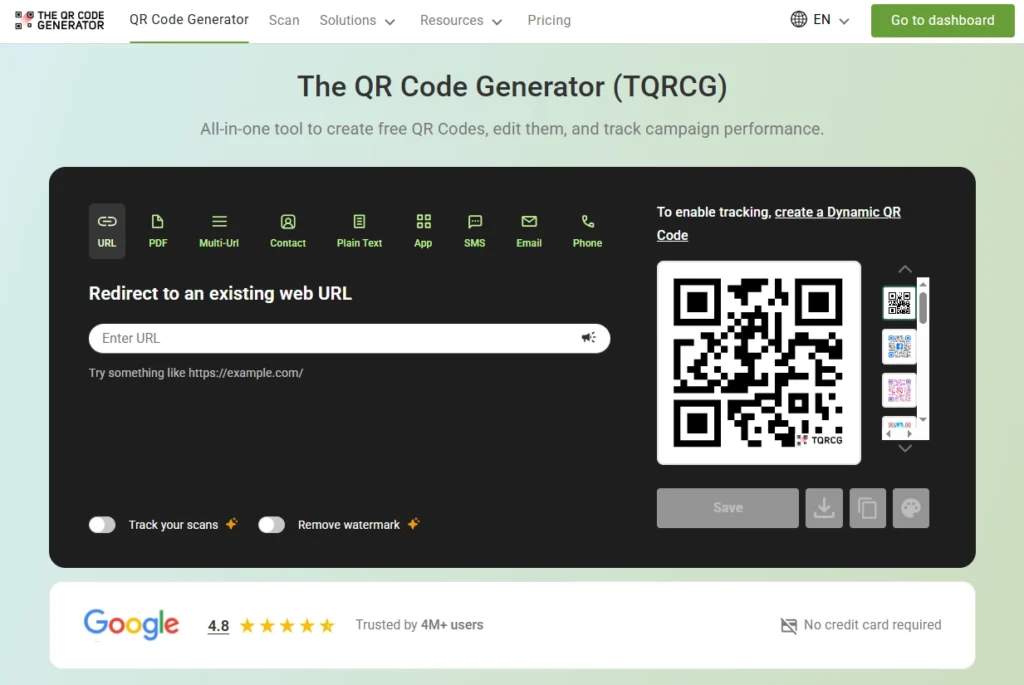
So, you know why QR Codes are so helpful on the gym floor. Now, you need a simple and effective tool, such as The QR Code Generator (TQRCG), to display those codes on your machines and ensure they open the correct content every time.
After choosing the tool, you should:
Step 1: Decide what each QR Code should open
Start with the backend before you create any code. For each machine, decide what experience you want members to see when they scan.
We recommend linking your QR Codes to
- How-to workout videos on YouTube that show setup, common mistakes, and two or three regressions or progressions. For example, you can link to a short leg press video that shows foot positions for glutes vs. quads and how to set the safety stops.
- Equipment manuals and safety notes that detail max load limits, adjustment diagrams, and cleaning instructions.
- Feedback or maintenance forms that members can use to report issues such as sticky pins, worn cables, or shaky seats.
If you have the time and budget, it is worth creating your own backend content. Record videos in your actual gym, using your own equipment and trainers. Create concise, clear guides and manuals that align with how you want people to use each machine.
Content you find online may not align with your setup, coaching style, or safety standards. When you create your own backend, you control the message and can show members exactly what you want them to see.
Step 2: Generate QR Codes with The QR Code Generator
Once you’ve figured out what your links should point to, it’s time to build the QR Codes.
For this, open The QR Code Generator in your browser. The tool lets you create both static and dynamic QR Codes, and supports different content types like URLs and email actions.
Pick between a static or dynamic code. Static QR Codes are fixed once printed. Dynamic codes allow you to change the destination later and track scans without needing to reprint stickers.
TQRCG’s unlimited static codes plus two dynamic codes are free forever, which is ideal for testing on your busiest machines, such as treadmills or squat racks, before scaling.
Next, choose the QR Code type. For most gym use cases, pick a URL QR Code and paste the link to your video, landing page, PDF, or form.
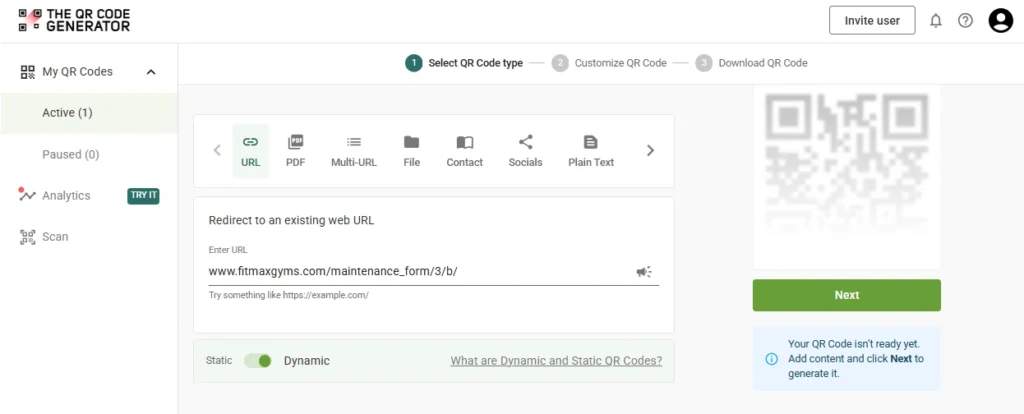
Step 4: Customize the design for the gym floor
Add brand colors and, if you like, a small logo while keeping strong contrast for easy scanning. Use a QR Code frame with text like “Scan for demo video” or “Scan for safety tips” so members know what they can expect.
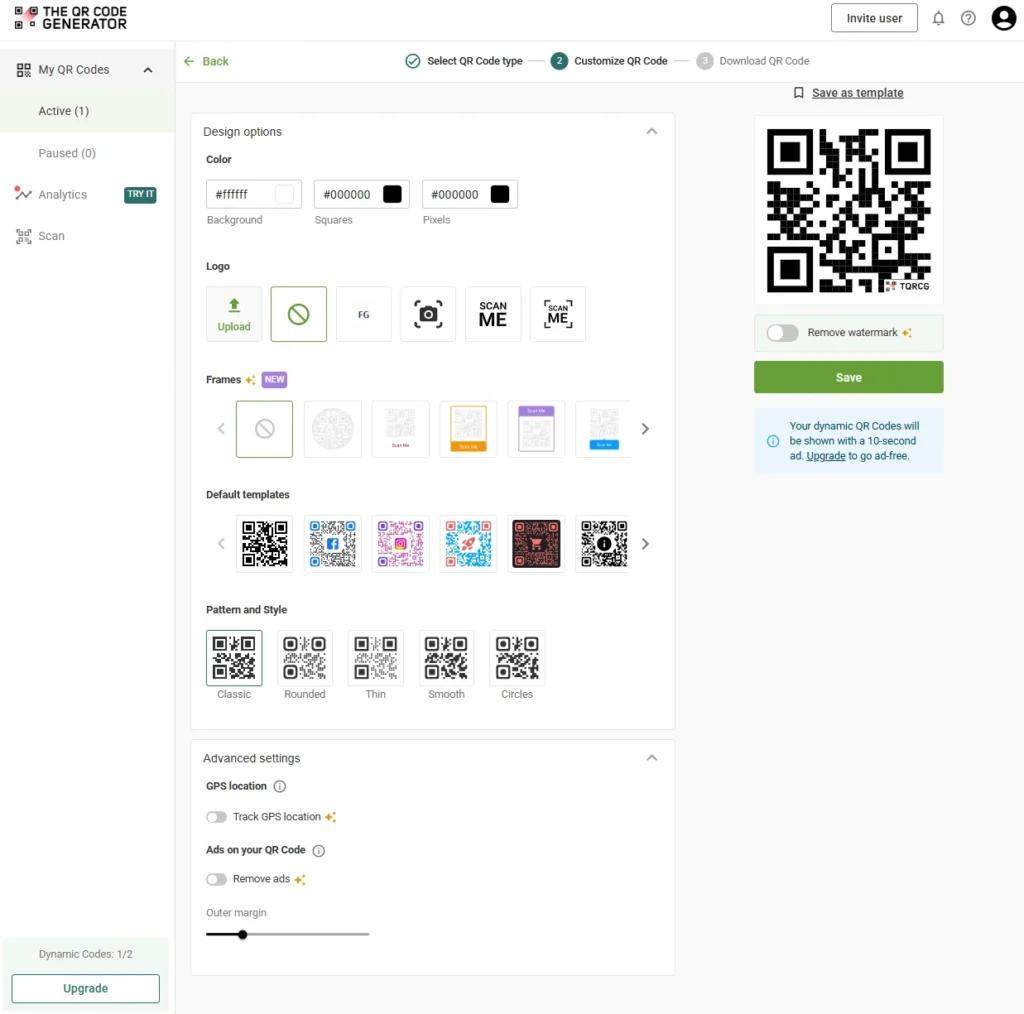
The QR Code Generator allows you to customize the color, add a logo, choose a frame, or select from a variety of high-quality default templates.
Step 5: Generate and download the files
After you create the code, test it right inside the browser once (more on testing later), then download it in PNG or SVG for sharp printing on labels or plates. Repeat this until every machine has a code and a clear destination.
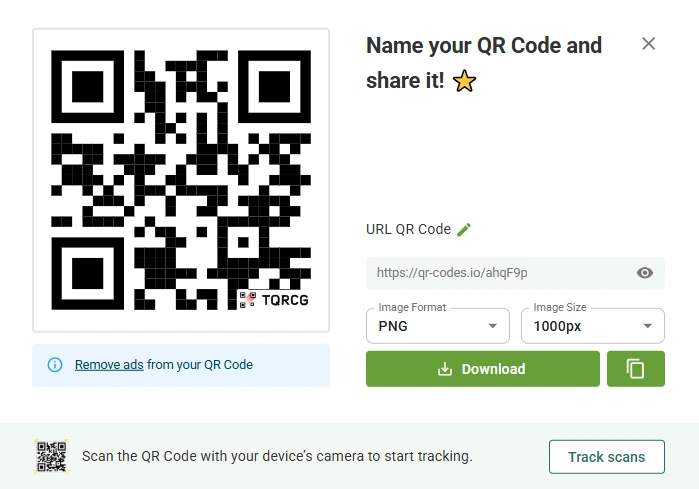
Step 6: Test the scan experience on the floor
Before printing a full batch, test the entire journey as a member would.
- Print a few sample stickers.
- Place them on one or two machines at eye level where someone naturally pauses to adjust the seat.
- Scan using both iPhone and Android.
- Confirm that the video, manual, or form loads fast, is readable without audio, and looks good in portrait orientation.
The QR Code Generator also offers a simple browser-based QR Code scanner and a Chrome extension, which can help staff quickly test codes from a desktop.
Step 7. Roll out and refine with analytics
After you roll out codes to use across the gym, you can use your dynamic QR Codes as a live feedback loop. The QR Code Generator supports QR Code scan tracking, such as total and unique scans, device type, and location patterns.
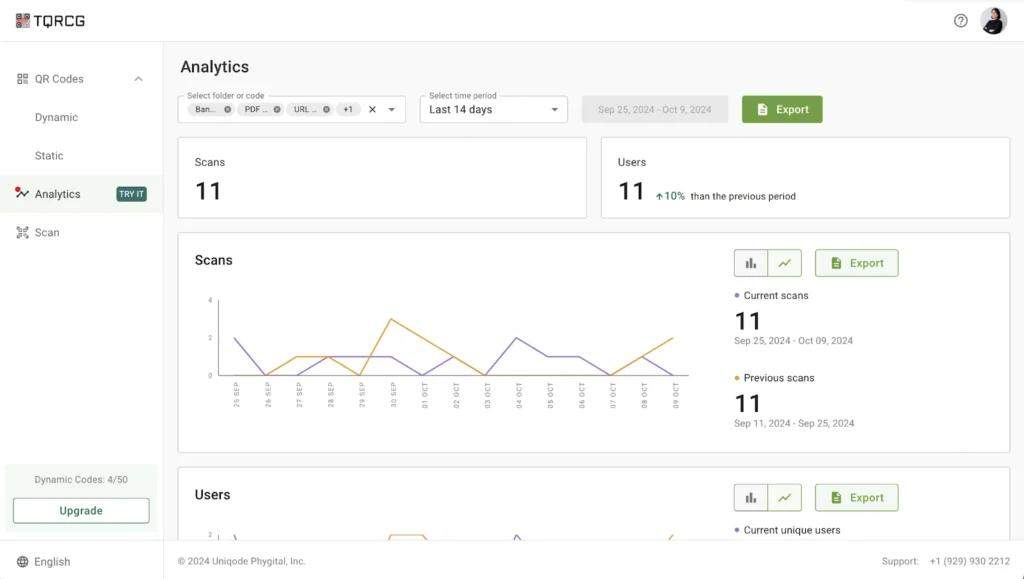
In practice, this lets you:
- See which machines members struggle with based on higher repeated scan counts.
- Decide where to improve videos or add extra regressions.
- Spot machines that get almost no scans and tweak the CTA or placement.
Over time, you get a low-maintenance system. Members scan a code, land on what they need in that moment, and you keep upgrading the content in the background without ever reprinting a single label.
Best practices for QR Codes on gym equipment
Follow these QR Code best practices to optimize the experience of using QR Codes for both users and maintenance teams:
- Use sweat- and scratch-resistant labels: Choose laminated, durable stickers that can withstand moisture, friction, and repeated contact. High-contrast designs help the QR Code remain scannable over time. This ensures long-term usability even in high-traffic areas.
- Match QR Code placement with natural eye movement: Position codes where users naturally pause before starting an exercise, such as the console or main panel. Avoid spots hidden behind handles, weight stacks, or moving parts. Proper placement increases visibility and scanning likelihood.
- Include strong visual cues: Add arrows, icons, or a short CTA like “Scan for how-to” or “Learn the right posture.” Plain QR Codes often go unnoticed. Clear visual prompts encourage members to interact immediately.
- Optimize for low connectivity: Ensure linked content loads quickly even in areas with poor Wi-Fi or mobile reception. Use lightweight web pages or fast-loading video platforms. Quick access reduces frustration and improves engagement.
- Localize and caption your content: Provide bilingual videos or subtitles to accommodate diverse members. This ensures instructions are understandable for everyone. Clear captions also allow users to follow guidance without relying on audio.
- Measure and update frequently: Track scan rates per machine to monitor engagement. Refresh thumbnails, CTA wording, or linked content if scans decline. Dynamic QR Codes make updates easy without requiring the replacement of physical labels.
- Align colors with the machine design, but maintain sufficient contrast: Ensure the codes stand out against the machine panel for easy scanning. Use high-contrast black or white codes. Avoid blending them into dark or reflective surfaces, as this reduces visibility under gym lighting.
Use QR Codes to transform the experience in your gym
QR Codes turn every machine into a small, smart touchpoint. Members receive instant coaching, safety information, and guidance on how to report issues, all without waiting for a trainer to become available. You get fewer basic questions on the floor and a better view of which equipment people struggle with.
With a simple setup and the right backend content, QR Codes upgrade the whole gym experience.
To put this in place, you only need two pieces: your content and a reliable way to turn links into codes. The QR Code Generator gives you both unlimited static QR Codes and flexible dynamic codes, so you can start small, test on a few key machines, and then scale across the floor without rebuilding anything.
Frequently Asked Questions
What is a gym equipment QR Code?
A gym equipment QR Code is a scannable label placed directly on a fitness machine. When members scan it with a smartphone, it links them to digital content such as exercise tutorials, form guidance, or program information. Essentially, it transforms each piece of equipment into an interactive tool that guides workouts, improves safety, and enhances engagement.
How do I add a QR Code to fitness machines?
Start by generating a QR Code using a reliable generator like TQRCG that supports static or dynamic codes. Print it on durable, laminated, sweat- and scratch-resistant labels. Place the code in visible areas of the machine where users naturally pause for a moment.
Should I use static or dynamic QR Codes on gym machines?
Dynamic QR Codes are generally recommended for gym equipment because they allow you to update the linked content without replacing the label. Static codes are fixed and cannot be changed once printed. Using dynamic codes gives you flexibility to refresh tutorials, update CTAs, or rotate promotional content as needed.
What content should a gym machine QR Code link to?
QR Codes can link to a variety of content: video demonstrations of exercises, instructions highlighting proper form and target muscles, personalized programs, paid class or training options, maintenance reporting, or integration with fitness tracking apps. The goal is to provide actionable guidance, enhance engagement, and add value to members’ workouts.
How can I measure the success of QR Codes on gym equipment?
Track scan rates for each machine and monitor engagement metrics such as video completions, class sign-ups, or program enrollments. Dynamic QR Codes make it easy to collect this data. You can also gather feedback from members and monitor changes in machine usage patterns or reductions in common errors to gauge impact.
Will members actually use QR Codes on gym machines?
Yes, if implemented thoughtfully. QR Codes should be placed where users naturally look, include clear CTAs, and link to content that is immediately useful. Studies and real-world examples demonstrate higher engagement when codes offer step-by-step tutorials or provide access to exclusive programs. Member adoption improves when scanning adds tangible value rather than feeling like extra work.